Namespaces and Resource Management
Overview
A production Kubernetes cluster rarely runs a single application in isolation. Platform teams host dozens of teams — each with staging, production, and experimental workloads — on shared infrastructure. Namespaces are Kubernetes' primary mechanism for partitioning a cluster: they scope object names, enable RBAC boundaries, and anchor resource policies. Without namespaces, every Service name must be globally unique and a runaway batch job in one team can exhaust cluster memory for everyone.
This tutorial covers namespace design, ResourceQuota and LimitRange enforcement, label-based organisation, and kubectl context workflows. You will learn how SRE and platform engineers prevent noisy-neighbor problems while keeping developer self-service intact.
This is Tutorial 11 in Module 4: Networking & Operations of the REBASH Academy Kubernetes series. Complete Ingress and External Access first — external routing and namespace-scoped Ingress rules go hand in hand.
Prerequisites
- Completed Ingress and External Access — understand Services, Ingress, and how traffic reaches pods
- A running Kubernetes cluster with
kubectlconfigured (minikube, kind, k3s, or managed EKS/GKE/AKS) - Ability to create Deployments and Services from YAML or imperative commands
- Basic understanding of CPU and memory units (
100m,256Mi,1Gi) - Comfort reading
kubectl getandkubectl describeoutput
Learning Objectives
By the end of this tutorial, you will be able to:
- Explain what a namespace is and when to create one vs using labels
- Design a namespace layout for dev, staging, and production workloads
- Apply ResourceQuota to cap aggregate resource consumption per namespace
- Use LimitRange to set default and maximum container resource requests and limits
- Switch kubectl context and namespace efficiently for multi-team operations
- Diagnose pod scheduling failures caused by quota exhaustion
- Apply labels and annotations for cost allocation and governance
Architecture
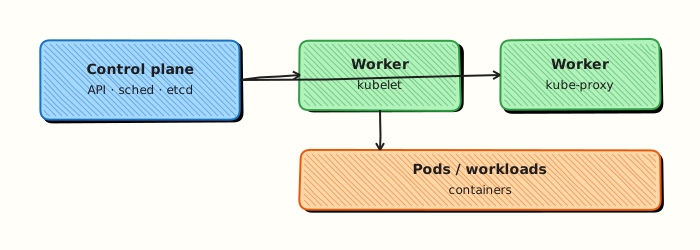
Namespaces sit logically above workloads. The API server enforces quotas at admission time; the scheduler respects requests and limits on each node.
Theory
What Is a Namespace?
A namespace is a virtual cluster inside a physical cluster. Object names are unique within a namespace but can repeat across namespaces — web-svc in dev and web-svc in production are distinct resources. The API server stores objects with a fully qualified name: namespace/name.
Kubernetes ships with built-in namespaces:
| Namespace | Purpose |
|---|---|
default | Workloads without an explicit namespace land here |
kube-system | Core control plane and add-on components (CoreDNS, kube-proxy) |
kube-public | Publicly readable metadata (rarely used) |
kube-node-lease | Node heartbeat leases for health detection |
Most user workloads should not live in default or kube-system. Treat default as a sandbox; production apps belong in purpose-named namespaces.
Namespace vs Labels
Namespaces provide hard boundaries for RBAC, quotas, and DNS (service-name.namespace.svc.cluster.local). Labels provide soft grouping across namespaces — for example, team=payments on Deployments in both staging and production.
| Mechanism | Best for |
|---|---|
| Namespace | RBAC isolation, quotas, network policies scoped to a tenant |
| Label | Cross-cutting queries, cost tags, feature flags, GitOps selectors |
Use namespaces for tenancy boundaries; use labels for metadata and filtering.
Resource Requests, Limits, and Quality of Service
Every container should declare requests (guaranteed minimum) and limits (maximum allowed):
The scheduler uses requests to find a node with enough allocatable capacity. The kubelet uses limits to enforce cgroup ceilings. Pods without requests are harder to schedule predictably and receive BestEffort QoS — the first evicted under memory pressure.
| QoS Class | Condition |
|---|---|
| Guaranteed | Every container has equal requests and limits for CPU and memory |
| Burstable | At least one container has requests or limits set |
| BestEffort | No requests or limits on any container |
ResourceQuota
A ResourceQuota caps aggregate consumption in a namespace. Common quota scopes:
apiVersion: v1
kind: ResourceQuota
metadata:
  name: team-quota
  namespace: payments
spec:
  hard:
    pods: "20"
    requests.cpu: "4"
    requests.memory: 8Gi
    limits.cpu: "8"
    limits.memory: 16Gi
    persistentvolumeclaims: "5"
    services.loadbalancers: "2"
When a team tries to create a Pod that would exceed the quota, the API server rejects it with a clear error. Quotas require that affected resources specify requests/limits — otherwise LimitRange defaults apply.
LimitRange
LimitRange sets defaults and constraints per Pod or container in a namespace:
apiVersion: v1
kind: LimitRange
metadata:
  name: default-limits
  namespace: payments
spec:
  limits:
    - type: Container
      default:
        cpu: "200m"
        memory: "256Mi"
      defaultRequest:
        cpu: "100m"
        memory: "128Mi"
      max:
        cpu: "2"
        memory: 2Gi
      min:
        cpu: "50m"
        memory: "64Mi"
LimitRange ensures every Pod entering the namespace has sane resource declarations — critical before enabling ResourceQuota.
Multi-Tenancy Patterns
Common namespace strategies:
| Pattern | Layout | Trade-off |
|---|---|---|
| Env per namespace | payments-dev, payments-prod | Simple RBAC; many namespaces at scale |
| Team per namespace | payments, catalog with env labels | Fewer namespaces; quotas per team not env |
| Env + team | dev-payments, prod-payments | Clear isolation; operational overhead |
Platform teams often combine namespace-per-environment for small orgs and namespace-per-team with labels for larger ones.
DNS and Service Discovery Within Namespaces
Services are reachable as:
- Same namespace:
http://web-svc - Cross namespace:
http://web-svc.production.svc.cluster.local
NetworkPolicies (covered in later security tutorials) restrict cross-namespace traffic. Ingress rules reference Services in their own namespace unless using ExternalName or multi-namespace controllers.
Hands-on Lab
Objective
Create a tenant namespace with ResourceQuota and LimitRange, deploy a constrained Pod that fits, then prove a over-quota Pod is rejected by admission.
Prerequisites
- A working Kubernetes cluster (kind, minikube, or any lab cluster)
- kubectl with permission to create namespaces and quotas
- Writable workspace at
~/rebash-k8s/module-08-ns
Lab environment
Workspace: ~/rebash-k8s/module-08-ns
Real-world scenario
Platform engineering onboards team payments-dev. They receive an isolated namespace, default container limits, and a hard cap of two Pods. You apply the bootstrap manifests, run one allowed workload, then demonstrate quota enforcement when someone tries to exceed the Pod count.
Step-by-step tasks
Task 1 – Namespace, LimitRange, and ResourceQuota
Create tenant-bootstrap.yaml:
apiVersion: v1
kind: Namespace
metadata:
  name: rebash-m08-ns
  labels:
    team: payments-dev
    environment: lab
---
apiVersion: v1
kind: LimitRange
metadata:
  name: defaults
  namespace: rebash-m08-ns
spec:
  limits:
    - type: Container
      defaultRequest:
        cpu: 100m
        memory: 128Mi
      default:
        cpu: 200m
        memory: 256Mi
      max:
        cpu: 500m
        memory: 512Mi
---
apiVersion: v1
kind: ResourceQuota
metadata:
  name: team-quota
  namespace: rebash-m08-ns
spec:
  hard:
    pods: "2"
    requests.cpu: "500m"
    requests.memory: 512Mi
Apply and inspect:
cd ~/rebash-k8s/module-08-ns
kubectl apply -f tenant-bootstrap.yaml
kubectl describe quota team-quota -n rebash-m08-ns | tee quota-describe.txt
kubectl describe limitrange defaults -n rebash-m08-ns | tee limitrange-describe.txt
grep -E 'pods|cpu|memory' quota-describe.txt
Expected output
Quota and LimitRange active; hard limits show pods: 2.
Task 2 – Allowed Pod within quota
Create allowed-pod.yaml:
apiVersion: v1
kind: Pod
metadata:
  name: api-one
  namespace: rebash-m08-ns
spec:
  containers:
    - name: nginx
      image: nginx:1.27-alpine
      resources:
        requests:
          cpu: 100m
          memory: 128Mi
        limits:
          cpu: 200m
          memory: 256Mi
Apply and verify usage:
cd ~/rebash-k8s/module-08-ns
kubectl apply -f allowed-pod.yaml
kubectl wait --for=condition=Ready pod/api-one -n rebash-m08-ns --timeout=120s
kubectl describe quota team-quota -n rebash-m08-ns | tee quota-after-one.txt
grep 'pods' quota-after-one.txt
Expected output
Pod Ready; quota used shows 1 Pod consumed.
Task 3 – Prove quota rejection
Create second-pod.yaml:
apiVersion: v1
kind: Pod
metadata:
  name: api-two
  namespace: rebash-m08-ns
spec:
  containers:
    - name: nginx
      image: nginx:1.27-alpine
      resources:
        requests:
          cpu: 100m
          memory: 128Mi
        limits:
          cpu: 200m
          memory: 256Mi
Create third-pod.yaml:
apiVersion: v1
kind: Pod
metadata:
  name: api-three
  namespace: rebash-m08-ns
spec:
  containers:
    - name: nginx
      image: nginx:1.27-alpine
      resources:
        requests:
          cpu: 100m
          memory: 128Mi
        limits:
          cpu: 200m
          memory: 256Mi
Apply second (should succeed), third (should fail):
cd ~/rebash-k8s/module-08-ns
kubectl apply -f second-pod.yaml
kubectl wait --for=condition=Ready pod/api-two -n rebash-m08-ns --timeout=120s
kubectl apply -f third-pod.yaml 2>&1 | tee quota-deny.txt || true
grep -Ei 'quota|exceeded|Forbidden' quota-deny.txt
kubectl get pods -n rebash-m08-ns | tee pods-final.txt
grep -c Running pods-final.txt | tee running-count.txt
test "$(cat running-count.txt)" -eq 2
Expected output
Third Pod create fails with quota exceeded; exactly two Running Pods remain.
Validation steps
- LimitRange and ResourceQuota applied in
rebash-m08-ns - Two Pods run within quota limits
- Third Pod rejected with quota error message captured
-
kubectl describe quotashows used vs hard limits
Common errors and fixes
| Error | Cause | Fix |
|---|---|---|
| Pod rejected without limits | LimitRange requires resources | Add requests/limits to Pod spec |
| Quota not enforced | Wrong namespace | Confirm -n rebash-m08-ns |
| Both extra Pods run | Quota too high | Lower pods hard limit to 2 |
| Pending not Forbidden | CPU quota not Pods | Check requests.cpu hard limit |
Challenge exercise
Add requests.cpu: "300m" hard limit to the ResourceQuota, keep two Pods at 100m each, then try a third Pod with cpu: 200m request and capture CPU quota denial.
Learning outcomes
- Bootstrapped a tenant namespace with LimitRange defaults
- Applied ResourceQuota hard limits
- Observed admission rejection when quota exceeded
Cleanup
Validation
Confirm the lab before moving on:
- Re-run the critical commands from the Hands-on Lab and compare them to the expected output in each step.
- Check that you can explain why each successful result matters (not only that it printed).
- Note any warnings or unexpected output — resolve them using Troubleshooting before continuing.
| Check | Pass criteria |
|---|---|
| Namespace | Lab namespace exists and is used for subsequent commands |
| Quota/limit | ResourceQuota and/or LimitRange applied and enforced as documented |
| Isolation | Resources in one namespace do not appear in another without -A |
| Cleanup | Lab namespace deleted |
Code Walkthrough
| Command | Description | Example |
|---|---|---|
kubectl get ns | List namespaces | kubectl get ns --show-labels |
kubectl create ns | Create namespace | kubectl create ns staging |
kubectl config set-context | Set default namespace | kubectl config set-context --current --namespace=staging |
kubectl describe quota | Inspect ResourceQuota usage | kubectl describe quota -n payments-dev |
kubectl describe limitrange | View LimitRange rules | kubectl describe limitrange -n payments-dev |
kubectl get all -A | List resources all namespaces | kubectl get pods -A -l app=web |
Namespace bootstrap manifest
Save as namespace-bootstrap.yaml for platform onboarding:
apiVersion: v1
kind: Namespace
metadata:
  name: payments-prod
  labels:
    team: payments
    environment: prod
---
apiVersion: v1
kind: LimitRange
metadata:
  name: defaults
  namespace: payments-prod
spec:
  limits:
    - type: Container
      defaultRequest:
        cpu: "100m"
        memory: "128Mi"
      default:
        cpu: "500m"
        memory: "512Mi"
---
apiVersion: v1
kind: ResourceQuota
metadata:
  name: team-quota
  namespace: payments-prod
spec:
  hard:
    pods: "50"
    requests.cpu: "10"
    requests.memory: 20Gi
Apply: kubectl apply -f namespace-bootstrap.yaml
Security Considerations
- Use namespaces as security and quota boundaries, not only organisational labels
- Apply ResourceQuotas and LimitRanges so tenants cannot exhaust the cluster
- Prefer RoleBindings scoped to a namespace over ClusterRoleBindings for app teams
- NetworkPolicy default-deny within sensitive namespaces
- Label namespaces for Pod Security admission (enforce/restricted) early
- Delete unused namespaces — leftover RBAC and Secrets accumulate risk
Common Mistakes
Running production workloads in default
The default namespace has no quota guardrails and confusing RBAC. Every production Deployment should live in a named namespace with quotas and LimitRange applied.
Enabling ResourceQuota without LimitRange
Quotas count requests and limits. Pods without resource fields may be rejected or count as zero — behaviour depends on quota scope. Always pair quotas with LimitRange defaults.
Identical Service names across namespaces without DNS awareness
curl http://api only resolves within the current namespace. Cross-namespace calls require the FQDN api.other-ns.svc.cluster.local or an Ingress rule.
Deleting kube-system or kube-public
System namespaces host critical cluster components. Restrict namespace deletion to platform admins via RBAC.
Best Practices
One namespace per environment minimum
Even small teams benefit from separating dev, staging, and prod namespaces. Pair with RBAC so developers cannot deploy to production accidentally.
Document quota rationale in annotations
Add kubectl annotate quota dev-quota description="2 dev pods per engineer, max 5" so future platform engineers understand sizing decisions.
Use --dry-run=server before bulk deploys
Validate quota and admission policies without creating objects. Integrate server-side dry-run in CI pipelines.
Monitor quota utilization
Alert when namespace quota usage exceeds 80%. Proactive quota increases prevent deployment failures during releases.
Troubleshooting
| Issue | Cause | Solution |
|---|---|---|
Forbidden: exceeded quota | Namespace ResourceQuota exhausted | kubectl describe quota -n <ns>; scale down or raise limits |
| Pod stuck Pending, events mention resources | Node lacks allocatable CPU/memory | Check kubectl describe node; reduce requests or add nodes |
must specify limits admission error | LimitRange requires limits; none set | Add resources block or fix LimitRange defaults |
| Wrong Service reached | DNS resolves same-namespace only | Use FQDN or verify -n flag and kubeconfig context |
| Namespace stuck Terminating | Finalizers on resources inside namespace | Identify blocking objects; remove finalizers only with care |
| Quota shows zero used but pods exist | Pods lack requests/limits | Update Deployments; ensure LimitRange injects defaults |
Summary
- Namespaces partition a cluster for tenancy, RBAC, DNS, and policy enforcement without separate physical clusters
- ResourceQuota caps aggregate namespace consumption; LimitRange sets per-container defaults and bounds
- Requests drive scheduling; limits enforce runtime ceilings and affect QoS eviction order
- Design namespace layouts deliberately — per team, per environment, or hybrid — and use labels for cross-cutting metadata
- Configure kubectl context namespace to reduce operator error during multi-namespace work
- Pair quotas with monitoring and documented sizing so teams understand capacity boundaries before incidents
Interview Questions
- How do ResourceQuota and LimitRange differ?
- What happens when a new Pod would exceed a ResourceQuota?
- Why set default requests via LimitRange?
- How can quotas be abused or misconfigured to cause denial of service for a team?
- When would you use multiple namespaces per team versus one shared namespace?
Sample answer — question 2
Admission rejects Pods that would break the quota. Teams see create failures until they free capacity or request a quota increase.
Sample answer — question 4
Quotas that are too tight block legitimate work; quotas that are too loose allow noisy neighbours. Review usage, set fair shares, and separate critical platforms into their own namespaces.
Related Tutorials
- Kubernetes – Category Overview
- Ingress and External Access (previous — Module 4)
- Health Checks, Probes, and Self-Healing (next in Module 4)
- RBAC and Kubernetes Security Basics
- Docker – Introduction to Containers — cgroups foundation
- Cheat sheet: Kubernetes Cheat Sheet
- Interview prep: Kubernetes Interview Prep
- Learning path: DevOps Engineer