kubectl Essentials and Workflows
Overview
Operate a cluster with declarative kubectl apply, inspect objects, stream logs, and exec for debugging — without guessing flags under pressure.
Prefer apply + Git over imperative create for anything lasting. Imperative commands are fine for labs and break-glass.
This is a core tutorial in Module 2 · Cluster Setup of the REBASH Academy Kubernetes for Cloud & DevOps Engineers series — written for Cloud, DevOps, Platform, and SRE engineers.
Prerequisites
- Working cluster from Installing Kubernetes
Learning Objectives
By the end of this tutorial, you will be able to:
-
get,describe,apply,delete -
logs,exec,port-forward - Use
-n/ contexts safely - Dry-run client/server
Architecture
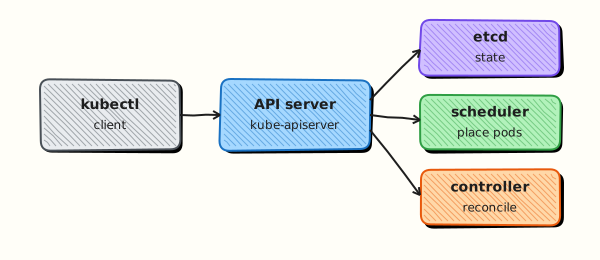
This topic’s control points and relationships are shown below.
Theory
What it is
kubectl is how DevOps engineers inspect and change cluster state day to day. It speaks the Kubernetes API: create or update objects, read status, stream logs, open a shell in a container, and forward ports for local debugging. Mastery is less about memorising every flag and more about a reliable workflow under pressure.
Why it matters
Incidents are won by disciplined inspection: Events before guesswork, describe before delete-and-recreate, declarative apply before snowflake imperative edits. Teams that standardise on Git + kubectl apply (or GitOps) reduce configuration drift. Imperative commands remain useful for labs and break-glass fixes.
How it works (mental model)
Prefer a loop:
- Orient —
kubectl config current-context,kubectl get ns, confirm the right place. - List —
getwith labels and namespaces (-n,-A,-l). - Explain —
describefor Events and conditions;get -o yamlfor full object. - Change — edit manifests,
apply -f, watch rollout; use--dry-run=client|serverto preview. - Observe —
logs,exec,port-forwardfor live behaviour.
Server-side apply and field managers matter in advanced teams; for this course, treat apply as “merge this desired state into the API”.
Key concepts / comparisons
| Task | Command pattern |
|---|---|
| List | kubectl get pods -A |
| Detail | kubectl describe pod NAME |
| Apply | kubectl apply -f app.yaml |
| Logs | kubectl logs deploy/NAME -f |
| Shell | kubectl exec -it POD -- sh |
| Local port | kubectl port-forward svc/NAME 8080:80 |
| Preview | kubectl apply --dry-run=server -f app.yaml |
| Style | When |
|---|---|
Declarative (apply -f) | Anything that should last |
Imperative (create, run, expose) | Labs, exploration, emergencies |
Common pitfalls
- Forgetting
-nand operating indefaultwhile the app lives elsewhere. - Using
kubectl editon live objects with no Git record — drift accumulates. - Relying on
logsalone; CrashLoop often needslogs --previousand Events. port-forwardis a debug tunnel, not a production exposure path.- Running
deletewithout confirming selectors — label mistakes wipe the wrong workloads.
Hands-on Lab
Objective
Practise declarative and imperative kubectl workflows: apply a Deployment from YAML, inspect it, stream logs, exec into a container, explain a field, then delete cleanly.
Prerequisites
- A working Kubernetes cluster (kind, minikube, or any lab cluster)
- kubectl configured with namespace-create rights
- Writable workspace at
~/rebash-k8s/module-02-kubectl
Lab environment
Workspace: ~/rebash-k8s/module-02-kubectl
Real-world scenario
A developer asks you to deploy a small web tier for a demo, confirm it is healthy, grab logs for the ticket, and remove the workload after review. You use Git-tracked YAML plus the inspection commands you would run during an incident.
Step-by-step tasks
Task 1 – Declarative apply
Create namespace.yaml:
Create web-deploy.yaml:
apiVersion: apps/v1
kind: Deployment
metadata:
  name: web
  namespace: rebash-m02-kubectl
  labels:
    app: web
spec:
  replicas: 1
  selector:
    matchLabels:
      app: web
  template:
    metadata:
      labels:
        app: web
    spec:
      containers:
        - name: nginx
          image: nginx:1.27-alpine
          ports:
            - containerPort: 80
          resources:
            requests:
              cpu: 50m
              memory: 64Mi
            limits:
              cpu: 200m
              memory: 128Mi
Apply and wait:
cd ~/rebash-k8s/module-02-kubectl
kubectl apply -f namespace.yaml
kubectl apply -f web-deploy.yaml
kubectl rollout status deployment/web -n rebash-m02-kubectl --timeout=120s
kubectl get deploy,pod -n rebash-m02-kubectl -o wide | tee apply-evidence.txt
Expected output
Deployment web Available; Pod 1/1 Ready in apply-evidence.txt.
Task 2 – Describe, logs, and exec
Inspect the running Pod the way you would during triage.
cd ~/rebash-k8s/module-02-kubectl
kubectl describe deployment web -n rebash-m02-kubectl | tee describe-deploy.txt
kubectl logs -n rebash-m02-kubectl -l app=web --tail=20 | tee logs-web.txt
kubectl exec -n rebash-m02-kubectl deploy/web -- wget -qO- http://127.0.0.1/ | head -n 3 | tee exec-curl.txt
grep -qi nginx exec-curl.txt || test -s exec-curl.txt
Expected output
HTML snippet or non-empty response in exec-curl.txt; logs file captured.
Task 3 – Explain, compare imperative delete
Learn schema with explain, then remove the workload declaratively.
cd ~/rebash-k8s/module-02-kubectl
kubectl explain deployment.spec.template.spec.containers.resources | head -n 15 | tee explain-resources.txt
grep -q resources explain-resources.txt
kubectl delete -f web-deploy.yaml
kubectl get deploy web -n rebash-m02-kubectl 2>&1 | tee delete-check.txt || true
grep -q 'NotFound' delete-check.txt || ! kubectl get deploy web -n rebash-m02-kubectl >/dev/null 2>&1
Expected output
explain documents resource fields; Deployment no longer exists after delete.
Validation steps
- Deployment applied from YAML and reached Ready
-
describe,logs, andexecproduced evidence files -
kubectl explainran against Deployment container resources - Workload deleted without leaving Pods in
rebash-m02-kubectl
Common errors and fixes
| Error | Cause | Fix |
|---|---|---|
Forgot -n rebash-m02-kubectl | Wrong namespace | Always pass -n or set context namespace |
error: unable to find container | Pod not Ready yet | Wait for rollout status |
| exec wget missing | Minimal image | Use curl if available or wait for Ready |
| explain empty | Wrong resource path | Use kubectl explain pod.spec.containers |
Challenge exercise
Re-apply web-deploy.yaml, run kubectl get deploy web -n rebash-m02-kubectl -o yaml > exported-web.yaml, change replicas to 2 in the file, apply again, and prove two Ready Pods with kubectl get pods -l app=web -n rebash-m02-kubectl.
Learning outcomes
- Applied and deleted a Deployment declaratively
- Used describe, logs, and exec for operational inspection
- Queried API schema with
kubectl explain
Cleanup
Validation
- Lab commands run under
~/rebash-k8s/module-02-kubectl/ - You can explain each Theory section in your own words
- You used modern tooling where it applies to this topic
- You can describe one production failure mode for this topic
Code Walkthrough
Production practice for kubectl Essentials and Workflows always combines:
- Inspect before you change (status, plan, logs, dry-run)
- Prefer reversible, documented changes (Git, IaC, drop-ins, version pins)
- Capture evidence (command output, pipeline logs) for handovers
- Prefer current tools and APIs over legacy shortcuts
- Least privilege — escalate credentials only when required
Keep runbooks short enough to follow under pressure. Automate checks; keep humans for judgement.
Security Considerations
- Treat credentials and tokens for kubernetes as privileged — never commit them
- Prefer short-lived auth (OIDC, roles, SSO) over long-lived keys
- Validate blast radius before apply/deploy/delete operations
- Restrict who can approve production changes
- Collect audit logs; limit who can read sensitive traces
Common Mistakes
Forgetting -n and operating in default while the app lives elsewhere.
Validate assumptions against the Theory section and official docs before changing production.
Using kubectl edit on live objects with no Git record — drift accumulates.
Lab shortcuts (open security groups, admin roles, skip approvals) must not ship unchanged.
Changing production without a rollback path
Always know how to revert (previous artefact, prior release, state rollback, DNS failback).
Best Practices
- Encode kubectl Essentials and Workflows changes as code and review them in pull requests
- Pin versions (images, modules, actions, provider plugins)
- Separate environments with clear promotion gates
- Alert on symptoms with runbooks attached
- Destroy lab resources; tag everything with owner and expiry where possible
Troubleshooting
| Symptom | Likely cause | Fix |
|---|---|---|
| Auth / permission denied | Wrong identity, policy, or scope | Check caller identity, roles, and least-privilege policies |
| Timeout / no route | Network, DNS, security group, or endpoint | Trace path, DNS, and allow-lists before retrying |
| Drift / unexpected plan | Manual change or wrong state/workspace | Reconcile desired vs actual; avoid click-ops on managed resources |
| Pipeline/job red | Flaky step, cache, or missing secret | Read failing step logs; bisect recent workflow/config changes |
| Cost spike | Idle load balancer, NAT, oversized compute | Inventory billable resources; stop/delete labs promptly |
Summary
kubectl Essentials and Workflows is essential for Cloud and DevOps engineers working with kubernetes. Practise the lab until the inspection and change path is muscle memory, then continue the track.
Interview Questions
- What is the difference between imperative kubectl run and declarative kubectl apply?
- When should you use
kubectl describeversuskubectl logs? - How do labels and selectors help day-to-day operations?
- Why is applying manifests from version control safer than one-off imperative edits?
- What does
--dry-run=clienthelp you validate?
Sample answer — question 2
describe shows object state, events, and configuration; logs show container stdout/stderr. Use describe for scheduling and probe issues, logs for application errors.
Sample answer — question 4
Git-backed manifests give review, history, and repeatable environments. Imperative edits drift from documented intent and are hard to audit after incidents.