RBAC and Kubernetes Security Basics
Overview
Create a ServiceAccount with a Role that can only list Pods in one namespace — least privilege in practice.
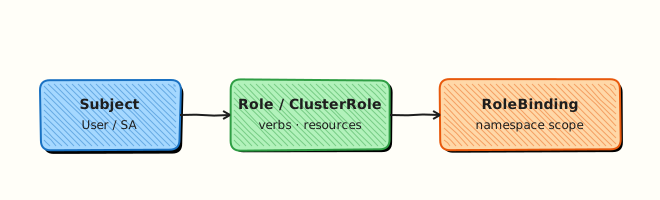
RBAC answers: who (Subject) can do what (verbs) on which resources. Prefer Roles + RoleBindings for namespace scope; ClusterRoles for cluster-wide.
This is a core tutorial in Module 10 · Security of the REBASH Academy Kubernetes for Cloud & DevOps Engineers series — written for Cloud, DevOps, Platform, and SRE engineers.
Prerequisites
Learning Objectives
By the end of this tutorial, you will be able to:
- Create ServiceAccount, Role, RoleBinding
- Test with
kubectl auth can-i - Contrast Role vs ClusterRole
- Avoid default SA over-privilege
Architecture
This topic’s control points and relationships are shown below.
Theory
What it is
Role-Based Access Control (RBAC) authorises API requests after authentication. You bind a subject (User, Group, or ServiceAccount) to a Role or ClusterRole that lists allowed verbs on resources. Namespace-scoped RoleBinding grants a Role inside one namespace; ClusterRoleBinding grants cluster-wide (or reuses a ClusterRole in a namespace via RoleBinding).
Why it matters
Every kubectl call and every in-Pod client uses some identity. Over-powered ServiceAccounts turn a single compromised Pod into cluster-admin. Least privilege is the foundation of CKA/CKS practice and of platform multi-tenancy. RBAC does not replace NetworkPolicy or Pod security — it gates the API.
How it works (mental model)
- Request arrives at the API server with credentials.
- Authentication establishes the user/SA identity.
- Authorisation (RBAC) checks bindings for matching verb/resource/namespace.
- Admission may still mutate or reject; then etcd persistence occurs.
- Controllers and apps should run as dedicated ServiceAccounts with minimal Roles — not
cluster-admin.
Test with kubectl auth can-i as the subject before deploying.
Key concepts / comparisons
| Object | Scope |
|---|---|
| Role | Rules in one namespace |
| ClusterRole | Cluster-wide rules (or reusable set) |
| RoleBinding | Bind in a namespace |
| ClusterRoleBinding | Bind cluster-wide |
| ServiceAccount | Pod identity for the API |
| Verb examples | Resources |
|---|---|
| get, list, watch | Read paths |
| create, update, patch, delete | Write paths |
Common pitfalls
- Binding
cluster-adminto application SAs “temporarily” and never removing it. - Using the
defaultServiceAccount with mounted tokens for app Pods. - Creating a Role but forgetting the RoleBinding — silent 403s.
- Confusing authentication (who are you?) with authorisation (what may you do?).
- Granting
*verbs on*resources in a namespace that still includes Secrets and Roles.
Hands-on Lab
Objective
Create a ServiceAccount, Role, and RoleBinding, then prove allowed and denied API actions with kubectl auth can-i as that ServiceAccount.
Prerequisites
- kubectl configured against a lab cluster (kind or minikube)
- Rights to create RBAC objects in a test namespace
- Writable workspace at
~/rebash-k8s/module-10
Lab environment
Workspace: ~/rebash-k8s/module-10 on a disposable lab cluster.
Real-world scenario
A new invoice-reader microservice needs to list Pods in its namespace for health dashboards, but must not delete workloads or read Secrets. You will implement least-privilege RBAC and prove it with auth can-i before handing the manifest to GitOps.
Step-by-step tasks
Task 1 – Namespace and ServiceAccount
Create namespace.yaml:
apiVersion: v1
kind: Namespace
metadata:
  name: rebash-m10
  labels:
    app.kubernetes.io/part-of: rebash-lab
Create serviceaccount.yaml:
apiVersion: v1
kind: ServiceAccount
metadata:
  name: invoice-reader
  namespace: rebash-m10
Apply:
cd ~/rebash-k8s/module-10
kubectl apply -f namespace.yaml -f serviceaccount.yaml
kubectl get sa invoice-reader -n rebash-m10 | tee sa-m10.txt
Expected output
sa-m10.txt lists invoice-reader in namespace rebash-m10.
Task 2 – Role and RoleBinding
Create role.yaml:
apiVersion: rbac.authorization.k8s.io/v1
kind: Role
metadata:
  name: pod-reader
  namespace: rebash-m10
rules:
  - apiGroups: [""]
    resources: ["pods"]
    verbs: ["get", "list"]
Create rolebinding.yaml:
apiVersion: rbac.authorization.k8s.io/v1
kind: RoleBinding
metadata:
  name: invoice-reader-pods
  namespace: rebash-m10
subjects:
  - kind: ServiceAccount
    name: invoice-reader
    namespace: rebash-m10
roleRef:
  apiGroup: rbac.authorization.k8s.io
  kind: Role
  name: pod-reader
Apply:
cd ~/rebash-k8s/module-10
kubectl apply -f role.yaml -f rolebinding.yaml
kubectl get role,rolebinding -n rebash-m10 | tee rbac-m10.txt
Expected output
rbac-m10.txt shows pod-reader Role and invoice-reader-pods RoleBinding.
Task 3 – Prove permissions with auth can-i
Create a sample Pod so list pods is meaningful, then test allow and deny:
Create sample-pod.yaml:
apiVersion: v1
kind: Pod
metadata:
  name: sample-app
  namespace: rebash-m10
spec:
  containers:
    - name: app
      image: busybox:1.36.1
      command: ["sh", "-c", "sleep 3600"]
cd ~/rebash-k8s/module-10
kubectl apply -f sample-pod.yaml
SA="system:serviceaccount:rebash-m10:invoice-reader"
kubectl auth can-i list pods -n rebash-m10 --as="$SA" | tee can-i-list.txt
kubectl auth can-i delete pods -n rebash-m10 --as="$SA" | tee can-i-delete.txt || true
kubectl auth can-i get secrets -n rebash-m10 --as="$SA" | tee can-i-secrets.txt || true
grep -q yes can-i-list.txt
grep -q no can-i-delete.txt
grep -q no can-i-secrets.txt
Expected output
yes for list pods; no for delete pods and get secrets.
Validation steps
- ServiceAccount, Role, and RoleBinding exist in
rebash-m10 -
auth can-i list podsreturnsyesfor the ServiceAccount -
auth can-i delete podsandget secretsreturnno - You can explain Role vs ClusterRole scope from Theory
Common errors and fixes
| Error | Cause | Fix |
|---|---|---|
Always no from can-i | Wrong --as subject string | Use system:serviceaccount:<ns>:<sa-name> exactly |
| RoleBinding 403 | Role name mismatch in roleRef | Align Role metadata name with RoleBinding |
| SA can do too much | Bound to cluster-admin elsewhere | kubectl describe rolebinding -n rebash-m10 |
| Changes not visible | RBAC cache delay (rare) | Re-run can-i after a few seconds |
Challenge exercise
Add a second Role event-reader (get, list on events) and bind it to the same ServiceAccount. Prove with kubectl auth can-i list events -n rebash-m10 --as=….
Learning outcomes
- Created namespaced RBAC objects as separate manifests
- Bound a ServiceAccount to a least-privilege Role
- Verified authorisation with
kubectl auth can-i - Distinguished authentication identity from RBAC permissions
Cleanup
Validation
- Lab commands run under
~/rebash-k8s/module-10/ - You can explain each Theory section in your own words
- You used modern tooling where it applies to this topic
- You can describe one production failure mode for this topic
Code Walkthrough
Production practice for RBAC and Kubernetes Security Basics always combines:
- Inspect before you change (status, plan, logs, dry-run)
- Prefer reversible, documented changes (Git, IaC, drop-ins, version pins)
- Capture evidence (command output, pipeline logs) for handovers
- Prefer current tools and APIs over legacy shortcuts
- Least privilege — escalate credentials only when required
Keep runbooks short enough to follow under pressure. Automate checks; keep humans for judgement.
Security Considerations
- Treat credentials and tokens for kubernetes as privileged — never commit them
- Prefer short-lived auth (OIDC, roles, SSO) over long-lived keys
- Validate blast radius before apply/deploy/delete operations
- Restrict who can approve production changes
- Collect audit logs; limit who can read sensitive traces
Common Mistakes
Binding cluster-admin to application SAs “temporarily” and never removing it.
Validate assumptions against the Theory section and official docs before changing production.
Using the default ServiceAccount with mounted tokens for app Pods.
Lab shortcuts (open security groups, admin roles, skip approvals) must not ship unchanged.
Changing production without a rollback path
Always know how to revert (previous artefact, prior release, state rollback, DNS failback).
Best Practices
- Encode RBAC and Kubernetes Security Basics changes as code and review them in pull requests
- Pin versions (images, modules, actions, provider plugins)
- Separate environments with clear promotion gates
- Alert on symptoms with runbooks attached
- Destroy lab resources; tag everything with owner and expiry where possible
Troubleshooting
| Symptom | Likely cause | Fix |
|---|---|---|
| Auth / permission denied | Wrong identity, policy, or scope | Check caller identity, roles, and least-privilege policies |
| Timeout / no route | Network, DNS, security group, or endpoint | Trace path, DNS, and allow-lists before retrying |
| Drift / unexpected plan | Manual change or wrong state/workspace | Reconcile desired vs actual; avoid click-ops on managed resources |
| Pipeline/job red | Flaky step, cache, or missing secret | Read failing step logs; bisect recent workflow/config changes |
| Cost spike | Idle load balancer, NAT, oversized compute | Inventory billable resources; stop/delete labs promptly |
Summary
RBAC and Kubernetes Security Basics is essential for Cloud and DevOps engineers working with kubernetes. Practise the lab until the inspection and change path is muscle memory, then continue the track.
Interview Questions
- What are Role, ClusterRole, RoleBinding, and ClusterRoleBinding?
- How do you test whether a ServiceAccount can list Pods in a namespace?
- Why prefer RoleBinding in a single namespace over ClusterRoleBinding?
- What is the danger of binding users to cluster-admin for convenience?
- How should applications authenticate to the API from inside a Pod?
Sample answer — question 2
Use kubectl auth can-i with --as=system:serviceaccount:ns:name to evaluate RBAC without guessing. It reflects the authorisation rules currently applied.
Sample answer — question 4
cluster-admin bypasses least privilege and turns any credential leak into full cluster compromise. Scope Roles narrowly and use Just-In-Time elevation where possible.