Production Patterns — HPA, PDB, and Affinity
Overview
Running two replicas is not production-ready. Real clusters face traffic spikes, node maintenance, and hardware failures simultaneously. Horizontal Pod Autoscaler (HPA) scales replicas on metrics. Pod Disruption Budgets (PDB) ensure voluntary disruptions (drains, upgrades) never take down too many pods at once. Affinity and topology spread place workloads on the right nodes and spread them across failure domains.
This tutorial teaches the production control loop: scale out under load, scale in safely, survive node drains, and avoid single points of failure.
This is Tutorial 17 in Module 6: Production of the REBASH Academy Kubernetes series.
Prerequisites
- GitOps and CI/CD with Kubernetes
- Health Checks, Probes, and Self-Healing
- Deployments — Managing Replicated Pods
- Namespaces and Resource Management
- Cluster with metrics-server installed (required for CPU/memory HPA)
- Optional: Prometheus Adapter for custom metrics HPA
Learning Objectives
By the end of this tutorial, you will be able to:
- Configure HPA on CPU, memory, and custom metrics
- Define PDBs that balance availability with cluster maintenance
- Apply node affinity, pod affinity, and anti-affinity rules
- Use topology spread constraints for zone and host distribution
- Combine resource requests with autoscaling for stable scheduling
- Validate scaling and disruption behaviour before production cutover
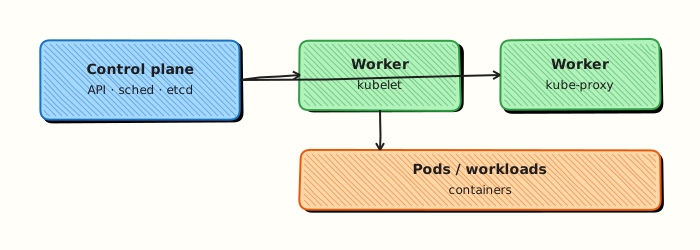
Architecture
Theory
Horizontal Pod Autoscaler
HPA adjusts Deployment.spec.replicas based on observed metrics.
| Metric source | Use case |
|---|---|
| CPU utilization | General web APIs |
| Memory utilization | Caches, JVM workloads |
| Custom metrics | Queue depth, RPS, latency |
| External metrics | CloudWatch, Pub/Sub backlog |
HPA formula (simplified):
Requirements for stable HPA:
- Resource requests set on containers — HPA compares usage against requests
- metrics-server running — provides CPU/memory via Metrics API
- Readiness probes — only ready pods receive traffic after scale-up
Default behaviour: scale-up is aggressive (add pods quickly); scale-down has stabilization windows to prevent flapping.
Pod Disruption Budget
Voluntary disruptions include node drains, cluster upgrades, and kubectl delete pod. PDB limits how many pods can be unavailable during these events.
| Field | Meaning |
|---|---|
minAvailable | Minimum pods that must stay running (absolute or %) |
maxUnavailable | Maximum pods that can be down during disruption |
PDB applies to pods matching its selector. It does not stop involuntary failures (node crash) — pair PDB with replica count and spread constraints.
Example: 5 replicas with minAvailable: 3 allows at most 2 simultaneous evictions during a drain.
Affinity and anti-affinity
| Type | Purpose |
|---|---|
| nodeAffinity | Schedule on nodes with labels (GPU, SSD, zone) |
| podAffinity | Co-locate with another pod (same node) |
| podAntiAffinity | Spread away from another pod (avoid same node) |
Required rules (requiredDuringSchedulingIgnoredDuringExecution) are hard constraints — pod stays Pending if unsatisfied.
Preferred rules (preferredDuringSchedulingIgnoredDuringExecution) are soft — scheduler tries but may violate under pressure.
Topology spread constraints
Modern alternative to anti-affinity for even distribution:
topologySpreadConstraints:
  - maxSkew: 1
    topologyKey: topology.kubernetes.io/zone
    whenUnsatisfiable: DoNotSchedule
    labelSelector:
      matchLabels:
        app: votestack-api
maxSkew: 1 means no zone can have more than one pod extra compared to another zone.
Scale and safety together
HPA scales replicas under load; PDBs limit voluntary disruption during drains; affinity/anti-affinity influence placement for resilience. Miscombined, they fight each other (a PDB that cannot be satisfied blocks node upgrades; an uncapped HPA overwhelms databases). Set max replicas thoughtfully, keep replica counts high enough for your PDB, and verify drain behaviour in staging.
Practice mindset
As you work through this tutorial, narrate why each control or command exists — not only how to type it. Production incidents are rarely solved by memorising flags; they are solved by connecting symptoms to the architecture (daemon vs kubelet, image vs running container, Service vs Endpoints, volume vs writable layer). After the lab, write three bullet notes in your own words: what you verified, what would break in production if skipped, and what you would monitor next.
Connecting the lab to production reviews
When a teammate asks “is this ready?”, answer with evidence from this tutorial’s controls: image provenance, privilege level, network exposure, health signals, and teardown/rollback. Copy-pasting a working lab snippet into production without those answers is how quiet misconfigurations become incidents. Prefer small, reviewable changes — one Dockerfile improvement, one RBAC binding, one probe — over large untested stacks.
Observability while you learn
Get into the habit of watching state while commands run: docker events / kubectl get events, resource usage, and logs in a second pane. Many failures are timing issues (probes, readiness, volume attach) that disappear if you only look at the final steady state. Capturing a short timeline of what you saw will also make your Troubleshooting section notes far more valuable later.
Hands-on Lab
Objective
Apply production-style manifests combining Deployment (with pod anti-affinity), HorizontalPodAutoscaler, and PodDisruptionBudget in one namespace, validating each object the cluster accepts.
Prerequisites
- kubectl configured against a lab cluster (kind or minikube; multi-node kind helps anti-affinity)
- Writable workspace at
~/rebash-k8s/module-patterns
Lab environment
Workspace: ~/rebash-k8s/module-patterns on a disposable lab cluster.
Real-world scenario
payments-api must survive node drains: at least two replicas, spread across nodes where possible, autoscale under load, and never drop below one available Pod during voluntary disruptions. You will commit the YAML bundle and capture evidence for a production readiness review.
Step-by-step tasks
Task 1 – Namespace and Deployment with anti-affinity
Create namespace.yaml:
Create deployment.yaml:
apiVersion: apps/v1
kind: Deployment
metadata:
  name: payments-api
  namespace: rebash-m-patterns
spec:
  replicas: 2
  selector:
    matchLabels:
      app: payments-api
  template:
    metadata:
      labels:
        app: payments-api
    spec:
      affinity:
        podAntiAffinity:
          preferredDuringSchedulingIgnoredDuringExecution:
            - weight: 100
              podAffinityTerm:
                labelSelector:
                  matchLabels:
                    app: payments-api
                topologyKey: kubernetes.io/hostname
      containers:
        - name: api
          image: nginxinc/nginx-unprivileged:1.27-alpine
          ports:
            - containerPort: 8080
          resources:
            requests:
              cpu: 100m
              memory: 64Mi
            limits:
              cpu: 200m
              memory: 128Mi
Apply:
cd ~/rebash-k8s/module-patterns
kubectl apply -f namespace.yaml -f deployment.yaml
kubectl rollout status deployment/payments-api -n rebash-m-patterns --timeout=120s
kubectl get pods -n rebash-m-patterns -o wide | tee patterns-pods-wide.txt
Expected output
Two Ready replicas; patterns-pods-wide.txt shows node placement (same node on single-node labs is acceptable with preferred anti-affinity).
Task 2 – PodDisruptionBudget
Create pdb.yaml:
apiVersion: policy/v1
kind: PodDisruptionBudget
metadata:
  name: payments-api-pdb
  namespace: rebash-m-patterns
spec:
  minAvailable: 1
  selector:
    matchLabels:
      app: payments-api
Apply and verify:
cd ~/rebash-k8s/module-patterns
kubectl apply -f pdb.yaml
kubectl get pdb payments-api-pdb -n rebash-m-patterns | tee patterns-pdb.txt
kubectl describe pdb payments-api-pdb -n rebash-m-patterns | tee patterns-pdb-describe.txt
grep -E 'Min Available|Allowed disruptions' patterns-pdb-describe.txt
Expected output
PDB shows minAvailable: 1 and current allowed disruptions.
Task 3 – HorizontalPodAutoscaler
Create hpa.yaml:
apiVersion: autoscaling/v2
kind: HorizontalPodAutoscaler
metadata:
  name: payments-api-hpa
  namespace: rebash-m-patterns
spec:
  scaleTargetRef:
    apiVersion: apps/v1
    kind: Deployment
    name: payments-api
  minReplicas: 2
  maxReplicas: 4
  metrics:
    - type: Resource
      resource:
        name: cpu
        target:
          type: Utilization
          averageUtilization: 60
Apply and describe:
cd ~/rebash-k8s/module-patterns
kubectl apply -f hpa.yaml
kubectl get hpa,pdb,deploy -n rebash-m-patterns | tee patterns-objects.txt
kubectl describe hpa payments-api-hpa -n rebash-m-patterns | tee patterns-hpa-describe.txt
if ! kubectl top pods -n rebash-m-patterns >/dev/null 2>&1; then
  echo "Metrics Server absent — HPA object valid; scaling conditions may show Unknown" | tee -a patterns-hpa-describe.txt
fi
Expected output
HPA, PDB, and Deployment listed; HPA min/max replicas documented.
Validation steps
- Deployment runs at least two replicas with resource requests
- PDB
minAvailable: 1is admitted and visible via kubectl - HPA targets
payments-apiwith min 2 / max 4 - Anti-affinity preference appears in Pod spec (
kubectl describe pod)
Common errors and fixes
| Error | Cause | Fix |
|---|---|---|
| PDB forbidden | replicas < minAvailable | Increase Deployment replicas or lower PDB |
| HPA invalid without requests | Missing CPU requests | Add resources.requests to container |
| Anti-affinity has no effect | Single-node cluster | Expected with preferred; use multi-node to spread |
| Metrics unavailable | No metrics-server | Document; install for production autoscaling |
Challenge exercise
Run kubectl drain <node> --ignore-daemonsets --delete-emptydir-data on a multi-node lab and observe PDB blocking excessive evictions; capture Events to patterns-drain.txt.
Learning outcomes
- Combined HPA, PDB, and scheduling preferences in one manifest set
- Verified disruption budget semantics alongside replica counts
- Applied autoscaling configuration with honest metrics caveats
- Prepared a production-style YAML bundle suitable for GitOps review
Cleanup
Validation
Confirm the lab before moving on:
- Re-run the critical commands from the Hands-on Lab and compare them to the expected output in each step.
- Check that you can explain why each successful result matters (not only that it printed).
- Note any warnings or unexpected output — resolve them using Troubleshooting before continuing.
| Check | Pass criteria |
|---|---|
| HPA | HorizontalPodAutoscaler exists and reacts to load or metrics as labbed |
| PDB | PodDisruptionBudget admitted and visible via kubectl |
| Affinity | Scheduling rules affect Pod placement as documented |
| Cleanup | HPA/PDB/demo workloads removed |
Code Walkthrough
# HPA inspection
kubectl autoscale deployment votestack-api --cpu-percent=70 --min=2 --max=10 -n votestack
kubectl get hpa -n votestack -w
kubectl describe hpa votestack-api -n votestack

# PDB
kubectl get pdb -A
kubectl describe pdb votestack-api -n votestack

# Scheduling debug
kubectl describe pod <pod> -n votestack | grep -A5 Events
kubectl get events -n votestack --sort-by='.lastTimestamp'

# VPA note (optional — different from HPA)
# Vertical Pod Autoscaler adjusts requests/limits, not replica count
| Resource | API version | Scope |
|---|---|---|
| HPA | autoscaling/v2 | Namespaced |
| PDB | policy/v1 | Namespaced |
| VPA | autoscaling.k8s.io/v1 | Namespaced (optional add-on) |
Security Considerations
- Cap HPA max replicas to protect downstream dependencies and your cloud bill
- Pair PodDisruptionBudgets with enough replicas — a PDB of minAvailable=1 on a single replica blocks drains forever or forces unsafe bypasses
- Use affinity/anti-affinity to improve resilience, not to pin everything to one tainted node
- Prevent autoscaling on insecure images by gating deploys with admission policy
- Watch that scale-up does not bypass Pod Security or quota unexpectedly
- Test drain/eviction behaviour in staging before relying on PDBs in production
Common Mistakes
HPA without resource requests
HPA cannot compute CPU utilization percentage if requests are unset — pods show <unknown> metrics.
PDB minAvailable equals replica count
With 2 replicas and minAvailable: 2, no voluntary eviction is ever allowed — node drains hang forever.
Hard anti-affinity on small clusters
required anti-affinity with 3 replicas on 2 nodes leaves pods Pending — use preferred or add nodes.
Scaling on CPU alone for I/O-bound apps
APIs waiting on postgres show low CPU while latency spikes — add custom metrics or RPS-based scaling.
Ignoring scale-down stabilization
Immediate scale-down after a spike causes thrashing — tune stabilizationWindowSeconds.
Best Practices
Set requests from production profiling
Use VPA recommender or load-test data — HPA and scheduler depend on accurate requests.
PDB maxUnavailable for large deployments
With 50+ replicas, maxUnavailable: 10% is easier to reason about than fixed minAvailable.
Combine spread + PDB + HPA
These controls interact — test node drain during peak load in staging.
Use HPA v2 only
autoscaling/v2 supports multiple metrics and behaviour policies — avoid deprecated v1.
Document min/max replica rationale
maxReplicas prevents runaway scaling costs; minReplicas ensures HA baseline — record both in runbooks.
Troubleshooting
| Issue | Cause | Solution |
|---|---|---|
HPA shows <unknown> | metrics-server down or no requests | Fix metrics-server; set resource requests |
| Pods Pending after spread rules | Insufficient nodes/zones | Relax whenUnsatisfiable or add capacity |
| Drain blocked | PDB too strict | Temporarily adjust PDB or add replicas |
| HPA never scales down | stabilization window / high min | Review behaviour policy and actual load |
| Flapping replicas | Target too aggressive | Raise target CPU%; add scale-down delay |
| Custom metric missing | Prometheus Adapter misconfigured | Check adapter logs and metric discovery |
Summary
- HPA scales replica count on CPU, memory, or custom metrics — requires resource requests and metrics-server
- PDB protects availability during voluntary disruptions like node drains and upgrades
- Affinity and topology spread control pod placement across nodes and availability zones
- Production workloads combine all three: scale under load, survive maintenance, distribute across failure domains
- Tune scale-down behaviour to prevent flapping; validate with load tests and drain simulations
- Next: Monitoring and Logging in Kubernetes
Interview Questions
- How do HPA and PDB interact during scale-down and node drains?
- What is preferred versus required pod anti-affinity?
- When is topology spread constraints a better fit than anti-affinity?
- What failure mode appears if minAvailable is higher than current Ready replicas?
- How would you place replicas across zones for a critical Service?
Sample answer — question 2
Preferred anti-affinity soft-scores placement; required rules block scheduling if unsatisfied. Preferred is safer when node count is small.
Sample answer — question 4
If minAvailable exceeds Ready Pods, voluntary disruptions are blocked and drains can stall. Keep PDB aligned with actual replica counts and readiness.
Related Tutorials
- GitOps and CI/CD with Kubernetes (previous)
- Monitoring and Logging in Kubernetes (next)
- Health Checks, Probes, and Self-Healing
- Namespaces and Resource Management
- Production Docker Patterns
- Kubernetes – Category Overview
- Cheat sheet: Kubernetes Cheat Sheet
- Interview prep: Kubernetes Interview Prep
- Learning path: DevOps Engineer