Troubleshooting Kubernetes Workloads
Overview
Apply a fixed playbook: Events → describe → logs → previous logs → exec → node/network — for the common Pending / CrashLoop / ImagePull failures.
Most “cluster down” tickets are workload config. Read Events before changing YAML randomly.
This is a core tutorial in Module 18 · Troubleshooting of the REBASH Academy Kubernetes for Cloud & DevOps Engineers series — written for Cloud, DevOps, Platform, and SRE engineers.
Prerequisites
Learning Objectives
By the end of this tutorial, you will be able to:
- Diagnose CrashLoopBackOff
- Fix ImagePullBackOff (tag/auth)
- Explain Pending (resources/affinity/PVC)
- Debug Service/DNS connectivity
Architecture
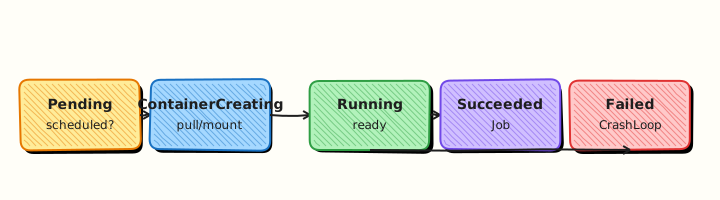
This topic’s control points and relationships are shown below.
Theory
What it is
Troubleshooting is a disciplined path from symptom to cause using the Kubernetes API: object status, Events, logs, and previous container instances. Most tickets labelled “cluster down” are workload misconfiguration — bad images, probes, resources, selectors, or mounts. The cluster’s controllers are usually doing exactly what you asked; the job is to discover what you asked for.
Why it matters
Random restarts and YAML churn lengthen outages. A fixed playbook — Events → describe → logs → previous logs → exec → node/network — cuts mean time to recovery and teaches juniors transferable habits. CKA scenarios reward this order under time pressure.
How it works (mental model)
- Reproduce scope: one Pod, one Deployment, one namespace, or many nodes?
- Read status:
getReady/Restarts;describefor Conditions and Events. - Logs: current and
--previousfor CrashLoop; check init containers too. - Dependencies: Secrets/ConfigMaps exist? PVC Bound? Service has endpoints?
- Platform layer: node NotReady, CNI, CoreDNS, admission webhooks denying creates.
Controllers reconcile desired state — if desired state is wrong, they will faithfully keep failing.
Key concepts / comparisons
| Symptom | First checks |
|---|---|
| CrashLoopBackOff | logs, logs --previous, probes, CMD |
| ImagePullBackOff | image name, pull secret, registry |
| Pending | describe Events, resources, taints |
| DNS | CoreDNS pods, NetworkPolicy |
| PVC Pending | StorageClass, provisioner |
| Service empty | Selector vs Pod labels, readiness |
| Layer | Examples |
|---|---|
| App | Exit code, config, migrations |
| Manifest | Probes, resources, mounts |
| Cluster | Scheduler, CNI, DNS, webhooks |
Common pitfalls
- Deleting Pods before capturing Events and previous logs.
- Fixating on Deployment status while the PVC is Pending.
- Ignoring init container failures.
- Assuming NetworkPolicy cannot be the cause of “DNS broken”.
- Changing three things at once — lose the causal link.
Hands-on Lab
Objective
Deploy a deliberately broken Deployment in namespace rebash-triage-lab, diagnose failure with describe/logs/events, apply a fixed manifest, and capture before/after evidence.
Prerequisites
- kubectl configured against kind or minikube
- Namespace-create rights on the lab cluster
- Writable workspace at
~/rebash-k8s/module-18
Lab environment
Workspace: ~/rebash-k8s/module-18
Real-world scenario
After a rushed manifest merge, the web Deployment in staging fails readiness checks — nginx serves / but probes hit /healthz. On-call needs evidence before patching. You reproduce the failure, triage with kubectl, apply a corrected manifest, and archive before/after proof.
Step-by-step tasks
Task 1 – Create namespace and broken Deployment
Create namespace.yaml:
apiVersion: v1
kind: Namespace
metadata:
  name: rebash-triage-lab
  labels:
    app.kubernetes.io/managed-by: rebash-lab
Create web-broken.yaml:
apiVersion: apps/v1
kind: Deployment
metadata:
  name: web
  namespace: rebash-triage-lab
  labels:
    app: web
spec:
  replicas: 2
  selector:
    matchLabels:
      app: web
  template:
    metadata:
      labels:
        app: web
    spec:
      containers:
        - name: web
          image: nginx:1.27-alpine
          ports:
            - containerPort: 80
          readinessProbe:
            httpGet:
              path: /healthz
              port: 80
            initialDelaySeconds: 2
            periodSeconds: 3
          livenessProbe:
            httpGet:
              path: /healthz
              port: 80
            initialDelaySeconds: 5
            periodSeconds: 5
          resources:
            requests:
              cpu: 50m
              memory: 64Mi
            limits:
              cpu: 200m
              memory: 128Mi
---
apiVersion: v1
kind: Service
metadata:
  name: web
  namespace: rebash-triage-lab
spec:
  selector:
    app: web
  ports:
    - port: 80
      targetPort: 80
Apply and confirm failure:
cd ~/rebash-k8s/module-18
set -euo pipefail
kubectl apply -f namespace.yaml
kubectl apply -f web-broken.yaml
kubectl rollout status deployment/web -n rebash-triage-lab --timeout=60s || true
kubectl get pods -n rebash-triage-lab -l app=web | tee before-pods.txt
Expected output
Pods 0/1 Ready or restarts; not fully Available.
Task 2 – Diagnose with describe, logs, and events
Gather the standard triage chain before changing manifests.
cd ~/rebash-k8s/module-18
kubectl get deploy,po,svc -n rebash-triage-lab -o wide | tee before-resources.txt
kubectl describe deploy web -n rebash-triage-lab | tee before-describe.txt
kubectl describe po -n rebash-triage-lab -l app=web | tee before-pod-describe.txt
kubectl logs -n rebash-triage-lab -l app=web --tail=20 | tee before-logs.txt || true
kubectl get events -n rebash-triage-lab --sort-by=.lastTimestamp | tail -n 20 | tee before-events.txt
grep -Ei 'probe|healthz|unhealthy' before-events.txt before-pod-describe.txt
Expected output
Events mention probe failures on /healthz (nginx default page is /).
Task 3 – Apply fixed manifest and verify Ready
Create web-fixed.yaml:
apiVersion: apps/v1
kind: Deployment
metadata:
  name: web
  namespace: rebash-triage-lab
  labels:
    app: web
spec:
  replicas: 2
  selector:
    matchLabels:
      app: web
  template:
    metadata:
      labels:
        app: web
    spec:
      containers:
        - name: web
          image: nginx:1.27-alpine
          ports:
            - containerPort: 80
          readinessProbe:
            httpGet:
              path: /
              port: 80
            initialDelaySeconds: 2
            periodSeconds: 3
          livenessProbe:
            httpGet:
              path: /
              port: 80
            initialDelaySeconds: 5
            periodSeconds: 5
          resources:
            requests:
              cpu: 50m
              memory: 64Mi
            limits:
              cpu: 200m
              memory: 128Mi
Apply fix and prove recovery:
cd ~/rebash-k8s/module-18
kubectl apply -f web-fixed.yaml
kubectl rollout status deployment/web -n rebash-triage-lab --timeout=120s
kubectl get pods -n rebash-triage-lab -l app=web | tee after-pods.txt
kubectl get endpoints web -n rebash-triage-lab | tee after-endpoints.txt
grep -q '1/1' after-pods.txt
Expected output
Rollout succeeds; all Pods 1/1 Ready; Endpoints populated.
Task 4 – Archive before/after evidence
cd ~/rebash-k8s/module-18
tar -czf module-18-triage-evidence.tgz namespace.yaml web-broken.yaml web-fixed.yaml before-*.txt after-*.txt
ls -l module-18-triage-evidence.tgz
Expected output
Tarball contains broken/fixed manifests and triage output files.
Validation steps
- Broken Deployment fails readiness on
/healthz - describe/events/logs identify probe path mismatch
- Fixed manifest reaches Ready with probes on
/ - Endpoints list Pod IPs after recovery
- Before/after evidence tarball created
Common errors and fixes
| Error | Cause | Fix |
|---|---|---|
| Probe failed HTTP 404 | Path not served by container | Probe a real path (/ for nginx) |
| CrashLoopBackOff | Liveness kills failing container | Fix readiness first; align liveness path |
| No Events | Wrong namespace or cleared cache | kubectl get events -n rebash-triage-lab --sort-by=.lastTimestamp |
| Endpoints empty | Pods not Ready | Wait for rollout; check probes |
| Patch without file | One-off kubectl edit | Prefer Git-tracked manifest (web-fixed.yaml) |
Challenge exercise
Introduce a second failure by setting image: nginx:does-not-exist-1.27 in a copy web-bad-image.yaml, triage ImagePullBackOff, then restore nginx:1.27-alpine and add the event snippet to your evidence tarball.
Learning outcomes
- Reproduced a probe misconfiguration failure on a real Deployment
- Executed describe → logs → events triage order
- Applied a declarative fix and verified Ready Endpoints
- Packaged before/after incident evidence
Cleanup
kubectl delete namespace rebash-triage-lab --ignore-not-found --wait=true
rm -f ~/rebash-k8s/module-18/before-*.txt ~/rebash-k8s/module-18/after-*.txt ~/rebash-k8s/module-18/module-18-triage-evidence.tgz
Validation
- Lab commands run under
~/rebash-k8s/module-18/ - You can explain each Theory section in your own words
- You used modern tooling where it applies to this topic
- You can describe one production failure mode for this topic
Code Walkthrough
Production practice for Troubleshooting Kubernetes Workloads always combines:
- Inspect before you change (status, plan, logs, dry-run)
- Prefer reversible, documented changes (Git, IaC, drop-ins, version pins)
- Capture evidence (command output, pipeline logs) for handovers
- Prefer current tools and APIs over legacy shortcuts
- Least privilege — escalate credentials only when required
Keep runbooks short enough to follow under pressure. Automate checks; keep humans for judgement.
Security Considerations
- Treat credentials and tokens for kubernetes as privileged — never commit them
- Prefer short-lived auth (OIDC, roles, SSO) over long-lived keys
- Validate blast radius before apply/deploy/delete operations
- Restrict who can approve production changes
- Collect audit logs; limit who can read sensitive traces
Common Mistakes
Deleting Pods before capturing Events and previous logs.
Validate assumptions against the Theory section and official docs before changing production.
Fixating on Deployment status while the PVC is Pending.
Lab shortcuts (open security groups, admin roles, skip approvals) must not ship unchanged.
Changing production without a rollback path
Always know how to revert (previous artefact, prior release, state rollback, DNS failback).
Best Practices
- Encode Troubleshooting Kubernetes Workloads changes as code and review them in pull requests
- Pin versions (images, modules, actions, provider plugins)
- Separate environments with clear promotion gates
- Alert on symptoms with runbooks attached
- Destroy lab resources; tag everything with owner and expiry where possible
Troubleshooting
| Symptom | Likely cause | Fix |
|---|---|---|
| Auth / permission denied | Wrong identity, policy, or scope | Check caller identity, roles, and least-privilege policies |
| Timeout / no route | Network, DNS, security group, or endpoint | Trace path, DNS, and allow-lists before retrying |
| Drift / unexpected plan | Manual change or wrong state/workspace | Reconcile desired vs actual; avoid click-ops on managed resources |
| Pipeline/job red | Flaky step, cache, or missing secret | Read failing step logs; bisect recent workflow/config changes |
| Cost spike | Idle load balancer, NAT, oversized compute | Inventory billable resources; stop/delete labs promptly |
Summary
Troubleshooting Kubernetes Workloads is essential for Cloud and DevOps engineers working with kubernetes. Practise the lab until the inspection and change path is muscle memory, then continue the track.
Interview Questions
- What is a sensible first triage order for a failing Pod?
- How do you distinguish ImagePullBackOff from CrashLoopBackOff?
- Which kubectl commands help most during an incident?
- How can excessive logging or exec debugging create security risk during outages?
- What cluster-level checks do you add if many Pods fail at once?
Sample answer — question 2
ImagePullBackOff means the image cannot be fetched; CrashLoopBackOff means the container starts then exits. describe events and logs separate registry issues from application failures.
Sample answer — question 4
Incident shells and dumped env may expose secrets. Prefer controlled debug containers, redacted logs, and audited break-glass access rather than unrestricted exec everywhere.