Introduction to Kubernetes and Orchestration
Overview
Explain what Kubernetes orchestrates, why single-host Docker is not enough for production fleets, and use cluster vocabulary correctly.
Kubernetes schedules containers across machines, keeps desired state, and exposes stable networking. This course is Kubernetes for Cloud & DevOps Engineers — operate clusters, not slide-deck trivia.
This is a core tutorial in Module 1 · Kubernetes Fundamentals of the REBASH Academy Kubernetes for Cloud & DevOps Engineers series — written for Cloud, DevOps, Platform, and SRE engineers.
Prerequisites
Learning Objectives
By the end of this tutorial, you will be able to:
- State problems orchestration solves
- Define cluster, node, Pod, control plane
- Contrast Compose vs Kubernetes
- Name CKA/CKAD-relevant domains
Architecture
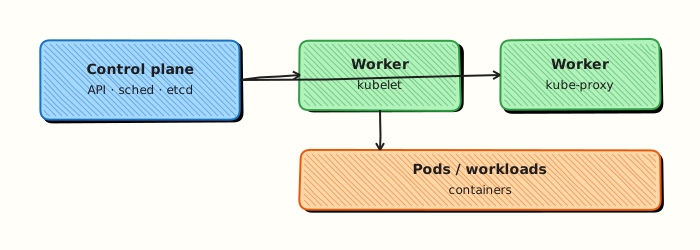
This topic’s control points and relationships are shown below.
Theory
What it is
Kubernetes (often abbreviated K8s) is an open-source container orchestration platform. You declare the desired state of workloads — how many replicas, which image, which ports — and the cluster continuously works to make reality match that declaration. It is not a replacement for Docker as a build tool; it schedules and operates containers that you already package as images.
Why it matters
A single Docker host is fine for a laptop or a tiny demo. Production DevOps faces many hosts, rolling updates, failed nodes, and the need for a stable network identity when Pods come and go. Orchestration answers those operational problems so teams stop hand-placing containers and start managing fleets through an API.
How it works (mental model)
Think of Kubernetes as a control loop:
- You (or CI/GitOps) write API objects (YAML or JSON).
- The API server validates and stores them in etcd.
- Controllers watch desired state and reconcile — create Pods, replace crashed ones, roll out new images.
- The scheduler picks a node; the kubelet on that node pulls images and runs containers.
Desired state is the source of truth. If a Pod dies, a controller recreates it. If you scale replicas from two to five, the Deployment controller adds Pods until the count matches.
Key concepts / comparisons
| Need | Kubernetes answer |
|---|---|
| Many hosts | Scheduler + kubelet |
| Self-heal | Controllers reconcile |
| Stable address | Service / Ingress |
| Declarative ops | API objects in etcd |
| Concept | Meaning |
|---|---|
| Cluster | Control plane + worker nodes |
| Node | Machine (VM or bare metal) running kubelet |
| Pod | Smallest deployable unit (one or more containers) |
| Control plane | API, etcd, scheduler, controllers |
Docker Compose is excellent locally for a few services on one host. Kubernetes is the portable control plane for multi-node cloud production. Compose does not give you cross-host scheduling, rolling updates with health gates, or cluster-wide RBAC out of the box.
Common pitfalls
- Treating Kubernetes as “Docker with YAML” and ignoring controllers — bare Pods do not self-heal on node loss.
- Expecting Compose skills alone to map one-to-one; Services, Deployments, and namespaces are new primitives.
- Confusing the container runtime (containerd) with orchestration — Kubernetes orchestrates; the runtime only runs containers.
- Jumping into production clusters before learning desired-state mental models and kubectl inspection habits.
Hands-on Lab
Objective
Collect cluster facts with kubectl, write a machine-readable orchestration-facts.yaml explaining why orchestration matters, validate it with Python, and run a minimal pause Pod to prove the API accepts workloads.
Prerequisites
- A working Kubernetes cluster (kind, minikube, or any lab cluster)
- kubectl installed and configured (
kubectl cluster-infosucceeds) - Python 3 on your workstation
- Writable workspace at
~/rebash-k8s/module-01
Lab environment
Workspace: ~/rebash-k8s/module-01
Use a disposable local cluster. Never target a shared production API server.
Real-world scenario
You join a platform team onboarding call. Before anyone deploys applications, you must document which cluster you are connected to, prove nodes are Ready, and capture why container orchestration beats manual Docker on single hosts. Your evidence files go into the team runbook.
Step-by-step tasks
Task 1 – Record cluster facts
Confirm client and server versions, node readiness, and API reachability.
cd ~/rebash-k8s/module-01
kubectl version --output=yaml | tee cluster-version.yaml
kubectl get nodes -o wide | tee nodes-wide.txt
kubectl cluster-info | tee cluster-info.txt
grep -q Ready nodes-wide.txt
Expected output
nodes-wide.txt lists at least one node in Ready state; cluster-info.txt shows a reachable control plane URL.
Task 2 – Write and validate orchestration-facts.yaml
Create orchestration-facts.yaml:
cluster_purpose: lab-onboarding
why_orchestration:
  - self_healing: controllers recreate failed Pods on healthy nodes
  - scaling: replica counts change without manual container restarts
  - service_discovery: stable DNS names while Pod IPs churn
  - rolling_updates: replace workloads without hard downtime windows
evidence_files:
  - cluster-version.yaml
  - nodes-wide.txt
  - cluster-info.txt
validated: false
Create validate-facts.py:
#!/usr/bin/env python3
from pathlib import Path

text = Path("orchestration-facts.yaml").read_text()
for key in ("why_orchestration", "cluster_purpose", "evidence_files"):
    if key not in text:
        raise SystemExit(f"missing key: {key}")
if text.count("  - ") < 3:
    raise SystemExit("need at least three why_orchestration bullets")
for name in ("cluster-version.yaml", "nodes-wide.txt", "cluster-info.txt"):
    if not Path(name).is_file():
        raise SystemExit(f"missing evidence file: {name}")
print("orchestration-facts.yaml: structure OK")
Run validation:
cd ~/rebash-k8s/module-01
python3 validate-facts.py | tee validate-out.txt
grep -q 'structure OK' validate-out.txt
Expected output
validate-out.txt contains orchestration-facts.yaml: structure OK.
Task 3 – Smoke-test the API with a pause Pod
Create namespace.yaml:
Create pause-pod.yaml:
apiVersion: v1
kind: Pod
metadata:
  name: pause-smoke
  namespace: rebash-m01
  labels:
    app: pause-smoke
    lab: module-01
spec:
  containers:
    - name: pause
      image: registry.k8s.io/pause:3.9
      resources:
        requests:
          cpu: 10m
          memory: 16Mi
        limits:
          cpu: 50m
          memory: 32Mi
  restartPolicy: Always
Apply and verify:
cd ~/rebash-k8s/module-01
kubectl apply -f namespace.yaml
kubectl apply -f pause-pod.yaml
kubectl wait --for=condition=Ready pod/pause-smoke -n rebash-m01 --timeout=120s
kubectl get pod pause-smoke -n rebash-m01 -o wide | tee pause-evidence.txt
Expected output
Pod pause-smoke shows 1/1 Ready with a node name in pause-evidence.txt.
Validation steps
-
kubectl get nodesshows Ready nodes -
python3 validate-facts.pysucceeds - Pause Pod reaches Ready in namespace
rebash-m01 - Evidence files exist under
~/rebash-k8s/module-01
Common errors and fixes
| Error | Cause | Fix |
|---|---|---|
Unable to connect to the server | Wrong kubeconfig or cluster stopped | Run kubectl config current-context; start kind/minikube |
| No Ready nodes | Cluster still starting | Wait 60s; run kubectl get nodes -w |
| Python validation fails on evidence | Task 1 not run first | Re-run Task 1 before validate-facts.py |
| Pod stays Pending | Insufficient cluster resources | kubectl describe pod pause-smoke -n rebash-m01 |
Challenge exercise
Add a fifth bullet to why_orchestration describing declarative desired state (Git-stored manifests reconciled by controllers). Update validate-facts.py to require five bullets, re-run validation, and set validated: true in orchestration-facts.yaml.
Learning outcomes
- Inspected cluster version, nodes, and API endpoint with kubectl
- Documented orchestration benefits in a machine-readable YAML file
- Validated lab evidence with a small Python script
- Proved the API accepts a minimal Pod in an isolated namespace
Cleanup
Validation
- Lab commands run under
~/rebash-k8s/module-01/ - You can explain each Theory section in your own words
- You used modern tooling where it applies to this topic
- You can describe one production failure mode for this topic
Code Walkthrough
Production practice for Introduction to Kubernetes and Orchestration always combines:
- Inspect before you change (status, plan, logs, dry-run)
- Prefer reversible, documented changes (Git, IaC, drop-ins, version pins)
- Capture evidence (command output, pipeline logs) for handovers
- Prefer current tools and APIs over legacy shortcuts
- Least privilege — escalate credentials only when required
Keep runbooks short enough to follow under pressure. Automate checks; keep humans for judgement.
Security Considerations
- Treat credentials and tokens for kubernetes as privileged — never commit them
- Prefer short-lived auth (OIDC, roles, SSO) over long-lived keys
- Validate blast radius before apply/deploy/delete operations
- Restrict who can approve production changes
- Collect audit logs; limit who can read sensitive traces
Common Mistakes
Treating Kubernetes as “Docker with YAML” and ignoring controllers — bare Pods do not self
Validate assumptions against the Theory section and official docs before changing production.
Expecting Compose skills alone to map one-to-one; Services, Deployments, and namespaces ar
Lab shortcuts (open security groups, admin roles, skip approvals) must not ship unchanged.
Changing production without a rollback path
Always know how to revert (previous artefact, prior release, state rollback, DNS failback).
Best Practices
- Encode Introduction to Kubernetes and Orchestration changes as code and review them in pull requests
- Pin versions (images, modules, actions, provider plugins)
- Separate environments with clear promotion gates
- Alert on symptoms with runbooks attached
- Destroy lab resources; tag everything with owner and expiry where possible
Troubleshooting
| Symptom | Likely cause | Fix |
|---|---|---|
| Auth / permission denied | Wrong identity, policy, or scope | Check caller identity, roles, and least-privilege policies |
| Timeout / no route | Network, DNS, security group, or endpoint | Trace path, DNS, and allow-lists before retrying |
| Drift / unexpected plan | Manual change or wrong state/workspace | Reconcile desired vs actual; avoid click-ops on managed resources |
| Pipeline/job red | Flaky step, cache, or missing secret | Read failing step logs; bisect recent workflow/config changes |
| Cost spike | Idle load balancer, NAT, oversized compute | Inventory billable resources; stop/delete labs promptly |
Summary
Introduction to Kubernetes and Orchestration is essential for Cloud and DevOps engineers working with kubernetes. Practise the lab until the inspection and change path is muscle memory, then continue the track.
Interview Questions
- What problem does container orchestration solve beyond running a single container?
- What is a Pod, and why is it the smallest deployable unit?
- How does desired state reconciliation differ from imperative scripting?
- What operational risks appear if you only run containers with Docker on one host in production?
- Name three capabilities Kubernetes provides out of the box for applications.
Sample answer — question 2
A Pod is one or more containers sharing network and storage namespaces. Kubernetes schedules and restarts Pods as units, so the Pod—not the container—is the atomic deployable object.
Sample answer — question 4
A single host lacks automated rescheduling, rolling updates, and cluster-wide service discovery. Failures of that host take everything down, and scaling is manual and error-prone.