Health Checks, Probes, and Self-Healing
Overview
Deploying a Pod is only the beginning. Production clusters must answer: Is this container alive? Is it ready to receive traffic? Has it finished starting up? Kubernetes answers these questions through probes — periodic health checks the kubelet runs against each container. Failed liveness probes trigger restarts; failed readiness probes remove the Pod from Service endpoints; startup probes protect slow-booting applications from premature liveness kills.
Combined with ReplicaSet controllers and node health monitoring, probes enable self-healing: crashed processes restart, unhealthy instances drain from load balancers, and the declared desired state converges without manual intervention. This is why Kubernetes replaces static "restart the service" runbooks with declarative health policies.
This is Tutorial 12 in Module 4: Networking & Operations of the REBASH Academy Kubernetes series. Complete Namespaces and Resource Management first.
Prerequisites
- Completed Namespaces and Resource Management
- Ability to deploy nginx or a simple HTTP app and expose it via a Service
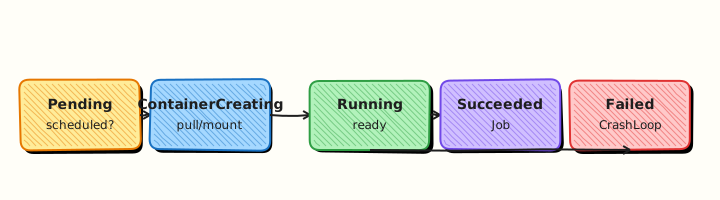
- Understanding of Deployment rollouts and Pod lifecycle (Pending → Running → Terminating)
- Optional:
curlinside the cluster or port-forward for probe verification - Familiarity with YAML editing and
kubectl apply
Learning Objectives
By the end of this tutorial, you will be able to:
- Distinguish liveness, readiness, and startup probes and when to use each
- Configure HTTP, TCP, and exec probe handlers in Pod specs
- Tune probe timing:
initialDelaySeconds,periodSeconds,failureThreshold,timeoutSeconds - Explain how readiness failures affect Service endpoints and Ingress routing
- Diagnose crash loops and probe-induced restart storms
- Design probe endpoints that reflect application health, not just process existence
- Relate probe behaviour to Deployment rolling update success criteria
Architecture
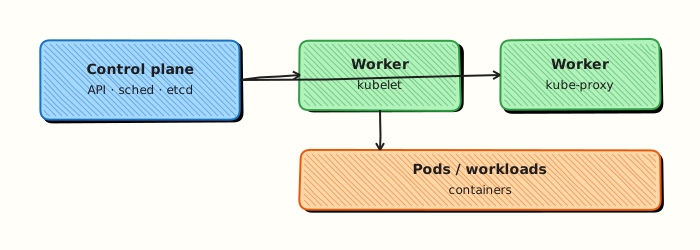
The kubelet runs probes locally on each node. Readiness state flows to the endpoints controller; liveness failures trigger container restarts.
Theory
Why Probes Exist
Without probes, Kubernetes assumes a running process is healthy. A deadlocked Java application, a nginx master with zero workers, or a database still replaying WAL all appear "Running" to the container runtime. Probes give the control plane application-level signals:
| Signal | Question answered | Action on failure |
|---|---|---|
| Liveness | Should this container be restarted? | Kill and restart container |
| Readiness | Should this Pod receive traffic? | Remove from Service endpoints |
| Startup | Has the container finished booting? | Disable liveness until success |
Liveness Probes
Liveness detects dead containers. When failures exceed failureThreshold, the kubelet restarts the container. Use liveness for unrecoverable states — deadlock, corrupted in-memory state, hung event loops.
livenessProbe:
  httpGet:
    path: /healthz
    port: 8080
  initialDelaySeconds: 15
  periodSeconds: 10
  failureThreshold: 3
  timeoutSeconds: 2
Misconfigured liveness kills healthy pods
If liveness checks a dependency that is temporarily unavailable (database, cache), Kubernetes restarts pods in a loop. Liveness should verify the container itself can recover — not external services.
Readiness Probes
Readiness determines traffic eligibility. A Pod can be Running but NotReady — for example, during warmup, cache loading, or leader election. The endpoints controller excludes NotReady pods from Service EndpointSlices; Ingress controllers stop routing to them.
Readiness failures do not restart the container. The Pod stays Running until it passes again or is terminated by a rollout.
Startup Probes
Startup probes address slow-starting containers — large JVM heaps, database migrations, model loading. While startup is failing, liveness probes are disabled. Once startup succeeds, liveness takes over.
startupProbe:
httpGet:
path: /healthz
port: 8080
failureThreshold: 30
periodSeconds: 10
# Allows up to 300 seconds to start
Without startup probes, you might set a large initialDelaySeconds on liveness — delaying crash detection for fast-fail scenarios. Startup probes decouple boot time from liveness sensitivity.
Probe Handler Types
| Handler | Use case | Example |
|---|---|---|
| httpGet | HTTP services with health endpoints | GET /healthz on port 8080 |
| tcpSocket | Services without HTTP (Redis, gRPC over TCP) | TCP connect to port 6379 |
| exec | Custom checks via script | pg_isready -U postgres |
| grpc | Native gRPC health protocol (K8s 1.24+) | gRPC health service |
HTTP probes support httpHeaders, scheme (HTTP/HTTPS), and success on status codes 200–399 by default.
Probe Timing Parameters
| Field | Default | Meaning |
|---|---|---|
initialDelaySeconds | 0 | Wait before first probe (liveness/readiness) |
periodSeconds | 10 | Interval between probes |
timeoutSeconds | 1 | Probe must respond within this window |
successThreshold | 1 | Consecutive successes to mark healthy |
failureThreshold | 3 | Consecutive failures before action |
Total time before restart (liveness): roughly initialDelaySeconds + (periodSeconds × failureThreshold).
Self-Healing Mechanisms Beyond Probes
Probes are one layer of resilience:
- ReplicaSet recreates deleted pods to match
replicas - Node controller evicts pods when nodes fail
- Deployment rolls out new versions with
maxUnavailable/maxSurgecontrols - PodDisruptionBudget limits voluntary disruptions during maintenance
Probes ensure individual instances are healthy; controllers maintain desired count and rollout safety.
Designing Health Endpoints
Production /healthz and /ready endpoints should differ:
| Endpoint | Checks | Should fail when |
|---|---|---|
/healthz (liveness) | Process responsive, no deadlock | Unrecoverable internal state |
/ready (readiness) | Can serve requests; dependencies OK | DB down, migration running, draining |
Avoid expensive checks on liveness (full DB query across shards). Keep liveness fast and local; readiness can check dependencies with timeouts.
Hands-on Lab
Objective
Deploy nginx with liveness and readiness probes on /, prove Ready replicas and Service endpoints, then briefly break the readiness path and observe self-healing behaviour.
Prerequisites
- A working Kubernetes cluster (kind, minikube, or any lab cluster)
- kubectl with namespace-create rights
- Writable workspace at
~/rebash-k8s/module-probes
Lab environment
Workspace: ~/rebash-k8s/module-probes
Real-world scenario
Before a production rollout, SRE requires probes on the demo web Deployment. You add HTTP probes on paths nginx actually serves, confirm only Ready Pods receive traffic, then simulate a bad readiness path to see endpoints drop—without using a fake /healthz on stock nginx.
Step-by-step tasks
Task 1 – Deployment with probes and Service
Create namespace.yaml:
Create web-probes.yaml:
apiVersion: apps/v1
kind: Deployment
metadata:
name: web
namespace: rebash-m-probes
spec:
replicas: 2
selector:
matchLabels:
app: web
template:
metadata:
labels:
app: web
spec:
containers:
- name: nginx
image: nginx:1.27-alpine
ports:
- containerPort: 80
livenessProbe:
httpGet:
path: /
port: 80
initialDelaySeconds: 5
periodSeconds: 10
failureThreshold: 3
readinessProbe:
httpGet:
path: /
port: 80
initialDelaySeconds: 2
periodSeconds: 5
failureThreshold: 2
---
apiVersion: v1
kind: Service
metadata:
name: web
namespace: rebash-m-probes
spec:
selector:
app: web
ports:
- port: 80
targetPort: 80
Apply and verify:
cd ~/rebash-k8s/module-probes
kubectl apply -f namespace.yaml
kubectl apply -f web-probes.yaml
kubectl rollout status deployment/web -n rebash-m-probes --timeout=180s
kubectl get pods -n rebash-m-probes -l app=web | tee probes-ready.txt
grep -c '1/1' probes-ready.txt | tee ready-count.txt
test "$(cat ready-count.txt)" -ge 2
kubectl get endpoints web -n rebash-m-probes | tee endpoints-healthy.txt
Expected output
Two Pods 1/1 Ready; Endpoints list two addresses.
Task 2 – Exec probe check from Pod
cd ~/rebash-k8s/module-probes
POD=$(kubectl get pod -n rebash-m-probes -l app=web -o jsonpath='{.items[0].metadata.name}')
kubectl exec -n rebash-m-probes "$POD" -- wget -qO- http://127.0.0.1/ | head -n 2 | tee probe-path-ok.txt
test -s probe-path-ok.txt
Expected output
HTML snippet confirms / responds—the same path probes use.
Task 3 – Break readiness briefly (bad path manifest)
Create web-probes-broken.yaml (readiness points at missing /healthz):
apiVersion: apps/v1
kind: Deployment
metadata:
name: web
namespace: rebash-m-probes
spec:
replicas: 2
selector:
matchLabels:
app: web
template:
metadata:
labels:
app: web
spec:
containers:
- name: nginx
image: nginx:1.27-alpine
ports:
- containerPort: 80
livenessProbe:
httpGet:
path: /
port: 80
initialDelaySeconds: 5
periodSeconds: 10
readinessProbe:
httpGet:
path: /healthz
port: 80
initialDelaySeconds: 2
periodSeconds: 5
failureThreshold: 2
Apply broken config, observe NotReady, restore good manifest:
cd ~/rebash-k8s/module-probes
kubectl apply -f web-probes-broken.yaml
sleep 15
kubectl get pods -n rebash-m-probes -l app=web | tee probes-notready.txt
grep -E '0/1|Not Ready' probes-notready.txt || true
kubectl get endpoints web -n rebash-m-probes | tee endpoints-empty.txt
kubectl apply -f web-probes.yaml
kubectl rollout status deployment/web -n rebash-m-probes --timeout=180s
kubectl get endpoints web -n rebash-m-probes | tee endpoints-recovered.txt
Expected output
After broken apply, Pods show NotReady and endpoints shrink; re-applying good manifest restores Ready state.
Validation steps
- Deployment with liveness and readiness probes reached full Ready
- Endpoints populated when probes pass
- Bad readiness path removed Pods from Ready/endpoints
- Re-applying fixed manifest recovered the rollout
Common errors and fixes
| Error | Cause | Fix |
|---|---|---|
| CrashLoopBackOff | Liveness fails on start | Increase initialDelaySeconds; add startupProbe |
| Never Ready | Wrong probe path | Use / for stock nginx, not /healthz |
| Rollout stuck | Readiness never passes | Fix probe; kubectl describe pod |
| Endpoints empty | All Pods NotReady | Fix readiness before debugging Service |
Challenge exercise
Add a startupProbe with failureThreshold: 30 and periodSeconds: 2 to web-probes.yaml, then set liveness initialDelaySeconds: 1 and prove slow-start Pods are not killed during boot.
Learning outcomes
- Configured liveness and readiness HTTP probes on a real path
- Correlated Ready state with Service endpoints
- Observed traffic gating when readiness fails and recovery after fix
Cleanup
Validation
Confirm the lab before moving on:
- Re-run the critical commands from the Hands-on Lab and compare them to the expected output in each step.
- Check that you can explain why each successful result matters (not only that it printed).
- Note any warnings or unexpected output — resolve them using Troubleshooting before continuing.
| Check | Pass criteria |
|---|---|
| Probes | Liveness/readiness (and startup if used) configured on the Pod/Deployment |
| Ready traffic | Unready Pods are removed from Service endpoints |
| Failure behaviour | Induced failure shows restart or traffic shift as documented |
| Cleanup | Lab workloads removed |
Code Walkthrough
| Command | Description | Example |
|---|---|---|
kubectl describe pod | View probe configuration and events | kubectl describe pod <name> |
kubectl get endpoints | See which pods receive traffic | kubectl get endpoints web -n prod |
kubectl logs --previous | Logs from crashed container | kubectl logs pod -c app --previous |
kubectl rollout restart | Force new pods (re-run probes) | kubectl rollout restart deploy/web |
kubectl debug | Attach debug container to running pod | kubectl debug -it pod/name --image=busybox |
Production probe template
containers:
- name: api
image: myorg/api:v2.4.1
ports:
- containerPort: 8080
startupProbe:
httpGet:
path: /healthz
port: 8080
failureThreshold: 30
periodSeconds: 10
livenessProbe:
httpGet:
path: /healthz
port: 8080
periodSeconds: 10
failureThreshold: 3
timeoutSeconds: 2
readinessProbe:
  httpGet:
    path: /ready
    port: 8080
  periodSeconds: 5
  failureThreshold: 2
timeoutSeconds: 3
Security Considerations
- Do not point liveness probes at dependencies (databases) — you will kill healthy Pods during dependency blips
- Protect probe endpoints from expensive work; unauthenticated heavy probes become DoS vectors
- Use readiness to remove Pods from Service endpoints before killing them on deploy
- Set realistic timeouts and failure thresholds — aggressive probes amplify outages
- Keep probe traffic on internal ports; do not expose admin health on public Ingress without need
- Log probe failures centrally so crash loops are visible without exec into Pods
Common Mistakes
Using the same endpoint for liveness and readiness
Readiness should gate traffic including dependency checks. Liveness should be minimal — checking external DBs on liveness causes restart loops during outages.
Too-aggressive liveness timing
periodSeconds: 1 with failureThreshold: 1 restarts on any transient blip. Allow headroom for GC pauses and brief CPU starvation.
HTTPS probe without proper scheme
Probes default to HTTP. For TLS-only ports, set scheme: HTTPS or probe a separate admin HTTP port.
Ignoring readiness during rollouts
If readiness never passes, Deployment rollouts stall with ProgressDeadlineExceeded. Monitor rollout status and probe endpoints in CI.
Best Practices
Implement /healthz and /ready in application code
Frameworks like Spring Boot Actuator, ASP.NET health checks, and Go net/http handlers make this straightforward. Document what each checks.
Log probe failures at warn level
Correlate kubelet Unhealthy events with application logs to distinguish probe misconfiguration from real failures.
Use startup probes for JVM and ML workloads
Boot times over 30 seconds are common. Startup probes avoid choosing between long initialDelaySeconds and false-positive liveness kills.
Test probes under load
Health endpoints must respond during peak traffic. Slow probes cause unnecessary NotReady states and uneven load balancing.
Troubleshooting
| Issue | Cause | Solution |
|---|---|---|
| CrashLoopBackOff | Liveness fails immediately on start | Add startup probe; increase initialDelaySeconds |
| Pod Running but no traffic | Readiness failing | Check /ready endpoint; verify dependencies |
| Frequent restarts under load | Liveness timeout too short | Increase timeoutSeconds; optimise health handler |
| Rollout stuck | New pods never Ready | kubectl describe pod; fix readiness probe path/port |
| 502 from Ingress during deploy | Old pods terminated before new Ready | Tune maxUnavailable; fix readiness timing |
| Probe works locally, fails in cluster | Wrong port or network policy | Verify containerPort; check NetworkPolicy |
Summary
- Liveness probes restart unhealthy containers; readiness probes control Service traffic; startup probes protect slow boot sequences
- Probe handlers include HTTP, TCP, exec, and gRPC — choose based on application protocol
- Timing parameters (
periodSeconds,failureThreshold,timeoutSeconds) determine sensitivity vs stability - Self-healing combines probes with ReplicaSets, node monitoring, and Deployment rollouts
- Design separate health endpoints: liveness checks internal recovery; readiness checks request-serving ability
- Misconfigured probes cause restart storms — test under failure and load conditions before production
Interview Questions
- What is the difference between liveness, readiness, and startup probes?
- What does Kubernetes do when a liveness probe fails repeatedly?
- When should you use a startup probe instead of a long initialDelaySeconds on liveness?
- How can aggressive probes harm availability, and how do you tune them safely?
- Why is a readiness probe essential for Services during rollouts?
Sample answer — question 2
Repeated liveness failures cause the kubelet to restart the container. This recovers stuck processes but cannot fix application bugs that crash-loop immediately.
Sample answer — question 4
Probes that are too frequent or too strict can kill healthy Pods under load or remove them from Service prematurely. Tune thresholds with realistic timeouts, failure thresholds, and separate readiness from liveness semantics.
Related Tutorials
- Kubernetes – Category Overview
- Namespaces and Resource Management (previous — Module 4)
- RBAC and Kubernetes Security Basics (next — Module 5)
- Ingress and External Access
- Troubleshooting Kubernetes Workloads
- Cheat sheet: Kubernetes Cheat Sheet
- Interview prep: Kubernetes Interview Prep
- Learning path: DevOps Engineer