Ingress and Gateway API
Overview
Route external HTTP traffic to Services via Ingress (and understand Gateway API as the successor model) including TLS secrets.
Ingress needs a controller (nginx, Traefik, cloud LB). Gateway API (Gateway, HTTPRoute) is the modern, role-oriented replacement gaining adoption.
This is a core tutorial in Module 6 · Ingress & Gateway API of the REBASH Academy Kubernetes for Cloud & DevOps Engineers series — written for Cloud, DevOps, Platform, and SRE engineers.
Prerequisites
- Services and Cluster Networking
- An Ingress controller installed (kind often needs one)
Learning Objectives
By the end of this tutorial, you will be able to:
- Write an Ingress rule (host/path → Service)
- Attach a TLS secret
- Name Gateway API resources
- Know controller must exist
Architecture
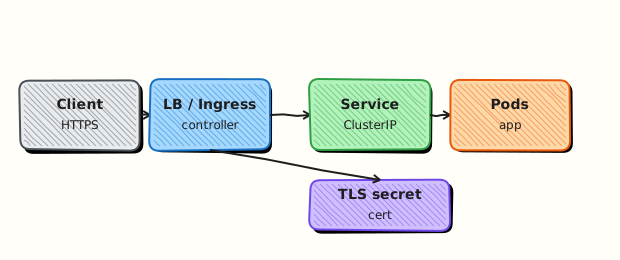
This topic’s control points and relationships are shown below.
Theory
What it is
Ingress is a Kubernetes API for HTTP(S) routing into the cluster: host and path rules forward to Services. An Ingress controller (nginx, Traefik, cloud L7) watches Ingress objects and programmes the actual proxy or load balancer. Gateway API (Gateway, HTTPRoute, and related resources) is the newer, role-oriented model that many platforms are adopting as the successor.
Why it matters
Exposing every Service as a LoadBalancer is expensive and noisy. Ingress (or Gateway API) centralises TLS termination, host-based routing, and path splitting for many apps behind one entry point. DevOps teams standardise on one controller and let application teams ship Ingress/HTTPRoute manifests.
How it works (mental model)
- Install a controller (DaemonSet/Deployment) that has permission to watch Ingress or Gateway API resources.
- Create Services for backends (usually ClusterIP).
- Declare rules:
host+path→ Service:port; attach a TLS Secret for HTTPS. - The controller configures its dataplane; DNS for the host points at the controller’s external address.
- Without a controller, Ingress objects sit idle — ADDRESS stays empty.
Gateway API separates infrastructure (Gateway) from application routes (HTTPRoute), improving multi-team ownership.
Key concepts / comparisons
| Model | Resources | Notes |
|---|---|---|
| Ingress | Ingress, IngressClass | Widely deployed today |
| Gateway API | Gateway, HTTPRoute, … | Modern replacement path |
| Piece | Role |
|---|---|
| Ingress / HTTPRoute | Desired HTTP routing |
| Controller | Implements routing |
| TLS Secret | Certificates for HTTPS |
On kind, install ingress-nginx (or similar). Managed clouds often provide a controller or L7 annotations on Services.
Common pitfalls
- Creating Ingress YAML with no controller installed — nothing listens.
- Wrong
pathTypeor missing trailing-slash assumptions causing 404s. - TLS Secret in the wrong namespace or wrong keys (
tls.crt/tls.key). - Pointing DNS at a NodePort by mistake while the controller expects a LoadBalancer.
- Treating Ingress as a Service type — it is a separate API that fronts Services.
Hands-on Lab
Objective
Create Deployment, Service, and Ingress manifests; validate them with dry-run; expose via NodePort if no Ingress controller is installed; capture routing evidence.
Prerequisites
- A working Kubernetes cluster (kind, minikube, or any lab cluster)
- kubectl with namespace-create rights
- Optional: kind with ingress-ready or minikube ingress addon
- Writable workspace at
~/rebash-k8s/module-06
Lab environment
Workspace: ~/rebash-k8s/module-06
Real-world scenario
You must publish an internal demo app at / on host demo.lab.local. Production uses an Ingress controller; your lab cluster might not have one yet. You still commit valid manifests, dry-run them against the API, and prove traffic with NodePort or port-forward if Ingress has no ADDRESS.
Step-by-step tasks
Task 1 – Backend Deployment and Service
Create namespace.yaml:
Create web-backend.yaml:
apiVersion: apps/v1
kind: Deployment
metadata:
  name: web
  namespace: rebash-m06
spec:
  replicas: 1
  selector:
    matchLabels:
      app: web
  template:
    metadata:
      labels:
        app: web
    spec:
      containers:
        - name: nginx
          image: nginx:1.27-alpine
          ports:
            - containerPort: 80
---
apiVersion: v1
kind: Service
metadata:
  name: web
  namespace: rebash-m06
spec:
  selector:
    app: web
  ports:
    - port: 80
      targetPort: 80
Apply and verify:
cd ~/rebash-k8s/module-06
kubectl apply -f namespace.yaml
kubectl apply -f web-backend.yaml
kubectl rollout status deployment/web -n rebash-m06 --timeout=120s
kubectl get svc web -n rebash-m06 | tee svc.txt
Expected output
Service web exists with ClusterIP assigned.
Task 2 – Ingress manifest and validation
Create ingress.yaml:
apiVersion: networking.k8s.io/v1
kind: Ingress
metadata:
  name: web
  namespace: rebash-m06
spec:
  ingressClassName: nginx
  rules:
    - host: demo.lab.local
      http:
        paths:
          - path: /
            pathType: Prefix
            backend:
              service:
                name: web
                port:
                  number: 80
Validate before or after apply:
cd ~/rebash-k8s/module-06
kubectl apply --dry-run=client -f ingress.yaml | tee ingress-dry-run.txt
kubectl apply -f ingress.yaml
kubectl get ingress web -n rebash-m06 | tee ingress-status.txt
kubectl describe ingress web -n rebash-m06 | tee ingress-describe.txt
Expected output
Ingress object created; ingress-status.txt shows NAME and CLASS (ADDRESS may be empty without a controller).
Task 3 – NodePort fallback proof
Create web-nodeport.yaml (Service only—adds external access path when Ingress has no ADDRESS):
apiVersion: v1
kind: Service
metadata:
  name: web-nodeport
  namespace: rebash-m06
spec:
  type: NodePort
  selector:
    app: web
  ports:
    - port: 80
      targetPort: 80
      nodePort: 30080
Apply and test (kind maps node ports to localhost):
cd ~/rebash-k8s/module-06
kubectl apply -f web-nodeport.yaml
kubectl get svc web-nodeport -n rebash-m06 -o wide | tee nodeport.txt
NODE_PORT=$(kubectl get svc web-nodeport -n rebash-m06 -o jsonpath='{.spec.ports[0].nodePort}')
curl -sS -o /dev/null -w '%{http_code}\n' "http://127.0.0.1:${NODE_PORT}/" | tee nodeport-curl.txt
grep -q 200 nodeport-curl.txt
Expected output
HTTP 200 via NodePort on kind/minikube (if port reachable). If Ingress controller is installed, also test demo.lab.local via /etc/hosts and document ADDRESS in ingress-status.txt.
Validation steps
- Deployment and ClusterIP Service Ready
- Ingress YAML passes client dry-run and applies
- NodePort curl returns 200 OR Ingress ADDRESS documented with controller installed
- You can explain what still runs if Ingress has no controller
Common errors and fixes
| Error | Cause | Fix |
|---|---|---|
| Ingress no ADDRESS | No controller | Use NodePort Task 3; install ingress-nginx on kind |
| nodePort already allocated | Port clash | Change nodePort to 30180 |
| 404 via Ingress | Wrong pathType/host | Match host header; check pathType: Prefix |
| Invalid ingress class | Class not installed | Set ingressClassName matching your controller |
Challenge exercise
Install ingress-nginx on kind, re-apply ingress.yaml, add 127.0.0.1 demo.lab.local to /etc/hosts, and curl http://demo.lab.local/ without NodePort.
Learning outcomes
- Declared HTTP routing with Ingress YAML
- Validated manifests with dry-run before apply
- Proved external access via NodePort when Ingress controller is absent
Cleanup
Validation
- Lab commands run under
~/rebash-k8s/module-06/ - You can explain each Theory section in your own words
- You used modern tooling where it applies to this topic
- You can describe one production failure mode for this topic
Code Walkthrough
Production practice for Ingress and Gateway API always combines:
- Inspect before you change (status, plan, logs, dry-run)
- Prefer reversible, documented changes (Git, IaC, drop-ins, version pins)
- Capture evidence (command output, pipeline logs) for handovers
- Prefer current tools and APIs over legacy shortcuts
- Least privilege — escalate credentials only when required
Keep runbooks short enough to follow under pressure. Automate checks; keep humans for judgement.
Security Considerations
- Treat credentials and tokens for kubernetes as privileged — never commit them
- Prefer short-lived auth (OIDC, roles, SSO) over long-lived keys
- Validate blast radius before apply/deploy/delete operations
- Restrict who can approve production changes
- Collect audit logs; limit who can read sensitive traces
Common Mistakes
Creating Ingress YAML with no controller installed — nothing listens.
Validate assumptions against the Theory section and official docs before changing production.
Wrong pathType or missing trailing-slash assumptions causing 404s.
Lab shortcuts (open security groups, admin roles, skip approvals) must not ship unchanged.
Changing production without a rollback path
Always know how to revert (previous artefact, prior release, state rollback, DNS failback).
Best Practices
- Encode Ingress and Gateway API changes as code and review them in pull requests
- Pin versions (images, modules, actions, provider plugins)
- Separate environments with clear promotion gates
- Alert on symptoms with runbooks attached
- Destroy lab resources; tag everything with owner and expiry where possible
Troubleshooting
| Symptom | Likely cause | Fix |
|---|---|---|
| Auth / permission denied | Wrong identity, policy, or scope | Check caller identity, roles, and least-privilege policies |
| Timeout / no route | Network, DNS, security group, or endpoint | Trace path, DNS, and allow-lists before retrying |
| Drift / unexpected plan | Manual change or wrong state/workspace | Reconcile desired vs actual; avoid click-ops on managed resources |
| Pipeline/job red | Flaky step, cache, or missing secret | Read failing step logs; bisect recent workflow/config changes |
| Cost spike | Idle load balancer, NAT, oversized compute | Inventory billable resources; stop/delete labs promptly |
Summary
Ingress and Gateway API is essential for Cloud and DevOps engineers working with kubernetes. Practise the lab until the inspection and change path is muscle memory, then continue the track.
Interview Questions
- What does an Ingress resource declare, and what still needs to exist for traffic to flow?
- How does Ingress differ from a Service of type LoadBalancer?
- What is pathType Prefix versus Exact?
- What security controls should sit in front of Ingress-exposed applications?
- Why might an Ingress show no ADDRESS even though the object is valid?
Sample answer — question 2
Ingress describes HTTP routing rules. A controller must implement them, and backends must be Ready Service Endpoints. Without a controller, the object alone does not open traffic.
Sample answer — question 4
Exposing HTTP needs TLS, authentication where appropriate, WAF or rate limiting, network policies, and careful host/path design so internal apps are not accidentally public.