Kubernetes Scheduling
Overview
Place Pods intentionally using nodeSelector, affinity/anti-affinity, taints/tolerations, and topology spread — and diagnose Pending schedule failures.
The scheduler binds Pods to nodes that satisfy predicates (resources, affinity, taints). Pending + FailedScheduling events mean constraints or capacity.
This is a core tutorial in Module 9 · Scheduling of the REBASH Academy Kubernetes for Cloud & DevOps Engineers series — written for Cloud, DevOps, Platform, and SRE engineers.
Prerequisites
Learning Objectives
By the end of this tutorial, you will be able to:
- Use nodeSelector / node affinity
- Spread replicas with pod anti-affinity or topologySpread
- Taint a node and tolerate it
- Read scheduling events
Architecture
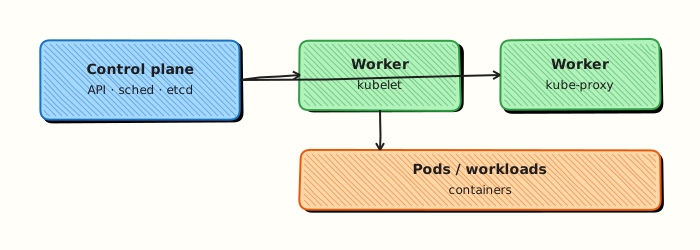
This topic’s control points and relationships are shown below.
Theory
What it is
Scheduling is how the control plane chooses a node for each Pod. The kube-scheduler filters nodes that cannot run the Pod (resources, taints, affinity, volume constraints), scores the remainder, and binds the winner. You influence placement with nodeSelector, node/pod affinity, taints and tolerations, and topology spread constraints.
Why it matters
Default scheduling spreads work opportunistically. Production needs intentional placement: GPUs only on labelled nodes, replicas across zones, batch jobs on spot pools, and system agents on tainted control planes. Pending Pods with FailedScheduling events are among the most common tickets — reading them correctly saves hours.
How it works (mental model)
- Pod created without
nodeName→ enters scheduling queue. - Predicates / filters: enough CPU/memory, match selectors, tolerate taints, volume zone limits.
- Priorities / scores: prefer balanced nodes, honour soft affinity and spread.
- Bind Pod to a node; kubelet admits and starts it.
- If no node fits, Pod stays Pending; Events explain the reason.
Taints repel Pods unless they tolerate the taint. Affinity attracts Pods to nodes or to/away from other Pods.
Key concepts / comparisons
| Mechanism | Purpose |
|---|---|
| nodeSelector | Simple label match |
| Node affinity | Required/preferred node rules |
| Pod affinity / anti-affinity | Co-locate or separate Pods |
| Taints / tolerations | Reserve nodes / allow exceptions |
| topologySpreadConstraints | Even spread across zones/hosts |
| Hard rule | Soft rule |
|---|---|
requiredDuringScheduling… | preferredDuringScheduling… |
| Must satisfy or Pending | Best-effort scoring |
Common pitfalls
- Required anti-affinity on a single-node lab — permanent Pending.
- Labelling nodes inconsistently (
disk=ssdvsdisk-type=ssd). - Tainting all nodes without matching tolerations on workloads.
- Ignoring PVC zone constraints when using regional disks.
- Overusing affinity until the scheduler has no legal packing — always check Events.
Hands-on Lab
Objective
Label a node, deploy a Pod with nodeSelector, and prove the scheduler placed it on the intended node using kubectl get pod -o wide and describe.
Prerequisites
- kubectl configured against a lab cluster with at least one schedulable node
- Rights to label nodes and create namespaces (lab cluster admin on kind/minikube is fine)
- Writable workspace at
~/rebash-k8s/module-09
Lab environment
Workspace: ~/rebash-k8s/module-09 on kind or minikube.
Real-world scenario
Your data platform team runs batch workers that must land on nodes tagged workload=batch. You will label a lab node, schedule a Pod with nodeSelector, and capture scheduling evidence for a change review.
Step-by-step tasks
Task 1 – Namespace and node label
Create namespace.yaml:
apiVersion: v1
kind: Namespace
metadata:
  name: rebash-m09
  labels:
    app.kubernetes.io/part-of: rebash-lab
Apply the namespace and label the first worker node (safe on single-node kind/minikube labs):
cd ~/rebash-k8s/module-09
kubectl apply -f namespace.yaml
NODE="$(kubectl get nodes -o jsonpath='{.items[0].metadata.name}')"
kubectl label node "$NODE" rebash.io/workload=batch --overwrite
kubectl get node "$NODE" --show-labels | tee node-labels.txt
grep -q 'rebash.io/workload=batch' node-labels.txt
Expected output
node-labels.txt includes rebash.io/workload=batch.
Task 2 – Deployment with nodeSelector
Create deployment.yaml:
apiVersion: apps/v1
kind: Deployment
metadata:
  name: batch-worker
  namespace: rebash-m09
spec:
  replicas: 1
  selector:
    matchLabels:
      app: batch-worker
  template:
    metadata:
      labels:
        app: batch-worker
    spec:
      nodeSelector:
        rebash.io/workload: batch
      containers:
        - name: worker
          image: busybox:1.36.1
          command: ["sh", "-c", "sleep 3600"]
          resources:
            requests:
              cpu: 10m
              memory: 32Mi
Apply and wait for rollout:
cd ~/rebash-k8s/module-09
kubectl apply -f deployment.yaml
kubectl rollout status deployment/batch-worker -n rebash-m09 --timeout=120s
Expected output
deployment "batch-worker" successfully rolled out.
Task 3 – Scheduling evidence
Prove the Pod landed on the labelled node:
cd ~/rebash-k8s/module-09
kubectl get pods -n rebash-m09 -o wide | tee schedule-wide.txt
POD="$(kubectl get pod -n rebash-m09 -l app=batch-worker -o jsonpath='{.items[0].metadata.name}')"
kubectl describe pod "$POD" -n rebash-m09 | tee schedule-describe.txt
grep -E 'Node:|Node-Selectors|rebash.io/workload' schedule-describe.txt
Expected output
schedule-wide.txt shows the Pod NODE column matching the labelled node; schedule-describe.txt lists Node-Selectors: rebash.io/workload=batch.
Validation steps
- Node carries label
rebash.io/workload=batch - Deployment Pod is Running on that node
-
describeoutput documents the nodeSelector constraint - You can explain Pending Pods when no node matches the selector
Common errors and fixes
| Error | Cause | Fix |
|---|---|---|
| Pod Pending | No node with required label | kubectl get nodes --show-labels and fix label key/value |
| Pod on wrong node | Typo in selector | Match nodeSelector key/value exactly to node labels |
| Cannot label node | Insufficient RBAC | Use lab cluster admin or ask platform team |
| Label lost after node recreate | kind cluster rebuilt | Re-apply label before scheduling |
Challenge exercise
Add pod-anti-affinity so two replicas of batch-worker prefer different nodes (requires multi-node cluster). On a single-node lab, switch to requiredDuringSchedulingIgnoredDuringExecution node affinity and document why the Pod stays Pending when the label is removed.
Learning outcomes
- Applied node labels as scheduling inputs
- Deployed a workload constrained by
nodeSelector - Collected scheduler evidence from
get -o wideanddescribe - Connected label hygiene to production placement policies
Cleanup
kubectl delete namespace rebash-m09 --ignore-not-found
NODE="$(kubectl get nodes -o jsonpath='{.items[0].metadata.name}' 2>/dev/null || true)"
if [ -n "$NODE" ]; then kubectl label node "$NODE" rebash.io/workload- 2>/dev/null || true; fi
Validation
- Lab commands run under
~/rebash-k8s/module-09/ - You can explain each Theory section in your own words
- You used modern tooling where it applies to this topic
- You can describe one production failure mode for this topic
Code Walkthrough
Production practice for Kubernetes Scheduling always combines:
- Inspect before you change (status, plan, logs, dry-run)
- Prefer reversible, documented changes (Git, IaC, drop-ins, version pins)
- Capture evidence (command output, pipeline logs) for handovers
- Prefer current tools and APIs over legacy shortcuts
- Least privilege — escalate credentials only when required
Keep runbooks short enough to follow under pressure. Automate checks; keep humans for judgement.
Security Considerations
- Treat credentials and tokens for kubernetes as privileged — never commit them
- Prefer short-lived auth (OIDC, roles, SSO) over long-lived keys
- Validate blast radius before apply/deploy/delete operations
- Restrict who can approve production changes
- Collect audit logs; limit who can read sensitive traces
Common Mistakes
Required anti-affinity on a single-node lab — permanent Pending.
Validate assumptions against the Theory section and official docs before changing production.
Labelling nodes inconsistently (disk=ssd vs disk-type=ssd).
Lab shortcuts (open security groups, admin roles, skip approvals) must not ship unchanged.
Changing production without a rollback path
Always know how to revert (previous artefact, prior release, state rollback, DNS failback).
Best Practices
- Encode Kubernetes Scheduling changes as code and review them in pull requests
- Pin versions (images, modules, actions, provider plugins)
- Separate environments with clear promotion gates
- Alert on symptoms with runbooks attached
- Destroy lab resources; tag everything with owner and expiry where possible
Troubleshooting
| Symptom | Likely cause | Fix |
|---|---|---|
| Auth / permission denied | Wrong identity, policy, or scope | Check caller identity, roles, and least-privilege policies |
| Timeout / no route | Network, DNS, security group, or endpoint | Trace path, DNS, and allow-lists before retrying |
| Drift / unexpected plan | Manual change or wrong state/workspace | Reconcile desired vs actual; avoid click-ops on managed resources |
| Pipeline/job red | Flaky step, cache, or missing secret | Read failing step logs; bisect recent workflow/config changes |
| Cost spike | Idle load balancer, NAT, oversized compute | Inventory billable resources; stop/delete labs promptly |
Summary
Kubernetes Scheduling is essential for Cloud and DevOps engineers working with kubernetes. Practise the lab until the inspection and change path is muscle memory, then continue the track.
Interview Questions
- What inputs does the kube-scheduler consider when placing a Pod?
- What is the difference between nodeSelector and node affinity?
- When would you use taints and tolerations?
- How can poor affinity rules reduce utilisation or availability?
- What does Pending with FailedScheduling usually indicate?
Sample answer — question 2
nodeSelector is a simple required label match. Node affinity supports required/preferred rules and richer operators, giving more expressive placement control.
Sample answer — question 4
Overly strict anti-affinity or scarce node labels can leave Pods Pending or pack unevenly. Preferred rules soften constraints; required rules must match capacity planning.