Production Kubernetes Excellence
Overview
Assemble a production excellence checklist: multi-cluster posture, policy, cost controls, observability SLOs, and scaling — ready for a platform review.
Excellence is boring consistency: GitOps everywhere, PSA/NetworkPolicy defaults, scanned images, HPA + PDB, backup tested, and cost visibility (requests right-sizing).
This is a core tutorial in Module 20 · Production Kubernetes of the REBASH Academy Kubernetes for Cloud & DevOps Engineers series — written for Cloud, DevOps, Platform, and SRE engineers.
Prerequisites
- Modules 15–19 complete
Learning Objectives
By the end of this tutorial, you will be able to:
- Choose single vs multi-cluster (blast radius)
- List policy engines (Kyverno/OPA Gatekeeper)
- Name FinOps levers (requests, bin-pack, spot)
- Complete an ops excellence checklist
Architecture
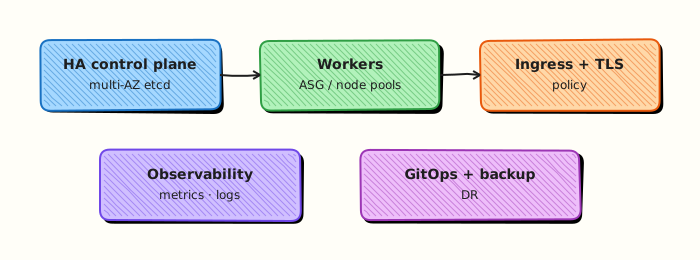
This topic’s control points and relationships are shown below.
Theory
What it is
Production Kubernetes excellence is the operating standard that ties earlier modules into a coherent platform: GitOps delivery, hardened defaults, observability with SLOs, autoscaling with disruption budgets, tested backups, multi-cluster strategy, and FinOps visibility. It is less a new API than a checklist of non-negotiables that keep clusters boring — in the best sense — under real traffic.
Why it matters
Individual features (HPA, RBAC, Ingress) fail in combination when teams skip integration: scale without PDBs, GitOps without policy, multi-cluster without identity federation. Excellence is how platform and SRE leaders review readiness before calling a service production. Certifications test pieces; production demands the whole system.
How it works (mental model)
- Blast radius: decide single cluster vs multi-cluster (prod/stage isolation, regional HA).
- Desired state: everything durable lives in Git; controllers and GitOps reconcilers converge reality.
- Guardrails: PSA, NetworkPolicy defaults, Kyverno/OPA Gatekeeper, image scanning.
- Operate: SLOs on golden signals, HPA + PDB, node/pool strategy, upgrade waves.
- Economics: right-size requests, bin-pack efficiently, use spot/preemptible where safe, turn down idle envs.
Review the checklist regularly; excellence decays without ownership.
Key concepts / comparisons
| Domain | Excellence signal |
|---|---|
| Delivery | GitOps + progressive delivery |
| Security | Least privilege, PSA, policies |
| Reliability | SLOs, PDBs, tested DR |
| Scale | HPA/CA + capacity headroom |
| Cost | Requests accuracy, idle cleanup |
| Single cluster | Multi-cluster |
|---|---|
| Simpler ops | Stronger isolation / region HA |
| Larger blast radius | More federation complexity |
Common pitfalls
- Multi-cluster sprawl without a platform story — N snowflake clusters.
- Policy theatre: engines installed, enforce mode never enabled.
- Over-requesting CPU “for safety” until bin-packing collapses and bills soar.
- Backups never restored; DR untested.
- Calling the platform done when observability still lacks actionable alerts.
Hands-on Lab
Objective
Apply a production baseline in namespace rebash-excellence-lab: ResourceQuota, NetworkPolicy, PodDisruptionBudget, and a Deployment with probes and resource limits — then package an evidence tarball.
Prerequisites
- kubectl configured against kind or minikube
- CNI that supports NetworkPolicy (kind default CNI supports it)
- Namespace-create rights on the lab cluster
- Writable workspace at
~/rebash-k8s/module-20
Lab environment
Workspace: ~/rebash-k8s/module-20
Real-world scenario
Before go-live, platform review requires a tenant namespace with quota guardrails, default-deny networking with explicit ingress, a PDB for drain safety, and a Deployment that declares requests, limits, and probes. You author the manifests, apply them to an isolated namespace, and submit an evidence pack for sign-off.
Step-by-step tasks
Task 1 – Create namespace and ResourceQuota
Create namespace.yaml:
apiVersion: v1
kind: Namespace
metadata:
  name: rebash-excellence-lab
  labels:
    app.kubernetes.io/managed-by: rebash-lab
    pod-security.kubernetes.io/enforce: restricted
Create resourcequota.yaml:
apiVersion: v1
kind: ResourceQuota
metadata:
  name: tenant-quota
  namespace: rebash-excellence-lab
spec:
  hard:
    pods: "10"
    requests.cpu: "2"
    requests.memory: 2Gi
    limits.cpu: "4"
    limits.memory: 4Gi
Apply and verify:
cd ~/rebash-k8s/module-20
kubectl apply -f namespace.yaml
kubectl apply -f resourcequota.yaml
kubectl get resourcequota tenant-quota -n rebash-excellence-lab
Expected output
Quota tenant-quota listed with hard limits.
Task 2 – Create production Deployment with probes and PDB
Create deployment.yaml:
apiVersion: apps/v1
kind: Deployment
metadata:
  name: api
  namespace: rebash-excellence-lab
  labels:
    app: api
spec:
  replicas: 2
  selector:
    matchLabels:
      app: api
  template:
    metadata:
      labels:
        app: api
    spec:
      securityContext:
        runAsNonRoot: true
        runAsUser: 101
        seccompProfile:
          type: RuntimeDefault
      containers:
        - name: api
          image: nginx:1.27-alpine
          ports:
            - containerPort: 80
          readinessProbe:
            httpGet:
              path: /
              port: 80
            initialDelaySeconds: 2
            periodSeconds: 5
          livenessProbe:
            httpGet:
              path: /
              port: 80
            initialDelaySeconds: 10
            periodSeconds: 10
          resources:
            requests:
              cpu: 100m
              memory: 128Mi
            limits:
              cpu: 500m
              memory: 256Mi
          securityContext:
            allowPrivilegeEscalation: false
            capabilities:
              drop:
                - ALL
Create pdb.yaml:
apiVersion: policy/v1
kind: PodDisruptionBudget
metadata:
  name: api-pdb
  namespace: rebash-excellence-lab
spec:
  minAvailable: 1
  selector:
    matchLabels:
      app: api
Apply and wait for Ready:
cd ~/rebash-k8s/module-20
kubectl apply -f deployment.yaml
kubectl apply -f pdb.yaml
kubectl rollout status deployment/api -n rebash-excellence-lab --timeout=120s
kubectl get pdb api-pdb -n rebash-excellence-lab
Expected output
Deployment Available; PDB shows ALLOWED DISRUPTIONS ≥ 1.
Task 3 – Add default-deny NetworkPolicy with explicit ingress
Create networkpolicy.yaml:
apiVersion: networking.k8s.io/v1
kind: NetworkPolicy
metadata:
  name: default-deny-ingress
  namespace: rebash-excellence-lab
spec:
  podSelector: {}
  policyTypes:
    - Ingress
---
apiVersion: networking.k8s.io/v1
kind: NetworkPolicy
metadata:
  name: allow-api-ingress
  namespace: rebash-excellence-lab
spec:
  podSelector:
    matchLabels:
      app: api
  policyTypes:
    - Ingress
  ingress:
    - from:
        - podSelector:
            matchLabels:
              role: probe-runner
      ports:
        - protocol: TCP
          port: 80
Apply and list policies:
cd ~/rebash-k8s/module-20
kubectl apply -f networkpolicy.yaml
kubectl get networkpolicy -n rebash-excellence-lab | tee netpol-evidence.txt
Expected output
Two NetworkPolicies in rebash-excellence-lab.
Task 4 – Package excellence evidence tarball
cd ~/rebash-k8s/module-20
kubectl get all,pdb,resourcequota,networkpolicy -n rebash-excellence-lab | tee excellence-status.txt
kubectl describe deploy api -n rebash-excellence-lab | tee excellence-describe.txt
tar -czf module-20-excellence-evidence.tgz namespace.yaml resourcequota.yaml deployment.yaml pdb.yaml networkpolicy.yaml excellence-status.txt excellence-describe.txt netpol-evidence.txt
ls -l module-20-excellence-evidence.tgz
Expected output
Tarball contains all baseline manifests and live status output.
Validation steps
- ResourceQuota applied with CPU/memory/pod limits
- Deployment runs 2 replicas with probes and resource requests
- PDB protects at least one available Pod during disruption
- NetworkPolicy default-deny plus explicit allow rule present
- Evidence tarball lists manifests and cluster status
Common errors and fixes
| Error | Cause | Fix |
|---|---|---|
| Pods fail restricted PSA | Missing securityContext | Add runAsNonRoot, drop capabilities |
| Probe failures | nginx listens on port 80 | Align containerPort and probe port to 80 |
| PDB not found | Wrong apiVersion | Use policy/v1 on Kubernetes 1.21+ |
| NetworkPolicy ignored | CNI lacks support | Use kind default; verify with kubectl get netpol |
| Quota exceeded | Too many lab objects | Delete test resources; stay within hard limits |
Challenge exercise
Add a LimitRange default for containers (128Mi memory request) and prove a Pod without explicit requests inherits the default with kubectl get pod -o yaml.
Learning outcomes
- Applied production guardrails: quota, PDB, and NetworkPolicy together
- Deployed a hardened workload with probes and resource declarations
- Verified policy objects with kubectl status output
- Packaged a review-ready evidence tarball
Cleanup
kubectl delete namespace rebash-excellence-lab --ignore-not-found --wait=true
rm -f ~/rebash-k8s/module-20/*.txt ~/rebash-k8s/module-20/module-20-excellence-evidence.tgz
Validation
- Lab commands run under
~/rebash-k8s/module-20/ - You can explain each Theory section in your own words
- You used modern tooling where it applies to this topic
- You can describe one production failure mode for this topic
Code Walkthrough
Production practice for Production Kubernetes Excellence always combines:
- Inspect before you change (status, plan, logs, dry-run)
- Prefer reversible, documented changes (Git, IaC, drop-ins, version pins)
- Capture evidence (command output, pipeline logs) for handovers
- Prefer current tools and APIs over legacy shortcuts
- Least privilege — escalate credentials only when required
Keep runbooks short enough to follow under pressure. Automate checks; keep humans for judgement.
Security Considerations
- Treat credentials and tokens for kubernetes as privileged — never commit them
- Prefer short-lived auth (OIDC, roles, SSO) over long-lived keys
- Validate blast radius before apply/deploy/delete operations
- Restrict who can approve production changes
- Collect audit logs; limit who can read sensitive traces
Common Mistakes
Multi-cluster sprawl without a platform story — N snowflake clusters.
Validate assumptions against the Theory section and official docs before changing production.
Policy theatre: engines installed, enforce mode never enabled.
Lab shortcuts (open security groups, admin roles, skip approvals) must not ship unchanged.
Changing production without a rollback path
Always know how to revert (previous artefact, prior release, state rollback, DNS failback).
Best Practices
- Encode Production Kubernetes Excellence changes as code and review them in pull requests
- Pin versions (images, modules, actions, provider plugins)
- Separate environments with clear promotion gates
- Alert on symptoms with runbooks attached
- Destroy lab resources; tag everything with owner and expiry where possible
Troubleshooting
| Symptom | Likely cause | Fix |
|---|---|---|
| Auth / permission denied | Wrong identity, policy, or scope | Check caller identity, roles, and least-privilege policies |
| Timeout / no route | Network, DNS, security group, or endpoint | Trace path, DNS, and allow-lists before retrying |
| Drift / unexpected plan | Manual change or wrong state/workspace | Reconcile desired vs actual; avoid click-ops on managed resources |
| Pipeline/job red | Flaky step, cache, or missing secret | Read failing step logs; bisect recent workflow/config changes |
| Cost spike | Idle load balancer, NAT, oversized compute | Inventory billable resources; stop/delete labs promptly |
Summary
You can design and operate production Kubernetes platforms end to end — from first Pod to multi-cluster GitOps with security and DR.
Interview Questions
- List five controls you expect on a production Deployment.
- How do PodDisruptionBudgets protect availability during node drains?
- Why are resource requests required for reliable scheduling and HPA?
- What trade-off exists between many small clusters and one large multi-tenant cluster?
- How do you validate excellence continuously after the first go-live?
Sample answer — question 2
PDBs limit voluntary disruptions so drains and upgrades cannot take too many Pods down at once, preserving minAvailable or maxUnavailable guarantees.
Sample answer — question 4
Multi-tenant clusters improve density but need stronger isolation and governance. Many clusters improve blast-radius isolation at higher operational and cost overhead.