Kubernetes Architecture and Components
Overview
Trace a request from kubectl through the API server to etcd, scheduling, and the kubelet — and name every major control-plane piece.
The control plane stores and reconciles desired state. Workers run Pods. Everything goes through the Kubernetes API.
This is a core tutorial in Module 1 · Kubernetes Fundamentals of the REBASH Academy Kubernetes for Cloud & DevOps Engineers series — written for Cloud, DevOps, Platform, and SRE engineers.
Prerequisites
Learning Objectives
By the end of this tutorial, you will be able to:
- List API server, etcd, scheduler, controller-manager
- Explain kubelet and kube-proxy roles
- Describe cloud-controller-manager (when present)
- Relate CNI to Pod networking
Architecture
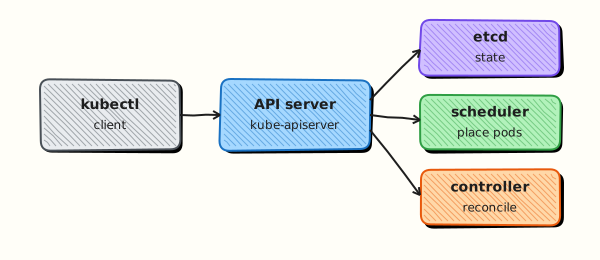
This topic’s control points and relationships are shown below.
Theory
What it is
A Kubernetes cluster has two logical halves: the control plane (brains) and worker nodes (muscle). Everything you do with kubectl is an API call against the control plane. Workers run your Pods under instructions from that API. Understanding the components lets you debug “who failed?” instead of guessing at YAML.
Why it matters
When a Deployment will not schedule, a node goes NotReady, or kubectl hangs, you need to know whether the API server, etcd, the scheduler, or the kubelet is involved. Architecture knowledge is the difference between productive troubleshooting and random restarts. Certifications (CKA/KCNA) and on-call work both assume this map.
How it works (mental model)
Trace a typical create:
kubectl apply→ kube-apiserver (authentication, authorisation, admission).- Object persisted in etcd.
- Controllers in kube-controller-manager notice desired replicas and create Pods (still unbound).
- kube-scheduler writes a
nodeNamebinding on the Pod. - The kubelet on that node asks the container runtime (via CRI — Container Runtime Interface) to pull and start containers.
- kube-proxy (or an eBPF dataplane) programmes rules so Services reach Pod IPs.
Reconciliation never stops: controllers and kubelets continuously compare desired vs actual state.
Key concepts / comparisons
| Component | Role |
|---|---|
| kube-apiserver | Front door; authn/authz |
| etcd | Cluster state store |
| kube-scheduler | Assign Pods to nodes |
| kube-controller-manager | Deployments, Nodes, endpoints, etc. |
| cloud-controller-manager | Cloud LB/volumes/routes (when present) |
| kubelet | Node agent; runs Pods |
| kube-proxy | Service dataplane (often) |
| container runtime | containerd / CRI-O |
| CNI plugin | Pod network addresses and routes |
Control plane may run on dedicated machines or as managed services (EKS/AKS/GKE). Workers hold application Pods. High availability means multiple API server and etcd members — a single control-plane VM is a lab pattern, not a production pattern.
Common pitfalls
- Assuming etcd is “just a database” — corrupting or starving etcd takes the cluster down.
- Forgetting that kube-proxy is not the only Service implementation; Cilium and others may replace it.
- Expecting
kubectl get componentstatusesto be the modern health check — prefer node Ready, API reachability, and control-plane Pods inkube-system. - Confusing CNI (Pod networking) with kube-proxy (Service VIP distribution).
Hands-on Lab
Objective
Inspect control plane and node components running in your cluster, map each role to evidence in arch-evidence.txt, and prove system Pods in kube-system are healthy.
Prerequisites
- A working kind cluster (
kubectl cluster-info) - kubectl with permission to list nodes and
kube-systemPods - Writable workspace at
~/rebash-k8s/module-01-arch
Lab environment
Workspace: ~/rebash-k8s/module-01-arch
Use a disposable kind cluster. Never target a shared production API server.
mkdir -p ~/rebash-k8s/module-01-arch && cd ~/rebash-k8s/module-01-arch
kubectl cluster-info | tee cluster-info.txt
kubectl get nodes | tee nodes-ready-check.txt
grep -q Ready nodes-ready-check.txt
Real-world scenario
During a cluster health review, your lead asks you to prove which nodes exist, which control-plane components run as Pods, and which daemons run on every node. You produce a short evidence file the on-call engineer can paste into the incident channel.
Step-by-step tasks
Task 1 – Inspect node and control-plane layout
Record node roles, versions, and runtime information.
cd ~/rebash-k8s/module-01-arch
kubectl get nodes -o wide | tee nodes-wide.txt
kubectl get nodes -o jsonpath='{range .items[*]}{.metadata.name}{"\t"}{.status.nodeInfo.kubeletVersion}{"\t"}{.status.nodeInfo.containerRuntimeVersion}{"\n"}{end}' | tee node-runtime.txt
grep -q Ready nodes-wide.txt
Expected output
nodes-wide.txt lists Ready nodes with internal IPs and container runtime versions.
Task 2 – List kube-system components
Identify control-plane and node agents running as Pods.
cd ~/rebash-k8s/module-01-arch
kubectl get pods -n kube-system -o wide | tee kube-system-pods.txt
kubectl get pods -n kube-system -o custom-columns=NAME:.metadata.name,NODE:.spec.nodeName,STATUS:.status.phase | tee kube-system-summary.txt
grep -E 'coredns|kube-proxy|etcd|apiserver|scheduler|controller' kube-system-pods.txt | tee control-plane-hits.txt || true
Expected output
kube-system-pods.txt shows system Pods (names vary by distribution); most entries are Running.
Task 3 – Build arch-evidence from live cluster output
Create build-arch-evidence.sh:
#!/usr/bin/env bash
set -euo pipefail
{
  echo "# REBASH module-01-arch — cluster component evidence"
  echo "generated: $(date -Iseconds)"
  echo ""
  echo "control_plane_components:"
  grep -E 'coredns|kube-proxy|etcd|apiserver|scheduler|controller' kube-system-pods.txt || echo "  (names vary by distribution)"
  echo ""
  echo "=== nodes-wide.txt ==="
  cat nodes-wide.txt
  echo ""
  echo "=== kube-system-pods.txt ==="
  cat kube-system-pods.txt
} > arch-evidence.txt
wc -l arch-evidence.txt | tee arch-evidence-lines.txt
test "$(wc -l < arch-evidence.txt)" -gt 10
Run it:
cd ~/rebash-k8s/module-01-arch
chmod +x build-arch-evidence.sh
./build-arch-evidence.sh
grep -q 'cluster component evidence' arch-evidence.txt
Expected output
arch-evidence.txt contains live command output and control-plane component hits; line count exceeds 10.
Validation steps
- All nodes in
nodes-wide.txtare Ready -
kube-system-pods.txtlists Running system Pods -
arch-evidence.txtmaps control plane vs node agents with live output appended - You can explain what etcd, kubelet, and CoreDNS do from this evidence
Common errors and fixes
| Error | Cause | Fix |
|---|---|---|
| Forbidden listing kube-system | RBAC limits | Use a lab cluster with admin access or ask platform team |
| No etcd Pod visible | External etcd (managed control plane) | Note "external etcd" in arch-evidence.txt |
| Different Pod names on minikube vs kind | Distribution packaging | Map by label: kubectl get pods -n kube-system --show-labels |
| Node NotReady | Cluster still booting | Wait and re-run kubectl get nodes -w |
Challenge exercise
Add one line per node to arch-evidence.txt showing which kube-system DaemonSet Pods run on that node (kubectl get pods -n kube-system -o wide --field-selector spec.nodeName=<node>).
Learning outcomes
- Correlated node Ready state with kubelet and runtime versions
- Identified control-plane and add-on Pods in
kube-system - Produced architecture evidence suitable for handover or review
Cleanup
cd ~/rebash-k8s/module-01-arch
# Evidence files are local only — no cluster resources to delete
rm -f nodes-wide.txt node-runtime.txt kube-system-pods.txt kube-system-summary.txt control-plane-hits.txt arch-evidence-lines.txt
# Keep arch-evidence.txt if you want it for notes
Validation
- Lab commands run under
~/rebash-k8s/module-01-arch/ - You can explain each Theory section in your own words
- You used modern tooling where it applies to this topic
- You can describe one production failure mode for this topic
Code Walkthrough
Production practice for Kubernetes Architecture and Components always combines:
- Inspect before you change (status, plan, logs, dry-run)
- Prefer reversible, documented changes (Git, IaC, drop-ins, version pins)
- Capture evidence (command output, pipeline logs) for handovers
- Prefer current tools and APIs over legacy shortcuts
- Least privilege — escalate credentials only when required
Keep runbooks short enough to follow under pressure. Automate checks; keep humans for judgement.
Security Considerations
- Treat credentials and tokens for kubernetes as privileged — never commit them
- Prefer short-lived auth (OIDC, roles, SSO) over long-lived keys
- Validate blast radius before apply/deploy/delete operations
- Restrict who can approve production changes
- Collect audit logs; limit who can read sensitive traces
Common Mistakes
Assuming etcd is “just a database” — corrupting or starving etcd takes the cluster down.
Validate assumptions against the Theory section and official docs before changing production.
Forgetting that kube-proxy is not the only Service implementation; Cilium and others may r
Lab shortcuts (open security groups, admin roles, skip approvals) must not ship unchanged.
Changing production without a rollback path
Always know how to revert (previous artefact, prior release, state rollback, DNS failback).
Best Practices
- Encode Kubernetes Architecture and Components changes as code and review them in pull requests
- Pin versions (images, modules, actions, provider plugins)
- Separate environments with clear promotion gates
- Alert on symptoms with runbooks attached
- Destroy lab resources; tag everything with owner and expiry where possible
Troubleshooting
| Symptom | Likely cause | Fix |
|---|---|---|
| Auth / permission denied | Wrong identity, policy, or scope | Check caller identity, roles, and least-privilege policies |
| Timeout / no route | Network, DNS, security group, or endpoint | Trace path, DNS, and allow-lists before retrying |
| Drift / unexpected plan | Manual change or wrong state/workspace | Reconcile desired vs actual; avoid click-ops on managed resources |
| Pipeline/job red | Flaky step, cache, or missing secret | Read failing step logs; bisect recent workflow/config changes |
| Cost spike | Idle load balancer, NAT, oversized compute | Inventory billable resources; stop/delete labs promptly |
Summary
Kubernetes Architecture and Components is essential for Cloud and DevOps engineers working with kubernetes. Practise the lab until the inspection and change path is muscle memory, then continue the track.
Interview Questions
- What are the main control plane components of Kubernetes?
- What is the role of kubelet versus kube-proxy on a node?
- Where does etcd fit, and why is its health critical?
- How does a highly available control plane change failure domains compared with a single API server?
- What is the scheduler responsible for?
Sample answer — question 2
kubelet ensures Pod specs assigned to the node are running and reports status. kube-proxy programmes Service networking rules (or relies on equivalent dataplane) so ClusterIP traffic reaches Pods.
Sample answer — question 4
Multiple API server and etcd members reduce single points of failure, but you must still plan for quorum, load balancing, and zone-aware placement so correlated failures do not take the whole control plane down.