Managed Kubernetes — EKS, AKS, GKE
Overview
Compare EKS, AKS, and GKE on control-plane responsibility, identity, networking models, and what you still own (nodes, add-ons, workloads, cost).
Managed Kubernetes runs the control plane for you. You still design node pools, CNI/network plugins, IAM mapping, upgrades, and GitOps.
This is a core tutorial in Module 19 · Managed Kubernetes of the REBASH Academy Kubernetes for Cloud & DevOps Engineers series — written for Cloud, DevOps, Platform, and SRE engineers.
Prerequisites
- Troubleshooting
- Cloud fundamentals helpful
Learning Objectives
By the end of this tutorial, you will be able to:
- State shared responsibility per cloud
- Map IAM → Kubernetes RBAC (roughly)
- Note default CNI / LB integrations
- Plan upgrades on managed offerings
Architecture
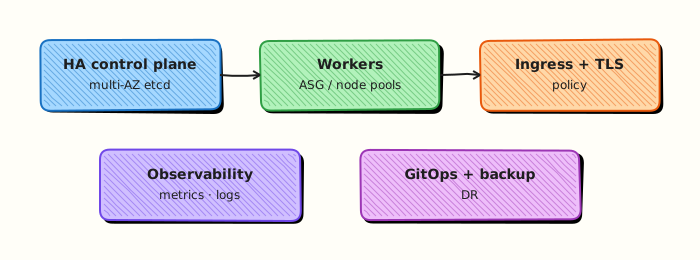
This topic’s control points and relationships are shown below.
Theory
What it is
Managed Kubernetes offerings — Amazon EKS, Azure AKS, and Google GKE — run the control plane (API server, etcd, and core controllers) as a cloud service. You consume a stable API endpoint and attach compute (node groups, serverless nodes, or autopilot-style modes). Networking, IAM mapping, add-ons, and workloads remain shared-responsibility items you must design.
Why it matters
Self-managing etcd HA and control-plane upgrades is real toil. Managed services reduce that burden so DevOps teams focus on platforms, GitOps, and applications. Choosing among EKS/AKS/GKE usually follows your cloud, identity model, and appetite for Autopilot/Fargate-style trade-offs versus node-level control.
How it works (mental model)
- Create a cluster in the cloud console/API/Terraform — provider runs the control plane.
- Configure VPC/VNet, subnets, and CNI (AWS VPC CNI, Azure CNI/overlay, GKE dataplane).
- Map cloud identities to Kubernetes RBAC (EKS access entries / aws-auth, Entra ID integration, Google IAM).
- Attach node pools or enable serverless/autopilot; install cluster add-ons (CSI, metrics, ingress).
- Point kubeconfig at the API; operate workloads as on any conformant cluster — controllers still reconcile desired state.
You do not SSH to etcd; you do still patch nodes, rotate credentials, and test restores of your data.
Key concepts / comparisons
| EKS | AKS | GKE | |
|---|---|---|---|
| Control plane | AWS-managed | Azure-managed | Google-managed |
| Identity | IAM + access entries / aws-auth | Entra ID / AAD | Google IAM |
| Nodes | Managed node groups / Fargate / Karpenter | Node pools / Virtual nodes | Node pools / Autopilot |
| Registry | ECR | ACR | Artifact Registry |
| Mode | Trade-off |
|---|---|
| Standard nodes | More control, more ops |
| Autopilot / Fargate-like | Less node ops, less flexibility |
Common pitfalls
- Treating managed as “no ops” — upgrades, IAM, and cost still need owners.
- Wrong subnet/CNI design causing Pod IP exhaustion.
- Forgetting cluster auth maps —
kubectlworks for admins but CI roles get 403. - Leaving public API endpoints open without IP allow lists or private-only access.
- Ignoring version deprecation calendars until the control plane blocks creates.
Hands-on Lab
Objective
Bootstrap a kind cluster, run a kubeconfig context checklist against it, apply a labelled namespace, and compare local node metadata with what managed EKS/AKS/GKE clusters expose — using live command output, not a principles worksheet.
Prerequisites
- kind installed (
kind version) - kubectl installed
- Docker Engine running (kind requirement)
- Writable workspace at
~/rebash-k8s/module-19
Lab environment
Workspace: ~/rebash-k8s/module-19
mkdir -p ~/rebash-k8s/module-19 && cd ~/rebash-k8s/module-19
kind create cluster --name rebash-m19 2>/dev/null || kind get clusters | grep -q rebash-m19
kubectl cluster-info | tee cluster-info.txt
kubectl get nodes | tee nodes-ready.txt
grep -q Ready nodes-ready.txt
Real-world scenario
Your team evaluates EKS, AKS, and GKE for a migration. Platform engineers run a pre-flight script that checks kubeconfig context, cluster endpoint, and node metadata before any cloud CLI runs. You bootstrap a local kind cluster, run the checklist, apply a labelled namespace, and document how local node fields differ from managed provider IDs.
Step-by-step tasks
Task 1 – Create kubeconfig context checklist script
Create kubeconfig-context-check.sh:
#!/usr/bin/env bash
set -euo pipefail

OUT="${1:-context-check.txt}"
: > "${OUT}"

echo "=== kubeconfig context checklist (read-only) ===" | tee -a "${OUT}"
echo "No cloud APIs called. Uses local kubeconfig only." | tee -a "${OUT}"
echo | tee -a "${OUT}"

kubectl config current-context | tee -a "${OUT}"
kubectl config view --minify -o jsonpath='{.clusters[0].cluster.server}{"\n"}' | tee -a "${OUT}"
kubectl config view --minify -o jsonpath='{.contexts[0].context.user}{"\n"}' | tee -a "${OUT}"

echo "--- cluster info ---" | tee -a "${OUT}"
kubectl cluster-info | tee -a "${OUT}"

echo "--- nodes (if permitted) ---" | tee -a "${OUT}"
kubectl get nodes -o wide | tee -a "${OUT}" || echo "nodes: access denied or unavailable" | tee -a "${OUT}"

echo "--- auth can-i sample ---" | tee -a "${OUT}"
kubectl auth can-i get pods --all-namespaces | tee -a "${OUT}" || true

echo | tee -a "${OUT}"
echo "Checklist complete. Review ${OUT} before targeting production contexts." | tee -a "${OUT}"
Run against your local context:
cd ~/rebash-k8s/module-19
chmod +x kubeconfig-context-check.sh
./kubeconfig-context-check.sh context-check.txt
grep -q 'kubeconfig context checklist' context-check.txt
grep -q 'cluster info' context-check.txt
Expected output
context-check.txt lists current context, API server URL, and cluster-info output.
Task 3 – Apply labelled namespace and inspect node metadata
Create namespace.yaml:
apiVersion: v1
kind: Namespace
metadata:
  name: rebash-managed-lab
  labels:
    environment: dev
    cloud-provider: local-kind
    app.kubernetes.io/managed-by: rebash-lab
Apply and capture managed-style metadata:
cd ~/rebash-k8s/module-19
kubectl apply -f namespace.yaml
kubectl get ns rebash-managed-lab --show-labels | tee namespace-evidence.txt
kubectl get nodes -o jsonpath='{range .items[*]}{.metadata.name}{"\t"}{.spec.providerID}{"\t"}{.metadata.labels}{"\n"}{end}' | tee node-provider-metadata.txt
grep -q 'rebash-managed-lab' namespace-evidence.txt
grep -q 'local-kind' namespace-evidence.txt
Expected output
Namespace is Active with labels; node-provider-metadata.txt shows empty or local provider IDs (kind differs from EKS/AKS/GKE cloud provider IDs).
Task 4 – Pack evidence for review
cd ~/rebash-k8s/module-19
tar -czf module-19-managed-evidence.tgz \
  cluster-info.txt nodes-ready.txt context-check.txt \
  namespace.yaml namespace-evidence.txt node-provider-metadata.txt \
  kubeconfig-context-check.sh
ls -l module-19-managed-evidence.tgz | tee evidence-ls.txt
test -s module-19-managed-evidence.tgz
Expected output
Evidence tarball is non-empty and includes context check plus namespace/node metadata.
Validation steps
- kind cluster
rebash-m19is Ready - Context checklist runs read-only against local kubeconfig
- Namespace
rebash-managed-labapplied with GitOps-style labels -
node-provider-metadata.txtcaptured from live nodes - Evidence tarball contains checklist and namespace output
Common errors and fixes
| Error | Cause | Fix |
|---|---|---|
kind: command not found | kind not installed | Install kind; or use existing lab cluster and skip create |
| current-context empty | No kubeconfig | Export KUBECONFIG; run kind create cluster --name rebash-m19 |
| cluster-info fails | Cluster stopped | kind start or recreate cluster |
| Namespace apply denied | Read-only kubeconfig | Use kind with admin context |
| Wrong cluster targeted | Multiple contexts | kubectl config use-context kind-rebash-m19 first |
Challenge exercise
Add one line to node-provider-metadata.txt explaining which field EKS would populate on nodes (spec.providerID with aws://…) that kind leaves empty — append via a one-line note file managed-contrast.txt generated from your observation, not a copied glossary.
Learning outcomes
- Bootstrapped a disposable kind cluster for managed-Kubernetes comparisons
- Built and ran a read-only kubeconfig pre-flight checklist
- Applied labelled namespace demonstrating cloud-agnostic GitOps metadata
- Compared local node provider metadata with managed-cluster expectations
Cleanup
kubectl delete namespace rebash-managed-lab --ignore-not-found --wait=true
kind delete cluster --name rebash-m19 2>/dev/null || true
rm -f ~/rebash-k8s/module-19/context-check.txt ~/rebash-k8s/module-19/namespace-evidence.txt ~/rebash-k8s/module-19/module-19-managed-evidence.tgz
Validation
- Lab commands run under
~/rebash-k8s/module-19/ - You can explain each Theory section in your own words
- You used modern tooling where it applies to this topic
- You can describe one production failure mode for this topic
Code Walkthrough
Production practice for Managed Kubernetes — EKS, AKS, GKE always combines:
- Inspect before you change (status, plan, logs, dry-run)
- Prefer reversible, documented changes (Git, IaC, drop-ins, version pins)
- Capture evidence (command output, pipeline logs) for handovers
- Prefer current tools and APIs over legacy shortcuts
- Least privilege — escalate credentials only when required
Keep runbooks short enough to follow under pressure. Automate checks; keep humans for judgement.
Security Considerations
- Treat credentials and tokens for kubernetes as privileged — never commit them
- Prefer short-lived auth (OIDC, roles, SSO) over long-lived keys
- Validate blast radius before apply/deploy/delete operations
- Restrict who can approve production changes
- Collect audit logs; limit who can read sensitive traces
Common Mistakes
Treating managed as “no ops” — upgrades, IAM, and cost still need owners.
Validate assumptions against the Theory section and official docs before changing production.
Wrong subnet/CNI design causing Pod IP exhaustion.
Lab shortcuts (open security groups, admin roles, skip approvals) must not ship unchanged.
Changing production without a rollback path
Always know how to revert (previous artefact, prior release, state rollback, DNS failback).
Best Practices
- Encode Managed Kubernetes — EKS, AKS, GKE changes as code and review them in pull requests
- Pin versions (images, modules, actions, provider plugins)
- Separate environments with clear promotion gates
- Alert on symptoms with runbooks attached
- Destroy lab resources; tag everything with owner and expiry where possible
Troubleshooting
| Symptom | Likely cause | Fix |
|---|---|---|
| Auth / permission denied | Wrong identity, policy, or scope | Check caller identity, roles, and least-privilege policies |
| Timeout / no route | Network, DNS, security group, or endpoint | Trace path, DNS, and allow-lists before retrying |
| Drift / unexpected plan | Manual change or wrong state/workspace | Reconcile desired vs actual; avoid click-ops on managed resources |
| Pipeline/job red | Flaky step, cache, or missing secret | Read failing step logs; bisect recent workflow/config changes |
| Cost spike | Idle load balancer, NAT, oversized compute | Inventory billable resources; stop/delete labs promptly |
Summary
Managed Kubernetes — EKS, AKS, GKE is essential for Cloud and DevOps engineers working with kubernetes. Practise the lab until the inspection and change path is muscle memory, then continue the track.
Interview Questions
- What responsibilities typically remain with you on a managed Kubernetes service?
- How does cloud IAM integration differ across EKS, AKS, and GKE at a high level?
- Why pin node image/version upgrade strategies even when the control plane is managed?
- What vendor lock-in trade-offs appear when using cloud-specific Ingress or identity add-ons?
- How do you validate portability of an application across managed offerings?
Sample answer — question 2
You still own workloads, RBAC inside the cluster, networking design, upgrades of node pools, add-ons you install, and cost. The vendor usually operates the control plane API servers and etcd.
Sample answer — question 4
Cloud-native LB annotations and IAM roles simplify ops but couple manifests to one provider. Prefer portable core APIs where possible, and isolate provider-specific resources behind modules.