Helm Package Management
Overview
Install a chart from a repo with custom values, list/upgrade/rollback a release, and sketch chart structure (Chart.yaml, templates, values).
Helm packages Kubernetes manifests as charts. Releases track installed instances. Prefer pinned chart versions in production.
This is a core tutorial in Module 14 · Package Management of the REBASH Academy Kubernetes for Cloud & DevOps Engineers series — written for Cloud, DevOps, Platform, and SRE engineers.
Prerequisites
- Kubernetes Autoscaling
- Helm 3 CLI installed
Learning Objectives
By the end of this tutorial, you will be able to:
-
helm repo add/install/upgrade/rollback - Override with
-f values.yaml - Inspect
helm templateoutput - Outline chart dependencies
Architecture
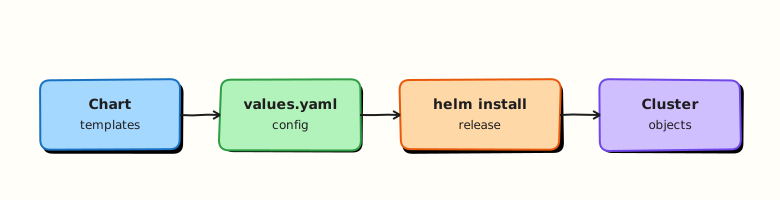
This topic’s control points and relationships are shown below.
Theory
What it is
Helm is the common package manager for Kubernetes. A chart is a versioned bundle of templates and default values. A release is a named instance of a chart installed into a cluster (and usually a namespace). Helm 3 stores release metadata in Secrets/ConfigMaps in-cluster; there is no Tiller.
Why it matters
Hand-maintaining dozens of raw manifests per environment does not scale. Charts parameterise images, replicas, and ingress hosts via values, so the same package deploys to lab and production with different -f files. Platforms and GitOps tools often render or deliver Helm charts as the unit of install.
How it works (mental model)
helm repo add/pullobtains chart packages (or youhelm createlocally).- Templates under
templates/plusvalues.yamlrender to Kubernetes YAML (helm templateto preview). helm install/upgradeapplies the rendered objects and records a release revision.helm rollbackreverts to a previous revision’s manifest set.- Dependencies in
Chart.yamlpull subcharts; OCI registries increasingly host charts alongside images.
Helm does not replace controllers — it ships the desired-state objects those controllers reconcile.
Key concepts / comparisons
| Piece | Role |
|---|---|
| Chart | Package (Chart.yaml, values, templates) |
| Release | Installed instance + history |
| Values | Configuration overlays |
| Repo / OCI | Distribution |
| Command | Use |
|---|---|
helm install | Create release |
helm upgrade | Move to new chart/values |
helm rollback | Restore prior revision |
helm template | Client-side render / debug |
Prefer pinned chart versions in production; floating latest charts are supply-chain risk.
Common pitfalls
- Upgrading with incomplete values and accidentally resetting replicas or resources to chart defaults.
- Editing live objects that Helm owns — next upgrade overwrites them (use values or
lookuppatterns carefully). - Ignoring
helm templatediffs in CI — broken YAML ships unnoticed. - Mixing
kubectl applyand Helm on the same resources without ownership rules. - Trusting unverified third-party charts with cluster-admin RBAC inside.
Hands-on Lab
Objective
Author a minimal Helm chart (Chart.yaml, values.yaml, templates/deployment.yaml), validate it with helm lint and helm template, install to a kind cluster, and prove Pods become Ready.
Prerequisites
- kind cluster running (
kubectl cluster-info) - Helm 3.x installed (
helm version) - kubectl configured against the kind context
- Writable workspace at
~/rebash-k8s/module-14
Lab environment
Workspace: ~/rebash-k8s/module-14 on your workstation with a disposable kind cluster.
mkdir -p ~/rebash-k8s/module-14/rebash-web/templates && cd ~/rebash-k8s/module-14
kubectl cluster-info | tee cluster-info.txt
kubectl get nodes | tee nodes-ready.txt
grep -q Ready nodes-ready.txt
Real-world scenario
Your team packages internal microservices as Helm charts for GitOps. Before opening a pull request, you scaffold a minimal chart, lint it, render templates locally, and install into an isolated namespace on kind — then prove the release is healthy.
Step-by-step tasks
Task 1 – Chart metadata and values
Create rebash-web/Chart.yaml:
apiVersion: v2
name: rebash-web
description: Minimal REBASH lab web chart
type: application
version: 0.1.0
appVersion: "1.27.4"
Create rebash-web/values.yaml:
replicaCount: 1
image:
  repository: nginxinc/nginx-unprivileged
  tag: "1.27-alpine"
  pullPolicy: IfNotPresent
service:
  port: 8080
Task 2 – Deployment template
Create rebash-web/templates/deployment.yaml:
apiVersion: apps/v1
kind: Deployment
metadata:
  name: {{ include "rebash-web.fullname" . }}
  labels:
    app.kubernetes.io/name: {{ include "rebash-web.name" . }}
    app.kubernetes.io/instance: {{ .Release.Name }}
spec:
  replicas: {{ .Values.replicaCount }}
  selector:
    matchLabels:
      app.kubernetes.io/name: {{ include "rebash-web.name" . }}
      app.kubernetes.io/instance: {{ .Release.Name }}
  template:
    metadata:
      labels:
        app.kubernetes.io/name: {{ include "rebash-web.name" . }}
        app.kubernetes.io/instance: {{ .Release.Name }}
    spec:
      containers:
        - name: web
          image: "{{ .Values.image.repository }}:{{ .Values.image.tag }}"
          imagePullPolicy: {{ .Values.image.pullPolicy }}
          ports:
            - containerPort: {{ .Values.service.port }}
Create rebash-web/templates/_helpers.tpl:
{{- define "rebash-web.name" -}}
{{- default .Chart.Name .Values.nameOverride | trunc 63 | trimSuffix "-" }}
{{- end }}

{{- define "rebash-web.fullname" -}}
{{- printf "%s-%s" .Release.Name .Chart.Name | trunc 63 | trimSuffix "-" }}
{{- end }}
Task 3 – Lint and render offline
cd ~/rebash-k8s/module-14
helm lint rebash-web | tee helm-lint-m14.txt
helm template rebash-web-demo rebash-web --namespace rebash-m14 | tee helm-template-m14.yaml
grep -q 'kind: Deployment' helm-template-m14.yaml
grep -q 'nginxinc/nginx-unprivileged:1.27-alpine' helm-template-m14.yaml
Expected output
helm lint reports 0 chart(s) failed; rendered YAML contains a Deployment with the pinned image.
Task 4 – Install to kind and prove Ready Pods
Create namespace.yaml:
cd ~/rebash-k8s/module-14
kubectl apply -f namespace.yaml
helm upgrade --install rebash-web-demo rebash-web -n rebash-m14 --wait --timeout 120s | tee helm-install-m14.txt
kubectl get deploy,pods -n rebash-m14 | tee helm-release-m14.txt
kubectl wait --for=condition=Ready pod -l app.kubernetes.io/instance=rebash-web-demo -n rebash-m14 --timeout=120s
kubectl get pods -n rebash-m14 -o wide | tee pods-ready-m14.txt
grep -q Running pods-ready-m14.txt
Expected output
Release installs; Pods reach Ready; pods-ready-m14.txt shows Running.
Validation steps
- Chart contains
Chart.yaml,values.yaml, and templated Deployment -
helm lintpasses without errors -
helm templaterenders valid Deployment YAML with pinned image - Release installs in namespace
rebash-m14and Pods are Ready
Common errors and fixes
| Error | Cause | Fix |
|---|---|---|
helm lint template undefined | Missing _helpers.tpl | Add helper templates for fullname and name |
| Rendered YAML invalid | Indentation in template | Run helm template and validate with kubeconform if available |
| Install fails watch timeout | Image pull or probes | kubectl describe pod -n rebash-m14 |
| MkDocs build breaks on Helm expressions | Unescaped templates | Wrap template fences in raw Jinja blocks in the tutorial |
Challenge exercise
Add a Service template exposing port 8080 and re-run helm template; verify Service selector labels match the Deployment pod template labels.
Learning outcomes
- Scaffolded a minimal Helm chart with pinned image values
- Validated charts with
helm lintandhelm template - Installed a release into an isolated namespace on kind
- Proved Pods reached Ready before cleanup
Cleanup
helm uninstall rebash-web-demo -n rebash-m14 2>/dev/null || true
kubectl delete namespace rebash-m14 --ignore-not-found
Validation
- Lab commands run under
~/rebash-k8s/module-14/ - You can explain each Theory section in your own words
- You used modern tooling where it applies to this topic
- You can describe one production failure mode for this topic
Code Walkthrough
Production practice for Helm Package Management always combines:
- Inspect before you change (status, plan, logs, dry-run)
- Prefer reversible, documented changes (Git, IaC, drop-ins, version pins)
- Capture evidence (command output, pipeline logs) for handovers
- Prefer current tools and APIs over legacy shortcuts
- Least privilege — escalate credentials only when required
Keep runbooks short enough to follow under pressure. Automate checks; keep humans for judgement.
Security Considerations
- Treat credentials and tokens for kubernetes as privileged — never commit them
- Prefer short-lived auth (OIDC, roles, SSO) over long-lived keys
- Validate blast radius before apply/deploy/delete operations
- Restrict who can approve production changes
- Collect audit logs; limit who can read sensitive traces
Common Mistakes
Upgrading with incomplete values and accidentally resetting replicas or resources to chart
Validate assumptions against the Theory section and official docs before changing production.
Editing live objects that Helm owns — next upgrade overwrites them (use values or lookup
Lab shortcuts (open security groups, admin roles, skip approvals) must not ship unchanged.
Changing production without a rollback path
Always know how to revert (previous artefact, prior release, state rollback, DNS failback).
Best Practices
- Encode Helm Package Management changes as code and review them in pull requests
- Pin versions (images, modules, actions, provider plugins)
- Separate environments with clear promotion gates
- Alert on symptoms with runbooks attached
- Destroy lab resources; tag everything with owner and expiry where possible
Troubleshooting
| Symptom | Likely cause | Fix |
|---|---|---|
| Auth / permission denied | Wrong identity, policy, or scope | Check caller identity, roles, and least-privilege policies |
| Timeout / no route | Network, DNS, security group, or endpoint | Trace path, DNS, and allow-lists before retrying |
| Drift / unexpected plan | Manual change or wrong state/workspace | Reconcile desired vs actual; avoid click-ops on managed resources |
| Pipeline/job red | Flaky step, cache, or missing secret | Read failing step logs; bisect recent workflow/config changes |
| Cost spike | Idle load balancer, NAT, oversized compute | Inventory billable resources; stop/delete labs promptly |
Summary
Helm Package Management is essential for Cloud and DevOps engineers working with kubernetes. Practise the lab until the inspection and change path is muscle memory, then continue the track.
Interview Questions
- What is a Helm chart, and what problem does it solve?
- What is the difference between
helm installandhelm upgrade --install? - Where does Helm store release metadata in modern Helm 3?
- What risks come from installing charts with default values in production?
- How do values files help manage environment differences?
Sample answer — question 2
helm upgrade --install creates the release if missing or upgrades it if present, which is convenient for CI idempotency. Plain helm install fails if the release already exists.
Sample answer — question 4
Default values often enable broad permissions, public images, or weak resource settings. Production needs reviewed values, pinned versions, least privilege, and secret handling outside plain values where possible.