Kubernetes Networking Deep Dive
Overview
Explain the Pod network (CNI), CoreDNS service discovery, kube-proxy modes, and how NetworkPolicies enforce east-west rules.
Every Pod gets an IP via CNI (Calico, Cilium, kindnet…). CoreDNS answers svc.ns.svc.cluster.local. NetworkPolicies are enforced by the CNI plugin — not by kube-apiserver alone.
This is a core tutorial in Module 11 · Networking Deep Dive of the REBASH Academy Kubernetes for Cloud & DevOps Engineers series — written for Cloud, DevOps, Platform, and SRE engineers.
Prerequisites
Learning Objectives
By the end of this tutorial, you will be able to:
- Name your cluster’s CNI
- Resolve Service DNS from a debug Pod
- Outline iptables vs IPVS vs eBPF
- Write a simple NetworkPolicy
Architecture
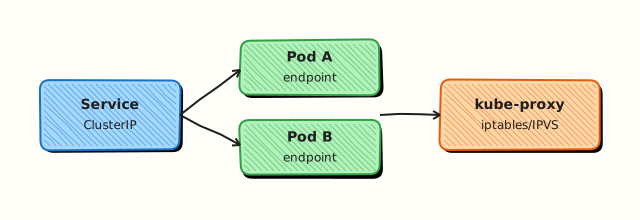
This topic’s control points and relationships are shown below.
Theory
What it is
Kubernetes networking rests on a few guarantees: every Pod gets an IP; Pods can reach each other without NAT (within the cluster model); agents on nodes implement that fabric via a CNI plugin. CoreDNS provides service discovery. kube-proxy (iptables/IPVS) or eBPF dataplanes implement Services. NetworkPolicies express allow/deny rules enforced by the CNI — not by the API server alone.
Why it matters
Most “it works on my laptop” failures in production are DNS, NetworkPolicy, or CNI MTU/routing issues. DevOps engineers who can name their CNI, query CoreDNS, and read EndpointSlices debug faster than those who only restart Pods. Security teams need NetworkPolicies that actually enforce.
How it works (mental model)
- CNI assigns Pod IPs and programmes routes/overlays/eBPF maps.
- kubelet and runtime attach the Pod to the network namespace.
- Services select Pods; EndpointSlices list ready backends; the dataplane DNAT/load-balances to Pod IPs.
- Pods resolve
service.namespace.svc.cluster.localvia CoreDNS (kube-dns Service). - NetworkPolicy objects are watched by the CNI agent; non-matching traffic is dropped when policies select a Pod.
Flat Pod network + Services + DNS is the mental model; overlays and cloud routing are implementation details.
Key concepts / comparisons
| Layer | Component |
|---|---|
| Pod IP fabric | CNI (Calico, Cilium, kindnet, …) |
| Service VIP | kube-proxy / eBPF |
| DNS | CoreDNS |
| Policy | NetworkPolicy (+ CiliumNetworkPolicy etc.) |
| kube-proxy mode | Trait |
|---|---|
| iptables | Common default |
| IPVS | Better scale characteristics |
| eBPF (Cilium) | Often replaces kube-proxy |
Common pitfalls
- Assuming NetworkPolicies work without a supporting CNI — they become no-ops.
- DNS failures from CoreDNS Pending/CrashLoop — check
kube-systemfirst. - Debugging Service traffic without checking endpoints emptiness.
- Overlapping NetworkPolicies that unintentionally isolate CoreDNS (egress to DNS must remain).
- Confusing NodePort exposure with Pod network reachability from outside.
Hands-on Lab
Objective
Deploy a backend Service with Endpoints, prove CoreDNS resolution from a client Pod, then apply a NetworkPolicy that blocks and later allows traffic between labelled Pods.
Prerequisites
- kubectl configured against a lab cluster (kind or minikube)
- CNI with NetworkPolicy support recommended (kind default works)
- Writable workspace at
~/rebash-k8s/module-11
Lab environment
Workspace: ~/rebash-k8s/module-11 on a disposable lab cluster.
Real-world scenario
An on-call engineer reports intermittent 503 errors. You must verify Service Endpoints are populated, confirm in-cluster DNS resolves the Service name, and demonstrate how a default-deny NetworkPolicy can isolate workloads until explicit allow rules are added.
Step-by-step tasks
Task 1 – Namespace, backend, and Service
Create namespace.yaml:
Create backend.yaml:
apiVersion: apps/v1
kind: Deployment
metadata:
  name: api-backend
  namespace: rebash-m11
spec:
  replicas: 1
  selector:
    matchLabels:
      app: api-backend
  template:
    metadata:
      labels:
        app: api-backend
        role: backend
    spec:
      containers:
        - name: api
          image: hashicorp/http-echo:1.0.0
          args: ["-text=ok-from-backend"]
          ports:
            - containerPort: 5678
Create service.yaml:
apiVersion: v1
kind: Service
metadata:
  name: api-svc
  namespace: rebash-m11
spec:
  selector:
    app: api-backend
  ports:
    - port: 80
      targetPort: 5678
Apply and check Endpoints:
cd ~/rebash-k8s/module-11
kubectl apply -f namespace.yaml -f backend.yaml -f service.yaml
kubectl rollout status deployment/api-backend -n rebash-m11 --timeout=120s
kubectl get endpoints api-svc -n rebash-m11 | tee endpoints-m11.txt
kubectl get svc api-svc -n rebash-m11 -o wide | tee svc-m11.txt
Expected output
Endpoints show at least one IP address; Service has ClusterIP.
Task 2 – Client Pod, DNS, and connectivity
Create client-pod.yaml:
apiVersion: v1
kind: Pod
metadata:
  name: net-client
  namespace: rebash-m11
  labels:
    role: client
spec:
  containers:
    - name: client
      image: busybox:1.36.1
      command: ["sh", "-c", "sleep 3600"]
Apply and test DNS plus HTTP:
cd ~/rebash-k8s/module-11
kubectl apply -f client-pod.yaml
kubectl wait --for=condition=Ready pod/net-client -n rebash-m11 --timeout=120s
kubectl exec -n rebash-m11 net-client -- nslookup api-svc.rebash-m11.svc.cluster.local | tee dns-m11.txt
kubectl exec -n rebash-m11 net-client -- wget -qO- http://api-svc.rebash-m11.svc.cluster.local | tee curl-m11.txt
grep -q 'ok-from-backend' curl-m11.txt
kubectl get pods -n kube-system -l k8s-app=kube-dns -o wide 2>/dev/null | tee coredns-m11.txt || \
  kubectl get pods -n kube-system -l k8s-app=coredns -o wide | tee coredns-m11.txt
Expected output
DNS resolves; curl-m11.txt contains ok-from-backend; CoreDNS Pods are Running.
Task 3 – NetworkPolicy deny then allow
Create networkpolicy-deny.yaml:
apiVersion: networking.k8s.io/v1
kind: NetworkPolicy
metadata:
  name: deny-client-to-backend
  namespace: rebash-m11
spec:
  podSelector:
    matchLabels:
      app: api-backend
  policyTypes:
    - Ingress
  ingress: []
Create networkpolicy-allow.yaml:
apiVersion: networking.k8s.io/v1
kind: NetworkPolicy
metadata:
  name: allow-client-to-backend
  namespace: rebash-m11
spec:
  podSelector:
    matchLabels:
      app: api-backend
  policyTypes:
    - Ingress
  ingress:
    - from:
        - podSelector:
            matchLabels:
              role: client
      ports:
        - protocol: TCP
          port: 5678
Test policy effect (skip deny test if your CNI does not enforce policies):
cd ~/rebash-k8s/module-11
kubectl apply -f networkpolicy-deny.yaml
if kubectl exec -n rebash-m11 net-client -- wget -qO- --timeout=3 http://api-svc 2>netpol-deny.txt; then
  echo "CNI may not enforce NetworkPolicy — document in lab notes" | tee -a netpol-deny.txt
else
  echo "connection blocked as expected" | tee netpol-result.txt
fi
kubectl delete -f networkpolicy-deny.yaml
kubectl apply -f networkpolicy-allow.yaml
kubectl exec -n rebash-m11 net-client -- wget -qO- http://api-svc | tee netpol-allow.txt
grep -q 'ok-from-backend' netpol-allow.txt
Expected output
With enforcing CNI, traffic fails under deny and succeeds under allow; otherwise document CNI limitation.
Validation steps
- Service Endpoints are non-empty for Ready backend Pods
- Client resolves
api-svcvia cluster DNS - HTTP request succeeds before restrictive policy (or after allow rule)
- CoreDNS Pods visible in
kube-system
Common errors and fixes
| Error | Cause | Fix |
|---|---|---|
| Empty Endpoints | Pods not Ready or selector mismatch | Compare Service selector to Pod labels |
| DNS lookup fails | CoreDNS unhealthy | Check kube-system CoreDNS Pods and logs |
| wget timeout with policy | Expected under default deny | Apply allow rule or remove policy |
| Policy has no effect | CNI lacks NetworkPolicy | Use kind/Calico/Cilium; note in evidence |
Challenge exercise
Add a label tier: frontend to the client Pod and tighten the allow policy to require both role: client and tier: frontend labels.
Learning outcomes
- Verified Service Endpoints reflect Ready Pod backends
- Tested in-cluster DNS resolution via CoreDNS
- Applied deny/allow NetworkPolicy manifests
- Understood CNI dependency for policy enforcement
Cleanup
Validation
- Lab commands run under
~/rebash-k8s/module-11/ - You can explain each Theory section in your own words
- You used modern tooling where it applies to this topic
- You can describe one production failure mode for this topic
Code Walkthrough
Production practice for Kubernetes Networking Deep Dive always combines:
- Inspect before you change (status, plan, logs, dry-run)
- Prefer reversible, documented changes (Git, IaC, drop-ins, version pins)
- Capture evidence (command output, pipeline logs) for handovers
- Prefer current tools and APIs over legacy shortcuts
- Least privilege — escalate credentials only when required
Keep runbooks short enough to follow under pressure. Automate checks; keep humans for judgement.
Security Considerations
- Treat credentials and tokens for kubernetes as privileged — never commit them
- Prefer short-lived auth (OIDC, roles, SSO) over long-lived keys
- Validate blast radius before apply/deploy/delete operations
- Restrict who can approve production changes
- Collect audit logs; limit who can read sensitive traces
Common Mistakes
Assuming NetworkPolicies work without a supporting CNI — they become no-ops.
Validate assumptions against the Theory section and official docs before changing production.
DNS failures from CoreDNS Pending/CrashLoop — check kube-system first.
Lab shortcuts (open security groups, admin roles, skip approvals) must not ship unchanged.
Changing production without a rollback path
Always know how to revert (previous artefact, prior release, state rollback, DNS failback).
Best Practices
- Encode Kubernetes Networking Deep Dive changes as code and review them in pull requests
- Pin versions (images, modules, actions, provider plugins)
- Separate environments with clear promotion gates
- Alert on symptoms with runbooks attached
- Destroy lab resources; tag everything with owner and expiry where possible
Troubleshooting
| Symptom | Likely cause | Fix |
|---|---|---|
| Auth / permission denied | Wrong identity, policy, or scope | Check caller identity, roles, and least-privilege policies |
| Timeout / no route | Network, DNS, security group, or endpoint | Trace path, DNS, and allow-lists before retrying |
| Drift / unexpected plan | Manual change or wrong state/workspace | Reconcile desired vs actual; avoid click-ops on managed resources |
| Pipeline/job red | Flaky step, cache, or missing secret | Read failing step logs; bisect recent workflow/config changes |
| Cost spike | Idle load balancer, NAT, oversized compute | Inventory billable resources; stop/delete labs promptly |
Summary
Kubernetes Networking Deep Dive is essential for Cloud and DevOps engineers working with kubernetes. Practise the lab until the inspection and change path is muscle memory, then continue the track.
Interview Questions
- How does Pod networking typically work regarding IP addresses?
- How does CoreDNS resolve a Service name inside a cluster?
- What is the difference between ClusterIP, NodePort, and LoadBalancer?
- How can NetworkPolicy restrict east-west traffic, and what must the CNI support?
- What symptoms suggest a CNI or kube-proxy problem rather than an application bug?
Sample answer — question 2
Services get a stable DNS name like name.namespace.svc.cluster.local that resolves to the ClusterIP. kube-dns/CoreDNS answers these queries for in-cluster clients.
Sample answer — question 4
NetworkPolicy only enforces if the CNI implements it. Policies default-deny unused paths, allow needed namespaces/pods/ports, and should be tested so you do not lock out DNS or probes accidentally.