Kubernetes Production Operations
Overview
Plan control-plane upgrades, document etcd backup/restore, and define HA and maintenance practices for self-managed or managed clusters.
Day-2 ops: version skew policy, drain/cordon workers, etcd snapshots (self-managed), and DR runbooks. Managed services shift etcd ownership to the cloud — still test restore of workloads and data.
This is a core tutorial in Module 17 · Production Operations of the REBASH Academy Kubernetes for Cloud & DevOps Engineers series — written for Cloud, DevOps, Platform, and SRE engineers.
Prerequisites
Learning Objectives
By the end of this tutorial, you will be able to:
- Follow Kubernetes version skew rules
- Cordon/drain a node safely
- Outline etcd snapshot (kubeadm)
- Write a DR checklist
Architecture
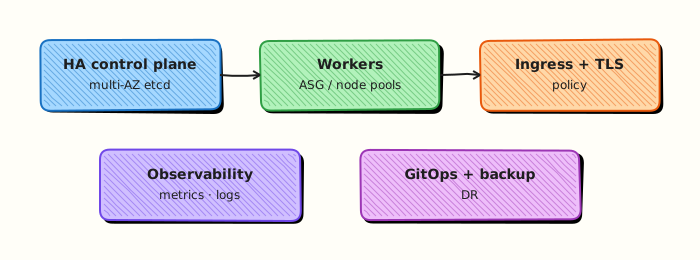
This topic’s control points and relationships are shown below.
Theory
What it is
Production operations (day-2) covers keeping clusters alive over time: upgrades, node maintenance, etcd backup/restore (self-managed), disaster recovery (DR), and high availability (HA). Managed Kubernetes shifts control-plane ownership to the cloud provider, but you still own node pools, add-ons, workloads, and data recovery drills.
Why it matters
A cluster that deploys well on day one still fails on day 200 without upgrade discipline and tested backups. Version skew between kubelets and control plane is constrained by Kubernetes policy — ignoring it breaks nodes. DR that exists only in slides fails when etcd or a region dies.
How it works (mental model)
- HA: multiple control-plane/API endpoints (or managed HA); workers across zones; PDBs for apps.
- Maintenance:
cordonto stop scheduling →drainto evict Pods (respects PDBs) → patch/reboot →uncordon. - Upgrades: control plane first (within skew), then kubelets/nodes in waves; validate workloads between waves.
- etcd (self-managed): periodic snapshots, encrypted off-box storage, documented restore; managed clouds: rely on provider control-plane SLAs plus your app/data backups.
- DR: rebuild cluster from GitOps + restore volumes/databases; rehearse regularly.
Controllers keep reconciling during maintenance if capacity remains; drains are voluntary disruptions.
Key concepts / comparisons
| Concern | Self-managed | Managed (EKS/AKS/GKE) |
|---|---|---|
| etcd backup | Your runbook | Provider control plane |
| Control-plane upgrade | kubeadm/kops process | Cloud upgrade API |
| Node upgrade | Your pools | Managed node groups / surge |
| Workload/data DR | Always yours | Always yours |
| Skew idea | Practice |
|---|---|
| kubelet vs API | Stay within supported minor skew |
| kubectl | Prefer close to cluster version |
Common pitfalls
- Draining without PDBs — simultaneous replica loss.
- Skipping etcd restore tests on self-managed clusters.
- Upgrading all nodes at once; no surge capacity.
- Assuming managed control-plane backup restores your PVCs and databases.
- Running ancient add-ons (CNI, Ingress) incompatible with the new Kubernetes version.
Hands-on Lab
Objective
Create a production operations checklist YAML, an etcd backup drill script that documents dry-run steps only, and capture cluster version/node evidence — without touching live etcd data.
Prerequisites
- kubectl configured against kind or minikube
- Cluster read access (node/version queries); no cloud spend required
- Bash and Python 3 with PyYAML
- Writable workspace at
~/rebash-k8s/module-17
Lab environment
Workspace: ~/rebash-k8s/module-17
Real-world scenario
Before a control-plane upgrade, SREs run a pre-flight checklist, confirm etcd backup procedures are documented, and capture cluster inventory (version, nodes, component health). On managed services you still own runbooks even when the vendor operates etcd. You produce validated checklist artefacts and cluster evidence — no real etcd snapshot or destructive drill on this lab cluster.
Step-by-step tasks
Task 1 – Create production operations checklist YAML
Create prod-ops-checklist.yaml:
# Production operations pre-flight checklist (Module 17)
cluster:
  capture:
    - kubectl version --output=yaml
    - kubectl get nodes -o wide
    - kubectl get componentstatuses
    - kubectl get --raw /readyz?verbose
upgrade:
  gates:
    - api_deprecation_warnings_resolved: true
    - pdb_coverage_reviewed: true
    - backup_restore_drill_scheduled: true
    - change_ticket_approved: true
backup:
  etcd:
    lab_mode: dry-run-only
    production_steps:
      - snapshot_etcd_member_with_official_tooling
      - verify_snapshot_integrity_on_staging
      - record_restore_rpo_rto_in_runbook
    never_on_kind: true
drain:
  order:
    - cordon_node
    - kubectl drain with ignore-daemonsets
    - verify pdb minAvailable
    - uncordon after validation
Validate offline:
cd ~/rebash-k8s/module-17
set -euo pipefail
python3 -c "
import yaml
doc = yaml.safe_load(open('prod-ops-checklist.yaml'))
assert doc['backup']['etcd']['lab_mode'] == 'dry-run-only'
assert doc['backup']['etcd']['never_on_kind'] is True
print('prod-ops-checklist.yaml OK')
"
Expected output
prod-ops-checklist.yaml OK
Task 2 – Create etcd backup reference and drill script
Create etcd-backup-commands.txt:
# Production self-managed cluster example (DO NOT RUN on kind/minikube):
# ETCDCTL_API=3 etcdctl snapshot save /var/backups/etcd-$(date +%F).db \
#   --endpoints=https://127.0.0.1:2379 \
#   --cacert=/etc/kubernetes/pki/etcd/ca.crt \
#   --cert=/etc/kubernetes/pki/etcd/server.crt \
#   --key=/etc/kubernetes/pki/etcd/server.key
#
# Verify: ETCDCTL_API=3 etcdctl snapshot status /var/backups/etcd-YYYY-MM-DD.db
Create etcd-backup-drill.sh:
#!/usr/bin/env bash
set -euo pipefail

LAB_ROOT="$(cd "$(dirname "${BASH_SOURCE[0]}")" && pwd)"
CHECKLIST="${LAB_ROOT}/prod-ops-checklist.yaml"
COMMANDS="${LAB_ROOT}/etcd-backup-commands.txt"
EVIDENCE_DIR="${LAB_ROOT}/evidence"
mkdir -p "${EVIDENCE_DIR}"

echo "=== etcd backup drill (DRY-RUN ONLY) ==="
echo "This script documents production steps. It does NOT snapshot etcd on kind/minikube."
echo

python3 -c "import yaml; yaml.safe_load(open('${CHECKLIST}')); print('checklist parsed OK')"
test -f "${COMMANDS}"

echo "--- Step 1: capture cluster inventory ---"
kubectl version --output=yaml | tee "${EVIDENCE_DIR}/version.yaml"
kubectl get nodes -o wide | tee "${EVIDENCE_DIR}/nodes.txt"
kubectl get pods -n kube-system -o wide | tee "${EVIDENCE_DIR}/kube-system-pods.txt"

echo "--- Step 2: copy documented etcd backup commands (NOT executed) ---"
cp "${COMMANDS}" "${EVIDENCE_DIR}/etcd-backup-commands.txt"

echo "--- Step 3: readiness probe ---"
kubectl get --raw='/readyz?verbose' 2>/dev/null | head -n 20 | tee "${EVIDENCE_DIR}/readyz.txt" || echo "readyz not available on this cluster" | tee "${EVIDENCE_DIR}/readyz.txt"

echo
echo "DRY-RUN complete. Evidence written to ${EVIDENCE_DIR}/"
Run the drill:
cd ~/rebash-k8s/module-17
chmod +x etcd-backup-drill.sh
./etcd-backup-drill.sh | tee drill-run.txt
test -f evidence/version.yaml
test -f evidence/nodes.txt
grep -q 'DRY-RUN ONLY' drill-run.txt
Expected output
checklist parsed OK; evidence files under evidence/; drill log states dry-run only.
Task 3 – Apply checklist namespace and capture handover bundle
Create namespace.yaml:
apiVersion: v1
kind: Namespace
metadata:
  name: rebash-prodops-lab
  labels:
    app.kubernetes.io/managed-by: rebash-lab
    purpose: prod-ops-evidence
Apply and archive:
cd ~/rebash-k8s/module-17
kubectl apply -f namespace.yaml
kubectl get ns rebash-prodops-lab | tee evidence/namespace.txt
tar -czf module-17-prodops-evidence.tgz prod-ops-checklist.yaml etcd-backup-commands.txt etcd-backup-drill.sh evidence/ drill-run.txt
ls -l module-17-prodops-evidence.tgz
Expected output
Namespace Active; tarball lists checklist, script, and evidence files.
Validation steps
- Checklist YAML parses and marks etcd drills as dry-run only on lab clusters
- Drill script captures version, nodes, and kube-system pod inventory
- No etcd snapshot command is executed against the lab cluster
- Evidence tarball contains checklist, script output, and cluster inventory
- Namespace
rebash-prodops-labexists for labelled demo scope
Common errors and fixes
| Error | Cause | Fix |
|---|---|---|
componentstatuses deprecated | Removed in newer Kubernetes | Use kubectl get --raw /readyz instead |
| readyz permission denied | RBAC on managed cluster | Capture nodes/version only; note limitation |
| Python import error | PyYAML missing | pip install pyyaml in venv |
| Script not executable | Missing chmod | chmod +x etcd-backup-drill.sh |
| Accidental etcd access | Ran production commands on lab | Follow never_on_kind: true; dry-run only |
Challenge exercise
Extend prod-ops-checklist.yaml with a post_upgrade section listing three validation commands, then add a grep check to etcd-backup-drill.sh that fails if never_on_kind is not true.
Learning outcomes
- Authored a structured production operations checklist as YAML
- Built a dry-run etcd backup drill script with documented production commands
- Captured cluster version and node inventory for upgrade planning
- Packaged evidence without destructive cluster operations
Cleanup
kubectl delete namespace rebash-prodops-lab --ignore-not-found --wait=true
rm -rf ~/rebash-k8s/module-17/evidence ~/rebash-k8s/module-17/drill-run.txt ~/rebash-k8s/module-17/module-17-prodops-evidence.tgz
Validation
- Lab commands run under
~/rebash-k8s/module-17/ - You can explain each Theory section in your own words
- You used modern tooling where it applies to this topic
- You can describe one production failure mode for this topic
Code Walkthrough
Production practice for Kubernetes Production Operations always combines:
- Inspect before you change (status, plan, logs, dry-run)
- Prefer reversible, documented changes (Git, IaC, drop-ins, version pins)
- Capture evidence (command output, pipeline logs) for handovers
- Prefer current tools and APIs over legacy shortcuts
- Least privilege — escalate credentials only when required
Keep runbooks short enough to follow under pressure. Automate checks; keep humans for judgement.
Security Considerations
- Treat credentials and tokens for kubernetes as privileged — never commit them
- Prefer short-lived auth (OIDC, roles, SSO) over long-lived keys
- Validate blast radius before apply/deploy/delete operations
- Restrict who can approve production changes
- Collect audit logs; limit who can read sensitive traces
Common Mistakes
Draining without PDBs — simultaneous replica loss.
Validate assumptions against the Theory section and official docs before changing production.
Skipping etcd restore tests on self-managed clusters.
Lab shortcuts (open security groups, admin roles, skip approvals) must not ship unchanged.
Changing production without a rollback path
Always know how to revert (previous artefact, prior release, state rollback, DNS failback).
Best Practices
- Encode Kubernetes Production Operations changes as code and review them in pull requests
- Pin versions (images, modules, actions, provider plugins)
- Separate environments with clear promotion gates
- Alert on symptoms with runbooks attached
- Destroy lab resources; tag everything with owner and expiry where possible
Troubleshooting
| Symptom | Likely cause | Fix |
|---|---|---|
| Auth / permission denied | Wrong identity, policy, or scope | Check caller identity, roles, and least-privilege policies |
| Timeout / no route | Network, DNS, security group, or endpoint | Trace path, DNS, and allow-lists before retrying |
| Drift / unexpected plan | Manual change or wrong state/workspace | Reconcile desired vs actual; avoid click-ops on managed resources |
| Pipeline/job red | Flaky step, cache, or missing secret | Read failing step logs; bisect recent workflow/config changes |
| Cost spike | Idle load balancer, NAT, oversized compute | Inventory billable resources; stop/delete labs promptly |
Summary
Kubernetes Production Operations is essential for Cloud and DevOps engineers working with kubernetes. Practise the lab until the inspection and change path is muscle memory, then continue the track.
Interview Questions
- What operational signals do you check first when a Deployment misbehaves?
- How do you perform a safe configuration change in production?
- What is the value of recording rollout history?
- How do you balance change velocity with change safety in a shared cluster?
- Which cluster upgrades are typically your responsibility on a managed service?
Sample answer — question 2
Prefer declarative apply, staged environments, rollouts with probes, and quick rollback via rollout undo. Avoid unreviewed imperative edits on live production objects.
Sample answer — question 4
Use progressive delivery, RBAC separation, quotas, PDBs, and change windows for risky work. Automate checks so velocity does not skip validation.