Services and Cluster Networking
Overview
Create a ClusterIP Service that load-balances to Deployment Pods and explain NodePort, LoadBalancer, ExternalName, and headless modes.
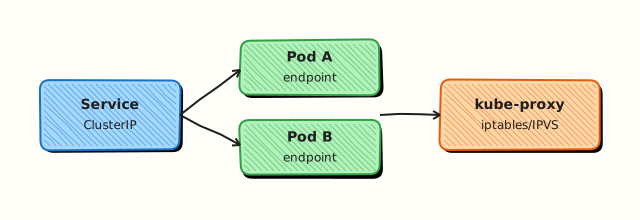
A Service gives a stable virtual IP and DNS name. Selectors bind to Pod labels; EndpointSlices track backends. kube-proxy (or eBPF dataplanes) implement distribution.
This is a core tutorial in Module 5 · Services & Networking of the REBASH Academy Kubernetes for Cloud & DevOps Engineers series — written for Cloud, DevOps, Platform, and SRE engineers.
Prerequisites
Learning Objectives
By the end of this tutorial, you will be able to:
- Create ClusterIP Service
- Contrast service types
- Use DNS
svc.namespace.svc.cluster.local - Inspect endpoints / EndpointSlices
Architecture
This topic’s control points and relationships are shown below.
Theory
What it is
A Service provides a stable virtual IP (ClusterIP) and DNS name in front of a changing set of Pods. You select Pods with labels; EndpointSlices track ready backends. Clients connect to the Service; the dataplane (kube-proxy, or eBPF alternatives) distributes connections to Pod IPs and ports.
Why it matters
Pods are mortal — their IPs change on every reschedule. Applications and other microservices need a durable address. Services also abstract exposure modes: internal only, node ports, cloud load balancers, or external DNS aliases. Without Services, Deployments alone cannot offer reliable in-cluster discovery.
How it works (mental model)
- Create a Service with a selector and port mapping (
port→targetPort). - Controllers populate EndpointSlices for matching ready Pods.
- CoreDNS resolves
my-svc.my-ns.svc.cluster.local(short names work inside the same namespace). - Traffic to the ClusterIP is load-balanced across backends.
- Change Pods underneath freely; the Service name stays constant.
Headless Services (clusterIP: None) return Pod DNS/IPs directly — common with StatefulSets.
Key concepts / comparisons
| Type | Typical use |
|---|---|
| ClusterIP | Default in-cluster access |
| NodePort | Lab / on-prem node exposure |
| LoadBalancer | Cloud LB integration |
| ExternalName | CNAME to external DNS |
| Headless | Direct Pod discovery |
| Piece | Role |
|---|---|
| Service | Stable VIP + DNS |
| EndpointSlice | Backend inventory |
| kube-proxy / eBPF | Dataplane programming |
Common pitfalls
- Selector labels that do not match the Pod template — empty endpoints, silent failures.
- Confusing Service
portwith containercontainerPort/targetPort. - Expecting LoadBalancer to allocate an address on kind without metalLB or similar.
- Testing with
curlto a Pod IP from outside the cluster network — use Service DNS from a debug Pod. - Ignoring readiness: not-ready Pods should drop from endpoints; missing probes keep bad Pods in the pool.
Hands-on Lab
Objective
Deploy nginx behind a ClusterIP Service, reach it by DNS from a debug Pod, and capture EndpointSlice evidence.
Prerequisites
- A working Kubernetes cluster (kind, minikube, or any lab cluster)
- kubectl with namespace-create rights
- Writable workspace at
~/rebash-k8s/module-05
Lab environment
Workspace: ~/rebash-k8s/module-05
Real-world scenario
Your microservice web must be reachable at a stable DNS name inside the cluster while Pods restart during rollouts. You apply Deployment + Service manifests, curl from a debug Pod using the Service DNS name, and save EndpointSlice proof for the architecture review.
Step-by-step tasks
Task 1 – Deployment and ClusterIP Service
Create namespace.yaml:
Create web-stack.yaml:
apiVersion: apps/v1
kind: Deployment
metadata:
  name: web
  namespace: rebash-m05
  labels:
    app: web
spec:
  replicas: 2
  selector:
    matchLabels:
      app: web
  template:
    metadata:
      labels:
        app: web
    spec:
      containers:
        - name: nginx
          image: nginx:1.27-alpine
          ports:
            - containerPort: 80
          readinessProbe:
            httpGet:
              path: /
              port: 80
            initialDelaySeconds: 2
            periodSeconds: 3
---
apiVersion: v1
kind: Service
metadata:
  name: web
  namespace: rebash-m05
spec:
  type: ClusterIP
  selector:
    app: web
  ports:
    - port: 80
      targetPort: 80
Apply and verify endpoints:
cd ~/rebash-k8s/module-05
kubectl apply -f namespace.yaml
kubectl apply -f web-stack.yaml
kubectl rollout status deployment/web -n rebash-m05 --timeout=180s
kubectl get svc,endpoints -n rebash-m05 | tee svc-endpoints.txt
grep web svc-endpoints.txt
Expected output
Service web has Endpoints with two Pod IPs.
Task 2 – Curl by DNS from debug Pod
Create debug-pod.yaml:
apiVersion: v1
kind: Pod
metadata:
  name: curl-debug
  namespace: rebash-m05
spec:
  restartPolicy: Never
  containers:
    - name: curl
      image: curlimages/curl:8.5.0
      command: ["sh", "-c", "curl -sS -o /dev/null -w '%{http_code}\\n' http://web.rebash-m05.svc.cluster.local/ | tee /tmp/http-code.txt && cat /tmp/http-code.txt && sleep 3600"]
Apply and read result:
cd ~/rebash-k8s/module-05
kubectl apply -f debug-pod.yaml
kubectl wait --for=condition=Ready pod/curl-debug -n rebash-m05 --timeout=120s
kubectl logs curl-debug -n rebash-m05 | tee curl-dns.txt
grep -q 200 curl-dns.txt
Expected output
curl-dns.txt contains 200.
Task 3 – EndpointSlice evidence
cd ~/rebash-k8s/module-05
kubectl get endpointslices -n rebash-m05 | tee endpointslices.txt
kubectl get endpointslices -n rebash-m05 -o yaml | grep -E 'addresses:|ready:' | tee endpointslices-detail.txt
test -s endpointslices-detail.txt
kubectl delete pod curl-debug -n rebash-m05 --ignore-not-found --wait=true
Expected output
EndpointSlice lists ready addresses backing Service web.
Validation steps
- Two Ready Pods behind Service
web - DNS curl from debug Pod returned HTTP 200
- EndpointSlice evidence captured
- Selectors match Pod labels (
app=web)
Common errors and fixes
| Error | Cause | Fix |
|---|---|---|
| Empty Endpoints | Selector mismatch | Compare Service selector to Pod labels |
| curl exits non-zero | Pods not Ready | Wait for rollout; check readinessProbe |
| Connection refused | Wrong port | Match targetPort to containerPort |
| DNS failure | CoreDNS issue | kubectl get pods -n kube-system -l k8s-app=kube-dns |
Challenge exercise
Scale Deployment to three replicas in web-stack.yaml, re-apply, and prove EndpointSlice address count increased.
Learning outcomes
- Exposed a Deployment with a ClusterIP Service
- Resolved in-cluster DNS (
service.namespace.svc.cluster.local) - Verified backends via Endpoints and EndpointSlices
Cleanup
Validation
- Lab commands run under
~/rebash-k8s/module-05/ - You can explain each Theory section in your own words
- You used modern tooling where it applies to this topic
- You can describe one production failure mode for this topic
Code Walkthrough
Production practice for Services and Cluster Networking always combines:
- Inspect before you change (status, plan, logs, dry-run)
- Prefer reversible, documented changes (Git, IaC, drop-ins, version pins)
- Capture evidence (command output, pipeline logs) for handovers
- Prefer current tools and APIs over legacy shortcuts
- Least privilege — escalate credentials only when required
Keep runbooks short enough to follow under pressure. Automate checks; keep humans for judgement.
Security Considerations
- Treat credentials and tokens for kubernetes as privileged — never commit them
- Prefer short-lived auth (OIDC, roles, SSO) over long-lived keys
- Validate blast radius before apply/deploy/delete operations
- Restrict who can approve production changes
- Collect audit logs; limit who can read sensitive traces
Common Mistakes
Selector labels that do not match the Pod template — empty endpoints, silent failures.
Validate assumptions against the Theory section and official docs before changing production.
Confusing Service port with container containerPort / targetPort.
Lab shortcuts (open security groups, admin roles, skip approvals) must not ship unchanged.
Changing production without a rollback path
Always know how to revert (previous artefact, prior release, state rollback, DNS failback).
Best Practices
- Encode Services and Cluster Networking changes as code and review them in pull requests
- Pin versions (images, modules, actions, provider plugins)
- Separate environments with clear promotion gates
- Alert on symptoms with runbooks attached
- Destroy lab resources; tag everything with owner and expiry where possible
Troubleshooting
| Symptom | Likely cause | Fix |
|---|---|---|
| Auth / permission denied | Wrong identity, policy, or scope | Check caller identity, roles, and least-privilege policies |
| Timeout / no route | Network, DNS, security group, or endpoint | Trace path, DNS, and allow-lists before retrying |
| Drift / unexpected plan | Manual change or wrong state/workspace | Reconcile desired vs actual; avoid click-ops on managed resources |
| Pipeline/job red | Flaky step, cache, or missing secret | Read failing step logs; bisect recent workflow/config changes |
| Cost spike | Idle load balancer, NAT, oversized compute | Inventory billable resources; stop/delete labs promptly |
Summary
Services and Cluster Networking is essential for Cloud and DevOps engineers working with kubernetes. Practise the lab until the inspection and change path is muscle memory, then continue the track.
Interview Questions
- What does a ClusterIP Service provide to clients?
- How do Service selectors relate to Pod labels?
- What are Endpoints or EndpointSlices used for?
- What happens if no Pods match a Service selector?
- When would you use a headless Service?
Sample answer — question 2
Selectors must match Pod labels for Endpoints to populate. Mismatched labels are a common reason Services exist but receive no backends.
Sample answer — question 4
With no matching Ready Pods, the Service still has a ClusterIP but no backends, so connections fail. Check selectors, readiness, and EndpointSlices when debugging.