GitOps and CI/CD with Kubernetes
Overview
Separate CI (build/push images) from GitOps (desired cluster state in Git) and sketch an Argo CD Application sync/rollback flow.
GitOps: Git is source of truth; a reconciler (Argo CD / Flux) syncs the cluster. Progressive delivery (Argo Rollouts / Flagger) gates traffic.
This is a core tutorial in Module 15 · GitOps of the REBASH Academy Kubernetes for Cloud & DevOps Engineers series — written for Cloud, DevOps, Platform, and SRE engineers.
Prerequisites
Learning Objectives
By the end of this tutorial, you will be able to:
- State GitOps principles
- Contrast push CI deploy vs pull GitOps
- Describe Argo CD sync / rollback
- Layout app vs config repos
Architecture
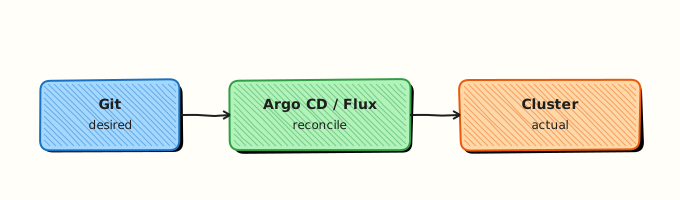
This topic’s control points and relationships are shown below.
Theory
What it is
GitOps keeps the desired cluster state in Git and uses a reconciler (Argo CD, Flux) to make the cluster match that state. CI still builds and tests images; it pushes artefacts to a registry and often opens a PR that bumps an image tag in the config repo. Progressive delivery tools (Argo Rollouts, Flagger) add traffic shifting and automated rollback on bad metrics.
Why it matters
Push-from-CI kubectl apply works until credentials sprawl, drifts accumulate, and nobody knows what production should look like. GitOps gives auditability (Git history), pull-based credentials on the cluster side, and a single rollback story: revert the commit or hard-sync a previous revision. Platform teams standardise Application/Kustomization objects per environment.
How it works (mental model)
- Developers merge app code → CI builds/pushes image → updates manifest/Helm values in Git.
- Argo CD/Flux detects the commit (webhook or poll) and syncs (apply/prune per policy).
- Kubernetes controllers reconcile Deployments and friends as usual.
- If health checks or metrics fail, roll back Git or disable auto-sync and fix forward.
- Drift (manual
kubectl edit) is either corrected on next sync or blocked by policy.
Desired state lives in Git; the cluster is a projection. Controllers still own runtime reconciliation.
Key concepts / comparisons
| Model | Flow |
|---|---|
| Push CI deploy | Pipeline kubeconfig applies YAML |
| Pull GitOps | In-cluster agent syncs from Git |
| Concern | Practice |
|---|---|
| App repo | Source code + Dockerfile |
| Config repo | Manifests / Helm / Kustomize per env |
| Secrets | Sealed Secrets, SOPS, ESO — not plain Git |
Common pitfalls
- Storing plaintext Secrets in Git.
- Auto-sync with prune in a shared folder that deletes unrelated resources.
- CI and GitOps both deploying the same app — fight over image tags.
- Monorepo paths without directory-scoped Applications — one bad sync affects all.
- Treating sync success as user-success without app health/metrics gates.
Hands-on Lab
Objective
Create a GitOps repository layout (apps/demo + clusters/dev), a CI workflow stub that kubectl dry-runs manifests, and offline YAML validation — then apply to an isolated namespace and prove Ready.
Prerequisites
- kubectl configured against kind or minikube (local lab cluster only)
- Python 3 with PyYAML (
python3 -c "import yaml"— installpyyamlif import fails) - Optional:
kustomizeorkubectl kustomizefor overlay rendering - Namespace-create rights; never target a shared production API server
- Writable workspace at
~/rebash-k8s/module-15
Lab environment
Workspace: ~/rebash-k8s/module-15
mkdir -p ~/rebash-k8s/module-15/{apps/demo,clusters/dev,.github/workflows}
cd ~/rebash-k8s/module-15
Real-world scenario
Your platform team adopts GitOps: application manifests live in apps/demo, environment overlays in clusters/dev, and CI validates every pull request with kubectl apply --dry-run=client before a cluster reconciler syncs. You scaffold the repo layout, wire a dry-run workflow stub, validate YAML offline, then prove the dev overlay reaches Ready in namespace rebash-gitops-lab.
Step-by-step tasks
Task 1 – Create base app manifests
Create apps/demo/deployment.yaml:
apiVersion: apps/v1
kind: Deployment
metadata:
  name: demo-api
  labels:
    app: demo-api
    app.kubernetes.io/part-of: rebash-gitops
spec:
  replicas: 1
  selector:
    matchLabels:
      app: demo-api
  template:
    metadata:
      labels:
        app: demo-api
    spec:
      containers:
        - name: api
          image: nginx:1.27-alpine
          ports:
            - containerPort: 80
          readinessProbe:
            httpGet:
              path: /
              port: 80
            initialDelaySeconds: 2
            periodSeconds: 5
          resources:
            requests:
              cpu: 50m
              memory: 64Mi
            limits:
              cpu: 200m
              memory: 128Mi
Create apps/demo/service.yaml:
apiVersion: v1
kind: Service
metadata:
  name: demo-api
  labels:
    app: demo-api
spec:
  selector:
    app: demo-api
  ports:
    - port: 80
      targetPort: 80
Validate offline:
cd ~/rebash-k8s/module-15
set -euo pipefail
python3 -c "
import yaml, pathlib
for p in ['apps/demo/deployment.yaml', 'apps/demo/service.yaml']:
    yaml.safe_load(pathlib.Path(p).read_text())
print('apps/demo manifests OK')
"
Expected output
apps/demo manifests OK
Task 2 – Create dev cluster overlay with Kustomize
Create clusters/dev/kustomization.yaml:
apiVersion: kustomize.config.k8s.io/v1beta1
kind: Kustomization
namespace: rebash-gitops-lab
resources:
  - namespace.yaml
  - ../../apps/demo/deployment.yaml
  - ../../apps/demo/service.yaml
commonLabels:
  environment: dev
Create clusters/dev/namespace.yaml:
apiVersion: v1
kind: Namespace
metadata:
  name: rebash-gitops-lab
  labels:
    environment: dev
    app.kubernetes.io/managed-by: rebash-lab
Render and validate:
cd ~/rebash-k8s/module-15
set -euo pipefail
if command -v kustomize >/dev/null 2>&1; then
  kustomize build clusters/dev | tee clusters/dev/rendered.yaml
elif kubectl kustomize clusters/dev | tee clusters/dev/rendered.yaml; then
  :
else
  echo "Install kustomize or use kubectl with kustomize support" >&2
  exit 1
fi
python3 -c "import yaml; list(yaml.safe_load_all(open('clusters/dev/rendered.yaml'))); print('rendered overlay OK')"
grep -q 'namespace: rebash-gitops-lab' clusters/dev/rendered.yaml
Expected output
rendered overlay OK; rendered YAML includes rebash-gitops-lab.
Task 3 – Create CI workflow stub for kubectl dry-run
Create .github/workflows/k8s-manifest-dry-run.yml:
name: Kubernetes manifest dry-run
on:
  pull_request:
    paths:
      - 'apps/**'
      - 'clusters/**'
  workflow_dispatch:

permissions:
  contents: read

jobs:
  validate:
    runs-on: ubuntu-latest
    steps:
      - uses: actions/checkout@v4
      - name: Render dev overlay
        run: |
          kubectl kustomize clusters/dev > /tmp/rendered.yaml
      - name: Client dry-run against cluster
        run: |
          kubectl apply --dry-run=client -f /tmp/rendered.yaml
        env:
          KUBECONFIG: ${{ secrets.LAB_KUBECONFIG }}
Validate offline (no cluster required):
cd ~/rebash-k8s/module-15
set -euo pipefail
python3 -c "import yaml; yaml.safe_load(open('.github/workflows/k8s-manifest-dry-run.yml')); print('workflow YAML OK')"
grep -q 'dry-run=client' .github/workflows/k8s-manifest-dry-run.yml
grep -q 'kubectl kustomize clusters/dev' .github/workflows/k8s-manifest-dry-run.yml
Expected output
workflow YAML OK
Task 4 – Apply dev overlay and capture evidence
Apply the GitOps dev overlay to your lab cluster and prove Ready.
cd ~/rebash-k8s/module-15
set -euo pipefail
kubectl apply -k clusters/dev
kubectl rollout status deployment/demo-api -n rebash-gitops-lab --timeout=120s
kubectl get deploy,po,svc -n rebash-gitops-lab | tee gitops-evidence.txt
kubectl get events -n rebash-gitops-lab --sort-by=.lastTimestamp | tail -n 10 | tee -a gitops-evidence.txt
tar -czf module-15-gitops-evidence.tgz apps/demo clusters/dev .github/workflows/k8s-manifest-dry-run.yml gitops-evidence.txt
ls -l module-15-gitops-evidence.tgz
Expected output
Deployment Available; tarball lists manifests and evidence.
Validation steps
-
apps/demoDeployment and Service parse with Python YAML -
clusters/devkustomize build sets namespacerebash-gitops-lab - CI workflow stub references kubectl dry-run and kustomize render
- Applied overlay reaches Ready in the lab cluster
- Evidence tarball contains manifests and
gitops-evidence.txt
Common errors and fixes
| Error | Cause | Fix |
|---|---|---|
| Kustomize path not found | Wrong relative resources path | Paths in overlay are relative to kustomization.yaml |
| dry-run auth failure | CI secret missing or wrong context | Use local kubectl apply -k first; fix kubeconfig in CI later |
| Pods NotReady | Probe path wrong for image | Use / for nginx; check describe pod Events |
| MkDocs build breaks on workflow | Unescaped Actions expressions in tutorial | Wrap workflow YAML in raw Jinja blocks |
| Namespace not created | Forgot namespace.yaml in overlay | Add Namespace manifest to kustomization resources |
Challenge exercise
Add a ConfigMap generator in clusters/dev/kustomization.yaml that sets LOG_LEVEL=debug, re-render, and prove the env var appears in the Pod spec after apply.
Learning outcomes
- Structured a GitOps repo with app base and environment overlay
- Authored a CI workflow stub for client-side dry-run validation
- Validated manifests offline with Python and kustomize
- Applied an overlay and captured rollout evidence
Cleanup
kubectl delete namespace rebash-gitops-lab --ignore-not-found --wait=true
rm -f ~/rebash-k8s/module-15/clusters/dev/rendered.yaml ~/rebash-k8s/module-15/gitops-evidence.txt ~/rebash-k8s/module-15/module-15-gitops-evidence.tgz
Validation
- Lab commands run under
~/rebash-k8s/module-15/{apps/demo,clusters/dev}/ - You can explain each Theory section in your own words
- You used modern tooling where it applies to this topic
- You can describe one production failure mode for this topic
Code Walkthrough
Production practice for GitOps and CI/CD with Kubernetes always combines:
- Inspect before you change (status, plan, logs, dry-run)
- Prefer reversible, documented changes (Git, IaC, drop-ins, version pins)
- Capture evidence (command output, pipeline logs) for handovers
- Prefer current tools and APIs over legacy shortcuts
- Least privilege — escalate credentials only when required
Keep runbooks short enough to follow under pressure. Automate checks; keep humans for judgement.
Security Considerations
- Treat credentials and tokens for kubernetes as privileged — never commit them
- Prefer short-lived auth (OIDC, roles, SSO) over long-lived keys
- Validate blast radius before apply/deploy/delete operations
- Restrict who can approve production changes
- Collect audit logs; limit who can read sensitive traces
Common Mistakes
Storing plaintext Secrets in Git.
Validate assumptions against the Theory section and official docs before changing production.
Auto-sync with prune in a shared folder that deletes unrelated resources.
Lab shortcuts (open security groups, admin roles, skip approvals) must not ship unchanged.
Changing production without a rollback path
Always know how to revert (previous artefact, prior release, state rollback, DNS failback).
Best Practices
- Encode GitOps and CI/CD with Kubernetes changes as code and review them in pull requests
- Pin versions (images, modules, actions, provider plugins)
- Separate environments with clear promotion gates
- Alert on symptoms with runbooks attached
- Destroy lab resources; tag everything with owner and expiry where possible
Troubleshooting
| Symptom | Likely cause | Fix |
|---|---|---|
| Auth / permission denied | Wrong identity, policy, or scope | Check caller identity, roles, and least-privilege policies |
| Timeout / no route | Network, DNS, security group, or endpoint | Trace path, DNS, and allow-lists before retrying |
| Drift / unexpected plan | Manual change or wrong state/workspace | Reconcile desired vs actual; avoid click-ops on managed resources |
| Pipeline/job red | Flaky step, cache, or missing secret | Read failing step logs; bisect recent workflow/config changes |
| Cost spike | Idle load balancer, NAT, oversized compute | Inventory billable resources; stop/delete labs promptly |
Summary
GitOps and CI/CD with Kubernetes is essential for Cloud and DevOps engineers working with kubernetes. Practise the lab until the inspection and change path is muscle memory, then continue the track.
Interview Questions
- What is GitOps in the context of Kubernetes delivery?
- Why is the Git repository treated as the source of truth rather than imperative kubectl changes?
- What is the difference between push-based CI deploy jobs and pull-based GitOps agents?
- What security trade-offs exist when CI pipelines hold kubeconfig credentials versus a cluster-side reconciler?
- How do you detect and remediate configuration drift?
Sample answer — question 2
Git records the desired state, enabling review, audit, and rollback through normal version control. Imperative cluster edits are easy to lose and hard to reproduce across environments.
Sample answer — question 4
CI push models concentrate powerful credentials in the pipeline. Pull-based controllers keep credentials in-cluster with narrower RBAC, reducing blast radius if the CI system is compromised, at the cost of another in-cluster component to operate.