GitOps Fundamentals
Overview
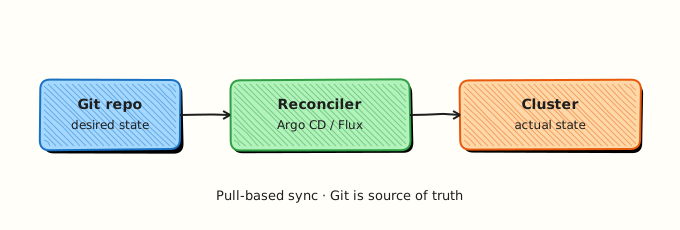
GitOps treats Git as the single source of truth for desired state — Kubernetes manifests, Helm values, or Kustomize overlays. A controller (Argo CD, Flux) pulls changes from Git and reconciles the cluster; humans do not kubectl apply ad hoc in production. Pull-based delivery improves auditability and rollback.
This is Tutorial 1 in Module 12: GitOps of the REBASH Academy Git & GitHub for Cloud & DevOps Engineers series — written for Cloud, DevOps, Platform, and SRE engineers.
Prerequisites
- GitHub Actions for DevOps
- Basic Kubernetes vocabulary (Deployment, Namespace)
- Git branching and PR workflow
Learning Objectives
By the end of this tutorial, you will be able to:
- State GitOps principles (declarative, versioned, automated, reconciled)
- Contrast push vs pull deployment models
- Layout
apps/vsclusters/in a GitOps repo - Commit a manifest change and document expected sync flow
- Build evidence under
~/rebash-git/module-12
Architecture
Application definitions live in apps/; environment-specific overlays in clusters/<env>/; the GitOps controller watches Git and applies drift correction.
Theory
What it is
GitOps combines Git workflow with continuous deployment: desired state is declared in Git; automation converges live systems toward that state. Declarative configs describe end state, not imperative steps. Pull-based controllers poll or webhook-fetch Git; push-based CI runs kubectl/helm from outside the cluster.
Why it matters
Change control maps 1:1 to commits and PRs. Rollback is git revert plus sync. Multi-cluster fleets share patterns — same app chart, different values per cluster folder. Incident response compares cluster drift to Git.
How it works
- Developer merges PR updating
clusters/prod/apps/payments/kustomization.yaml. - Argo CD/Flux detects new commit on tracked branch.
- Controller renders manifests (Helm/Kustomize) and diff against cluster.
- Sync applies changes; health checks report status.
- Drift (manual kubectl edit) is optionally auto-healed or flagged.
Key concepts and comparisons
| Principle | Meaning |
|---|---|
| Declarative | YAML/Helm describes target state |
| Versioned | Git history is audit log |
| Automated | Controller syncs |
| Reconciled | Loop detects drift |
| Layout | Holds |
|---|---|
| apps/ | Base charts, shared kustomize |
| clusters/prod/ | Env overlays, versions |
| clusters/staging/ | Lower env pins |
| Tool | Model |
|---|---|
| Argo CD | Kubernetes-native CD |
| Flux | GitOps toolkit, CNCF |
Common pitfalls
- Cluster-admin kubectl bypassing Git — drift returns.
- Secrets in plain YAML in Git — use sealed-secrets/ESO/Vault.
- One giant branch without env folders — blast radius.
- Auto-sync to prod without PR review on
main.
Hands-on Lab
Objective
Create GitOps repo skeleton with apps/ base manifest and clusters/dev/ overlay; simulate promotion by bumping image tag in Git and run gitops-sync-check.sh against repo layout.
Prerequisites
- Git 2.x
- Optional: kubectl (not required for file layout lab)
Lab environment
Workspace: ~/rebash-git/module-12
Real-world scenario
Platform team standardises on apps/ + clusters/ split. You onboard a new payments service to dev cluster via Git-only change.
Step-by-step tasks
Task 1 – apps/ base deployment
Create apps/payments/base/deployment.yaml:
apiVersion: apps/v1
kind: Deployment
metadata:
  name: payments
spec:
  replicas: 1
  selector:
    matchLabels:
      app: payments
  template:
    metadata:
      labels:
        app: payments
    spec:
      containers:
        - name: payments
          image: ghcr.io/rebash/payments:1.0.0
Create apps/payments/base/kustomization.yaml:
apiVersion: kustomize.config.k8s.io/v1beta1
kind: Kustomization
resources:
  - deployment.yaml
Initialise the GitOps repo:
cd ~/rebash-git/module-12
set -euo pipefail
rm -rf gitops-lab
mkdir -p gitops-lab/apps/payments/base gitops-lab/clusters/dev/apps/payments
cd gitops-lab
git init -b main
git config user.email 'lab@rebash.local'
git config user.name 'REBASH Lab'
git add apps/
git commit -m 'feat: add payments base app'
test -f apps/payments/base/deployment.yaml
cd ..
Expected output
Base app committed under apps/payments/base.
Task 2 – clusters/dev overlay
Create clusters/dev/apps/payments/kustomization.yaml:
apiVersion: kustomize.config.k8s.io/v1beta1
kind: Kustomization
resources:
  - ../../../../apps/payments/base
images:
  - name: ghcr.io/rebash/payments
    newTag: "1.0.0-dev.1"
Commit the overlay:
cd ~/rebash-git/module-12/gitops-lab
set -euo pipefail
git add clusters/
git commit -m 'feat: wire payments into dev cluster overlay'
grep -q '1.0.0-dev.1' clusters/dev/apps/payments/kustomization.yaml
cd ..
Expected output
Dev overlay references base and pins dev tag.
Task 3 – Promotion simulation and sync checks script
Create gitops-sync-check.sh:
#!/usr/bin/env bash
set -euo pipefail
test -f apps/payments/base/deployment.yaml
test -f clusters/dev/apps/payments/kustomization.yaml
grep -q '1.0.0-dev.2' clusters/dev/apps/payments/kustomization.yaml
grep -q 'ghcr.io/rebash/payments' clusters/dev/apps/payments/kustomization.yaml
echo "expected_sha=$(git rev-parse HEAD)"
echo 'layout_ok'
Promote the dev tag and validate:
cd ~/rebash-git/module-12/gitops-lab
set -euo pipefail
sed -i.bak 's/1.0.0-dev.1/1.0.0-dev.2/' clusters/dev/apps/payments/kustomization.yaml
rm -f clusters/dev/apps/payments/kustomization.yaml.bak
git commit -am 'deploy: promote payments to 1.0.0-dev.2 in dev'
chmod +x gitops-sync-check.sh
./gitops-sync-check.sh | tee ../gitops-sync-results.txt
grep -q 'layout_ok' ../gitops-sync-results.txt
git add gitops-sync-check.sh
git commit -m 'chore: add gitops sync check script'
git log --oneline | tee ../gitops-log.txt
grep -q 'promote payments' ../gitops-log.txt
tar -czf ../module-12-gitops-evidence.tgz -C .. gitops-log.txt gitops-sync-results.txt
ls -l ../module-12-gitops-evidence.tgz | tee ../gitops-evidence.txt
cd ..
Expected output
Tag bump commit; sync check script validates layout and pinned tag.
Validation steps
- apps/ and clusters/dev/ layout exists
- Overlay uses kustomize images newTag
- Promotion commit in log
-
gitops-sync-check.shpasses and writes results
Common errors and fixes
| Error | Cause | Fix |
|---|---|---|
| kustomize path broken | Wrong relative path | Fix resources path |
| base not found | Missing commit order | Commit apps before clusters |
| sed failed macOS | BSD sed | Use backup extension pattern |
| secret in yaml | Bad practice | Use External Secrets |
Challenge exercise
Add clusters/prod/apps/payments/ with tag 1.0.0, extend gitops-sync-check.sh to assert prod overlay exists, and set require_manual_sync: true in a clusters/prod/sync-policy.yaml file.
Learning outcomes
- Built standard GitOps directory layout
- Promoted version via Git edit only
- Validated post-merge sync readiness with executable checks
Cleanup
Validation
- Lab under module-12
- Can list four GitOps principles
- Can explain pull vs push deploy
- Know apps vs clusters split purpose
Code Walkthrough
- Never kubectl edit prod — fix Git; let controller sync.
- Pin versions in clusters/ — not floating tags in prod.
- PR every prod change — same as app code.
- Health in UI/CLI — argocd app get / flux get.
- Revert for rollback — Git-first incident response.
Security Considerations
- No plaintext secrets in Git — SealedSecrets, SOPS, or ESO.
- Restrict who can merge to
clusters/prod/. - RBAC on GitOps controller service accounts.
- Sign commits on prod paths if required.
- Audit sync events and Git SHA in logging.
Common Mistakes
Imperative hotfix in cluster
Next sync reverts or hides drift. Fix: Emergency PR; optional sync disable with ticket.
Same branch for all envs without folders
Prod and dev collide. Fix: clusters/
Auto-sync prod without checks
Bad merge deploys instantly. Fix: Manual sync or progressive delivery.
Best Practices
- One repo or monorepo policy documented org-wide
- ApplicationSet/Flux Kustomization for fleet scale
- Diff preview in PR via bot
- Tag Argo CD apps with team labels
- Keep chart sources version-pinned
Troubleshooting
| Symptom | Likely cause | Fix |
|---|---|---|
| OutOfSync persistent | Manual cluster change | Refresh; fix Git or enable auto-heal |
| Sync failed | Invalid YAML | kubectl apply --dry-run in CI |
| Wrong image | Overlay typo | Fix newTag; commit |
| App missing | Path not watched | Register Application manifest |
Summary
GitOps makes Git the desired-state contract for clusters — layout repos deliberately and let controllers pull changes. Next: Git for Infrastructure as Code.
Interview Questions
1. Four GitOps principles?
Reveal answer
Declarative configuration, versioned and immutable in Git, pulled automatically by agents, continuously reconciled against live state.
2. Pull vs push deployment?
Reveal answer
Pull: cluster controller fetches Git and applies. Push: CI/CD pipeline pushes changes with kubectl/helm from outside — harder to secure and audit at cluster boundary.
3. apps/ vs clusters/ layout?
Reveal answer
apps/ holds reusable base manifests/charts; clusters/
4. Rollback in GitOps?
Reveal answer
Revert or reset Git to known good commit; controller syncs previous desired state — faster and auditable than manual kubectl rollback alone.
5. Argo CD vs Flux one-liner?
Reveal answer
Both implement Kubernetes GitOps; Argo CD is UI-rich application-centric; Flux is modular GitOps Toolkit controllers — choice is org preference and ecosystem.
6. Drift detection meaning?
Reveal answer
Live cluster differs from Git-declared state — controller reports OutOfSync; may auto-remediate or alert depending on policy.
7. Why not store secrets in GitOps repo?
Reveal answer
Git history is long-lived and widely cloned — secrets leak via forks and logs; use encrypted or external secret operators instead.
8. GitOps vs traditional CI deploy?
Reveal answer
GitOps moves deploy authority to in-cluster pull agents with Git as SOT; traditional CI often pushes with long-lived cluster credentials from pipeline.