Production Git Practices
Overview
Teams debate GitHub Flow, Git Flow, and trunk-based development — not as religion, but as fit for release cadence, compliance, and team size. Production repository governance ties branching policy to CODEOWNERS, CI gates, semver, and GitOps sync. This capstone tutorial helps you choose and document what your org actually runs.
This is Tutorial 1 in Module 17: Production Git Practices of the REBASH Academy Git & GitHub for Cloud & DevOps Engineers series — written for Cloud, DevOps, Platform, and SRE engineers.
Prerequisites
- Git Bisect and Debugging History
- Branching Fundamentals
- Pull Requests and Code Review
- GitOps Fundamentals
Learning Objectives
By the end of this tutorial, you will be able to:
- Compare GitHub Flow, Git Flow, and trunk-based development
- Match workflow to release frequency and compliance needs
- Author a branch strategy YAML decision record
- Define sample branch protection and naming rules
- Deliver artefacts under
~/rebash-git/module-17
Architecture
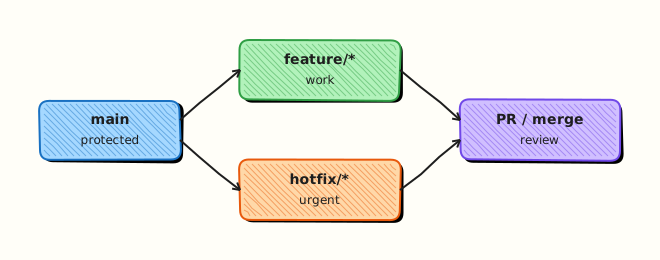
Strategy choice drives branch longevity, release branches, hotfix paths, and CI investment — all anchored on protected main as source of truth.
Theory
What it is
GitHub Flow: short-lived branches off main, PR review, deploy from main — simple for continuous delivery. Git Flow: long-lived develop, release/*, hotfix/* — formal semver releases. Trunk-based: developers commit small changes to main (or 1-day branches) with feature flags — maximises integration frequency. Governance encodes rules in docs, branch protection, and automation.
Why it matters
Wrong workflow creates either chaos (everyone on main breaking prod) or friction (month-long release branches blocking fixes). Regulated environments may require release branches with sign-off; SaaS startups often use GitHub Flow + GitOps. Platform teams document the decision so hires and auditors align.
How it works
- Assess release cadence (daily vs quarterly).
- Assess compliance (SOX, change tickets).
- Choose primary workflow; allow exceptions (hotfix).
- Document in
docs/BRANCH_POLICY.md. - Implement protection, CI, CODEOWNERS to match.
- Review strategy yearly as team scales.
Key concepts and comparisons
| Model | Branch life | Release | Best for |
|---|---|---|---|
| GitHub Flow | Short | Continuous from main | SaaS, GitOps |
| Git Flow | Long release branches | Semver cadence | Packaged software |
| Trunk-based | Hours–1 day | Continuous + flags | High maturity CI |
| Criterion | Lean GitHub Flow | Formal Git Flow |
|---|---|---|
| CI maturity | Must be strong | Can batch in release |
| Rollback | Revert + redeploy | Patch release branch |
| Complexity | Low | Higher |
Common pitfalls
- Adopting Git Flow without release discipline — only cost, no benefit.
- Trunk-based without feature flags — half-built features ship.
- Document says GitHub Flow but team runs months-long branches.
- No hotfix path documented — incidents improvise dangerously.
Hands-on Lab
Objective
Research three workflows, commit branch-strategy.yaml with decision matrix fields, and validate with SAMPLE_BRANCH_POLICY.yaml rules artefact.
Prerequisites
- Git 2.x
- Course modules 1–16 context
Lab environment
Workspace: ~/rebash-git/module-17
Real-world scenario
You lead platform engineering for a SaaS with daily deploys and quarterly compliance audits — leadership asks for a written branching decision and enforceable policy sample.
Step-by-step tasks
Task 1 – Branch strategy YAML with comparison matrix
Create branch-strategy.yaml:
context:
  product: SaaS platform
  deploy_cadence: daily_staging
  prod_promotion: gitops_from_main
  audit: quarterly_compliance_snapshot

options:
  github_flow:
    release_cadence: continuous
    branch_count: low
    hotfix_path: pr_to_main_cherry_pick_tag
    ci_demand: high_on_main
    audit_friendliness: pr_log_signed_merges
  git_flow:
    release_cadence: scheduled
    branch_count: high
    hotfix_path: hotfix_branch
    ci_demand: moderate
    audit_friendliness: release_branches
  trunk_based:
    release_cadence: continuous
    branch_count: minimal
    hotfix_path: revert_forward_on_main
    ci_demand: highest
    audit_friendliness: pr_and_feature_flags

decision:
  primary: github_flow
  exceptions:
    - git_flow_style_release_branches_for_quarterly_audit_tags
  not_adopted:
    - pure_trunk_based_until_feature_flag_platform_matures

consequences:
  - all_prod_changes_via_pr_to_main_with_codeowners
  - tag_vYYYY_QN_quarterly_from_main_sha
  - hotfix_branch_from_tag_if_needed_cherry_pick_back

review_date: '2027-02-01'
Validate the strategy file:
cd ~/rebash-git/module-17
set -euo pipefail
rm -rf governance-lab
mkdir governance-lab && cd governance-lab
git init -b main
git config user.email 'lab@rebash.local'
git config user.name 'REBASH Lab'
grep -q 'primary: github_flow' branch-strategy.yaml
grep -c 'github_flow\|git_flow\|trunk_based' branch-strategy.yaml | tee ../strategy-option-count.txt
test "$(cat ../strategy-option-count.txt)" -ge 3
cd ..
Expected output
Branch strategy YAML with three-way comparison and explicit decision.
Task 2 – Sample branch policy YAML artefact
Create SAMPLE_BRANCH_POLICY.yaml:
branch_naming:
  allowed_prefixes:
    - feature/
    - fix/
    - chore/
    - release/
  max_age_days: 14
  require_ticket_in_message: true

protected_branches:
  main:
    require_pull_request: true
    required_reviews: 2
    require_codeowners: true
    required_checks:
      - terraform-validate
      - secret-scan
    block_force_push: true
    require_signed_commits: true

hotfix:
  allowed_from: [main, tags/v*]
  max_lifetime_hours: 48
  require_incident_ticket: true

gitops:
  prod_changes_only_from: main
  manual_sync_prod: true
Commit the policy sample:
cd ~/rebash-git/module-17/governance-lab
set -euo pipefail
grep -q 'require_signed_commits' SAMPLE_BRANCH_POLICY.yaml
git add branch-strategy.yaml SAMPLE_BRANCH_POLICY.yaml
git commit -m 'chore: branch strategy YAML and sample policy'
cd ..
Expected output
Machine-readable policy sample committed.
Task 3 – Validation script and evidence
Create validate-policy.sh:
#!/usr/bin/env bash
set -euo pipefail
grep -q 'main' SAMPLE_BRANCH_POLICY.yaml
grep -q 'primary: github_flow' branch-strategy.yaml
python3 - <<'PY'
from pathlib import Path
required = {
    'branch-strategy.yaml': ['primary: github_flow', 'github_flow:', 'git_flow:', 'trunk_based:'],
    'SAMPLE_BRANCH_POLICY.yaml': ['protected_branches:', 'require_signed_commits'],
}
for name, keys in required.items():
    text = Path(name).read_text()
    for key in keys:
        assert key in text, f'missing {key} in {name}'
print('yaml_ok')
PY
echo 'policy_ok'
Run validation and archive evidence:
cd ~/rebash-git/module-17/governance-lab
set -euo pipefail
chmod +x validate-policy.sh
./validate-policy.sh | tee ../policy-validate.txt
grep -q 'policy_ok' ../policy-validate.txt
git add validate-policy.sh
git commit -m 'chore: add policy validation script'
tar -czf ../module-17-governance-evidence.tgz -C .. strategy-option-count.txt policy-validate.txt
ls -l ../module-17-governance-evidence.tgz | tee ../governance-evidence.txt
cd ..
Expected output
validate-policy.sh passes; evidence tarball created.
Validation steps
-
branch-strategy.yamlcompares three workflows - Explicit decision and exceptions in YAML
- SAMPLE_BRANCH_POLICY.yaml defines main protection
- validate-policy.sh exits success
Common errors and fixes
| Error | Cause | Fix |
|---|---|---|
| Policy contradicts decision | Copy-paste | Align YAML with doc |
| No review date | Incomplete ADR | Add review section |
| validate fails | missing string | fix grep patterns |
| YAML typo | indent | lint yaml |
Challenge exercise
Add rulesets_mapping keys to branch-strategy.yaml mapping each policy rule to GitHub branch rulesets setting names — commit on new branch docs/rulesets-mapping.
Learning outcomes
- Compared workflows with structured YAML matrix
- Authored enforceable branch policy sample
- Linked strategy to GitOps prod constraints
Cleanup
Validation
- Lab under module-17
- Can defend workflow choice for SaaS vs packaged software
- Can list GitHub Flow steps
- Can explain quarterly audit exception pattern
Code Walkthrough
- Write decisions down — ADR format prevents oral tradition drift.
- Policy as code — eventually encode YAML in OPA or forge API.
- Revisit on scale — trunk-based when CI + flags mature.
- Hotfix always documented — incident stress needs runbook.
- Align GitOps — prod sync rules match branch policy.
Security Considerations
- Signed commits in policy for regulated paths
- Admin bypass logged and rare
- Release tags immutable
- CODEOWNERS on policy files themselves
- Separate repos for prod secrets config if needed
Common Mistakes
Git Flow ceremony without releases
Extra branches slow delivery. Fix: Simplify to GitHub Flow if shipping daily.
Trunk-based without CI
main breaks constantly. Fix: invest in tests first.
Policy not enforced technically
Document ignored. Fix: branch rulesets + required checks.
Best Practices
- ADR per major workflow change
- Train new hires on named workflow
- Metrics: branch age, PR cycle time, deploy frequency
- Align semver tags with audit snapshots
- Feature flags decouple deploy from release
Troubleshooting
| Symptom | Likely cause | Fix |
|---|---|---|
| Teams use different flows | No ADR | publish decision |
| Release branch drift | infrequent merges | schedule merges |
| Hotfix missed on main | no cherry-pick rule | update policy |
| GitOps bypass | kubectl culture | controller permissions |
Summary
Production Git is policy plus tooling — choose GitHub Flow, Git Flow, or trunk-based deliberately, then enforce with protection and CI. You have completed the core Git & GitHub course tutorials — revisit the course index for labs, interview prep, and capstone.
Interview Questions
1. GitHub Flow in four steps?
Reveal answer
Branch from main, commit and push, open PR with review and CI, merge to main and deploy — main always releasable.
2. Git Flow release branch purpose?
Reveal answer
Stabilise semver release with only fixes while develop continues — cut release/*, test, tag, merge to main and develop.
3. Trunk-based prerequisite?
Reveal answer
Strong CI, feature flags, small batches, culture of fixing main immediately — high integration frequency discipline.
4. When prefer Git Flow over GitHub Flow?
Reveal answer
Scheduled semver releases, supported versions in parallel, packaged software — when continuous deploy from main is not desired for all customers.
5. Hotfix under GitHub Flow?
Reveal answer
Short-lived fix/* from main, fast PR, merge, deploy; tag if needed; cherry-pick to release line if multiple versions supported.
6. Repository governance components?
Reveal answer
Branch protection, CODEOWNERS, signed commits, secret scanning, PR templates, semver tags, documented workflow ADR, audit logs.
7. Feature flags vs long branches?
Reveal answer
Flags hide incomplete features on main safely; long branches hide integration risk until merge — trunk-based favours flags over month branches.
8. GitOps interaction with GitHub Flow?
Reveal answer
Merge to main is approval gate; GitOps controller syncs main to cluster — branch policy must keep main deployable; prod manual sync optional extra gate.