Branching Fundamentals
Overview
Branches are lightweight pointers that let teams ship features, hotfixes, and experiments without destabilising main. Cloud and DevOps delivery relies on short-lived feature branches, protected main, and clear naming so automation (CI, CODEOWNERS, release bots) can route work correctly.
This is Tutorial 1 in Module 5: Branching of the REBASH Academy Git & GitHub for Cloud & DevOps Engineers series — written for Cloud, DevOps, Platform, and SRE engineers. You will create branches with git switch, follow naming conventions, and visualise strategy with a branching diagram.
Prerequisites
- .gitignore and .gitattributes
- Git 2.23+ (for
git switch) - Understanding of commits and remotes
Learning Objectives
By the end of this tutorial, you will be able to:
- Explain what a branch is relative to HEAD and commits
- Create and switch branches with
git switch -c - Apply team naming patterns (
feature/,fix/,chore/) - List and delete merged branches safely
- Document branch layout evidence under
~/rebash-git/module-05
Architecture
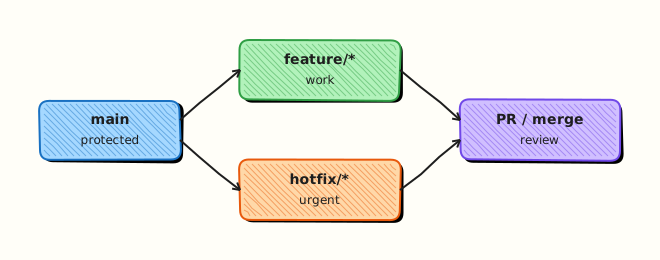
main stays deployable; feature branches diverge and rejoin via merge or pull request; HEAD tracks your current branch checkout.
Theory
What it is
A branch is a named reference (ref) pointing at a commit. Creating a branch does not copy files — it adds a pointer. HEAD usually points to the current branch ref, which points to a commit. Switching branches updates the working tree to match that commit's tree. Feature branches isolate work until review and CI pass.
Why it matters
Platform teams run dozens of parallel changes — Helm chart bumps, Terraform modules, pipeline fixes. Without branches, half-finished work would block releases. Naming (feature/add-oidc-role, fix/pipeline-timeout) lets bots assign reviewers and environments. Short-lived branches reduce merge pain and keep main always releasable.
How it works
- Start on
mainat commitA. git switch -c feature/widgetcreates reffeature/widgetatAand checks it out.- New commits advance
feature/widget;mainstays atAuntil merge. git switch mainmoves HEAD back; working tree matchesmain.- After merge, delete local branch with
git branch -d feature/widget.
Key concepts and comparisons
| Command | Purpose |
|---|---|
git branch | List branches |
git switch -c name | Create and checkout |
git switch main | Return to main |
git branch -d name | Delete merged branch |
git branch -vv | Show tracking info |
| Naming prefix | Typical use |
|---|---|
feature/ | New capability |
fix/ | Bug or incident patch |
chore/ | Tooling, deps, docs-only infra |
release/ | Release preparation (some flows) |
Common pitfalls
- Long-lived branches that diverge hundreds of commits from
main. - Non-descriptive names (
test,john-branch) breaking automation. - Forgetting to pull latest
mainbefore creating a feature branch. - Deleting branches with
-Dwhile unmerged work still exists only there.
Hands-on Lab
Objective
Simulate a platform repo: create feature/add-healthcheck and fix/readiness-probe, commit on each, merge one via fast-forward practice setup, and export branch graph evidence.
Prerequisites
- Git 2.x with
switch
Lab environment
Workspace: ~/rebash-git/module-05
Real-world scenario
You maintain a Kubernetes manifest repo. Two engineers work in parallel — one adds a liveness probe feature, another fixes readiness timing — using separate branches from updated main.
Step-by-step tasks
Task 1 – Initialise main and feature branch
Create base manifest and branch for healthcheck work.
cd ~/rebash-git/module-05
set -euo pipefail
rm -rf branch-lab
mkdir branch-lab && cd branch-lab
git init -b main
git config user.email 'lab@rebash.local'
git config user.name 'REBASH Lab'
mkdir k8s
printf 'containers:\n  - name: app\n' > k8s/deployment.yaml
git add k8s/deployment.yaml
git commit -m 'chore: initial deployment manifest'
git switch -c feature/add-healthcheck
printf '    livenessProbe:\n      httpGet:\n        path: /healthz\n' >> k8s/deployment.yaml
git commit -am 'feat: add liveness healthcheck'
git log --oneline -1 | tee ../feature-commit.txt
grep -q 'liveness' ../feature-commit.txt
cd ..
Expected output
Feature branch one commit ahead of main.
Task 2 – Second branch from main for fix
Switch to main, create fix/readiness-probe, commit fix independently.
cd ~/rebash-git/module-05/branch-lab
set -euo pipefail
git switch main
git switch -c fix/readiness-probe
printf '    readinessProbe:\n      httpGet:\n        path: /ready\n' >> k8s/deployment.yaml
git commit -am 'fix: add readiness probe path'
git branch | tee ../branch-list.txt
grep -q 'fix/readiness-probe' ../branch-list.txt
grep -q 'feature/add-healthcheck' ../branch-list.txt
git log --oneline --graph --decorate --all | tee ../branch-graph.txt
cd ..
Expected output
Graph shows two branches diverging from main.
Task 3 – Merge feature to main and clean up
Merge healthcheck feature; verify branch pointers; prepare evidence.
cd ~/rebash-git/module-05/branch-lab
set -euo pipefail
git switch main
git merge feature/add-healthcheck -m 'merge: feature/add-healthcheck'
grep -q 'livenessProbe' k8s/deployment.yaml
git branch --merged main | tee ../merged-branches.txt
grep -q 'feature/add-healthcheck' ../merged-branches.txt
git branch -d feature/add-healthcheck
git branch | tee ../after-delete.txt
! grep -q 'feature/add-healthcheck' ../after-delete.txt
tar -czf ../module-05-branch-evidence.tgz -C .. branch-graph.txt merged-branches.txt
ls -l ../module-05-branch-evidence.tgz | tee ../branch-evidence.txt
cd ..
Expected output
main contains liveness probe; feature branch deleted after merge.
Validation steps
- Two feature branches created from
main - Graph shows divergence
- Merged branch deleted with
-d -
fix/readiness-probestill exists unmerged
Common errors and fixes
| Error | Cause | Fix |
|---|---|---|
pathspec did not match | Typo in branch name | git branch to list |
| Cannot switch with local changes | Dirty working tree | Commit, stash, or restore |
not fully merged on delete | Branch not merged | Merge or use -D knowingly |
| Wrong base commit | Branched from feature | Recreate from main |
Challenge exercise
Document a one-page branch-policy.md in the repo listing allowed prefixes, max branch age (14 days), and requirement to rebase on main weekly — commit on chore/branch-policy.
Learning outcomes
- Created and switched named feature branches
- Visualised parallel work with
--graph - Merged and deleted a completed branch
Cleanup
Validation
- Lab under
~/rebash-git/module-05 - Can define branch vs commit vs HEAD
- Can explain feature branch purpose
- Can name one risk of long-lived branches
Code Walkthrough
- Update main first —
git switch main && git pullbefore new branch. - Name for automation — include ticket ID if Jira/GitHub Issues integrate.
- Keep branches short — merge or abandon within days, not months.
- Graph before merge —
git log --graph --allconfirms topology. - Delete after merge — reduce clutter; remote delete on GitHub too.
Security Considerations
- Do not push experimental branches with secrets to shared remotes.
- Protect
mainand production release branches on the forge. - Limit who can create
release/*or environment branches. - Audit orphaned branches for stale credentials in old commits.
- Use branch protection instead of informal "do not push" rules.
Common Mistakes
Branching from stale main
You inherit silent conflicts and duplicate work. Fix: Pull/rebase main before git switch -c.
Everything on one branch
Mixed features block review and rollback. Fix: One concern per branch; use stacked PRs if needed.
Never deleting branches
Hundreds of stale refs confuse humans and CI. Fix: Delete merged branches locally and on origin.
Best Practices
- Use
git switchinstead of legacycheckoutfor clarity - Align naming with org convention documented in CONTRIBUTING.md
- Keep
maingreen — CI must pass before merge - Rebase or merge
maininto feature frequently - Tag releases only from vetted
mainor release branches
Troubleshooting
| Symptom | Likely cause | Fix |
|---|---|---|
| Detached HEAD after checkout | Checked out commit SHA | git switch main |
| Branch already exists | Name collision | Pick new name or delete old |
| Switch blocked | Uncommitted changes | Stash or commit |
| Wrong files after switch | Uncommitted carryover | Stash before switch |
Summary
Branches enable parallel, reviewable DevOps work without blocking releases. Next: Merging and Merge Conflicts to integrate branches and resolve clashes.
Interview Questions
1. What is a Git branch technically?
Reveal answer
A movable pointer (ref) to a commit — cheap to create because it does not duplicate file content, only references an existing commit SHA.
2. Why use feature branches in DevOps repos?
Reveal answer
They isolate in-progress IaC or pipeline changes, let CI run per branch, enable pull request review, and keep main deployable while work continues.
3. git switch vs git checkout for branches?
Reveal answer
git switch (Git 2.23+) focuses on branch operations with clearer errors; checkout is legacy and overloaded with path and commit checkout.
4. What naming helps automation?
Reveal answer
Prefixes like feature/, fix/, ticket IDs — CODEOWNERS, CI workflows, and deployment bots can match paths and branch patterns.
5. When is it safe to git branch -d?
Reveal answer
When the branch tip is reachable from the current HEAD history (merged) — Git warns if commits would be lost.
6. What is HEAD?
Reveal answer
The symbolic ref to your current checkout — usually a branch name that points to the commit you are working on.
7. Risk of long-lived feature branches?
Reveal answer
Merge conflicts accumulate, drift from main breaks CI assumptions, and integration pain delays delivery — prefer short-lived branches and frequent integration.
8. Should hotfixes branch from main or tag?
Reveal answer
Typically from the production line — often main or a release tag — so the fix can ship fast and backport; org policy defines exact flow (GitHub Flow vs Git Flow).