GitHub Actions for DevOps
Overview
GitHub Actions runs event-driven workflows in YAML — on push, pull request, schedule, or release. Jobs execute on runners (GitHub-hosted or self-hosted) with steps that checkout code, run tests, build images, and call cloud APIs using secrets and variables.
This is Tutorial 1 in Module 11: GitHub Actions of the REBASH Academy Git & GitHub for Cloud & DevOps Engineers series — written for Cloud, DevOps, Platform, and SRE engineers.
Prerequisites
- Pull Requests and Code Review
- Basic YAML
- Understanding of CI concepts
Learning Objectives
By the end of this tutorial, you will be able to:
- Structure workflow files under
.github/workflows/ - Trigger on push and pull_request with path filters
- Write a validate job with bash steps and artefact output
- Escape GitHub Actions syntax for MkDocs (raw Jinja blocks)
- Validate workflow YAML locally under
~/rebash-git/module-11
Architecture
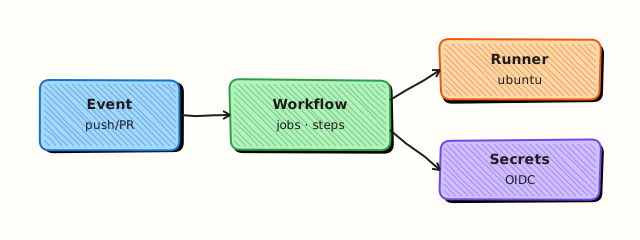
Events trigger workflows; jobs run on runners; steps execute actions or shell commands; secrets inject at runtime — never commit secrets to Git.
Theory
What it is
A workflow is a YAML file defining on triggers, jobs, and steps. Jobs run in parallel by default (unless needs); steps are sequential. Actions are reusable units from marketplace or local ./.github/actions. Runners provide the VM/container environment. Secrets (secrets.AWS_ROLE) come from repo/org settings; variables hold non-sensitive config.
Why it matters
GitOps and IaC repos gate merges on terraform validate, tflint, container scans, and unit tests. Actions replace Jenkins for many teams — same repo houses code and pipeline. Misconfigured pull_request_target or leaked secrets in logs are common incident sources.
How it works
- Developer pushes branch;
pull_requestevent fires workflow. - Job
validatechecks out repo, sets up tools, runs commands. - Step outputs logs; optional artefact upload.
- Required check name must match branch protection.
- Reusable workflows (
workflow_call) share org standards.
Key concepts and comparisons
| Key | Role |
|---|---|
| on | Triggers |
| jobs | Parallel units |
| needs | Job dependency DAG |
| strategy.matrix | Multi-version/OS tests |
| permissions | GITHUB_TOKEN scope |
| concurrency | Cancel duplicate runs |
| DevOps pattern | Workflow shape |
|---|---|
| IaC validate | PR → fmt + validate |
| Image build | push tag → build push ECR |
| Deploy | workflow_dispatch + env |
Common pitfalls
- Using
pull_request_targetwith untrusted code checkout — RCE risk. - Echoing secrets in logs — GitHub masks but custom encoding may leak.
- Missing
permissions:least privilege on GITHUB_TOKEN. - Hard-coding Actions expressions in docs without raw Jinja wrapping, which breaks MkDocs.
Hands-on Lab
Objective
Create a repository with a sample validate.yml workflow that runs shell validation on Terraform stub files and passes local YAML syntax checks.
Prerequisites
- Git 2.x
- Python 3 with
pip install pyyamloptional for yamllint
Lab environment
Workspace: ~/rebash-git/module-11
Real-world scenario
Platform team requires every PR touching *.tf to run a lightweight validate workflow before reviewers approve.
Step-by-step tasks
Task 1 – Repo and Terraform stub
Create main.tf:
Initialise the repo:
cd ~/rebash-git/module-11
set -euo pipefail
rm -rf actions-lab
mkdir -p actions-lab/.github/workflows
cd actions-lab
git init -b main
git config user.email 'lab@rebash.local'
git config user.name 'REBASH Lab'
git add main.tf
git commit -m 'chore: terraform stub'
cd ..
Expected output
Minimal Terraform file on main.
Task 2 – Write validate workflow (MkDocs-safe pattern documented)
Create .github/workflows/validate.yml. In repository docs we escape Actions expressions for MkDocs; in the actual file use real GitHub Actions syntax.
name: Validate Terraform

on:
  push:
    branches: [main]
    paths: ['**.tf']
  pull_request:
    paths: ['**.tf']

permissions:
  contents: read

jobs:
  validate:
    runs-on: ubuntu-latest
    steps:
      - uses: actions/checkout@v4
      - name: Install Terraform
        uses: hashicorp/setup-terraform@v3
        with:
          terraform_version: "1.5.7"
      - name: Terraform fmt check
        run: terraform fmt -check -recursive
      - name: Terraform init and validate
        run: |
          terraform init -backend=false
          terraform validate
      - name: Write evidence
        run: echo "validate=pass" > validate-evidence.txt
      - uses: actions/upload-artifact@v4
        with:
          name: validate-evidence
          path: validate-evidence.txt
Commit the workflow:
cd ~/rebash-git/module-11/actions-lab
set -euo pipefail
git add .github/workflows/validate.yml
git commit -m 'ci: add terraform validate workflow'
grep -q 'validate:' .github/workflows/validate.yml
cd ..
Expected output
Workflow committed with path filters and least-privilege permissions.
Task 3 – Local validation of workflow structure
Simulate CI checks without GitHub using shell and optional Python.
cd ~/rebash-git/module-11/actions-lab
set -euo pipefail
terraform fmt -check -recursive 2>/dev/null || terraform fmt -recursive && terraform fmt -check -recursive
terraform init -backend=false
terraform validate | tee ../terraform-validate-out.txt
grep -qi 'success\|Success' ../terraform-validate-out.txt || terraform validate
python3 - <<'PY' 2>/dev/null || true
import yaml, sys
with open('.github/workflows/validate.yml') as f:
    yaml.safe_load(f)
print('yaml_ok')
PY
grep -q 'Validate Terraform' .github/workflows/validate.yml
tar -czf ../module-11-actions-evidence.tgz -C .. terraform-validate-out.txt
ls -l ../module-11-actions-evidence.tgz | tee ../actions-evidence.txt
cd ..
Expected output
Terraform validate succeeds; workflow name grep matches.
Validation steps
- Workflow under
.github/workflows/validate.yml - Path filter includes
**.tf - permissions contents read only
- Local terraform validate passed
Common errors and fixes
| Error | Cause | Fix |
|---|---|---|
| YAML parse error | Indentation | yamllint; 2-space indent |
| terraform not found | Local PATH | Install tf or use setup action only on GH |
| workflow not triggered | Path filter | Touch .tf file in PR |
| secret not found | Not configured | Add in repo settings |
Challenge exercise
Add a workflow_dispatch trigger and a concurrency group keyed on ${ github.ref } — in your committed YAML use proper GitHub expression syntax (see GitHub docs). Add matrix terraform_version: ['1.5.7', '1.6.0'] for validate job.
Learning outcomes
- Authored event-driven workflow YAML
- Applied path filters and permissions
- Ran validate steps locally before push
Cleanup
Validation
- Lab under module-11
- Can explain jobs vs steps
- Can explain secrets vs variables
- Know why permissions block matters
Code Walkthrough
- Pin action versions —
@v4not@mainfor supply chain. - Path filters — save runner minutes on monorepos.
- Minimal permissions — default read-only GITHUB_TOKEN.
- Artefacts for plan — upload terraform plan in guarded workflows.
- Reusable workflows — org standard for validate/deploy.
Security Considerations
- Never commit secrets; use GitHub Secrets and OIDC to cloud.
- Avoid
pull_request_targetrunning PR code with secrets. - Mask outputs; do not print secrets in terraform plan in public forks.
- Use environments with required reviewers for production deploy jobs.
- Enable Dependabot for action version bumps.
Common Mistakes
Overprivileged GITHUB_TOKEN
write-all enables supply chain attacks if workflow compromised. Fix: Explicit permissions: per job.
Running untrusted PR workflows with secrets
Fork PRs can exfiltrate secrets. Fix: Approval for first-time contributors; no secrets on fork workflows.
Unpinned third-party actions
Tag movement can inject malicious code. Fix: Pin SHA or semver tag.
Best Practices
- Required checks match branch protection names exactly
- Cache Terraform providers in CI for speed
- Self-hosted runners for private network deploy targets
- Separate workflows for CI vs CD with different triggers
- Document workflow in README with badge
Troubleshooting
| Symptom | Likely cause | Fix |
|---|---|---|
| Workflow skipped | paths filter | Adjust paths or event |
| Job stuck queued | Runner capacity | Wait or self-hosted |
| 403 GITHUB_TOKEN | permissions | Add contents/write if needed |
| Action not found | Typo or private | Check name and access |
Summary
GitHub Actions embed CI/CD in the repository — start with validate workflows, least privilege, and pinned actions. Next: GitOps Fundamentals.
Interview Questions
1. Jobs vs steps in Actions?
Reveal answer
Jobs are independent runner allocations (parallel unless needs); steps are sequential commands or action calls within one job sharing the same runner filesystem.
2. secrets vs variables?
Reveal answer
Secrets are encrypted sensitive values (API keys); variables are plain config (region name, feature flags) — both inject at runtime but secrets are masked in logs.
3. Why path filters on on.push.paths?
Reveal answer
Monorepos trigger only relevant workflows — saves minutes and reduces noise when unrelated directories change.
4. Self-hosted vs GitHub-hosted runners?
Reveal answer
GitHub-hosted are managed VMs; self-hosted run inside your network for private resource access — you patch and secure them.
5. workflow_call purpose?
Reveal answer
Reusable workflow invoked by other repos/workflows — standardises org-wide validate or deploy patterns.
6. pull_request vs pull_request_target?
Reveal answer
Normal pull_request runs in merge context with limited fork secrets; pull_request_target runs base repo context — dangerous with untrusted code checkout — use only with extreme care.
7. How tie CI to branch protection?
Reveal answer
Workflow job name becomes status check; enable "Require status checks" and select that job name before merge allowed.
8. OIDC vs long-lived cloud keys in Actions?
Reveal answer
OIDC federates short-lived tokens from GitHub to AWS/Azure/GCP — preferred over static keys in secrets for rotation and blast radius.
Related Tutorials
References
MkDocs note — escaping Actions expressions in tutorial docs
When documenting Actions expressions inside MkDocs Markdown, wrap examples in raw Jinja blocks (raw / endraw) so mkdocs-macros does not interpret them. Committed workflow files in your repository use normal Actions expression syntax with no MkDocs wrapping.