Viewing History and Diffs
Overview
When production breaks after a deploy, the first question is "what changed?" Git history tools — log, show, diff, and blame — let you answer that without guessing. Reviewers use the same commands to validate pull requests locally; SRE teams use them during incident response and postmortems.
This is Tutorial 3 in Module 3: Git Basics of the REBASH Academy Git & GitHub for Cloud & DevOps Engineers series — written for Cloud, DevOps, Platform, and SRE engineers. You will build a small commit graph, inspect it visually, compare versions, and attribute line-level changes.
Prerequisites
- Basic Git Workflow — Add, Commit, Push
- Git 2.x
- Comfort reading unified diff output
Learning Objectives
By the end of this tutorial, you will be able to:
- Navigate history with
git log --oneline --graph --decorate - Inspect a single commit with
git show - Compare working tree, index, and commits with
git diff - Use
git blameto find who last changed a line - Capture audit evidence under
~/rebash-git/module-03
Architecture
Commits form a directed acyclic graph (DAG); log walks refs; diff compares trees or blobs; blame maps lines to introducing commits.
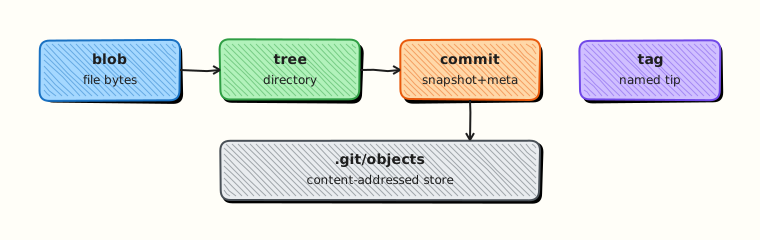
Theory
What it is
History inspection commands read Git's object database without modifying it. git log lists commits reachable from a ref. git show displays one commit including its patch. git diff compares two snapshots (files, commits, or staging area). git blame annotates each line with the commit and author that last modified it.
Why it matters
DevOps changes are often small but high impact — a single Terraform variable or pipeline secret reference. During incidents you need fast, accurate diffs between "last good deploy" and "current." Code review on GitHub mirrors these local commands; knowing them makes you effective offline and in CI debug jobs.
How it works
git logfollows parent pointers fromHEAD(or a named ref).- Filters (
--author,--since, pathspecs) narrow results. git show <sha>prints metadata + patch for that commit.git diff A Bcompares tree snapshots;git diffalone compares working tree to index.git blame fileruns a reverse line-level history walk.
Key concepts and comparisons
| Command | Typical use |
|---|---|
git log --oneline --graph | Visual branch history |
git log -p -- path | Patch history for one file |
git show HEAD~1 | Previous commit details |
git diff main..feature | All changes on feature branch |
git diff --cached | Staged vs last commit |
git blame -L 10,20 file.tf | Line range attribution |
| Diff form | Meaning |
|---|---|
git diff | Working tree vs index |
git diff --cached | Index vs HEAD |
git diff HEAD | Working tree vs HEAD |
git diff v1.0 v1.1 | Between tags |
Common pitfalls
- Reading
git blameoutput without checking if a line was moved (-M) or copied (-C). - Using
git logwithout--graphon branched repos and missing merge structure. - Comparing wrong refs (
main..featurevsfeature..main— direction matters for reachability). - Assuming GitHub's web diff replaces local
git diffduring air-gapped incident response.
Hands-on Lab
Objective
Create a three-commit history with a branch merge, produce graph and diff artefacts, and use blame to trace a configuration line change.
Prerequisites
- Git 2.x
Lab environment
Workspace: ~/rebash-git/module-03
mkdir -p ~/rebash-git/module-03/history-lab && cd ~/rebash-git/module-03/history-lab
set -euo pipefail
Real-world scenario
An on-call engineer needs to know which commit raised the replica count in deploy.yaml and what else changed in that release. You simulate that audit locally.
Step-by-step tasks
Task 1 – Build commit history on main
Create a repo with three commits touching a deploy manifest.
cd ~/rebash-git/module-03
set -euo pipefail
rm -rf history-lab
mkdir history-lab && cd history-lab
git init -b main
git config user.email 'lab@rebash.local'
git config user.name 'REBASH Lab'
mkdir -p k8s
printf 'replicas: 1\n' > k8s/deploy.yaml
git add k8s/deploy.yaml
git commit -m 'feat: initial deploy manifest with 1 replica'
printf 'replicas: 2\n' > k8s/deploy.yaml
git commit -am 'feat: scale to 2 replicas for load test'
echo '# runbook' > RUNBOOK.md
git add RUNBOOK.md
git commit -m 'docs: add runbook stub'
git log --oneline | tee ../history-log.txt
test "$(git rev-list --count HEAD)" -eq 3
Expected output
Three commits; history-log.txt lists them newest-first.
Task 2 – Graph, show, and range diff
Export visual history and compare first vs last commit on the manifest.
cd ~/rebash-git/module-03/history-lab
set -euo pipefail
git log --oneline --graph --decorate --all | tee ../history-graph.txt
FIRST=$(git rev-list --max-parents=0 HEAD)
git show --stat "$FIRST" | tee ../history-show-first.txt
git diff "$FIRST" HEAD -- k8s/deploy.yaml | tee ../history-deploy-diff.txt
grep -q 'replicas: 2' ../history-deploy-diff.txt
git log -1 --format='%H %s' HEAD | tee ../history-head.txt
Expected output
Graph file shows linear history; diff shows replica change from 1 to 2.
Task 3 – Blame and staged diff drill
Modify a line, inspect blame before commit, then compare cached diff.
cd ~/rebash-git/module-03/history-lab
set -euo pipefail
printf 'replicas: 3\n' > k8s/deploy.yaml
git blame k8s/deploy.yaml | tee ../history-blame-before.txt
git add k8s/deploy.yaml
git diff --cached k8s/deploy.yaml | tee ../history-cached-diff.txt
grep -q '+replicas: 3' ../history-cached-diff.txt
git commit -m 'feat: scale to 3 replicas for peak traffic'
git blame k8s/deploy.yaml | tee ../history-blame-after.txt
grep -q 'scale to 3' ../history-blame-after.txt
tar -czf ../module-03-history-evidence.tgz -C .. \
  history-log.txt history-graph.txt history-deploy-diff.txt \
  history-blame-after.txt history-cached-diff.txt
ls -l ../module-03-history-evidence.tgz | tee ../history-evidence.txt
Expected output
Blame after commit points at the scaling commit; cached diff captured before commit.
Validation steps
-
history-graph.txtshows commit chain - Deploy diff between first and HEAD documents replica changes
- Blame output references the scale-to-3 commit
- Evidence tarball exists
Common errors and fixes
| Error | Cause | Fix |
|---|---|---|
bad revision | Wrong SHA or ref | Use git log --oneline to copy SHAs |
| Empty diff | Same content both sides | Check refs and pathspec |
| Blame shows old commit | Not committed yet | Commit or blame previous revision |
unknown option for -L | Old Git | Upgrade Git or omit line range |
Challenge exercise
Create a short-lived branch hotfix/log-level, change one line in RUNBOOK.md, merge to main, then run git log --oneline --graph and save merge-graph.txt. Explain in one sentence which commits are reachable from main only.
Learning outcomes
- Produced graph and patch audit files
- Compared commits and staged changes
- Used blame to tie a line to a commit message
Cleanup
ls ~/rebash-git/module-03/history-lab
# rm -rf ~/rebash-git/module-03/history-lab  # optional
Validation
- Lab completed under
~/rebash-git/module-03 - Can explain
git diffvsgit diff --cached - Can read
--graphoutput for a linear history - Can name one incident use case for blame
Code Walkthrough
- Start with graph —
git log --oneline --graph --decorate -20orients you on branches. - Narrow by path — append
-- path/to/fileto ignore unrelated churn. - Show one commit —
git show <sha> --statbefore reading full patch. - Blame with context — use
-Lranges on large Terraform files. - Export for tickets — redirect diffs to files attached to incident records.
Security Considerations
- Diffs may expose secrets if they were ever committed — redact before sharing externally.
git log -pon public channels can leak internal hostnames; sanitise output.- Blame exposes author emails; respect privacy in exported reports.
- Do not run arbitrary
git showon untrusted bundles without reviewing objects. - Store audit artefacts with the same access controls as the source repo.
Common Mistakes
Blaming without understanding moves
Lines moved between files show misleading attribution. Fix: Use git blame -M -C or trace with git log --follow.
Wrong diff direction
git diff main..feature shows what feature adds vs main; reversing refs inverts the story. Fix: Say aloud: "changes reachable from feature not in main."
Ignoring merge commits in log
Default log may simplify merges. Fix: Use --graph and --merges when debugging release branches.
Best Practices
- Bookmark useful log aliases (
lg = log --oneline --graph --decorate) - Attach
git showoutput to change tickets for IaC approvals - Compare tag to tag for release diffs (
git diff v2.0.0 v2.1.0) - Use path filters in CI to diff only affected modules
- Pair blame with
git log -p -- filefor full context
Troubleshooting
| Symptom | Likely cause | Fix |
|---|---|---|
| Log stops early | Shallow clone | git fetch --unshallow if needed |
| Diff empty between branches | Already merged | Compare merge-base: git diff A...B |
| Blame all one commit | File added recently | Expected; use log for older files |
| Binary diff unreadable | Git detects binary | Use --text cautiously or open file |
Summary
You can navigate commit history, compare versions, and attribute line changes — the same skills used in code review and incident response. Next: .gitignore and .gitattributes to keep repos clean across platforms.
Interview Questions
1. What does git log --graph show?
Reveal answer
A text visualization of commit topology — branches, merges, and where refs point — helping you see how features integrated into main.
2. Difference between git diff and git diff --cached?
Reveal answer
Plain git diff compares working tree to index (unstaged changes). --cached compares index to HEAD (what will be committed next).
3. When do you use git show vs git log -p?
Reveal answer
git show <commit> focuses one commit's metadata and patch. git log -p streams patches across many commits — better for file history walks.
4. What is git blame used for in production?
Reveal answer
Finding which commit last modified a line — useful when a config value or pipeline step causes an incident and you need the author and change ticket context.
5. What does git diff main..feature mean?
Reveal answer
Shows changes reachable from feature that are not reachable from main — typically the feature branch's net diff ready for review.
6. How do you view history for a renamed file?
Reveal answer
git log --follow -- path tracks renames across commits so history is not lost when files move in refactors.
7. Why might blame be misleading after a mass reformat?
Reveal answer
Every line appears changed in one commit even if logic is old. Use -M, -C, or ignore the formatting commit when investigating logic bugs.
8. How do SREs use diffs during rollback decisions?
Reveal answer
Compare last known good tag or deploy SHA to current HEAD on manifest paths; if diff is small and understood, revert or redeploy previous tag; if large, escalate for targeted revert.
Related Tutorials
- Basic Git Workflow — Add, Commit, Push
- Understanding the Git Object Model
- Git Bisect and Debugging History
- Course index