Git for Infrastructure as Code
Overview
Infrastructure as Code (IaC) lives in Git — Terraform modules, Kubernetes manifests, Ansible roles. Teams version modules with Git tags (v1.2.0), consume them via source refs, and enforce review on *.tf paths. Git workflow for IaC mirrors application code with extra validation (fmt, validate, plan).
This is Tutorial 1 in Module 13: Infrastructure as Code of the REBASH Academy Git & GitHub for Cloud & DevOps Engineers series — written for Cloud, DevOps, Platform, and Infrastructure engineers.
Prerequisites
- GitOps Fundamentals
- .gitignore and .gitattributes
- Terraform basics
Learning Objectives
By the end of this tutorial, you will be able to:
- Structure a Terraform module repository for reuse
- Tag module releases with semantic versioning
- Consume a module via Git source with ref tag
- Exclude state and secrets from Git
- Complete lab evidence under
~/rebash-git/module-13
Architecture
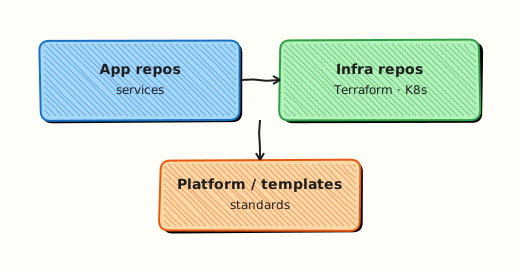
Module repo publishes tagged refs; root stacks pin module version via source + ref; CI validates each PR; state stays in remote backend.
Theory
What it is
IaC in Git stores declarative infrastructure definitions with history and review. Terraform modules are reusable directories with variables.tf, outputs.tf, and resources. Consumers reference:
Semantic versioning tags (vMAJOR.MINOR.PATCH) communicate breaking vs safe upgrades.
Why it matters
Untagged main module sources break production when someone merges experimental change. Tags immutably pin what stacks deploy. Git blame on IAM policies supports audits. Monorepo vs polyrepo decisions affect blast radius and CI cost.
How it works
- Module repo: feature branch → PR → merge
main→ tagv1.1.0. - Root stack bumps
ref=v1.1.0in separate PR with plan output. .gitignoreexcludes*.tfstate,.terraform/.- Lock file
.terraform.lock.hclcommitted for provider pins. - CODEOWNERS on
*.tffor platform review.
Key concepts and comparisons
| Ref type | Risk |
|---|---|
| ?ref=v1.0.0 | Pinned — preferred prod |
| ?ref=main | Floating — dev only |
| ?ref=feature-x | Experimental |
| Repo layout | Use |
|---|---|
| modules/vpc/ | Monorepo modules |
| terraform-vpc/ | Polyrepo per module |
| live/prod/ | Root stacks per env |
Common pitfalls
- Committing tfstate — secrets and corruption risk.
- Tag moving (force-updated tag) — consumers get surprise changes.
- No CHANGELOG on module repos — consumers cannot assess upgrades.
- Relative module sources in published modules — breaks external consumers.
Hands-on Lab
Objective
Publish a minimal VPC module, tag v0.1.0, consume it from a root stack via Git source with local path simulation, and verify version pin file.
Prerequisites
- Git 2.x
- Terraform 1.5+
Lab environment
Workspace: ~/rebash-git/module-13
Real-world scenario
Platform team releases terraform-s3-bucket module v0.1.0; application stack pins that tag instead of tracking main.
Step-by-step tasks
Task 1 – Module repository
Create .gitignore:
Create bucket/main.tf:
variable "name" { type = string }
resource "aws_s3_bucket" "this" {
  bucket = var.name
}
output "bucket_name" { value = aws_s3_bucket.this.bucket }
Create bucket/variables.tf:
Create bucket/outputs.tf:
Create README.md:
Initialise the module repo:
cd ~/rebash-git/module-13
set -euo pipefail
rm -rf module-s3 stack-app
mkdir -p module-s3/bucket
cd module-s3
git init -b main
git config user.email 'lab@rebash.local'
git config user.name 'REBASH Lab'
git add .
git commit -m 'feat: initial s3 bucket module'
cd ..
Expected output
Module repo with bucket/ subdirectory.
Task 2 – Tag v0.1.0
cd ~/rebash-git/module-13/module-s3
set -euo pipefail
git tag -a v0.1.0 -m 'Release v0.1.0 — initial bucket module'
git tag -l | tee ../module-tags.txt
grep -q 'v0.1.0' ../module-tags.txt
cd ..
Expected output
Annotated tag v0.1.0 on module repo.
Task 3 – Root stack consumes module via local Git path + ref file
Simulate Git source using local file URL and VERSION pin artefact.
Create main.tf (relative path to the module repo):
Create .gitignore:
Create MODULE_VERSION:
Validate and commit:
cd ~/rebash-git/module-13
set -euo pipefail
mkdir stack-app && cd stack-app
git init -b main
git config user.email 'lab@rebash.local'
git config user.name 'REBASH Lab'
terraform init -backend=false
terraform validate | tee ../stack-validate.txt
grep -qi 'success' ../stack-validate.txt || terraform validate
git add main.tf MODULE_VERSION .gitignore
git commit -m 'feat: pin s3 module v0.1.0'
grep -q 'v0.1.0' MODULE_VERSION
tar -czf ../module-13-iac-evidence.tgz -C .. module-tags.txt stack-validate.txt MODULE_VERSION
ls -l ../module-13-iac-evidence.tgz | tee ../iac-evidence.txt
cd ..
Expected output
Stack validates; MODULE_VERSION records pin.
Validation steps
- Module tagged v0.1.0
- Stack sources module with ref
- MODULE_VERSION file equals v0.1.0
- terraform validate passed
Common errors and fixes
| Error | Cause | Fix |
|---|---|---|
| Module not found | Wrong path | Check absolute local path |
| Ref not found | Tag not created | git tag -l |
| validate fails AWS | Provider without creds | validate only syntax; mock provider optional |
| state committed | Missing gitignore | add *.tfstate |
Challenge exercise
Bump module to v0.2.0 with a new optional variable; update stack MODULE_VERSION in a second commit simulating dependabot-style PR.
Learning outcomes
- Tagged IaC module release
- Pinned consumer stack to semver tag
- Kept state out of Git
Cleanup
Validation
- Lab under module-13
- Can explain semver tag for modules
- Can explain why not to use main in prod
- Know tfstate must not be in Git
Code Walkthrough
- Tag on release — CI job after merge to main.
- CHANGELOG — document breaking variable renames.
- Plan in PR — mandatory for live stacks.
- Lock file committed — provider consistency.
- Separate module and live repos — polyrepo clarity.
Security Considerations
- Remote state with encryption and locking
- No secrets in tfvars committed — use CI secrets
- Signed tags for module releases
- Least privilege on module CI AWS roles
- Scan IaC PRs with checkov/tfsec
Common Mistakes
source = main in production
Unreviewed module change deploys on next apply. Fix: Pin semver tags; bump deliberately.
Moving tags
Breaks consumer reproducibility. Fix: Immutable tags; new version for fixes.
Monolithic root module only
No reuse across teams. Fix: Extract modules; version independently.
Best Practices
- semver + CHANGELOG per module repo
- terraform-docs generated README
- CI on module repo: fmt, validate, tflint
- Consumer stack PR shows plan diff
- Remote backend mandatory for teams
Troubleshooting
| Symptom | Likely cause | Fix |
|---|---|---|
| Module download fail | Auth to Git | SSH or token in CI |
| Wrong version applied | ref typo | grep MODULE_VERSION |
| Drift vs Git | Manual cloud console | import or revert |
| Lock file conflict | Provider bump | deliberate upgrade PR |
Summary
Treat IaC modules like libraries — tag releases, pin refs, keep state out of Git. Next: Repository Management and Releases.
Interview Questions
1. Why tag Terraform modules?
Reveal answer
Tags immutably identify module snapshots so root stacks pin known code — upgrades become explicit ref bumps with plan review, not surprise main merges.
2. Git source module string components?
Reveal answer
git::URL//subpath?ref=tag — protocol, repo URL, subdirectory within repo, and Git ref (tag/branch/sha).
3. Why not commit tfstate?
Reveal answer
Contains sensitive data, causes merge conflicts, lacks locking — use remote backend (S3+ DynamoDB, Terraform Cloud, etc.).
4. .terraform.lock.hcl purpose?
Reveal answer
Locks provider versions and checksums for reproducible init across laptops and CI.
5. Monorepo vs polyrepo for IaC?
Reveal answer
Monorepo: shared CI, atomic cross-module changes, larger blast radius. Polyrepo: independent release cycles, clearer ownership — org picks based on scale and team structure.
6. Plan in PR workflow?
Reveal answer
CI runs terraform plan on PR, posts diff — reviewers see infrastructure impact before merge; apply runs post-merge with stricter gates.
7. Breaking change in module — semver?
Reveal answer
Major version bump (v2.0.0) when removing/changing variables or resources incompatibly; document migration in CHANGELOG.
8. Kubernetes IaC in Git differences?
Reveal answer
Often YAML/Helm/Kustomize with GitOps pull sync instead of terraform apply from CI — still use PR review, ignores for secrets, env folders.