Git Hooks and Automation
Overview
Git hooks are scripts Git runs at lifecycle events — before commit, after merge, before push. They catch formatting errors, bad commit messages, and secrets before CI spends minutes and before bad history reaches main. Platform teams combine local hooks with server-side checks on GitHub and bare remotes for defence in depth.
This is a Related depth tutorial in the REBASH Academy Git & GitHub for Cloud & DevOps Engineers series — written for Cloud, DevOps, Platform, and DevSecOps engineers. Complete Production Git Practices first; use this page when you need enforceable local policy.
Prerequisites
- Basic Git Workflow — Add, Commit, Push
- Signed Commits and Git Security
- Shell scripting from the Linux track
- Python 3 optional (for the pre-commit framework)
Learning Objectives
By the end of this tutorial, you will be able to:
- Distinguish client-side from server-side hooks
- Install executable hooks in
.git/hooks/and verify they run - Block commits with failing pre-commit and commit-msg checks
- Share hook config with the pre-commit framework in-repo
- Know when
--no-verifyis acceptable and when it is not - Complete lab evidence under
~/rebash-git/related/hooks
Architecture
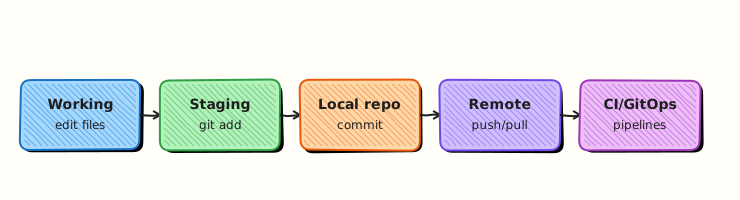
Git invokes hook scripts at defined events; exit code non-zero aborts the operation; shared frameworks version hook definitions in Git instead of copying scripts manually.
Theory
What it is
A hook is an executable file named after an event (pre-commit, commit-msg, pre-push, etc.) in .git/hooks/. Git runs it automatically; exit 0 continues, non-zero aborts. Client-side hooks run on developer machines. Server-side hooks (pre-receive, update, post-receive) run on bare remotes or forge equivalents. The pre-commit framework stores hook definitions in .pre-commit-config.yaml and installs wrappers into .git/hooks/ via pre-commit install.
Why it matters
CI that only runs on push is late — secrets and broken Terraform already entered history. Hooks shift left: terraform fmt -check, gitleaks, Conventional Commit regex — locally in seconds. DevOps repos with IaC benefit enormously; one bad kubectl apply YAML typo caught pre-commit saves an incident.
How it works
- Developer runs
git commit. - Git executes
.git/hooks/pre-commitif present and executable. - Script runs linters on staged files; fails fast on error.
commit-msghook receives path to message file — validates format.pre-pushcan run tests before objects leave the laptop.pre-commit install(framework) registers managed hooks team-wide via committed YAML.
Key concepts and comparisons
| Hook | When | Typical check |
|---|---|---|
| pre-commit | Before commit created | fmt, lint, secrets |
| commit-msg | After message entered | Conventional Commits regex |
| pre-push | Before push | unit tests, terraform validate |
| pre-receive | Server push | reject non-FF, ACL |
| Approach | Pros | Cons |
|---|---|---|
Raw shell in .git/hooks/ | Simple | Not versioned in repo |
| pre-commit framework | Shared YAML in Git | Python dependency |
| CI only | Centralised | Late feedback |
Common pitfalls
- Hooks not executable (
chmod +x) — silently skipped on some setups. - Checking entire repo instead of staged files — slow pre-commit.
--no-verifynormalised for convenience — bypasses all policy.- Server-side hooks on GitHub — use Actions/branch protection instead of bare
pre-receive(unless self-hosted).
Hands-on Lab
Objective
Create a repo with shell pre-commit and commit-msg hooks that block unstaged secrets patterns and reject non-Conventional messages; add .pre-commit-config.yaml stub for team sharing.
Prerequisites
- Git 2.x
- bash
Lab environment
Workspace: ~/rebash-git/related/hooks
Real-world scenario
Platform team requires feat:/fix:/chore: prefixes and blocks commits containing fake AWS key patterns in staged content before push reaches GitHub.
Step-by-step tasks
Task 1 – Bootstrap repo and secret-scan pre-commit hook
Create .git/hooks/pre-commit:
#!/usr/bin/env bash
set -euo pipefail
staged=$(git diff --cached --name-only --diff-filter=ACM || true)
for f in $staged; do
  if git diff --cached -- "$f" | grep -qE 'AKIA[0-9A-Z]{16}'; then
    echo "pre-commit: rejected — staged diff looks like AWS key in $f"
    exit 1
  fi
done
if command -v terraform >/dev/null 2>&1 && echo "$staged" | grep -q '\.tf$'; then
  terraform fmt -check -recursive || { echo 'pre-commit: terraform fmt failed'; exit 1; }
fi
exit 0
Bootstrap the repo:
cd ~/rebash-git/related/hooks
set -euo pipefail
rm -rf hooks-lab
mkdir hooks-lab && cd hooks-lab
git init -b main
git config user.email 'lab@rebash.local'
git config user.name 'REBASH Lab'
chmod +x .git/hooks/pre-commit
printf 'variable "x" {}\n' > main.tf
git add main.tf
git commit -m 'chore: add terraform stub'
test -x .git/hooks/pre-commit
cd ..
Expected output
Initial commit succeeds; pre-commit hook executable.
Task 2 – commit-msg hook and rejection test
Create .git/hooks/commit-msg:
#!/usr/bin/env bash
set -euo pipefail
msg_file=$1
head -1 "$msg_file" | grep -qE '^(feat|fix|chore|docs|ci)(\(.+\))?: .+' || {
  echo 'commit-msg: use Conventional Commits, e.g. feat: add hook'
  exit 1
}
Test rejection and acceptance:
cd ~/rebash-git/related/hooks/hooks-lab
set -euo pipefail
chmod +x .git/hooks/commit-msg
echo 'bad' >> main.tf
git add main.tf
if git commit -m 'bad message' 2>/dev/null; then
  echo 'unexpected pass' >&2; exit 1
else
  echo 'rejected as expected' | tee ../bad-msg-result.txt
fi
git commit -m 'feat: extend terraform stub' | tee ../good-msg-result.txt
grep -q 'feat: extend' ../good-msg-result.txt
cd ..
Expected output
Bad message rejected; good Conventional message accepted.
Task 3 – Shared pre-commit config and evidence
Create .pre-commit-config.yaml:
repos:
  - repo: https://github.com/pre-commit/pre-commit-hooks
    rev: v4.6.0
    hooks:
      - id: trailing-whitespace
      - id: end-of-file-fixer
  - repo: https://github.com/gitleaks/gitleaks
    rev: v8.18.4
    hooks:
      - id: gitleaks
Commit and archive evidence:
cd ~/rebash-git/related/hooks/hooks-lab
set -euo pipefail
git add .pre-commit-config.yaml
git commit -m 'chore: add shared pre-commit config for team'
git log --oneline | tee ../hooks-log.txt
test "$(git rev-list --count HEAD)" -eq 3
tar -czf ../related-hooks-evidence.tgz -C .. hooks-log.txt bad-msg-result.txt good-msg-result.txt
ls -l ../related-hooks-evidence.tgz | tee ../hooks-evidence.txt
cd ..
Expected output
Three commits; shared YAML committed; evidence tarball created.
Validation steps
- pre-commit and commit-msg hooks executable
- Non-Conventional message rejected
-
.pre-commit-config.yamlin repo root - Evidence archive exists
Common errors and fixes
| Error | Cause | Fix |
|---|---|---|
| Hook not running | Not executable | chmod +x .git/hooks/pre-commit |
| terraform fmt fails | Unformatted .tf | terraform fmt -recursive |
| pre-commit install missing | Framework not installed | pip install pre-commit; pre-commit install |
| Bypass abused | --no-verify habit | Policy: break-glass only with ticket |
Challenge exercise
Add pre-push hook that runs terraform validate when *.tf changed — block push on failure. Document when team allows git push --no-verify (incident only) in HOOK_POLICY.md.
Learning outcomes
- Installed client-side hooks locally
- Enforced commit message convention
- Versioned shared pre-commit config for teammates
Cleanup
Validation
- Lab under
~/rebash-git/related/hooks - Can name three hook types and when they run
- Can explain why hooks complement CI
- Know server-side vs GitHub Actions boundary
Code Walkthrough
- Stage-only checks — faster pre-commit; use
git diff --cached. - Version hooks in repo — pre-commit framework or
scripts/hooks/+ installer. - Match CI commands — same
terraform fmtlocally and in Actions. - Document --no-verify policy — emergency only with audit.
- Install in onboarding — README setup step runs
pre-commit install.
Security Considerations
- gitleaks/trufflehog in pre-commit catches secrets before push
- Do not disable hooks for convenience on IaC repos
- Server-side hooks on self-hosted bare repos enforce ACLs
- Hooks run arbitrary code — review hook changes in PRs
- Sign commits on hook config changes if policy requires
Common Mistakes
Hooks only on one developer laptop
Others bypass policy. Fix: Commit .pre-commit-config.yaml; CI runs same checks.
Slow pre-commit running full test suite
Developers skip with --no-verify. Fix: Fast checks locally; heavy tests in pre-push or CI.
Regex commit-msg too strict
Blocks valid messages; team disables hooks. Fix: Align with Conventional Commits spec; allow fix!: breaking if needed.
Best Practices
- Same checks in hooks and required CI status
pre-commit autoupdateon schedule for hook versions- commit-msg validates ticket ID if Jira integrated
- Husky for Node monorepos; pre-commit for polyglot
- Log hook bypass in change ticket when used
Troubleshooting
| Symptom | Likely cause | Fix |
|---|---|---|
| Hook never runs | Wrong name/path | Must be .git/hooks/pre-commit |
| Works locally not CI | CI separate config | Add workflow step |
| pre-commit install fails | No Python | Install pre-commit in dev container |
| False positive secret | Test fixture | allowlist in gitleaks config |
Summary
Hooks automate policy at commit time — pair local pre-commit with CI and branch protection for production repos. Next related depth: Git Submodules and Subtrees.
Interview Questions
1. Client vs server-side hooks?
Reveal answer
Client hooks run on the developer machine (pre-commit, pre-push); server hooks run on the remote when receiving pushes (pre-receive, update) — GitHub replaces many server hooks with branch protection and Actions.
2. What exit code stops a commit?
Reveal answer
Any non-zero exit from pre-commit or commit-msg aborts the commit; zero allows Git to proceed.
3. Why pre-commit framework over copying scripts?
Reveal answer
Hook definitions live in .pre-commit-config.yaml in Git — teammates get identical checks via pre-commit install instead of manual .git/hooks copies that drift.
4. When is git commit --no-verify acceptable?
Reveal answer
Rare break-glass with documented approval — e.g. emergency hotfix when hook tooling broken; never routine; follow-up commit fixes hook compliance.
5. pre-commit vs pre-push?
Reveal answer
pre-commit runs before commit is created — fast lint/fmt; pre-push runs before objects upload — suitable for slower tests that still fail before CI queue.
6. Enforce hooks on GitHub without bare server?
Reveal answer
Required status checks in branch protection mirror hook commands in Actions; optional push rulesets; secret scanning push protection — server-side policy without custom pre-receive scripts.
7. Hook checking staged vs working tree?
Reveal answer
Staged (git diff --cached) is what the commit will contain — correct target; working tree may include unrelated unstaged edits.
8. Risk of malicious hook in cloned repo?
Reveal answer
Hooks in .git/hooks are not cloned from remote by default — but core.hooksPath or install scripts in Makefile can run attacker code; review setup scripts; use framework from trusted rev pins.