Introduction to Git and Version Control
Overview
Incidents ask “what changed?” Compliance asks “who approved?” Delivery asks “can we roll this back?” Version control answers those questions with a reviewable history of files — not a folder of final_v3_really.zip on someone’s laptop.
Git is the distributed Version Control System (VCS) that dominates Cloud and DevOps work: Infrastructure as Code (IaC), application source, pipeline definitions, and GitOps desired state all live as commits. This course is Git & GitHub for Cloud & DevOps Engineers — collaboration, recovery, and production workflows, not Git as trivia.
This is Tutorial 1 in Module 1: Version Control Fundamentals of the REBASH Academy Git & GitHub for Cloud & DevOps Engineers series — written for Cloud, DevOps, Platform, and Site Reliability Engineering (SRE) engineers. By the end you will compare VCS models, use core Git vocabulary correctly, and leave evidence of a change timeline with and without Git.
Prerequisites
- Linux Fundamentals — shell, files, and paths
- Comfort with a terminal (macOS, Linux, or Windows Subsystem for Linux (WSL))
- No GitHub account required for this tutorial
Learning Objectives
By the end of this tutorial, you will be able to:
- State the problems version control solves for infrastructure and delivery teams
- Compare local, centralised, and distributed VCS models
- Explain why Git fits Cloud-native and IaC workflows
- Define repository, commit, branch, remote, working tree, and staging area
- Produce a lab evidence pack under
~/rebash-git/module-01that contrasts “folder copy” history with Git commits
Architecture
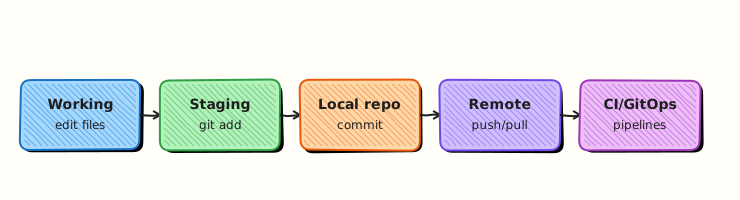
Edits move from the working tree through the staging area into commits; branches point at commits; remotes share those objects with teammates and CI.
Theory
What it is
A Version Control System (VCS) records snapshots of a project over time, who made each change, and how to reconstruct earlier states. Local VCS tools keep history on one machine. Centralised VCS (for example older Subversion-style workflows) require a shared server for almost every operation. Distributed VCS — Git — gives every clone a full object database so you can commit, branch, and inspect history offline, then synchronise with remotes when ready.
Git stores content-addressed objects (blobs, trees, commits) and moves lightweight pointers called branches. A repository is that database plus refs. The working tree is the checked-out files you edit. The staging area (index) is what the next commit will contain. A remote is another repository URL (often on GitHub) you fetch from and push to.
Why it matters
Without Git, IaC drift becomes archaeology: nobody knows which Terraform change broke production. With Git, pull requests encode peer review, CI attaches status to commits, and git revert or a previous tag becomes a controlled rollback path. Platform and SRE teams treat the repository as the system of record — the same way they treat monitoring as the system of observation.
How it works
Mental model: edit → stage → commit → (optional) push → review/merge on remote.
- You change files in the working tree.
git addrecords selected changes in the index.git commitfreezes the index as a new commit on the current branch.git pushsends new objects and updates the remote branch tip.- Teammates
git fetch/git pullto obtain those commits; CI runs against the same SHAs.
Branches let parallel work share a common history without overwriting each other. Remotes do not replace local commits — they publish them.
Key concepts and comparisons
| Model | Strength | Weakness for DevOps |
|---|---|---|
| Local VCS | Simple history on one disk | No collaboration or CI source of truth |
| Centralised VCS | One server of record | Offline work and branching friction |
| Distributed (Git) | Full history per clone; cheap branches | Requires discipline on remotes and shared history |
| Term | Meaning |
|---|---|
| Repository | .git database + working tree |
| Commit | Immutable snapshot + metadata (author, message, parents) |
| Branch | Movable pointer to a commit |
| Remote | Named URL of another repo (origin) |
| HEAD | The commit you currently have checked out |
Common pitfalls
- Treating Git as “backup” and writing useless commit messages.
- Editing production by hand instead of merging reviewed commits.
- Assuming a private repo makes secrets safe to commit.
- Confusing “files on disk” with “what the next commit contains” (always check
git status).
Hands-on Lab
Objective
Contrast an ad-hoc folder timeline with a Git commit timeline for the same infrastructure note, and archive git log / git status evidence proving two commits on a clean tree.
Prerequisites
- Git 2.x available as
git(install comes next module if missing — this lab only needsgitfor Task 2–3) - A shell and write access under your home directory
Lab environment
Workspace: ~/rebash-git/module-01
Real-world scenario
A platform team still shares “prod-firewall-rules-FINAL.docx” over chat. You must show why a Git-backed change log is safer for audit and rollback before the team standardises on GitHub.
Step-by-step tasks
Task 1 – Simulate change history without Git
cd ~/rebash-git/module-01
set -euo pipefail

mkdir -p without-git
cd without-git
printf 'allow 10.0.0.0/8 to 443\n' > firewall-notes.txt
cp firewall-notes.txt firewall-notes-v1.txt
printf 'allow 10.0.0.0/8 to 443\nallow 10.1.0.0/16 to 22\n' > firewall-notes.txt
cp firewall-notes.txt firewall-notes-v2.txt
ls -1 | tee ../without-git-listing.txt
diff -u firewall-notes-v1.txt firewall-notes-v2.txt | tee ../without-git-diff.txt || true
cd ..
Expected output
Multiple copies and a diff file — history is manual and easy to lose.
Task 2 – Same change as Git commits
cd ~/rebash-git/module-01
set -euo pipefail

rm -rf with-git
mkdir with-git && cd with-git
git init -b main
git config user.email 'lab@rebash.local'
git config user.name 'REBASH Lab'
printf 'allow 10.0.0.0/8 to 443\n' > firewall-notes.txt
git add firewall-notes.txt
git commit -m 'feat: baseline HTTPS allow for RFC1918'
printf 'allow 10.0.0.0/8 to 443\nallow 10.1.0.0/16 to 22\n' > firewall-notes.txt
git add firewall-notes.txt
git commit -m 'feat: allow SSH from 10.1.0.0/16'
git log --oneline --decorate | tee ../with-git-log.txt
git status | tee ../with-git-status.txt
grep -q 'baseline HTTPS' ../with-git-log.txt
grep -q 'allow SSH' ../with-git-log.txt
grep -q 'nothing to commit, working tree clean' ../with-git-status.txt
test "$(git rev-list --count HEAD)" -eq 2
cd ..
tar -czf module-01-evidence.tgz without-git-listing.txt without-git-diff.txt with-git-log.txt with-git-status.txt
ls -l module-01-evidence.tgz | tee evidence.txt
Expected output
Two commits on main; working tree clean; evidence tarball with log and status files.
Validation steps
- Without-Git listing shows versioned copies
-
with-git-log.txtshows two meaningful commits -
with-git-status.txtreports a clean working tree -
module-01-evidence.tgzcontains log and status evidence
Common errors and fixes
| Error | Cause | Fix |
|---|---|---|
git: command not found | Git not installed | Install Git (next tutorial) then re-run Task 2 |
| Author identity unknown | Missing user.name/email | Use the git config lines in Task 2 |
| Empty log | Commit failed | Re-run git status and commit again |
Challenge exercise
Add a third commit that removes the SSH allow line and use git log -p -1 to prove the removal is recorded as a reversible change.
Learning outcomes
- Contrasted folder copy history with Git commits
- Used staging and commit messages for an ops-style change
- Captured
git logandgit statusevidence for audit comparison
Cleanup
# Keep evidence; remove when finished:
# rm -rf ~/rebash-git/module-01
ls ~/rebash-git/module-01
Validation
- Lab completed under
~/rebash-git/module-01/ - You can explain local vs centralised vs distributed VCS
- You can define working tree, index, commit, branch, remote
- You can name one production failure mode fixed by Git history
Code Walkthrough
- Ask what changed — prefer
git log/ PR history over chat archaeology. - Stage deliberately — commits should be reviewable units of work.
- Message the why — future incident responders read messages under pressure.
- Publish via remotes — local commits are not a backup until they leave your laptop.
- Never commit secrets — private remotes still leak through forks, clones, and CI logs.
Security Considerations
- Assume every commit may be cloned widely — no passwords, tokens, or keys in history.
- Prefer short-lived credentials for remotes (SSH keys, SSO, OIDC) over shared passwords.
- Treat “force push to main” as a privileged, rarely justified action.
- Require review for production IaC paths (later: branch protection).
- Keep auditability: meaningful authors and messages, not anonymous
rootcommits on shared repos.
Common Mistakes
Using zip copies as version control
You lose authorship, atomic undo, and CI hooks. Fix: one Git repo with commits per change.
Empty commit messages
History becomes noise. Fix: imperative summary plus why (for example fix: pin provider to stop plan drift).
Believing private GitHub means secrets are safe
Clones, forks, and logs still expose them. Fix: never stage secrets; use a secret manager.
Best Practices
- One logical change per commit when practical.
- Keep repositories focused (app, modules, or platform concern).
- Agree vocabulary before arguing about branching strategies.
- Record decisions in commits and pull requests, not only chat.
- Move next to the object model so recovery commands make sense.
Troubleshooting
| Symptom | Likely cause | Fix |
|---|---|---|
| “Did we deploy that?” | No commit/tag linkage | Tag releases; store deploy SHA in release notes |
| Two “final” folders disagree | Manual copy drift | Single Git source of truth |
| Cannot explain a prod change | Missing messages/authors | Enforce identity config and reviews |
| Fear of changing a file | No rollback story | Learn revert/restore in later modules |
Summary
Version control is the DevOps system of record. Git’s distributed model fits Cloud delivery because every engineer and every pipeline shares the same commit SHAs. Next: Understanding the Git Object Model.
Interview Questions
1. What problem does version control solve for infrastructure teams?
Reveal answer
It records what changed, who changed it, and how to reconstruct or roll back earlier states — essential for IaC audit, incident response, and collaboration.
2. How does distributed VCS differ from centralised VCS?
Reveal answer
Distributed systems like Git give each clone a full history so you can commit and branch offline; centralised systems typically need the server for most history operations.
3. What is the staging area (index)?
Reveal answer
The index is the set of changes prepared for the next commit. It lets you craft a coherent snapshot instead of committing every dirty file on disk.
4. Working tree looks dirty — what do you run first?
Reveal answer
git status and git diff (and git diff --staged) to see untracked, unstaged, and staged changes before adding or committing.
5. Why prefer small, reviewable commits in DevOps repos?
Reveal answer
Reviewers can reason about blast radius, CI failures are easier to bisect, and reverts stay precise instead of undoing unrelated work.
6. What should never be committed even in a private repository?
Reveal answer
Secrets, credentials, private keys, and often terraform state or large binaries — private remotes still get cloned, forked, and logged.
7. What is a branch in Git?
Reveal answer
A movable pointer to a commit. Creating a branch is cheap because it does not copy the whole project tree.
8. Why is Git a good fit for GitOps?
Reveal answer
Desired state is stored as commits that controllers can pull, verify, and reconcile — the same history humans review in pull requests.