Git Troubleshooting
Overview
Production Git incidents include detached HEAD after checking out a tag, authentication failures blocking CI push, half-finished merges, and conflict recovery after bad resolution. Systematic drills turn panic into checklists — the same mindset as SRE incident response.
This is Tutorial 1 in Module 16: Troubleshooting of the REBASH Academy Git & GitHub for Cloud & DevOps Engineers series — written for Cloud, DevOps, Platform, and SRE engineers.
Prerequisites
Learning Objectives
By the end of this tutorial, you will be able to:
- Recognise and fix detached HEAD safely
- Diagnose SSH vs HTTPS authentication errors
- Abort or complete stuck merges and rebases
- Recover from bad conflict resolution using reflog
- Complete drills under
~/rebash-git/module-16
Architecture
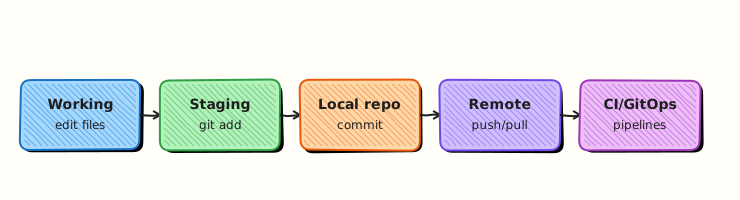
HEAD may point to branch or raw commit; remotes require auth; merge/rebase state stored in .git/MERGE_HEAD etc.; reflog enables local recovery.
Theory
What it is
Detached HEAD means HEAD points directly to a commit, not a branch — new commits are unreachable unless you create a branch. Authentication errors stem from wrong keys, expired PATs, or missing known_hosts. Stuck operations leave MERGE_HEAD or rebase directories until --continue, --abort, or --skip. Conflict recovery may require aborting merge and restarting after fetching latest.
Why it matters
CI jobs checking out tags for deploy often detach HEAD — scripts must not commit there. Midnight git pull failures block releases. Bad merge on values.yaml can take production offline — knowing abort/reset paths saves minutes in incidents.
How it works
git statusfirst — always.- Detached:
git switch -c rescueorgit switch main. - Auth:
ssh -T git@github.com; check credential helper. - Merge stuck:
git merge --abortor resolve +git commit. - Lost work:
git reflog→git reset --hard <good>.
Key concepts and comparisons
| Symptom | First command |
|---|---|
| detached HEAD | git status |
| auth failed | ssh -T / gh auth status |
| merge conflict | git status; git diff |
| lost commits | git reflog |
| State file | Meaning |
|---|---|
| MERGE_HEAD | Merge in progress |
| rebase-merge/ | Rebase in progress |
| CHERRY_PICK_HEAD | Cherry-pick in progress |
Common pitfalls
- Committing on detached HEAD without branch — commits orphaned until reflog rescue.
git pushafter wrong merge resolution — deploys bad config.- Repeated failed auth with same expired PAT — lockouts.
- Deleting
.gitas "fix" — nuclear data loss.
Hands-on Lab
Objective
Run three drills: detached HEAD rescue, auth diagnostics script, merge abort and redo — with evidence files.
Prerequisites
- Git 2.x
Lab environment
Workspace: ~/rebash-git/module-16
Real-world scenario
On-call runbook requires engineers to prove they can recover from common Git failure modes without calling senior help.
Step-by-step tasks
Task 1 – Detached HEAD drill
cd ~/rebash-git/module-16
set -euo pipefail
rm -rf trouble-lab
mkdir trouble-lab && cd trouble-lab
git init -b main
git config user.email 'lab@rebash.local'
git config user.name 'REBASH Lab'
printf 'v1\n' > app.txt && git add app.txt && git commit -m 'v1'
git tag v1.0.0
git checkout v1.0.0
git status | tee ../detached-status.txt
grep -q 'detached HEAD' ../detached-status.txt
echo 'hotfix on tag' >> app.txt
git commit -am 'fix: hotfix on detached'
git switch -c hotfix/from-tag
git log --oneline -1 | tee ../detached-rescue.txt
grep -q 'hotfix on detached' ../detached-rescue.txt
cd ..
Expected output
Detached state detected; branch hotfix/from-tag preserves commit.
Task 2 – Auth diagnostics script
Create auth-diagnose.sh:
#!/usr/bin/env bash
set -euo pipefail
echo '=== git version ==='
git --version
echo '=== remote (if any) ==='
git -C trouble-lab remote -v 2>/dev/null || echo 'no_remote_configured'
echo '=== credential helper ==='
git config --global --get credential.helper 2>/dev/null || echo 'credential_helper=unset'
echo '=== ssh keys loaded ==='
ssh-add -l 2>/dev/null || echo 'ssh_agent=no_keys_or_agent'
echo '=== github ssh probe (may fail offline) ==='
ssh -T -o BatchMode=yes -o ConnectTimeout=5 git@github.com 2>&1 || true
echo 'diagnose_complete'
Run the script:
cd ~/rebash-git/module-16
set -euo pipefail
chmod +x auth-diagnose.sh
./auth-diagnose.sh | tee auth-diagnose.txt
grep -q 'diagnose_complete' auth-diagnose.txt
test "$(wc -l < auth-diagnose.txt)" -ge 8
cd ..
Expected output
auth-diagnose.txt with Git version, credential, and SSH probe results.
Task 3 – Merge abort and recovery drill
cd ~/rebash-git/module-16/trouble-lab
set -euo pipefail
git switch main
printf 'v2-main\n' > app.txt && git commit -am 'main advance'
git switch -c feature/conflict
printf 'v2-feature\n' > app.txt && git commit -am 'feature change'
git switch main
git merge feature/conflict || true
grep -q '<<<<<<<' app.txt
git merge --abort
grep -qv '<<<<<<<' app.txt || ! grep -q '<<<<<<<' app.txt
git show main:app.txt | tee ../post-abort-main.txt
grep -q 'v2-main' ../post-abort-main.txt
tar -czf ../module-16-trouble-evidence.tgz -C .. detached-status.txt post-abort-main.txt auth-diagnose.txt auth-diagnose.sh
ls -l ../module-16-trouble-evidence.tgz | tee ../trouble-evidence.txt
cd ..
Expected output
Merge aborted; main content unchanged from bad merge.
Validation steps
- Detached HEAD recognised and branched
-
auth-diagnose.shproducedauth-diagnose.txt - merge --abort restored clean main
- Evidence tarball exists
Common errors and fixes
| Error | Cause | Fix |
|---|---|---|
| cannot switch branch | uncommitted changes | stash or commit |
| merge --abort fails | no merge | check MERGE_HEAD |
| orphan commit | detached no branch | reflog + branch |
| ssh permission denied | wrong key | fix ssh config |
Challenge exercise
Start rebase, cause conflict, run git rebase --abort, verify original branch tip — capture git log -1 --oneline output in REBASE_ABORT.txt.
Learning outcomes
- Rescued detached HEAD work on branch
- Ran auth diagnostics script with captured output
- Aborted bad merge safely
Cleanup
Validation
- Lab under module-16
- Can explain detached HEAD
- Can list SSH auth checks
- Know merge --abort vs --continue
Code Walkthrough
- git status — every incident step zero.
- Never force-push main — revert instead.
- reflog before panic — local undo journal.
- Test SSH outside Git — isolates auth vs repo issues.
- Document merge abort — in incident ticket.
Security Considerations
- Do not paste PATs into tickets while debugging auth
- Verify remote URL before push after auth fix
- Stolen credentials during incident — rotate immediately
- Recovery commits still need review before merge
- Limit break-glass force-push to named admins
Common Mistakes
Commits on detached HEAD during tag deploy job
CI loses commits after job ends. Fix: checkout branch or create one in script.
Continuing merge with conflict markers
Broken YAML reaches prod. Fix: abort; fix properly; re-merge.
Deleting branch before merge abort
Harder to retry. Fix: abort first; reset state.
Best Practices
- Pin runbooks in wiki linking
auth-diagnose.shoutput - CI templates checkout branches not tags for build jobs needing commits
- Practice drills quarterly
git config --global merge.conflictstyle diff3for clearer conflicts- Alias
git undodocumented for team (reflog helper)
Troubleshooting
| Symptom | Likely cause | Fix |
|---|---|---|
| HEAD detached at vX.Y.Z | Tag checkout | switch -c or main |
| Permission denied publickey | SSH | ssh-add; config |
| HTTP 403 | PAT scope | regen token |
| MERGE_HEAD exists | Incomplete merge | abort or finish |
| rebase in progress | Interrupted | continue/abort |
Summary
Most Git incidents yield to status, abort/continue discipline, and reflog — practise drills before production pressure. Next: Git Bisect and Debugging History.
Interview Questions
1. What is detached HEAD?
Reveal answer
HEAD references a commit directly rather than a branch name — commits made in this state are not on any branch until you create one or switch to existing branch.
2. Fix detached HEAD after accidental tag checkout?
Reveal answer
git switch -c branch-name to keep commits, or git switch main if no work to keep — use reflog if commits seem lost.
3. merge --abort vs reset --hard during merge?
Reveal answer
--abort safely cancels merge restoring pre-merge state; --hard is broader destructive reset — abort is preferred for in-progress merge only.
4. SSH auth works locally but CI fails?
Reveal answer
CI uses different credentials — check deploy keys, secrets, OIDC trust policy, and whether fork PR has secret access.
5. How find if merge in progress?
Reveal answer
git status says merging; existence of .git/MERGE_HEAD; unmerged paths listed.
6. Recovery after bad conflict resolution pushed?
Reveal answer
Revert merge commit on main or reset feature and redo merge after fetch — never force-push shared main; use forward fix revert.
7. git fsck when?
Reveal answer
Suspected repository corruption, shallow clone issues, or missing objects — low-level integrity check before reclone.
8. Prevent detached HEAD in CI?
Reveal answer
Checkout ref as branch (ref: refs/heads/main) or explicit git switch -c ci-build before commits needed for versioning.