Understanding the Git Object Model
Overview
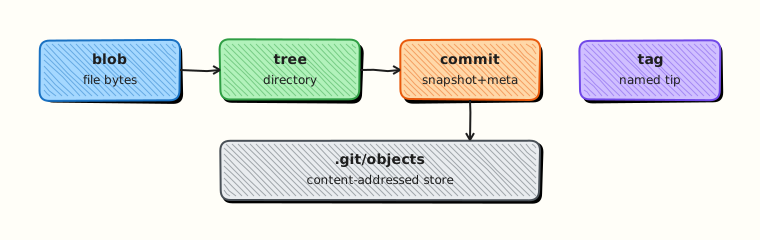
Git is not a mysterious diff machine — it is a content-addressed object database. File bytes become blobs, directories become trees, and snapshots become commits (with optional tags). Commands mostly move pointers; objects are rarely rewritten in place.
That model is why reflog can recover “deleted” commits and why rewriting shared history is dangerous. This is Tutorial 2 in Module 1: Version Control Fundamentals of the REBASH Academy Git & GitHub for Cloud & DevOps Engineers series — written for Cloud, DevOps, Platform, and Site Reliability Engineering (SRE) engineers.
Prerequisites
- Introduction to Git and Version Control
- Git 2.x installed (
git --version)
Learning Objectives
By the end of this tutorial, you will be able to:
- Name the four object types: blob, tree, commit, tag
- Explain content-addressed storage and why hashes change when content changes
- Use
git rev-parseandgit cat-fileto inspect objects - Relate commits → trees → blobs for a real repository
- Leave object-inspection evidence under
~/rebash-git/module-01-objects
Architecture
Commits point to trees; trees point to blobs (and nested trees); tags can point to commits. Branches and HEAD are refs pointing into this graph.
Theory
What it is
Git stores objects under .git/objects, named by the SHA-1 or SHA-256 hash of their content (depending on repo hash algorithm). A blob is file content (no filename). A tree maps names to modes and object IDs (files and subtrees). A commit records a tree ID, parent commit IDs, author/committer, and message. An annotated tag is an object pointing at another object (often a commit) with a message and tagger; lightweight tags are just refs.
Why it matters
When production asks “what was in that release?”, you are asking for a commit’s tree. When recovery asks “where did that commit go?”, you are asking for refs and reflog — the objects often still exist. Understanding objects prevents magical thinking about reset and rebase.
How it works
git addhashes file contents into blob objects and updates the index.git commitwrites a tree from the index and a commit object pointing at that tree and parents.- Branch refs under
.git/refs/heads/move to the new commit. git cat-file -t/-pshows type and pretty-printed content;git rev-parseresolves names to IDs.
Identical content shares one blob (deduplication). Changing one byte yields a new hash.
Key concepts and comparisons
| Object | Stores | Points to |
|---|---|---|
| blob | file bytes | — |
| tree | name → mode + OID | blobs/trees |
| commit | snapshot metadata | tree + parents |
| tag (annotated) | label + message | usually a commit |
| Ref | Role |
|---|---|
refs/heads/* | branches |
refs/tags/* | tags |
HEAD | current checkout tip |
Common pitfalls
- Thinking a branch “contains files” — it points at a commit.
- Expecting
reset --hardto delete objects immediately (GC later; reflog still sees them for a time). - Rewriting commits that others already fetched.
Hands-on Lab
Objective
Build a tiny repo and inspect blob, tree, and commit objects with cat-file and rev-parse.
Prerequisites
- Git 2.x
Lab environment
Workspace: ~/rebash-git/module-01-objects
mkdir -p ~/rebash-git/module-01-objects && cd ~/rebash-git/module-01-objects
set -euo pipefail
Real-world scenario
An engineer claims “the file disappeared from Git.” You must prove whether the blob still exists and which commit last referenced it.
Step-by-step tasks
Task 1 – Create two commits with inspectable content
cd ~/rebash-git/module-01-objects
set -euo pipefail

rm -rf demo && mkdir demo && cd demo
git init -b main
git config user.email 'lab@rebash.local'
git config user.name 'REBASH Lab'
printf 'apiVersion: v1\nkind: ConfigMap\n' > app.yaml
git add app.yaml
git commit -m 'feat: add ConfigMap stub'
printf 'apiVersion: v1\nkind: ConfigMap\nmetadata:\n  name: demo\n' > app.yaml
git add app.yaml
git commit -m 'feat: name the ConfigMap'
git log --oneline | tee ../log.txt
cd ..
Expected output
Two commits listed in log.txt.
Task 2 – Resolve HEAD and inspect commit → tree → blob
cd ~/rebash-git/module-01-objects/demo
set -euo pipefail

git rev-parse HEAD | tee ../head.txt
git cat-file -t HEAD | tee ../head-type.txt
git cat-file -p HEAD | tee ../head-commit.txt
TREE=$(git rev-parse HEAD^{tree})
echo "$TREE" | tee ../tree-id.txt
git cat-file -p "$TREE" | tee ../tree.txt
BLOB=$(git rev-parse HEAD:app.yaml)
echo "$BLOB" | tee ../blob-id.txt
git cat-file -t "$BLOB" | tee ../blob-type.txt
git cat-file -p "$BLOB" | tee ../blob.txt
grep -q 'commit' ../head-type.txt
grep -q 'blob' ../blob-type.txt
grep -q 'ConfigMap' ../blob.txt
Expected output
Commit points at a tree; tree lists app.yaml blob; blob contains ConfigMap YAML.
Task 3 – Show two blobs differ after the edit
cd ~/rebash-git/module-01-objects/demo
set -euo pipefail

B1=$(git rev-parse HEAD~1:app.yaml)
B2=$(git rev-parse HEAD:app.yaml)
printf '%s\n%s\n' "$B1" "$B2" | tee ../blob-compare.txt
test "$B1" != "$B2"
tar -czf ../module-01-objects-evidence.tgz -C .. log.txt head.txt head-type.txt head-commit.txt tree-id.txt tree.txt blob-id.txt blob-type.txt blob.txt blob-compare.txt
ls -l ../module-01-objects-evidence.tgz | tee ../evidence.txt
Expected output
Different blob IDs for the two file versions; evidence archive created.
Validation steps
-
head-type.txtiscommit -
blob-type.txtisblob - Blob IDs for
HEAD~1:app.yamlandHEAD:app.yamldiffer
Common errors and fixes
| Error | Cause | Fix |
|---|---|---|
bad revision | Wrong syntax | Use HEAD, HEAD~1, HEAD:path |
Empty cat-file -p | Wrong OID | Copy ID from rev-parse output |
| Identical blob IDs | File content unchanged | Ensure Task 1 edited the file |
Challenge exercise
Create an annotated tag v0.1.0 on HEAD and run git cat-file -p v0.1.0 to show the tag object (not just the commit).
Learning outcomes
- Traced commit → tree → blob
- Saw content-addressing when file bytes changed
- Used inspection tools you will reuse in recovery labs
Cleanup
Validation
- Lab completed under
~/rebash-git/module-01-objects/ - You can explain blob vs tree vs commit
- You know why identical files share a blob
- You can describe what a branch ref stores
Code Walkthrough
- Resolve names to IDs —
git rev-parsebefore guessing. - Inspect types —
git cat-file -tthen-p. - Follow the graph — commit → tree → path → blob.
- Compare SHAs — changed content means new objects.
- Leave objects alone — move refs; do not hand-edit
.git/objects.
Security Considerations
- Object databases can contain leaked secrets forever — rotate and purge with care (BFG/filter-repo), not hope.
- Tags that sign releases (later module) bind trust to commit IDs.
- Do not share bare
.gitdirectories from production hosts casually. - Hooks and CI should scan for secrets before objects reach a shared remote.
- Treat force-pushed “removed” commits as still potentially fetchable from forks.
Common Mistakes
Assuming delete removes history
The blob may still be reachable from older commits or reflog. Fix: inspect with git log -- all -- path and recovery tools.
Rewriting shared commits casually
New IDs break everyone else’s history. Fix: prefer revert on shared branches.
Ignoring trees when debugging ‘missing files’
The file may exist as a blob under another tree. Fix: git rev-parse COMMIT:path and git log -- path.
Best Practices
- Learn
cat-file/rev-parsebefore complex recovery. - Prefer annotated tags for releases.
- Document the deploy SHA in release notes.
- Keep repos free of generated noise so object graphs stay meaningful.
- Practice on throwaway repos before production incidents.
Troubleshooting
| Symptom | Likely cause | Fix |
|---|---|---|
Not a valid object name | Typo or wrong repo | pwd; confirm .git |
| Detached HEAD confusion | Checked out a raw commit | git switch -c a branch |
| File “gone” after reset | Ref moved; object may remain | git reflog; restore commit |
Huge .git | Large blobs committed | Remove from history; use LFS or artefact stores |
Summary
Git history is a graph of content-addressed objects. Inspect it with rev-parse and cat-file, and recovery stops feeling like magic. Next: Git Installation and Configuration.
Interview Questions
1. What are the four Git object types?
Reveal answer
Blob (file content), tree (directory listing), commit (snapshot metadata + tree + parents), and tag (annotated label object; lightweight tags are refs only).
2. What does content-addressed mean here?
Reveal answer
Objects are stored and named by a hash of their content, so identical content shares storage and any change produces a new object ID.
3. Does a branch contain file copies?
Reveal answer
No. A branch is a ref (pointer) to a commit. The commit points to a tree that references blobs.
4. How do you show the raw commit object for HEAD?
Reveal answer
git cat-file -p HEAD (after confirming type with git cat-file -t HEAD).
5. Why might two commits share the same blob ID for a file?
Reveal answer
The file’s bytes are identical in both snapshots, so Git stores one blob and both trees reference it.
6. What is the difference between an annotated tag and a lightweight tag?
Reveal answer
Annotated tags are full objects with tagger and message; lightweight tags are just refs pointing at a commit.
7. Why is rewriting published commits dangerous?
Reveal answer
Rewrites create new object IDs. Anyone who fetched the old commits has divergent history; force-pushing can discard others’ work.
8. How does the object model help after an accidental reset?
Reveal answer
The commit object often still exists and remains reachable from the reflog for a retention window, so you can recreate a branch pointing at it.