Advanced Git Workflows
Overview
Branching strategy determines integration pain, release cadence, and audit shape. GitFlow uses long-lived develop and release/* branches; GitHub Flow keeps main always deployable with short PRs; trunk-based development commits small changes to trunk hourly behind feature flags. Application and platform teams often need different models — this related-depth page goes beyond Production Git Practices with promotion mechanics and migration paths.
This is a Related depth tutorial in the REBASH Academy Git & GitHub for Cloud & DevOps Engineers series.
Prerequisites
Learning Objectives
By the end of this tutorial, you will be able to:
- Contrast GitFlow, GitHub Flow, and trunk-based development with decision criteria
- Model environment promotion with branches vs tags vs GitOps folders
- Explain feature flags as alternative to long-lived feature branches
- Draft CONTRIBUTING.md workflow section for a platform team
- Complete comparison lab evidence under
~/rebash-git/related/workflows
Architecture
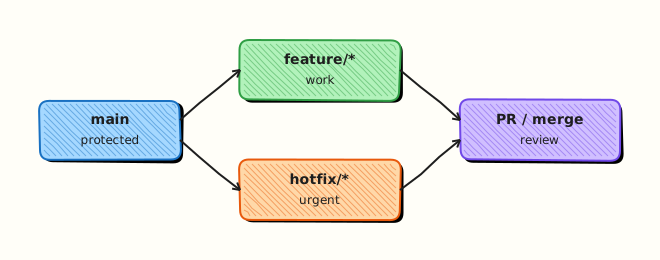
Workflow choice constrains branch lifetime, merge methods, release artefacts, and CI investment — all anchored on protected main.
Theory
What it is
An advanced Git workflow is the agreed rules for where work happens, how it integrates, and how releases are cut. GitFlow (Vincent Driessen model): main + develop, feature branches merge to develop, releases from release/*, hotfixes from main. GitHub Flow: branch → PR → merge main → deploy. Trunk-based: developers commit to trunk (main) within hours; incomplete work hidden behind feature flags; release branches optional and short.
Why it matters
Wrong workflow creates either integration hell (month-long branches) or release chaos (no stabilisation window for on-prem semver). Platform GitOps repos often use GitHub Flow; shrink-wrapped software may need GitFlow release branches. Documenting the choice prevents oral-tradition drift when teams scale.
How it works
GitHub Flow (SaaS daily deploy): 1. Branch from main. 2. PR + CI. 3. Merge to main. 4. CD/GitOps deploys staging then prod with gates.
GitFlow (scheduled semver): 1. Features merge to develop. 2. release/1.2 cut; only fixes allowed. 3. Tag v1.2.0; merge to main and back to develop. 4. Hotfix from main tag if needed.
Trunk-based (high maturity CI): 1. Small PRs merge to main multiple times daily. 2. Flags hide user-facing incomplete features. 3. No long-lived feature branches; optional release branch ≤ few days.
Key concepts and comparisons
| Criterion | GitHub Flow | GitFlow | Trunk-based |
|---|---|---|---|
| Branch lifetime | Days | Weeks–months | Hours–1 day |
| Release cadence | Continuous | Scheduled | Continuous |
| CI maturity needed | High | Medium | Very high |
| Feature flags | Helpful | Optional | Required |
| Audit snapshots | Tags optional | Release branches | Tags/commits |
| Promotion mechanism | Example |
|---|---|
| Branch | release/2025-Q1 |
| Tag | v2.3.1 on main SHA |
| GitOps folder | clusters/prod bump |
Common pitfalls
- GitFlow without release manager — develop rots.
- Trunk-based without flags — half-built UX ships.
- Documenting GitHub Flow but running GitFlow in practice.
- Environment branches (
staging) diverging years — merge nightmares.
Hands-on Lab
Objective
Simulate three mini workflow tracks in one lab repo, produce workflow-matrix.yaml with scored matrix validated by script, and commit operational CONTRIBUTING.md workflow section.
Prerequisites
- Git 2.x
Lab environment
Workspace: ~/rebash-git/related/workflows
mkdir -p ~/rebash-git/related/workflows && cd ~/rebash-git/related/workflows
set -euo pipefail
Real-world scenario
Engineering leadership asks platform team to document why SaaS services use GitHub Flow while on-prem agent uses quarterly GitFlow-style release branches.
Step-by-step tasks
Task 1 – GitHub Flow track simulation
cd ~/rebash-git/related/workflows
set -euo pipefail
rm -rf wf-lab
mkdir wf-lab && cd wf-lab
git init -b main
git config user.email 'lab@rebash.local'
git config user.name 'REBASH Lab'
printf 'svc: v1\n' > service.yaml
git add service.yaml && git commit -m 'chore: baseline service'
git switch -c feature/flag-demo
echo 'flag: new_checkout=false' >> service.yaml
git commit -am 'feat: add checkout flag default off'
git switch main
git merge --no-ff feature/flag-demo -m 'merge: PR #1 feature/flag-demo'
git log --oneline --graph | tee ../github-flow-graph.txt
grep -q 'feature/flag-demo' ../github-flow-graph.txt
cd ..
Expected output
Single merge to main representing PR flow.
Task 2 – GitFlow-style release branch simulation
cd ~/rebash-git/related/workflows/wf-lab
set -euo pipefail
git switch -c develop
echo 'dev: true' >> service.yaml
git commit -am 'feat: develop only tweak'
git switch -c release/0.2.0
echo 'release: stabilising' >> service.yaml
git commit -am 'chore: release branch stabilisation'
git switch main
git merge --no-ff release/0.2.0 -m 'release: v0.2.0'
git tag -a v0.2.0 -m 'GitFlow style release'
git switch develop
git merge main -m 'chore: back-merge release to develop'
git tag -l | tee ../gitflow-tags.txt
grep -q 'v0.2.0' ../gitflow-tags.txt
cd ..
Expected output
Release branch merged to main; tag v0.2.0; back-merge to develop.
Task 3 – Workflow matrix YAML and CONTRIBUTING snippet
Create workflow-matrix.yaml:
criteria:
  - simplicity
  - scheduled_release_fit
  - cd_gitops_fit
  - small_team_fit
  - mature_ci_required
workflows:
  github_flow:
    simplicity: 5
    scheduled_release_fit: 2
    cd_gitops_fit: 5
    small_team_fit: 5
    mature_ci_required: 4
  gitflow:
    simplicity: 2
    scheduled_release_fit: 5
    cd_gitops_fit: 3
    small_team_fit: 3
    mature_ci_required: 3
  trunk_based:
    simplicity: 4
    scheduled_release_fit: 3
    cd_gitops_fit: 5
    small_team_fit: 4
    mature_ci_required: 5
recommendations:
  saas: github_flow_with_feature_flags
  on_prem_agent: gitflow_quarterly_tags
Create validate-workflow-matrix.sh:
#!/usr/bin/env bash
set -euo pipefail
grep -q 'github_flow:' workflow-matrix.yaml
grep -q 'trunk_based:' workflow-matrix.yaml
grep -q 'saas: github_flow' workflow-matrix.yaml
echo 'matrix_ok'
Create CONTRIBUTING.md:
## Git workflow (platform services)

- Branch from `main`: `feature/`, `fix/`, `chore/`
- Open PR; require CI green + 1 review
- Merge squash or merge commit per repo settings
- Delete head branch after merge
- Production via GitOps sync from `main` only
Validate and commit:
cd ~/rebash-git/related/workflows/wf-lab
set -euo pipefail
chmod +x validate-workflow-matrix.sh
./validate-workflow-matrix.sh | tee ../matrix-validate.txt
grep -q 'matrix_ok' ../matrix-validate.txt
git add workflow-matrix.yaml validate-workflow-matrix.sh CONTRIBUTING.md
git commit -m 'chore: workflow matrix YAML and CONTRIBUTING guide'
grep -c 'github_flow\|gitflow\|trunk_based' workflow-matrix.yaml | tee ../comparison-rows.txt
test "$(cat ../comparison-rows.txt)" -ge 3
tar -czf ../related-workflows-evidence.tgz -C .. github-flow-graph.txt gitflow-tags.txt comparison-rows.txt matrix-validate.txt
ls -l ../related-workflows-evidence.tgz | tee ../workflows-evidence.txt
cd ..
Expected output
Workflow matrix YAML validated; operational CONTRIBUTING committed; evidence tarball.
Validation steps
- GitHub Flow merge visible in graph
- GitFlow-style tag v0.2.0 created
-
workflow-matrix.yamlpasses validation script - CONTRIBUTING.md workflow section present
Common errors and fixes
| Error | Cause | Fix |
|---|---|---|
| develop diverges | skipped back-merge | merge main/release into develop |
| tag on wrong branch | checked out develop | tag on main commit |
| graph confusing | too many merges | use --oneline --graph |
| policy contradicts | copy-paste | align CONTRIBUTING with ADR |
Challenge exercise
Add trunk-based simulation: three tiny commits directly on main in trunk-sandbox branch with flag_* toggles in service.yaml — merge via fast-forward only; add trunk_based scores to workflow-matrix.yaml and re-run validate-workflow-matrix.sh.
Learning outcomes
- Simulated GitHub Flow and GitFlow release paths
- Authored scored workflow matrix YAML with validation
- Wrote operational CONTRIBUTING workflow section
Cleanup
Validation
- Lab under
~/rebash-git/related/workflows - Can recommend workflow for SaaS vs on-prem
- Can explain feature flag role in trunk-based
- Know difference vs Production Git Practices ADR
Code Walkthrough
- Start from team constraints — release law, audit, cadence — not blog popularity.
- Write CONTRIBUTING — newcomers read this first.
- Align CI cost — GitFlow without automation is manual pain.
- Migrate gradually — shorten branch max age before trunk-based jump.
- Revisit ADR yearly — team size changes optimal model.
Security Considerations
- Release branches still need signed merges on main
- Hotfix path documented to avoid direct prod kubectl
- Protect develop if GitFlow — not semi-public scratch space
- Tag protection on release tags
- CODEOWNERS on workflow policy files
Common Mistakes
GitFlow without releases
Extra branches, no benefit. Fix: Simplify to GitHub Flow.
Trunk-based without CI coverage
main breaks constantly. Fix: Invest in tests before workflow change.
Long-lived environment branches
staging branch never merges — use GitOps env folders or tags instead.
Best Practices
- ADR per workflow change (Production Git Practices)
- Feature flags owned by product + platform
- Max branch age metric (e.g. 14 days)
- Release manager role for GitFlow
- Train interview candidates on your actual model
Troubleshooting
| Symptom | Likely cause | Fix |
|---|---|---|
| Teams use different flows | No ADR | publish decision |
| Release branch never ends | scope creep | freeze features; ship |
| main not deployable | long branches merge | smaller PRs |
| Flag debt | flags never removed | flag cleanup sprints |
Summary
Advanced workflows are organisational choices expressed in Git — match model to cadence, CI maturity, and compliance, then document in CONTRIBUTING and ADRs. Return to course index or optional Git Hooks.
Interview Questions
1. When choose GitFlow over GitHub Flow?
Reveal answer
Scheduled semver releases, multiple supported versions, packaged software delivered to customers who cannot take daily deploys — when release stabilisation branches add value.
2. Trunk-based prerequisite?
Reveal answer
Strong CI, feature flags, culture of fixing main immediately, small batches — high integration frequency discipline.
3. Feature flags vs long feature branches?
Reveal answer
Flags hide incomplete work on main safely; long branches defer integration risk until painful merge — trunk-based prefers flags.
4. GitFlow hotfix path?
Reveal answer
Branch from production tag on main, fix, tag patch release, merge to main and develop (and release branch if open) — ship fast without waiting for develop features.
5. Environment promotion without env branches?
Reveal answer
GitOps clusters/staging vs clusters/prod folders, or deploy same main SHA to staging then promote tag/manifest to prod — avoid long-lived staging branch diverging from main.
6. Migrate GitFlow → GitHub Flow?
Reveal answer
Gradually: shorten release branches, increase deploy frequency, strengthen CI, retire develop or sync develop daily to main, document ADR, train team on PR-to-prod path.
7. Platform vs app team different workflows?
Reveal answer
Common — app SaaS on GitHub Flow; platform modules semver tags; infra GitOps repos PR-to-main — unify principles (review, CI) not identical branch names.
8. CONTRIBUTING.md purpose in workflow?
Reveal answer
Onboarding contract — branch naming, PR rules, merge method, who owns releases — reduces ad hoc git habits and audit surprises.
Related Tutorials
- Production Git Practices
- Pull Requests and Code Review
- Git Submodules and Subtrees
- Git in CI/CD and DevOps
- Course index