Basic Git Workflow — Add, Commit, Push
Overview
Every delivery pipeline depends on a clean commit history. The daily Git loop — edit, inspect, stage, commit, push — is how infrastructure changes, application code, and pipeline definitions reach teammates and Continuous Integration (CI). Staging lets you split unrelated edits into atomic commits so reviewers and git bisect can trace failures to a single change.
This is Tutorial 2 in Module 3: Git Basics of the REBASH Academy Git & GitHub for Cloud & DevOps Engineers series — written for Cloud, DevOps, Platform, and Site Reliability Engineering (SRE) engineers. You will practise selective git add, Conventional-style messages, and git push -u to a bare remote without GitHub.
Prerequisites
- Creating and Cloning Repositories
- Git 2.x on PATH
- Completed or understood the
~/rebash-git/module-03bare-remote lab (or equivalent local setup)
Learning Objectives
By the end of this tutorial, you will be able to:
- Interpret
git statusfor staged, unstaged, and untracked files - Stage changes selectively with pathspecs and
git add -p - Create atomic commits with clear Conventional-style messages
- Push to a bare remote and set upstream with
git push -u - Leave evidence under
~/rebash-git/module-03proving two logical commits on the remote
Architecture
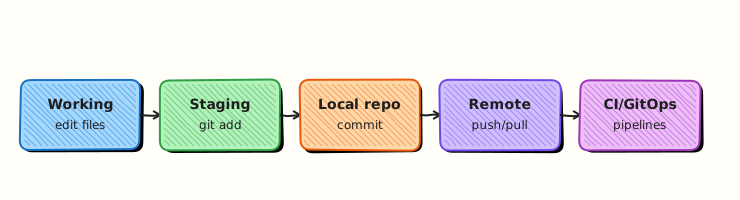
Edits flow from the working tree into the index (staging area), then into immutable commits on a branch; push publishes commits to a bare remote for CI and teammates.
Theory
What it is
The basic Git workflow is the repeatable cycle of inspecting changes, staging what belongs in the next commit, recording that snapshot with metadata, and publishing it to a remote. Staging (git add) is Git's index — a preview of the next commit. Committing (git commit) creates a permanent object linked to the previous tip. Pushing (git push) sends new commits and updates remote branch pointers.
Why it matters
In DevOps, one pull request often maps to one logical change: a Terraform module bump, a Kubernetes manifest fix, or a pipeline variable rename. Mixing those in one commit forces reviewers to untangle history and makes rollbacks risky. Atomic commits also let CI run per-commit checks and let git revert target a single fix. Push with -u (upstream) records which remote branch your local branch tracks — scripts and teammates expect that link.
How it works
- Edit files in the working tree.
git statusshows modified, staged, and untracked paths.git add <path>orgit add -pmoves hunks into the index.git commit -m "type: summary"creates a commit on the current branch.git push -u origin main(first push) publishes commits and sets upstream tracking.- Later pushes can use plain
git pushbecause upstream is configured.
Key concepts and comparisons
| Command | Effect |
|---|---|
git add file.tf | Stage one file |
git add -p | Interactively stage hunks |
git commit -m "fix: …" | Snapshot index only |
git push -u origin main | Push and set upstream |
git push | Push to configured upstream |
| Staging choice | When to use |
|---|---|
| Whole file | Single-purpose edit |
-p (patch) | Split formatting from logic in same file |
git restore --staged | Unstage before commit |
Conventional Commits (common in DevOps repos): feat:, fix:, chore:, docs:, ci: — helps changelog automation and code review scanning.
Common pitfalls
- Committing secrets because
.envwas never ignored — always checkgit statusbefore commit. git add .sweeping unrelated files into one commit.- Forgetting
-uon first push, then wondering whygit pulldoes not know the remote branch. - Empty or vague messages like "updates" that fail audit and release-note generation.
Hands-on Lab
Objective
Build a small IaC-style repo with two atomic commits (README + Terraform stub), push to a bare remote with upstream tracking, and prove both commits exist on the remote.
Prerequisites
- Git 2.x
- Shell with
grep,test
Lab environment
Workspace: ~/rebash-git/module-03 (extends the create/clone lab)
Real-world scenario
Your platform team stores Terraform in Git. A colleague already pushed an initial README; you must add a main.tf stub in a separate commit so the infrastructure review can approve documentation and code independently.
Step-by-step tasks
Task 1 – Prepare repo and make first atomic commit
Start from a clean app directory linked to a bare remote.
cd ~/rebash-git/module-03
set -euo pipefail
rm -rf workflow-app remotes/workflow.git
mkdir -p workflow-app remotes
cd workflow-app
git init -b main
git config user.email 'lab@rebash.local'
git config user.name 'REBASH Lab'
printf '# Platform stack\n\nManaged by Terraform.\n' > README.md
git add README.md
git commit -m 'docs: add README for platform stack'
git log --oneline | tee ../workflow-log-1.txt
grep -q 'docs: add README' ../workflow-log-1.txt
cd ..
git init --bare remotes/workflow.git
cd workflow-app
git remote add origin ../remotes/workflow.git
git push -u origin main
git status | tee ../after-first-push.txt
grep -q 'Your branch is up to date with' ../after-first-push.txt
cd ..
Expected output
One commit on main; push succeeds; status shows tracking origin/main.
Task 2 – Second change, selective staging only for Terraform
Add infrastructure file without touching README again.
Create main.tf:
Stage and commit only the Terraform file:
cd ~/rebash-git/module-03/workflow-app
set -euo pipefail
git status --short | tee ../status-before-tf.txt
grep -q '?? main.tf' ../status-before-tf.txt
git add main.tf
git status --short | tee ../status-staged-tf.txt
grep -q 'A  main.tf' ../status-staged-tf.txt
git commit -m 'feat: add minimal Terraform root module stub'
git log --oneline | tee ../workflow-log-2.txt
test "$(git rev-list --count HEAD)" -eq 2
cd ..
Expected output
Two commits locally; main.tf staged alone; README not in second commit.
Task 3 – Push and verify remote history
Publish the second commit and assert remote matches.
cd ~/rebash-git/module-03/workflow-app
set -euo pipefail
git push
git log --oneline origin/main | tee ../remote-log.txt
grep -q 'feat: add minimal Terraform' ../remote-log.txt
git show --stat HEAD | tee ../last-commit-stat.txt
grep -q 'main.tf' ../last-commit-stat.txt
git branch -vv | tee ../upstream.txt
grep -q '\[origin/main\]' ../upstream.txt
tar -czf ../module-03-workflow-evidence.tgz -C .. \
  workflow-log-1.txt workflow-log-2.txt remote-log.txt upstream.txt
ls -l ../module-03-workflow-evidence.tgz | tee ../workflow-evidence.txt
cd ..
Expected output
Remote has two commits; local branch tracks origin/main; evidence archive created.
Validation steps
- Exactly two commits with distinct messages
-
git branch -vvshows[origin/main] - Remote bare repo log matches local log
- Second commit touches only
main.tf
Common errors and fixes
| Error | Cause | Fix |
|---|---|---|
src refspec main does not match any | No commits yet | Commit before first push |
failed to push some refs | Remote ahead of local | git pull --rebase then push |
remote origin already exists | Re-run lab | rm -rf workflow-app remotes/workflow.git |
| Unrelated files staged | Used git add . carelessly | git restore --staged <file> |
Challenge exercise
Use git add -p on a file where you intentionally mix a comment change and a logic change — stage only the logic hunk and commit with refactor: prefix. Document the hunk choice in a one-line note file patch-notes.txt.
Learning outcomes
- Staged changes independently of working tree noise
- Created two review-friendly atomic commits
- Configured upstream and verified remote history
Cleanup
# Keep evidence for portfolio; remove working copy if needed:
# rm -rf ~/rebash-git/module-03/workflow-app
ls ~/rebash-git/module-03/*evidence* 2>/dev/null || true
Validation
- Completed lab under
~/rebash-git/module-03 - Can explain staging vs working tree
- Can describe when to use
git add -p - Can name one production failure from non-atomic commits
Code Walkthrough
- Inspect before stage — always run
git statusandgit diffbeforegit add. - One logical change per commit — split docs, code, and CI config when possible.
- Message for reviewers — subject line states what and why in under 72 characters.
- Set upstream once —
git push -u origin <branch>on first publish. - Verify remote —
git log origin/mainafter push in automation scripts.
Security Considerations
- Never stage
.env, kubeconfig, or private keys — add to.gitignorefirst. - Review
git diff --cachedbefore commit in shared repos. - Do not embed tokens in commit messages or Terraform defaults.
- Use signed commits on protected branches where policy requires it.
- Restrict push access on bare remotes the same as on GitHub.
Common Mistakes
Committing everything with git add .
Unrelated files (logs, local overrides) enter history permanently. Fix: Stage by path; use git status; maintain .gitignore.
Vague commit messages
Audits and release notes become useless. Fix: Use Conventional Commits; reference ticket IDs when your org requires them.
Skipping upstream on first push
git pull without tracking branch confuses new contributors. Fix: Always git push -u origin <branch> the first time.
Best Practices
- Commit small, reviewable units aligned to one ticket or concern
- Run linters or
terraform validatebefore commit when applicable - Pull or rebase before push if teammates may have merged
- Keep
maindeployable; use feature branches for risky work - Mirror commit message rules in CI with commitlint where teams enforce style
Troubleshooting
| Symptom | Likely cause | Fix |
|---|---|---|
| Nothing to commit, working tree clean | Forgot to save or edit | Edit files; check path |
| Changes not in commit | Not staged | git add then commit |
| Push rejected (non-fast-forward) | Remote has new commits | Fetch; rebase or merge; push |
| Wrong files in last commit | Over-broad staging | git reset --soft HEAD~1; re-stage |
Summary
You practised the core DevOps Git loop: selective staging, atomic commits with clear messages, and push with upstream tracking to a bare remote. Next: Viewing History and Diffs to inspect and compare commits.
Interview Questions
1. What is the staging area (index)?
Reveal answer
A buffer between the working tree and the next commit. git add copies selected changes into the index; git commit snapshots the index only — not every unstaged edit on disk.
2. Why are atomic commits important in IaC repos?
Reveal answer
They let reviewers approve one concern at a time, let CI bisect failures to a single Terraform or manifest change, and make git revert safe because it targets one logical rollback unit.
3. What does git push -u origin main do beyond a normal push?
Reveal answer
It publishes commits and sets the upstream tracking branch so future git pull and git push know which remote branch corresponds to local main.
4. When would you use git add -p?
Reveal answer
When one file contains multiple logical changes — for example formatting and a bug fix — and you want separate commits without manually editing the file twice.
5. How do you unstage a file before commit?
Reveal answer
git restore --staged <path> (Git 2.23+) removes it from the index while keeping working tree edits; older workflows used git reset HEAD <path>.
6. What is the difference between git commit and git push?
Reveal answer
Commit creates a local snapshot in your repository; push transfers commits to a remote and updates remote refs. Commit alone does not share history with teammates.
7. What should you check before every commit in a DevOps repo?
Reveal answer
git status, git diff --cached, secret patterns, and that the message describes a single reviewable change — especially for Terraform, Kubernetes YAML, and pipeline files.
8. Why might CI fail after a push even when commit succeeded locally?
Reveal answer
CI runs against the remote tip; hooks, branch protection, or missing files pushed (wrong branch, shallow clone, or forgotten git add) can fail validation that local commit did not run.