Undoing Changes — Reset, Revert, Stash
Overview
Not every mistake needs panic. git stash parks uncommitted work; git restore discards or revives file versions; git reset moves branch pointers for private history fixes; git revert adds a new commit that undoes a public change without rewriting history teammates already pulled.
This is Tutorial 2 in Module 7: Rebasing & History of the REBASH Academy Git & GitHub for Cloud & DevOps Engineers series — written for Cloud, DevOps, Platform, and SRE engineers.
Prerequisites
- Rebasing and Interactive Rebase
- Git 2.23+ (
restore) - Understanding of local vs pushed commits
Learning Objectives
By the end of this tutorial, you will be able to:
- Stash and pop WIP changes safely
- Use
git restorefor working tree and staged files - Apply soft/mixed reset on unpushed commits
- Revert a bad commit on shared history
- Document evidence under
~/rebash-git/module-07
Architecture
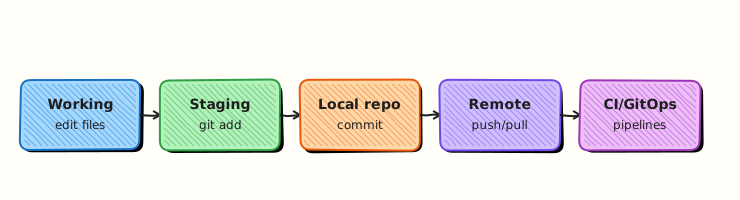
Stash stores index and working tree snapshots on a stack; reset moves refs; revert creates inverse commit linked to parent history.
Theory
What it is
Stash (git stash push) saves dirty state temporarily and cleans working tree. Restore checks out file content from index or commit. Reset moves the current branch ref — --soft keeps index and working tree; --mixed (default) resets index; --hard discards local changes. Revert computes inverse patch of a commit and commits it — safe for main already pushed.
Why it matters
On-call you may need to stash infra experiments to hotfix main. After a bad Terraform apply from a merged PR, git revert on main is the audit-friendly fix — not reset --hard and force-push. Soft reset helps squash unpushed commits locally before opening PR.
How it works
git stash push -m "msg"→ clean tree; stash stack grows.git stash popreapplies top stash (may conflict).git restore --staged funstages;git restore fdrops working changes to HEAD.git reset --soft HEAD~1removes last commit, keeps changes staged.git revert <sha>creates new commit undoing that SHA.
Key concepts and comparisons
| Situation | Tool |
|---|---|
| Save WIP temporarily | stash |
| Unstage file | restore --staged |
| Drop local edits | restore |
| Fix last unpushed commit | reset --soft |
| Undo pushed commit on main | revert |
| reset mode | Branch | Index | Working tree |
|---|---|---|---|
| --soft | moves | kept | kept |
| --mixed | moves | reset | kept |
| --hard | moves | reset | reset |
Common pitfalls
reset --hardon work never backed up — unrecoverable without reflog window.- Reverting merge commits needs
-m 1parent specification. - Stash pop after long time — conflicts with evolved branch.
- Using reset instead of revert on shared
main— breaks teammates.
Hands-on Lab
Objective
Stash experimental pipeline edits, soft-reset an unpushed commit and recommit, then revert a "bad" commit simulating shared main — proving three undo strategies.
Prerequisites
- Git 2.x
Lab environment
Workspace: ~/rebash-git/module-07 (subdir undo-lab)
mkdir -p ~/rebash-git/module-07/undo-lab && cd ~/rebash-git/module-07/undo-lab
set -euo pipefail
Real-world scenario
You started risky pipeline edits, must switch to hotfix branch (stash). Locally you fix commit message via soft reset. Production merged a bad replica count — revert on shared branch without force-push.
Step-by-step tasks
Task 1 – Stash and restore WIP
cd ~/rebash-git/module-07
set -euo pipefail
rm -rf undo-lab && mkdir undo-lab && cd undo-lab
git init -b main
git config user.email 'lab@rebash.local'
git config user.name 'REBASH Lab'
printf 'replicas: 1\n' > deploy.yaml
git add deploy.yaml && git commit -m 'chore: baseline'
echo 'experimental: true' >> deploy.yaml
git stash push -m 'wip experimental flag'
git status --short | tee ../stash-clean.txt
test ! -s ../stash-clean.txt
git stash list | tee ../stash-list.txt
grep -q 'wip experimental' ../stash-list.txt
git stash pop
grep -q 'experimental: true' deploy.yaml
cd ..
Expected output
Clean tree after stash; file restored after pop.
Task 2 – Soft reset unpushed commit
cd ~/rebash-git/module-07/undo-lab
set -euo pipefail
git add deploy.yaml
git commit -m 'bad message wip'
git reset --soft HEAD~1
git status --short | tee ../soft-reset-status.txt
grep -q 'deploy.yaml' ../soft-reset-status.txt
git commit -m 'feat: add experimental flag for lab only'
git log --oneline | tee ../after-soft-reset.txt
grep -q 'experimental flag' ../after-soft-reset.txt
cd ..
Expected output
One commit with improved message; changes remained staged through soft reset.
Task 3 – Revert bad commit on shared history
Simulate bad deploy commit then revert.
cd ~/rebash-git/module-07/undo-lab
set -euo pipefail
printf 'replicas: 99\n' > deploy.yaml
git commit -am 'feat: scale to 99 (bad)'
BAD=$(git rev-parse HEAD)
printf 'replicas: 2\n' > deploy.yaml
git commit -am 'fix: partial rollback manual'
git revert --no-edit "$BAD"
grep -q 'replicas: 1' deploy.yaml || grep -q 'replicas: 2' deploy.yaml
git log --oneline | tee ../revert-log.txt
grep -q 'Revert' ../revert-log.txt
tar -czf ../module-07-undo-evidence.tgz -C .. stash-list.txt revert-log.txt after-soft-reset.txt
ls -l ../module-07-undo-evidence.tgz | tee ../undo-evidence.txt
cd ..
Expected output
Revert commit present; bad scale undone in file content.
Validation steps
- Stash list showed WIP entry
- Soft reset preserved staged changes
- Revert added inverse commit without removing history
Common errors and fixes
| Error | Cause | Fix |
|---|---|---|
| stash pop conflict | Diverged files | Resolve; drop stash if applied |
| nothing to commit after soft reset | Already reset too far | reflog |
| revert merge fail | Need parent | git revert -m 1 <merge> |
| hard reset data loss | Wrong mode | reflog within window |
Challenge exercise
Create script safe-undo.sh that prints whether to use stash, reset, or revert based on: (a) uncommitted, (b) unpushed commit, © pushed to main — three echo branches only, no real git calls required.
Learning outcomes
- Stashed and recovered WIP
- Fixed commit message with soft reset
- Reverted shared bad commit safely
Cleanup
Validation
- Completed undo lab
- Can choose reset vs revert
- Can explain stash use case
- Know risk of reset --hard
Code Walkthrough
- Default to revert on shared branches — audit trail preserved.
- Stash with message —
git stash push -m "context". - Soft reset for local commit edit — before push only.
- restore before hard reset — try safer options first.
- reflog after mistakes — next tutorial deepens recovery.
Security Considerations
- Revert of secret-introducing commit may leave secret in history — rotate credentials.
- Hard reset on laptop with copied kubeconfigs — ensure secrets not in shell history.
- Stash may contain credentials — treat stash list as sensitive.
- Force-push after reset on shared repo bypasses review — forbid by policy.
- Document reverts in incident tickets for compliance.
Common Mistakes
reset --hard on main
Destroys shared expectations if pushed. Fix: revert; reset only local/unpushed branches.
Stash forever
Stashes are forgotten and may reintroduce stale code. Fix: List stashes weekly; pop or drop.
Revert without redeploy
Git history fixed but production still runs bad config. Fix: Revert + pipeline redeploy.
Best Practices
- Prefer
git restoreover legacy checkout for files - Name stashes; use branch for long WIP
- Revert merge commits with documented
-mparent - Keep unpushed experiments off shared remotes
- Pair revert commits with monitoring validation
Troubleshooting
| Symptom | Likely cause | Fix |
|---|---|---|
| Revert empty | Already undone | Check diff |
| Lost commit | Hard reset | git reflog |
| Stash not found | Wrong repo | git stash list |
| restore fails | Unmerged paths | Resolve merge first |
Summary
You applied stash, soft reset, and revert — the core undo toolkit for private vs public history. Next: Cherry-pick and Reflog.
Interview Questions
1. When use stash vs commit?
Reveal answer
Stash for temporary WIP you are not ready to commit (context switch, hotfix interrupt). Commit when change has logical meaning and message — even on a WIP branch.
2. reset --soft vs --mixed vs --hard?
Reveal answer
Soft moves branch only (keeps staging and files). Mixed resets staging to commit (default). Hard resets staging and working tree to match commit — destructive to uncommitted work.
3. Why revert instead of reset on main?
Reveal answer
Revert adds a forward commit that undoes change without rewriting history — teammates and CI already based on old SHAs stay consistent; audit logs show explicit undo.
4. git restore --staged?
Reveal answer
Removes file from index (unstage) while keeping working tree modifications — opposite of git add.
5. Revert a merge commit challenge?
Reveal answer
Merge commits have two parents; specify mainline with -m 1 (usually first parent is main) so Git knows which side to invert.
6. Can teammates see your stash?
Reveal answer
No — stash is local unless explicitly exported; do not rely on stash for sharing work — push a branch instead.
7. Production bad deploy from merged PR — first Git action?
Reveal answer
Revert the offending commit on main (or redeploy previous tag), trigger pipeline, validate monitoring — avoid force-push unless emergency policy allows.
8. After soft reset HEAD~1 what happens to changes?
Reveal answer
They remain staged in the index ready to recommit — ideal for fixing commit message or splitting commits before push.