Introduction to Containers and Docker
Overview
Explain containers vs virtual machines (VMs), name the Open Container Initiative (OCI) pieces, and state why Docker matters for Cloud and DevOps delivery.
Containers package an application with its dependencies and share the host kernel. Teams get portable builds from laptop → CI → cloud. This course is Docker for Cloud & DevOps Engineers — production packaging, not Docker trivia.
This is a core tutorial in Module 1 · Container Fundamentals of the REBASH Academy Docker for Cloud & DevOps Engineers series — written for Cloud, DevOps, Platform, and SRE engineers.
Prerequisites
- Linux Fundamentals
- Comfort with a terminal; Git helpful
Learning Objectives
By the end of this tutorial, you will be able to:
- Define a container and an image
- Compare VMs and containers for ops trade-offs
- Outline Docker’s brief history and ecosystem role
- Name OCI image and runtime standards
- Sketch create → start → stop → remove
Architecture
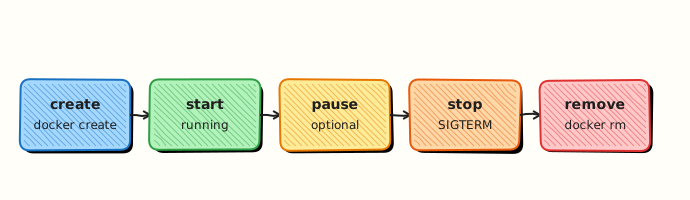
This topic’s control points and relationships are shown below.
Theory
What
A container packages an application with its libraries and runtime configuration so it runs consistently on a laptop, in Continuous Integration (CI), and in the cloud. Containers share the host kernel and isolate processes with Linux namespaces and control groups (cgroups). An image is the immutable template; a container is a running (or stopped) instance with a writable layer. Docker popularised this workflow with a Dockerfile → image → registry → run loop.
Why
Virtual machines (VMs) give strong isolation but are heavy: each guest carries a full operating system. Containers start in seconds, pack densely on a host, and produce portable artefacts for DevOps pipelines. The same Open Container Initiative (OCI) images later run under Kubernetes. Teams adopt Docker to remove “works on my machine” drift and to standardise delivery.
How it works
You build or pull an image (layered filesystem plus config), then create a container that adds a thin writable layer and starts the configured process. Networking, volumes, and resource limits are attached at runtime. Under the hood Docker Engine speaks OCI image and runtime standards (runc is a common runtime). Lifecycle is create → start → stop → remove; ephemeral containers use --rm so cleanup is automatic.
| Virtual machine | Container | |
|---|---|---|
| Isolation | Hardware + guest OS | Namespaces + cgroups |
| Footprint | Gigabytes, minutes | Megabytes, seconds |
| Kernel | Guest kernel each | Shared host kernel |
| Ops fit | Strong isolation, legacy | Dense packing, CI/CD |
Key concepts
- OCI image — layered filesystem + config, portable across engines
- OCI runtime — how a bundle becomes a running process
- Registry — stores and distributes images
- Docker’s role — developer UX and ecosystem; not the only engine
Common pitfalls
- Equating containers with perfect security isolation (kernel is shared)
- Treating containers as tiny VMs that need full systemd stacks
- Ignoring OCI portability and locking into non-standard image formats
- Skipping the image vs container distinction in incidents
Hands-on Lab
Objective
Verify Docker Engine is working, run a one-off Alpine container, and capture inspect evidence that shows how a container differs from a full virtual machine.
Prerequisites
- Docker Engine or Docker Desktop installed and running
- Permission to run
dockerwithoutsudo(or usesudoconsistently)
Lab environment
Workspace: ~/rebash-docker/module-01
Local Docker daemon on Ubuntu 22.04/24.04 or Docker Desktop. Remove lab containers before you finish.
Real-world scenario
You join a platform team and need to confirm Docker works on a new laptop before onboarding tutorials. Your lead asks for docker version and docker info snippets plus proof that a container shares the host kernel (PID namespace, lightweight footprint) — not a separate guest OS like a VM.
Step-by-step tasks
Task 1 – Verify Engine and client versions
Onboarding checklists start with version and daemon health.
cd ~/rebash-docker/module-01
docker version | tee docker-version.txt
docker info --format '{{ "{{" }}ServerVersion{{ "}}" }} {{ "{{" }}.OperatingSystem{{ "}}" }}' | tee docker-info-snippet.txt
grep -q 'Server:' docker-version.txt
test -s docker-info-snippet.txt
Expected output
docker-version.txt lists Client and Server sections; docker-info-snippet.txt shows a Server version string.
Task 2 – Run Alpine with a one-off command
Containers start from an image and exit when the command finishes — unlike a VM you boot and log into.
cd ~/rebash-docker/module-01
docker run --rm alpine:3.20 uname -a | tee alpine-uname.txt
grep -q 'Linux' alpine-uname.txt
Expected output
alpine-uname.txt contains a Linux kernel line (same kernel family as the host, not a separate guest OS).
Task 3 – Inspect a short-lived container and record VM contrast facts
Run Alpine in the background, then inspect PID, image, and status — evidence that this is a process-isolated workload, not a hypervisor guest.
cd ~/rebash-docker/module-01
docker run -d --name rebash-mod01-facts alpine:3.20 sleep 300
docker inspect rebash-mod01-facts --format 'Pid={{ "{{" }}.State.Pid{{ "}}" }} Image={{ "{{" }}.Config.Image{{ "}}" }} Status={{ "{{" }}.State.Status{{ "}}" }}' | tee container-facts.txt
grep -E 'Pid=[0-9]+' container-facts.txt
grep -q 'Status=running' container-facts.txt
docker rm -f rebash-mod01-facts
Expected output
container-facts.txt shows a non-zero PID, alpine:3.20, and Status=running before removal.
Validation steps
-
docker-version.txtanddocker-info-snippet.txtexist and are non-empty -
alpine-uname.txtproves a container ran a command fromalpine:3.20 -
container-facts.txtrecords PID, image, and status from inspect
Common errors and fixes
| Error | Cause | Fix |
|---|---|---|
| Cannot connect to the Docker daemon | Docker not running or wrong context | Start Docker Desktop or sudo systemctl start docker; run docker context ls |
| permission denied on socket | User not in docker group | Add user to group and re-login, or prefix with sudo |
| Unable to find image | No network or typo | Check connectivity; use pinned tag alpine:3.20 |
Challenge exercise
Add cgroup evidence and a one-line VM contrast note to your facts file.
Create vm-contrast.txt:
Containers share the host kernel; cgroups limit this process tree. A VM runs a separate guest kernel under a hypervisor.
Run and merge:
cd ~/rebash-docker/module-01
docker run --rm alpine:3.20 cat /proc/1/cgroup | head -n 3 | tee cgroup-snippet.txt
cat vm-contrast.txt >> container-facts.txt
grep -q 'shared kernel' container-facts.txt
Expected output
cgroup-snippet.txt shows cgroup paths; container-facts.txt ends with the contrast note.
Learning outcomes
- Captured
docker versionanddocker infoevidence for onboarding - Ran a disposable Alpine container with a pinned tag
- Used inspect to relate container PID, image, and status to the VM mental model
Cleanup
cd ~/rebash-docker/module-01
docker rm -f rebash-mod01-facts 2>/dev/null || true
docker rmi alpine:3.20 2>/dev/null || true
Validation
- Lab commands run under
~/rebash-docker/module-01/ - Evidence files (
docker-version.txt,container-facts.txt) support container vs VM discussion - You can explain each Theory section in your own words
- You can describe one production failure mode for this topic
Code Walkthrough
Production practice for Introduction to Containers and Docker always combines:
- Inspect before you change (status, plan, logs, dry-run)
- Prefer reversible, documented changes (Git, IaC, drop-ins, version pins)
- Capture evidence (command output, pipeline logs) for handovers
- Prefer current tools and APIs over legacy shortcuts
- Least privilege — escalate credentials only when required
Keep runbooks short enough to follow under pressure. Automate checks; keep humans for judgement.
Security Considerations
- Treat credentials and tokens for docker as privileged — never commit them
- Prefer short-lived auth (OIDC, roles, SSO) over long-lived keys
- Validate blast radius before apply/deploy/delete operations
- Restrict who can approve production changes
- Collect audit logs; limit who can read sensitive traces
Common Mistakes
Equating containers with perfect security isolation (kernel is shared)
Validate assumptions against the Theory section and official docs before changing production.
Treating containers as tiny VMs that need full systemd stacks
Lab shortcuts (open security groups, admin roles, skip approvals) must not ship unchanged.
Changing production without a rollback path
Always know how to revert (previous artefact, prior release, state rollback, DNS failback).
Best Practices
- Encode Introduction to Containers and Docker changes as code and review them in pull requests
- Pin versions (images, modules, actions, provider plugins)
- Separate environments with clear promotion gates
- Alert on symptoms with runbooks attached
- Destroy lab resources; tag everything with owner and expiry where possible
Troubleshooting
| Symptom | Likely cause | Fix |
|---|---|---|
| Auth / permission denied | Wrong identity, policy, or scope | Check caller identity, roles, and least-privilege policies |
| Timeout / no route | Network, DNS, security group, or endpoint | Trace path, DNS, and allow-lists before retrying |
| Drift / unexpected plan | Manual change or wrong state/workspace | Reconcile desired vs actual; avoid click-ops on managed resources |
| Pipeline/job red | Flaky step, cache, or missing secret | Read failing step logs; bisect recent workflow/config changes |
| Cost spike | Idle load balancer, NAT, oversized compute | Inventory billable resources; stop/delete labs promptly |
Summary
Introduction to Containers and Docker is essential for Cloud and DevOps engineers working with docker. Practise the lab until the inspection and change path is muscle memory, then continue the track.
Interview Questions
- How does a container differ from a virtual machine?
- Container exits immediately — what do you check first?
- What is an image versus a container?
- Why is cleanup (docker rm) part of every lab?
- Where do containers fit in Cloud/DevOps workflows?
Sample answer — question 2
Check docker ps -a for exit code, then docker logs and the container command.
Sample answer — question 4
Prefer official images, avoid privileged mode, and never put secrets in image layers.