Docker Networking Fundamentals
Overview
Create a user-defined bridge network, connect containers by name, publish ports, and know when host/overlay/macvlan apply.
Default bridge isolates containers; user-defined bridges add DNS. Host shares the host stack. Overlay spans Swarm/multi-host. Port mapping publishes container ports to the host.
This is a core tutorial in Module 8 · Networking of the REBASH Academy Docker for Cloud & DevOps Engineers series — written for Cloud, DevOps, Platform, and SRE engineers.
Prerequisites
- Volumes and Persistent Storage
- Networking basics from the Networking track help
Learning Objectives
By the end of this tutorial, you will be able to:
- Create and inspect a bridge network
- Reach containers via DNS names
- Publish ports with
-p - Contrast bridge vs host
- Outline overlay / macvlan use cases
Architecture
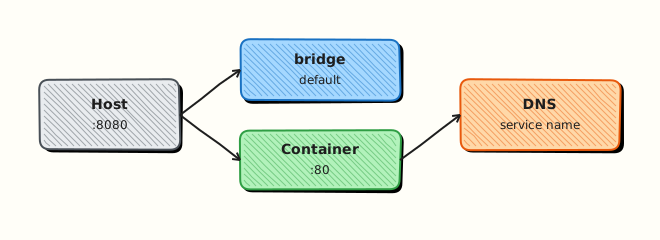
This topic’s control points and relationships are shown below.
Theory
What
Docker networks connect containers to each other and to the outside world. The default bridge network suits single-host apps; host shares the host network namespace; none isolates; overlay serves multi-host Swarm; macvlan makes containers appear as LAN hosts. Published ports map container ports to the host.
Why
Most “container cannot connect” tickets are network misunderstandings: wrong network, unpublished ports, or DNS name mismatches. Compose and Swarm rely on user-defined networks so service names resolve via embedded DNS.
How it works
User-defined bridge networks give containers IP addresses and DNS entries based on container or Compose service names. docker run --network attaches at start; you can also connect later. Publishing -p 8080:80 forwards host port 8080 to container port 80. Troubleshoot with docker network inspect, docker exec plus wget/nc, and host tools such as ss or lsof for published ports. Firewall rules on the host can still block traffic after Docker’s iptables/nftables integration.
| Driver | Typical use |
|---|---|
| bridge | Single-host apps (default for Compose) |
| host | Max performance / special networking |
| none | Locked down (no NIC) |
| overlay | Multi-host Swarm |
| macvlan | Appear as LAN hosts |
Key concepts
- Embedded DNS — service discovery on user-defined networks
- Publish vs expose — publish creates host forwarding
- Hairpin / localhost — Desktop vs Linux differences
- Network policies — Docker alone is not Kubernetes NetworkPolicy
Common pitfalls
- Using the legacy default bridge without DNS service names
- Binding only to
127.0.0.1then wondering why other hosts cannot connect - Assuming containers share localhost with the host (they do not, except
hostmode) - Overlapping subnet CIDRs with corporate VPNs
Hands-on Lab
Objective
Create a custom bridge network, attach two containers, resolve each other by name, publish a port to the host, and capture docker network inspect evidence.
Prerequisites
- Docker Engine or Docker Desktop
curlon the host
Lab environment
Workspace: ~/rebash-docker/module-08
Custom network rebash-mod08-net; host port 18086 for the web container.
Real-world scenario
Two microservices on the same Docker host must talk over a private network with DNS names, while only the web tier exposes a port to engineers on localhost. You create the network, start nginx and an Alpine client, curl from client to web by service name, and inspect the network attachment.
Step-by-step tasks
Task 1 – Create custom bridge network
cd ~/rebash-docker/module-08
docker network create rebash-mod08-net | tee network-create.txt
docker network ls --filter name=rebash-mod08-net | tee network-ls.txt
grep -q 'rebash-mod08-net' network-ls.txt
Expected output
network-ls.txt lists rebash-mod08-net as bridge driver.
Task 2 – Start web and client on the network
cd ~/rebash-docker/module-08
docker run -d --name rebash-mod08-web --network rebash-mod08-net -p 18086:80 nginx:1.27-alpine
docker run -d --name rebash-mod08-client --network rebash-mod08-net alpine:3.20 sleep 600
docker ps --filter network=rebash-mod08-net --format '{{ "{{" }}.Names{{ "}}" }}' | tee network-containers.txt
grep rebash-mod08-web network-containers.txt
grep rebash-mod08-client network-containers.txt
Expected output
Both container names appear attached to the network.
Task 3 – DNS by name, host curl, and network inspect
cd ~/rebash-docker/module-08
docker exec rebash-mod08-client wget -qO- http://rebash-mod08-web/ | head -n 5 | tee client-to-web.txt
grep -qi 'nginx' client-to-web.txt
curl -sI http://127.0.0.1:18086 | head -n 3 | tee host-curl.txt
grep -qi 'HTTP/' host-curl.txt
docker network inspect rebash-mod08-net --format '{{ "{{" }}range .Containers{{ "}}" }}{{ "{{" }}.Name{{ "}}" }} {{ "{{" }}end{{ "}}" }}' | tee network-inspect-names.txt
grep rebash-mod08-web network-inspect-names.txt
Expected output
Client resolves rebash-mod08-web and returns HTML; host curl gets HTTP headers; inspect lists both container names.
Validation steps
- Custom network
rebash-mod08-netexists - Client container reached web container via DNS name on the network
- Host port 18086 responds and
network-inspect-names.txtlists attachments
Common errors and fixes
| Error | Cause | Fix |
|---|---|---|
| wget: bad address | Containers on default bridge | Attach both to rebash-mod08-net |
| port is already allocated | 18086 in use | Stop conflicting container or change port |
| network with name exists | Previous lab | docker network rm rebash-mod08-net after cleanup |
Challenge exercise
Add a second client that fails to resolve a name off-network — prove isolation by pinging the web IP from inside the client (should work) versus wrong hostname:
cd ~/rebash-docker/module-08
docker exec rebash-mod08-client ping -c 1 rebash-mod08-web | tee ping-dns.txt
grep -q '1 packets transmitted' ping-dns.txt
Expected output
ping-dns.txt shows one successful ping to the web container by name.
Learning outcomes
- Created an user-defined bridge with embedded DNS
- Published only the web tier while keeping client internal
- Used
docker network inspectto audit container attachments
Cleanup
cd ~/rebash-docker/module-08
docker rm -f rebash-mod08-web rebash-mod08-client 2>/dev/null || true
docker network rm rebash-mod08-net 2>/dev/null || true
docker rmi nginx:1.27-alpine alpine:3.20 2>/dev/null || true
Validation
- Lab commands run under
~/rebash-docker/module-08/ -
client-to-web.txtandnetwork-inspect-names.txtprove DNS and inspect goals - You can explain each Theory section in your own words
- You can describe one production failure mode for this topic
Code Walkthrough
Production practice for Docker Networking Fundamentals always combines:
- Inspect before you change (status, plan, logs, dry-run)
- Prefer reversible, documented changes (Git, IaC, drop-ins, version pins)
- Capture evidence (command output, pipeline logs) for handovers
- Prefer current tools and APIs over legacy shortcuts
- Least privilege — escalate credentials only when required
Keep runbooks short enough to follow under pressure. Automate checks; keep humans for judgement.
Security Considerations
- Treat credentials and tokens for docker as privileged — never commit them
- Prefer short-lived auth (OIDC, roles, SSO) over long-lived keys
- Validate blast radius before apply/deploy/delete operations
- Restrict who can approve production changes
- Collect audit logs; limit who can read sensitive traces
Common Mistakes
Using the legacy default bridge without DNS service names
Validate assumptions against the Theory section and official docs before changing production.
Binding only to 127.0.0.1 then wondering why other hosts cannot connect
Lab shortcuts (open security groups, admin roles, skip approvals) must not ship unchanged.
Changing production without a rollback path
Always know how to revert (previous artefact, prior release, state rollback, DNS failback).
Best Practices
- Encode Docker Networking Fundamentals changes as code and review them in pull requests
- Pin versions (images, modules, actions, provider plugins)
- Separate environments with clear promotion gates
- Alert on symptoms with runbooks attached
- Destroy lab resources; tag everything with owner and expiry where possible
Troubleshooting
| Symptom | Likely cause | Fix |
|---|---|---|
| Auth / permission denied | Wrong identity, policy, or scope | Check caller identity, roles, and least-privilege policies |
| Timeout / no route | Network, DNS, security group, or endpoint | Trace path, DNS, and allow-lists before retrying |
| Drift / unexpected plan | Manual change or wrong state/workspace | Reconcile desired vs actual; avoid click-ops on managed resources |
| Pipeline/job red | Flaky step, cache, or missing secret | Read failing step logs; bisect recent workflow/config changes |
| Cost spike | Idle load balancer, NAT, oversized compute | Inventory billable resources; stop/delete labs promptly |
Summary
Docker Networking Fundamentals is essential for Cloud and DevOps engineers working with docker. Practise the lab until the inspection and change path is muscle memory, then continue the track.
Interview Questions
- Bridge versus host versus none networks?
- How do containers resolve each other by name?
- Published ports versus container ports?
- When do custom networks beat the default bridge?
- How do you inspect connectivity failures?
Sample answer — question 2
Use docker network inspect and confirm both containers share the network.
Sample answer — question 4
Avoid host networking unless required; it weakens isolation.