Dockerfile Best Practices and Multi-Stage Builds
Overview
Shrink and harden images with multi-stage builds, sensible bases, BuildKit cache, and ordered layers.
Smaller images pull faster, scan cleaner, and attack less surface. Multi-stage builds compile in a fat stage and copy artefacts into a slim runtime stage.
This is a core tutorial in Module 6 · Image Optimisation of the REBASH Academy Docker for Cloud & DevOps Engineers series — written for Cloud, DevOps, Platform, and SRE engineers.
Prerequisites
Learning Objectives
By the end of this tutorial, you will be able to:
- Write a multi-stage Dockerfile
- Compare Alpine, Debian slim, distroless
- Order layers for cache hits
- Enable BuildKit features
- Measure image size before/after
Architecture
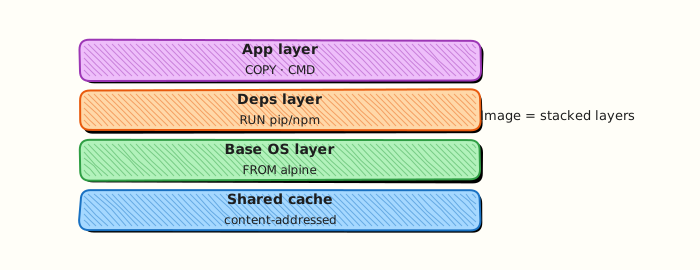
This topic’s control points and relationships are shown below.
Theory
What
Best practices keep images small, reproducible, and safer: pin versions, use .dockerignore, drop build tools from the final image, and run as non-root. Multi-stage builds use multiple FROM sections so compile toolchains stay in intermediate stages while the final stage copies only artefacts.
Why
Fat images slow pulls, expand vulnerability surface, and cost more in registries. Multi-stage builds are the standard way to ship Go, Java, and Node production binaries without compilers. Cache-aware ordering keeps CI fast.
How it works
Declare a builder stage (FROM golang:… AS build) that compiles, then a runtime stage (FROM gcr.io/distroless/static or a minimal distro) that COPY --from=build the binary. Combine RUN lines thoughtfully: fewer layers vs granular cache invalidation is a trade-off. Pin base images and dependency versions. Enable BuildKit features (cache mounts) when appropriate. Distroless or minimal images remove shells — great for production, harder for docker exec debugging (use debug sidecars or ephemeral debug images).
| Technique | Why |
|---|---|
| Multi-stage | Drop compilers from the final image |
.dockerignore | Smaller, safer build context |
| Pin versions | Reproducible builds |
Careful RUN grouping | Balance layers vs cache |
| Distroless / minimal | Less shell and CVE surface |
Key concepts
- Attack surface — fewer packages, fewer CVEs
- Cache mounts — accelerate package downloads without bloating layers
- SBOM-friendly builds — know what you shipped
- Provenance — attestations in advanced supply-chain setups
Common pitfalls
- Copying the entire build stage into the final image by mistake
- “Optimising” by disabling cache in CI always (slow feedback)
- Keeping package manager caches in layers
- Using multi-stage complexity when a single slim stage would do
Hands-on Lab
Objective
Build single-stage and multi-stage images from explicit Dockerfiles, compare image sizes, and run the final image as a non-root user.
Prerequisites
- Docker Engine or Docker Desktop with BuildKit enabled (default on recent installs)
- Basic familiarity with
Dockerfileinstructions
Lab environment
Workspace: ~/rebash-docker/module-06
Two Dockerfiles live side by side for size comparison.
Real-world scenario
Security review flagged a Go toolchain left in a production image. You refactor to a multi-stage build: compile in a builder stage, copy only the binary into a slim runtime, add a non-root USER, and attach size evidence for the change ticket.
Step-by-step tasks
Task 1 – Create single-stage and multi-stage Dockerfiles
Create app.sh:
Create Dockerfile.single:
FROM alpine:3.20
RUN apk add --no-cache bash
WORKDIR /app
COPY app.sh /app/app.sh
RUN chmod +x /app/app.sh
CMD ["/app/app.sh"]
Create Dockerfile.multi:
FROM alpine:3.20 AS build
RUN apk add --no-cache bash
WORKDIR /src
COPY app.sh /src/app.sh
RUN chmod +x /src/app.sh && /src/app.sh > /src/out.txt

FROM alpine:3.20
RUN adduser -D -u 10001 appuser
WORKDIR /app
COPY --from=build /src/out.txt /app/out.txt
USER appuser
CMD ["cat", "/app/out.txt"]
Expected output
Three files exist in the lab directory.
Task 2 – Build both tags and record sizes
cd ~/rebash-docker/module-06
docker build -f Dockerfile.single -t rebash-mod06:single .
docker build -f Dockerfile.multi -t rebash-mod06:multi .
docker image ls --format 'table {{ "{{" }}.Repository{{ "}}" }}\t{{ "{{" }}.Tag{{ "}}" }}\t{{ "{{" }}.Size{{ "}}" }}' | grep rebash-mod06 | tee image-size-compare.txt
grep -q 'rebash-mod06' image-size-compare.txt
Expected output
image-size-compare.txt lists both tags with size columns (multi-stage is typically smaller or equal without bash in the final stage).
Task 3 – Run multi-stage image and prove non-root USER
cd ~/rebash-docker/module-06
docker run --rm rebash-mod06:multi | tee multi-out.txt
grep -q 'rebash-mod06 artefact' multi-out.txt
docker run --rm rebash-mod06:multi id -u | tee multi-uid.txt
grep -q '10001' multi-uid.txt
Expected output
multi-out.txt prints the artefact line; multi-uid.txt shows UID 10001.
Validation steps
- Both
rebash-mod06:singleandrebash-mod06:multiimages built -
image-size-compare.txtdocuments size difference - Multi-stage container runs as UID 10001 and prints expected output
Common errors and fixes
| Error | Cause | Fix |
|---|---|---|
| exec user process caused: permission denied | File not readable by appuser | Ensure copied artefact is world-readable or owned correctly |
| COPY --from=build failed | Wrong stage name | Match AS build name in COPY --from=build |
| apk: not found | Wrong base in stage | Use alpine:3.20 consistently |
Challenge exercise
Add a .dockerignore excluding *.txt, rebuild multi-stage only, and append the new size line:
Create .dockerignore:
cd ~/rebash-docker/module-06
docker build -f Dockerfile.multi -t rebash-mod06:multi-v2 .
docker image ls rebash-mod06:multi-v2 --format '{{ "{{" }}.Size{{ "}}" }}' | tee multi-v2-size.txt
test -s multi-v2-size.txt
Expected output
multi-v2-size.txt contains a size string for the rebuilt image.
Learning outcomes
- Contrasted single-stage and multi-stage Dockerfile layouts
- Measured image sizes before promoting builds
- Ran a final stage with an explicit non-root
USER
Cleanup
cd ~/rebash-docker/module-06
docker rmi rebash-mod06:single rebash-mod06:multi rebash-mod06:multi-v2 2>/dev/null || true
Validation
- Lab commands run under
~/rebash-docker/module-06/ -
image-size-compare.txtandmulti-uid.txtprove size and non-root goals - You can explain each Theory section in your own words
- You can describe one production failure mode for this topic
Code Walkthrough
Production practice for Dockerfile Best Practices and Multi-Stage Builds always combines:
- Inspect before you change (status, plan, logs, dry-run)
- Prefer reversible, documented changes (Git, IaC, drop-ins, version pins)
- Capture evidence (command output, pipeline logs) for handovers
- Prefer current tools and APIs over legacy shortcuts
- Least privilege — escalate credentials only when required
Keep runbooks short enough to follow under pressure. Automate checks; keep humans for judgement.
Security Considerations
- Treat credentials and tokens for docker as privileged — never commit them
- Prefer short-lived auth (OIDC, roles, SSO) over long-lived keys
- Validate blast radius before apply/deploy/delete operations
- Restrict who can approve production changes
- Collect audit logs; limit who can read sensitive traces
Common Mistakes
Copying the entire build stage into the final image by mistake
Validate assumptions against the Theory section and official docs before changing production.
“Optimising” by disabling cache in CI always (slow feedback)
Lab shortcuts (open security groups, admin roles, skip approvals) must not ship unchanged.
Changing production without a rollback path
Always know how to revert (previous artefact, prior release, state rollback, DNS failback).
Best Practices
- Encode Dockerfile Best Practices and Multi-Stage Builds changes as code and review them in pull requests
- Pin versions (images, modules, actions, provider plugins)
- Separate environments with clear promotion gates
- Alert on symptoms with runbooks attached
- Destroy lab resources; tag everything with owner and expiry where possible
Troubleshooting
| Symptom | Likely cause | Fix |
|---|---|---|
| Auth / permission denied | Wrong identity, policy, or scope | Check caller identity, roles, and least-privilege policies |
| Timeout / no route | Network, DNS, security group, or endpoint | Trace path, DNS, and allow-lists before retrying |
| Drift / unexpected plan | Manual change or wrong state/workspace | Reconcile desired vs actual; avoid click-ops on managed resources |
| Pipeline/job red | Flaky step, cache, or missing secret | Read failing step logs; bisect recent workflow/config changes |
| Cost spike | Idle load balancer, NAT, oversized compute | Inventory billable resources; stop/delete labs promptly |
Summary
Dockerfile Best Practices and Multi-Stage Builds is essential for Cloud and DevOps engineers working with docker. Practise the lab until the inspection and change path is muscle memory, then continue the track.
Interview Questions
- How do multi-stage builds improve security and size?
- What should the final stage contain?
- Layer caching tips that actually help CI?
- Why order Dockerfile instructions carefully?
- When is distroless a good final base?
Sample answer — question 2
Compare image sizes and docker history before/after multi-stage.
Sample answer — question 4
Keep build tools out of production images and pin base digests.