From Docker to Kubernetes
Overview
If you understand Docker, you already know half of Kubernetes. Containers become Pods, docker run flags become Pod specs, Compose services become Deployments and Services, and Swarm overlay networks become ClusterIP routing. This tutorial builds a explicit concept map so you can read Kubernetes manifests confidently and migrate workloads incrementally.
This is Tutorial 19 in Module 6: Production & Beyond of the REBASH Academy Docker track.
Prerequisites
- Docker Swarm Orchestration Basics
- Docker Compose Fundamentals
- Production Docker Patterns
- Docker Networking Fundamentals
- Optional: local cluster via minikube or kind
Learning Objectives
By the end of this tutorial, you will be able to:
- Map Docker primitives to Kubernetes API objects
- Explain Pods, Deployments, Services, and Namespaces in Docker terms
- Translate a Compose file into equivalent Kubernetes manifests
- Understand how health checks, env vars, volumes, and secrets differ in K8s
- Plan an incremental migration path from Docker Compose to Kubernetes
- Know when to continue with the Kubernetes track
Architecture
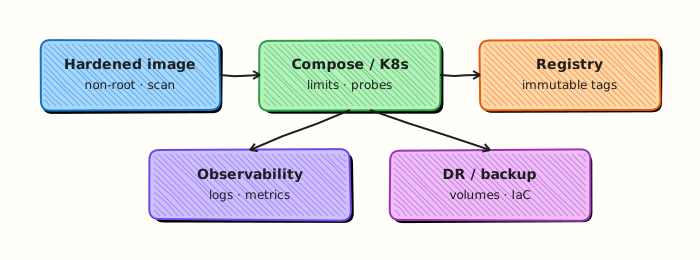
Theory
The big picture
| Docker mental model | Kubernetes equivalent |
|---|---|
| Container | Container inside a Pod |
docker run | kubectl run or Pod manifest (prefer Deployment) |
| Image | Same OCI image — pulled from same registries |
docker compose service | Deployment + Service (+ Ingress) |
| Bridge network | Pod network (CNI plugin) |
--publish 8080:80 | Service type: NodePort/LoadBalancer + Ingress |
| Named volume | PersistentVolumeClaim |
| Bind mount | hostPath or ConfigMap/Secret volume |
Env file / -e | ConfigMap, Secret, or env in manifest |
| HEALTHCHECK | livenessProbe, readinessProbe, startupProbe |
--restart unless-stopped | Deployment restartPolicy: Always |
| Swarm service | Deployment + Service |
| Swarm secret | Secret object |
| Swarm stack | Helm chart or Kustomize overlay |
Kubernetes adds a control plane that continuously reconciles desired state — similar to Swarm managers, but richer and ecosystem-backed.
Pod — the atomic unit
A Pod is the smallest deployable unit in Kubernetes. Usually one Pod runs one primary container (sometimes sidecars share the network namespace).
Docker equivalent:
Kubernetes Pod (simplified):
apiVersion: v1
kind: Pod
metadata:
  name: api
  labels:
    app: api
spec:
  containers:
    - name: api
      image: myapi:1.2.0
      env:
        - name: DB_HOST
          value: db
      ports:
        - containerPort: 3000
  restartPolicy: Always
Do not deploy bare Pods in production
Pods are ephemeral. Use a Deployment (or StatefulSet for stable identity) to manage Pod lifecycle.
Deployment — desired replica count and rollouts
A Deployment owns ReplicaSets and Pods. It provides scaling and rolling updates — the closest match to a Swarm replicated service or a Compose service with deploy.replicas.
apiVersion: apps/v1
kind: Deployment
metadata:
  name: api
spec:
  replicas: 3
  selector:
    matchLabels:
      app: api
  template:
    metadata:
      labels:
        app: api
    spec:
      containers:
        - name: api
          image: registry.example.com/myapi:1.2.0
          ports:
            - containerPort: 3000
          resources:
            limits:
              memory: "256Mi"
              cpu: "500m"
          livenessProbe:
            httpGet:
              path: /health
              port: 3000
            initialDelaySeconds: 10
            periodSeconds: 15
          readinessProbe:
            httpGet:
              path: /ready
              port: 3000
            periodSeconds: 5
| Deployment field | Docker/Swarm analog |
|---|---|
replicas: 3 | --replicas 3 / scale 3 |
strategy.rollingUpdate | docker service update --update-parallelism |
resources.limits | --memory, --cpus |
| Probes | HEALTHCHECK with separate liveness/readiness |
Service — stable network identity
Pods get new IPs on restart. A Service provides a stable ClusterIP and DNS name (api.default.svc.cluster.local) that load-balances to healthy Pod endpoints.
apiVersion: v1
kind: Service
metadata:
  name: api
spec:
  selector:
    app: api
  ports:
    - port: 80
      targetPort: 3000
  type: ClusterIP
| Service type | Docker analog |
|---|---|
| ClusterIP | Internal overlay DNS (default) |
| NodePort | --publish on every node IP |
| LoadBalancer | Cloud LB in front of NodePort |
| Ingress | nginx/Traefik routing rules (no direct Docker equivalent) |
Namespace — logical isolation
Namespaces partition objects (dev, staging, prod). Docker has no direct match — closest is separate Compose project names or Swarm stack names.
ConfigMap and Secret
| Docker | Kubernetes |
|---|---|
-e KEY=val | env from ConfigMap/Secret |
--env-file | ConfigMap keys |
| Swarm secret file | Secret volume mount |
| Bind mount config | ConfigMap volume |
Volumes
| Docker | Kubernetes |
|---|---|
| Named volume | PersistentVolumeClaim |
| Bind mount | hostPath (avoid in prod), ConfigMap, emptyDir |
| tmpfs | emptyDir with medium: Memory |
volumes:
  - name: data
    persistentVolumeClaim:
      claimName: postgres-pvc
containers:
  - name: db
    volumeMounts:
      - name: data
        mountPath: /var/lib/postgresql/data
Health checks — three probes
Kubernetes improves on Docker's single HEALTHCHECK:
| Probe | Maps to | Failure action |
|---|---|---|
| startupProbe | Extended boot grace | Kill container if boot never succeeds |
| livenessProbe | Liveness HEALTHCHECK | Restart container |
| readinessProbe | Readiness check | Remove from Service endpoints |
See Production Docker Patterns for probe design principles.
Translate intent, not flags
A naïve Compose-to-Kubernetes conversion that copies privileged, host mounts, and published ports will recreate the same risks at larger blast radius. Map services to Deployments, ports to Services/Ingress, env files to ConfigMaps/Secrets, and healthchecks to probes — then apply Pod Security and NetworkPolicies. Keep image digests identical across the migration so you debug orchestration differences, not application drift.
Practice mindset
As you work through this tutorial, narrate why each control or command exists — not only how to type it. Production incidents are rarely solved by memorising flags; they are solved by connecting symptoms to the architecture (daemon vs kubelet, image vs running container, Service vs Endpoints, volume vs writable layer). After the lab, write three bullet notes in your own words: what you verified, what would break in production if skipped, and what you would monitor next.
Connecting the lab to production reviews
When a teammate asks “is this ready?”, answer with evidence from this tutorial’s controls: image provenance, privilege level, network exposure, health signals, and teardown/rollback. Copy-pasting a working lab snippet into production without those answers is how quiet misconfigurations become incidents. Prefer small, reviewable changes — one Dockerfile improvement, one RBAC binding, one probe — over large untested stacks.
Observability while you learn
Get into the habit of watching state while commands run: docker events / kubectl get events, resource usage, and logs in a second pane. Many failures are timing issues (probes, readiness, volume attach) that disappear if you only look at the final steady state. Capturing a short timeline of what you saw will also make your Troubleshooting section notes far more valuable later.
Checklist before you leave the lab
- Resources created in this tutorial are deleted or clearly labelled for retention.
- No secrets, kubeconfigs, or registry passwords were written into Git.
- You can explain the Architecture diagram without reading the caption.
- Validation pass criteria in this page are satisfied on your machine.
- You noted one question to revisit in the next tutorial of the series.
Common production failure modes this topic prevents
Misconfiguration here usually shows up as intermittent outages rather than clean errors: restart loops without log shipping, services that listen but never become Ready, volumes that work on one node only, or credentials that leak into image history. Use the Hands-on Lab as a rehearsal for the failure mode — break something on purpose, watch the signal, then apply the fix documented in Troubleshooting.
Hands-on Lab
Objective
Translate a docker run equivalent into Kubernetes Deployment and Service YAML, validate manifests with Python, and optionally apply to a local kind cluster.
Prerequisites
- Docker Engine (for the reference container mental model)
python3with PyYAML (pip install pyyaml)- Optional: kind for live apply
Lab environment
Workspace: ~/rebash-docker/from-docker-to-kubernetes
mkdir -p ~/rebash-docker/from-docker-to-kubernetes && cd ~/rebash-docker/from-docker-to-kubernetes
Real-world scenario
Platform is migrating an edge API from docker run on a VM to Kubernetes. You document the Docker invocation, write equivalent Deployment/Service manifests, validate YAML locally, and (if kind is available) prove pods reach Ready.
Step-by-step tasks
Task 1 – Document Docker run baseline
Reference command this lab replaces:
docker run -d --name rebash-k8s-18200 -p 18200:8080 \
  -e APP_ENV=lab \
  --restart unless-stopped \
  rebash-k8s-lab:1.0.0
Create Dockerfile (build context for the image reference):
Create app.py:
import os
from http.server import BaseHTTPRequestHandler, HTTPServer
ENV = os.environ.get("APP_ENV", "unknown")

class H(BaseHTTPRequestHandler):
    def do_GET(self):
        if self.path == "/healthz":
            self.send_response(200)
            self.end_headers()
            self.wfile.write(b"ok\n")
            return
        self.send_error(404)
    def log_message(self, *args):
        return

HTTPServer(("0.0.0.0", 8080), H).serve_forever()
Build locally for reference:
cd ~/rebash-docker/from-docker-to-kubernetes
docker build -t rebash-k8s-lab:1.0.0 .
docker images rebash-k8s-lab:1.0.0 | tee docker-ref.txt
grep -q rebash-k8s-lab docker-ref.txt
Expected output
Image rebash-k8s-lab:1.0.0 exists locally.
Task 2 – Create Kubernetes manifests
Create deployment.yaml:
apiVersion: apps/v1
kind: Deployment
metadata:
  name: rebash-k8s-lab
  labels:
    app: rebash-k8s-lab
spec:
  replicas: 1
  selector:
    matchLabels:
      app: rebash-k8s-lab
  template:
    metadata:
      labels:
        app: rebash-k8s-lab
    spec:
      containers:
        - name: api
          image: rebash-k8s-lab:1.0.0
          imagePullPolicy: IfNotPresent
          ports:
            - containerPort: 8080
          env:
            - name: APP_ENV
              value: lab
          readinessProbe:
            httpGet:
              path: /healthz
              port: 8080
            initialDelaySeconds: 3
            periodSeconds: 5
Create service.yaml:
apiVersion: v1
kind: Service
metadata:
  name: rebash-k8s-lab
spec:
  type: NodePort
  selector:
    app: rebash-k8s-lab
  ports:
    - port: 8080
      targetPort: 8080
      nodePort: 30200
Validate YAML:
cd ~/rebash-docker/from-docker-to-kubernetes
python3 -c "
import yaml, pathlib
for f in ('deployment.yaml','service.yaml'):
    yaml.safe_load(pathlib.Path(f).read_text())
print('k8s_yaml_ok')
" | tee k8s-yaml-check.txt
grep -q k8s_yaml_ok k8s-yaml-check.txt
Expected output
k8s-yaml-check.txt contains k8s_yaml_ok.
Task 3 – Optional kind apply and Ready proof
If kind is installed, load the image and apply:
cd ~/rebash-docker/from-docker-to-kubernetes
if command -v kind >/dev/null 2>&1; then
  kind create cluster --name rebash-k8s-lab 2>/dev/null || true
  kind load docker-image rebash-k8s-lab:1.0.0 --name rebash-k8s-lab
  kubectl apply -f deployment.yaml -f service.yaml
  kubectl rollout status deployment/rebash-k8s-lab --timeout=120s | tee k8s-rollout.txt
  kubectl get pods -l app=rebash-k8s-lab -o wide | tee k8s-pods.txt
else
  echo "kind not installed — YAML validation only" | tee k8s-rollout.txt
fi
test -s k8s-rollout.txt
Expected output
With kind, rollout succeeds and pods show Running/Ready; without kind, fallback message is recorded.
Validation steps
- Docker reference image builds locally
- Deployment and Service YAML parse with Python
- Readiness probe maps from Docker healthcheck concept
- Optional kind apply reaches Ready (when kind available)
- Cleanup removes kind cluster and local files
Common errors and fixes
| Error | Cause | Fix |
|---|---|---|
ImagePullBackOff in kind | Image not loaded into cluster | Run kind load docker-image before apply |
| NodePort conflict | Port 30200 taken | Change nodePort in Service |
| YAML parse error | Tabs in YAML | Use spaces only |
| Probe never Ready | Wrong port/path | Match /healthz on port 8080 |
Challenge exercise
Add a ConfigMap for APP_ENV instead of a literal env value and mount it as envFrom in the Deployment.
Learning outcomes
- Mapped
docker runflags to Deployment/Service fields - Authored readiness probes equivalent to Docker healthchecks
- Validated manifests locally before cluster apply
- Applied optionally to kind with rollout evidence
Cleanup
kind delete cluster --name rebash-k8s-lab 2>/dev/null || true
docker rmi rebash-k8s-lab:1.0.0 2>/dev/null || true
rm -f ~/rebash-docker/from-docker-to-kubernetes/*.txt
Validation
Confirm the lab before moving on:
- Re-run the critical commands from the Hands-on Lab and compare them to the expected output in each step.
- Check that you can explain why each successful result matters (not only that it printed).
- Note any warnings or unexpected output — resolve them using Troubleshooting before continuing.
| Check | Pass criteria |
|---|---|
| Mapping | You produced Deployment/Service YAML equivalent to the Compose services |
| Probes | Healthcheck mapped to a probe (or documented deliberate difference) |
| Config/secret | Env/volume concerns mapped to ConfigMap/Secret/Volume patterns |
| Review | You listed at least two security differences Compose→Kubernetes |
Code Walkthrough
kubectl ↔ docker cheat sheet
| Operation | Docker | Kubernetes |
|---|---|---|
| List running | docker ps | kubectl get pods |
| Logs | docker logs CONTAINER | kubectl logs POD |
| Exec shell | docker exec -it C sh | kubectl exec -it POD -- sh |
| Inspect | docker inspect C | kubectl describe pod POD |
| Remove | docker rm -f C | kubectl delete pod POD |
| Scale | docker service scale | kubectl scale deployment D --replicas=5 |
| Update image | docker service update --image | kubectl set image deployment/D c=img:tag |
| Rollout status | service ps | kubectl rollout status deployment/D |
| Rollback | service rollback | kubectl rollout undo deployment/D |
Ingress replaces manual nginx routing in Compose stacks — see the Kubernetes track.
Security Considerations
- Do not translate Compose
privileged: trueor host mounts into Kubernetes without a security review - Map Compose secrets to Kubernetes Secrets or an external secret store — not plain ConfigMaps
- Replace host port publishes with Services/Ingress and network policies
- Keep image digests stable across the migration so you are not debugging two variables at once
- Apply Pod Security standards early; “it worked in Compose” is not a security model
- Limit kubeconfig privileges used during migration labs to a dedicated namespace
Common Mistakes
Running one Pod per deployment without probes
Silent failures stay in load rotation. Port Docker HEALTHCHECK to liveness and readiness probes.
Using latest tag in manifests
Same anti-pattern as Docker — pin SHA or semver; use imagePullPolicy: IfNotPresent thoughtfully.
Lift-and-shift stateful containers as Deployments
Postgres in a Deployment loses data on reschedule. Use StatefulSet + PVC + backup.
Assuming kubectl apply from laptop is production CD
Use CI/CD or GitOps — same lesson as Docker in CI/CD Pipelines.
Ignoring resource requests
Without requests, scheduler overcommits nodes — worse than missing Docker --memory limits.
Best Practices
Migrate stateless services first
API, workers, frontends — then tackle databases with proper operators.
Keep images unchanged
Kubernetes runs the same OCI images you built for Docker — reuse CI pipelines.
Use Helm or Kustomize for environments
Like Compose overrides — base chart + staging/prod values.
Learn one local cluster tool
kind or minikube plus kubectl beats Docker Desktop alone for K8s-specific learning.
Continue on the Kubernetes track
This tutorial maps concepts — Kubernetes tutorials go deep on operations.
Troubleshooting
| Issue | Cause | Solution |
|---|---|---|
| ImagePullBackOff | Private registry auth | imagePullSecrets |
| CrashLoopBackOff | App exits on boot | kubectl logs; fix config |
| Pod pending | Insufficient resources | Check requests; add nodes |
| Service no traffic | Selector mismatch | Labels on Pod template must match Service selector |
| Probe failures | Wrong port/path | Align with HEALTHCHECK from Docker image |
| PVC pending | No storage class | Define StorageClass or use hostPath in lab only |
Summary
- Pods wrap containers; Deployments manage replica count and rollouts (like Swarm services)
- Services provide stable DNS and load balancing (like overlay service names + VIP)
- ConfigMaps/Secrets, PVCs, and probes map directly from Compose and Dockerfile patterns
- Migration is incremental: same images, new orchestration API, stronger production primitives
- Continue learning on the Kubernetes track
- Finish the Docker series with Docker Capstone and Next Steps
Interview Questions
- Map Docker run flags to Kubernetes fields.
- Why isn't Compose a production orchestrator for most enterprises?
- What stays the same when moving images to Kubernetes?
- How do probes differ from Docker HEALTHCHECK?
- What operational skills transfer directly?
Sample answer — question 2
Compare the working docker run/compose config to Deployment/Service YAML. Client dry-run catches API mistakes early.
Sample answer — question 4
Keep image supply-chain controls; move secrets to Kubernetes Secret/CSI providers.
Related Tutorials
- Docker Swarm Orchestration Basics (previous)
- Docker Capstone and Next Steps (next)
- Docker Compose Fundamentals
- Production Docker Patterns
- Kubernetes – Category Overview
- Docker – Category Overview
- Cheat sheet: Docker Cheat Sheet
- Interview prep: Docker Interview Prep
- Learning path: DevOps Engineer