Docker Security Hardening
Overview
Run a container as non-root with a read-only root filesystem, dropped capabilities, and no secrets in the image layers.
Default containers often run as root with a writable filesystem — fine for demos, risky in production. Defence in depth: user, capabilities, seccomp/AppArmor, read-only FS, secrets mounts.
This is a core tutorial in Module 11 · Security of the REBASH Academy Docker for Cloud & DevOps Engineers series — written for Cloud, DevOps, Platform, and SRE engineers.
Prerequisites
Learning Objectives
By the end of this tutorial, you will be able to:
- Build/run as non-root
USER - Drop Linux capabilities
- Use
--read-only+ writable tmp mounts - Outline seccomp / AppArmor roles
- Keep secrets out of
ENVin images
Architecture
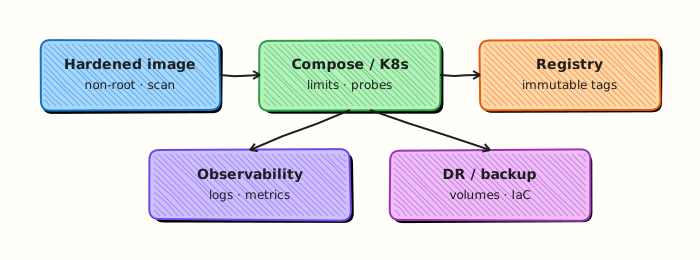
This topic’s control points and relationships are shown below.
Theory
What
Container hardening reduces privilege and blast radius: non-root users, dropped Linux capabilities, read-only root filesystems, secret handling outside the image, and optionally rootless Engine. Orchestrators add further controls (Pod Security, seccomp), but image and runtime defaults still matter on Docker hosts.
Why
Containers share a kernel. A process running as root with the Docker socket mounted can compromise the host. DevOps images often start from convenience bases that run as UID 0 — fine for demos, unsafe as a production default.
How it works
Set USER in the Dockerfile to a non-root UID and align Kubernetes runAsNonRoot later. Start with --cap-drop=ALL and add back only required capabilities. Use --read-only plus tmpfs for /tmp when apps allow it. Never COPY production secrets into layers; inject at runtime via environment (carefully), files, or orchestrator secret stores. Prefer rootless Engine on locked-down laptops; understand its networking limits. Keep the daemon and hosts patched.
| Control | Practice |
|---|---|
| Non-root | USER in Dockerfile + runAsNonRoot |
| Capabilities | --cap-drop=ALL then add minimal |
| Read-only FS | --read-only + tmpfs for /tmp |
| Rootless engine | Reduce daemon privilege |
| Secrets | Runtime mounts — not COPY secret |
Key concepts
- Docker socket — treat as root
- Seccomp / AppArmor — default profiles block dangerous syscalls
- Supply chain — signed bases and scanned images complement runtime hardening
- Break-glass — debug images may relax rules temporarily
Common pitfalls
- Mounting
docker.sockinto random utility containers - Running privileged (
--privileged) to “make it work” - Baking cloud keys into images
- Dropping capabilities without testing startup (then disabling all hardening)
Hands-on Lab
Objective
Build a hardened image with a non-root user, drop Linux capabilities, and run with a read-only root filesystem — then prove User and CapDrop via docker inspect.
Prerequisites
- Docker Engine or Docker Desktop
- Permission to build and run containers
- Basic familiarity with Dockerfile
USERdirective
Lab environment
Workspace: ~/rebash-docker/module-11
Real-world scenario
Security review flagged a legacy container running as root with full capabilities. You ship a hardened replacement: non-root UID, dropped NET_RAW, read-only root with a writable /tmp mount, and runtime flags that enforce the policy.
Step-by-step tasks
Task 1 – Create a hardened Dockerfile
Create Dockerfile:
FROM alpine:3.20
RUN apk add --no-cache netcat-openbsd \
    && addgroup -S app && adduser -S app -G app \
    && mkdir -p /app /tmp/app \
    && chown -R app:app /app /tmp/app
WORKDIR /app
COPY --chown=app:app server.sh .
RUN chmod +x server.sh
USER app
EXPOSE 8080
CMD ["./server.sh"]
Create server.sh:
#!/bin/sh
set -eu
echo "rebash-sec-lab listening on 8080 as $(id -un)"
while true; do printf 'HTTP/1.0 200 OK\r\nContent-Length: 2\r\n\r\nok' | nc -l -p 8080 -q 1; done
Build the image:
cd ~/rebash-docker/module-11
docker build -t rebash-sec-lab:1.0.0 .
docker images rebash-sec-lab:1.0.0 | tee build-proof.txt
grep -q rebash-sec-lab build-proof.txt
Expected output
Image rebash-sec-lab:1.0.0 appears in build-proof.txt.
Task 2 – Run with capability drop and read-only rootfs
Run with production-style runtime hardening:
cd ~/rebash-docker/module-11
docker run -d --name rebash-sec-18110 \
  --read-only \
  --tmpfs /tmp:rw,noexec,nosuid,size=16m \
  --cap-drop ALL \
  --cap-add NET_BIND_SERVICE \
  -p 18110:8080 \
  rebash-sec-lab:1.0.0
docker ps --filter name=rebash-sec-18110 --format '{{.Names}} {{.Status}}' | tee run-status.txt
curl -sS http://127.0.0.1:18110/ | tee curl-sec.txt
Expected output
Container is Up; curl-sec.txt contains ok.
Task 3 – Prove User and CapDrop with inspect
Capture security-relevant fields:
cd ~/rebash-docker/module-11
docker inspect rebash-sec-18110 --format 'User={{.Config.User}} CapDrop={{.HostConfig.CapDrop}} ReadonlyRootfs={{.HostConfig.ReadonlyRootfs}}' | tee inspect-sec.txt
grep -q 'User=app' inspect-sec.txt
grep -q 'ReadonlyRootfs=true' inspect-sec.txt
docker exec rebash-sec-18110 id | tee id-in-container.txt
grep -q 'uid=100(app)' id-in-container.txt
Expected output
inspect-sec.txt shows User=app, CapDrop=[all], ReadonlyRootfs=true; id-in-container.txt shows non-root UID.
Validation steps
- Dockerfile sets
USER appbeforeCMD - Container runs with
--read-onlyand writable/tmp -
CapDropincludesALLwith onlyNET_BIND_SERVICEadded - HTTP responds on port
18110 - Cleanup removes container and image
Common errors and fixes
| Error | Cause | Fix |
|---|---|---|
Permission denied writing to /app | Read-only root without tmpfs | Mount --tmpfs /tmp or a volume for writable paths |
bind: permission denied on port 8080 | Non-root cannot bind <1024 | Use -p 18110:8080 (lab port) or --cap-add NET_BIND_SERVICE |
exec user process caused: no such file | Missing shebang or CRLF | Ensure server.sh uses LF and chmod +x in Dockerfile if needed |
| Container exits immediately | nc missing in alpine | Add RUN apk add --no-cache netcat-openbsd to Dockerfile |
Challenge exercise
Add HEALTHCHECK using wget or a shell probe, rebuild, and capture docker inspect --format '{{.State.Health.Status}}' after 30 seconds in health-sec.txt.
Learning outcomes
- Built an image that runs as a dedicated non-root user
- Applied
--cap-drop ALLwith minimal capability adds - Ran with read-only root filesystem and tmpfs for writes
- Verified hardening with
docker inspectand in-containerid
Cleanup
docker rm -f rebash-sec-18110 2>/dev/null || true
docker rmi rebash-sec-lab:1.0.0 2>/dev/null || true
rm -f ~/rebash-docker/module-11/*.txt
Validation
- Lab commands run under
~/rebash-docker/module-11/ - You can explain each Theory section in your own words
- You used modern tooling where it applies to this topic
- You can describe one production failure mode for this topic
Code Walkthrough
Production practice for Docker Security Hardening always combines:
- Inspect before you change (status, plan, logs, dry-run)
- Prefer reversible, documented changes (Git, IaC, drop-ins, version pins)
- Capture evidence (command output, pipeline logs) for handovers
- Prefer current tools and APIs over legacy shortcuts
- Least privilege — escalate credentials only when required
Keep runbooks short enough to follow under pressure. Automate checks; keep humans for judgement.
Security Considerations
- Treat credentials and tokens for docker as privileged — never commit them
- Prefer short-lived auth (OIDC, roles, SSO) over long-lived keys
- Validate blast radius before apply/deploy/delete operations
- Restrict who can approve production changes
- Collect audit logs; limit who can read sensitive traces
Common Mistakes
Mounting docker.sock into random utility containers
Validate assumptions against the Theory section and official docs before changing production.
Running privileged (--privileged) to “make it work”
Lab shortcuts (open security groups, admin roles, skip approvals) must not ship unchanged.
Changing production without a rollback path
Always know how to revert (previous artefact, prior release, state rollback, DNS failback).
Best Practices
- Encode Docker Security Hardening changes as code and review them in pull requests
- Pin versions (images, modules, actions, provider plugins)
- Separate environments with clear promotion gates
- Alert on symptoms with runbooks attached
- Destroy lab resources; tag everything with owner and expiry where possible
Troubleshooting
| Symptom | Likely cause | Fix |
|---|---|---|
| Auth / permission denied | Wrong identity, policy, or scope | Check caller identity, roles, and least-privilege policies |
| Timeout / no route | Network, DNS, security group, or endpoint | Trace path, DNS, and allow-lists before retrying |
| Drift / unexpected plan | Manual change or wrong state/workspace | Reconcile desired vs actual; avoid click-ops on managed resources |
| Pipeline/job red | Flaky step, cache, or missing secret | Read failing step logs; bisect recent workflow/config changes |
| Cost spike | Idle load balancer, NAT, oversized compute | Inventory billable resources; stop/delete labs promptly |
Summary
Docker Security Hardening is essential for Cloud and DevOps engineers working with docker. Practise the lab until the inspection and change path is muscle memory, then continue the track.
Interview Questions
- List three hardening flags you use on docker run.
- Why drop capabilities?
- Read-only root filesystem — when it breaks apps?
- Risks of privileged containers?
- How do user namespaces help?
Sample answer — question 2
Inspect HostConfig for privileged, capabilities, and mounts.
Sample answer — question 4
Default deny: non-root, cap-drop ALL, no privileged, minimal mounts.