Volumes and Persistent Storage
Overview
Persist data with named volumes, use bind mounts for live code, know when tmpfs fits, and back up a volume.
Container filesystems are ephemeral. Volumes survive container removal; bind mounts map host paths; tmpfs keeps data in memory.
This is a core tutorial in Module 7 · Volumes & Storage of the REBASH Academy Docker for Cloud & DevOps Engineers series — written for Cloud, DevOps, Platform, and SRE engineers.
Prerequisites
Learning Objectives
By the end of this tutorial, you will be able to:
- Create and mount a named volume
- Contrast volume vs bind mount
- Use
tmpfsfor scratch data - Backup/restore a volume with a helper container
Architecture
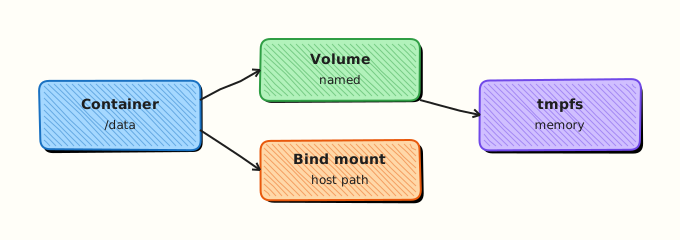
This topic’s control points and relationships are shown below.
Theory
What
Containers are ephemeral by default: the writable layer disappears when the container is removed. Volumes, bind mounts, and tmpfs mounts persist or isolate data differently. Named volumes are managed by Docker; bind mounts map host paths; tmpfs keeps data in memory.
Why
Databases, queues, and CI caches need durable or shared storage. Bind-mounting source code enables live development. Choosing the wrong mount type causes permission errors, data loss on recreate, or accidental exposure of host files.
How it works
Declare mounts with docker run -v / --mount or Compose volumes:. Named volumes live under Docker’s volume directory and survive container recreation. Bind mounts use an absolute host path — ideal for code, risky for production config if paths differ. tmpfs is useful for scratch space and sensitive temporary files that must not touch disk. Volume drivers can back remote storage; local is the default. Permissions inside the container depend on user IDs (UID/GID) matching ownership on the volume.
| Type | Use |
|---|---|
| Named volume | Databases, durable app data |
| Bind mount | Dev source, host configs |
| tmpfs | Secrets scratch, caches (lost on stop) |
Key concepts
- Lifecycle — volumes persist after
docker rmunless removed explicitly - UID mapping — non-root containers often need chowned volumes
- Backup — treat volumes as stateful; plan snapshots
- Compose namespacing — project prefixes on volume names
Common pitfalls
- Storing production data only in the container writable layer
- Bind-mounting
/var/run/docker.sockwithout understanding host takeover risk - Permission denied after switching
USERin the image - Deleting volumes with
docker volume prunewithout checking labels
Hands-on Lab
Objective
Persist data in a named Docker volume across container recreation, optionally mirror a host bind mount, and capture docker volume inspect evidence.
Prerequisites
- Docker Engine or Docker Desktop
- Write access under
~/rebash-docker/module-07/host-data
Lab environment
Workspace: ~/rebash-docker/module-07/host-data
Named volume rebash-mod07-data and bind path ./bind-data are created during the lab.
Real-world scenario
A stateful sidecar writes cache files that must survive container upgrades. You prove a named volume keeps data after docker rm, add a bind mount for config files the platform team edits on the host, and attach inspect output for the change record.
Step-by-step tasks
Task 1 – Write to a named volume and recreate the container
cd ~/rebash-docker/module-07/host-data
docker volume create rebash-mod07-data | tee volume-create.txt
docker run --rm --name rebash-mod07-writer -v rebash-mod07-data:/data alpine:3.20 \
  sh -c 'echo rebash-persist-v1 > /data/cache.txt && cat /data/cache.txt' | tee volume-write-v1.txt
docker run --rm -v rebash-mod07-data:/data alpine:3.20 cat /data/cache.txt | tee volume-read-after.txt
grep -q 'rebash-persist-v1' volume-read-after.txt
Expected output
Second container reads rebash-persist-v1 without the first container running.
Task 2 – Inspect the named volume
cd ~/rebash-docker/module-07/host-data
docker volume inspect rebash-mod07-data --format 'Name={{ "{{" }}.Name{{ "}}" }} Mountpoint={{ "{{" }}.Mountpoint{{ "}}" }}' | tee volume-inspect.txt
grep -q 'Name=rebash-mod07-data' volume-inspect.txt
Expected output
volume-inspect.txt shows the volume name and host mountpoint path.
Task 3 – Bind mount host directory and read back
Create bind-data/config.txt:
Run with bind mount:
cd ~/rebash-docker/module-07/host-data
docker run --rm -v "$PWD/bind-data:/config:ro" alpine:3.20 cat /config/config.txt | tee bind-read.txt
grep -q 'bind-mount-ok' bind-read.txt
Expected output
bind-read.txt prints bind-mount-ok from the host file.
Validation steps
- Data in
rebash-mod07-datasurvives container removal -
volume-inspect.txtrecords name and mountpoint - Bind-mounted
config.txtis readable inside a container
Common errors and fixes
| Error | Cause | Fix |
|---|---|---|
| Volume not found | Typo in volume name | docker volume ls and match rebash-mod07-data |
| cat: /data/cache.txt: No such file | Wrong mount path | Mount to /data consistently |
| Permission denied on bind mount | SELinux/AppArmor | On enforcing hosts use :Z suffix cautiously in lab only |
Challenge exercise
Append a second line to the volume from a new container, then pack evidence:
cd ~/rebash-docker/module-07/host-data
docker run --rm -v rebash-mod07-data:/data alpine:3.20 \
  sh -c 'echo rebash-persist-v2 >> /data/cache.txt && wc -l /data/cache.txt' | tee volume-write-v2.txt
grep -q '2' volume-write-v2.txt
Expected output
volume-write-v2.txt shows line count 2.
Learning outcomes
- Used a named volume to persist data across ephemeral containers
- Inspected volume metadata with
docker volume inspect - Contrasted named volumes with a read-only bind mount for host-managed config
Cleanup
cd ~/rebash-docker/module-07/host-data
docker volume rm rebash-mod07-data 2>/dev/null || true
rm -rf bind-data 2>/dev/null || true
Validation
- Lab commands run under
~/rebash-docker/module-07/host-data/ -
volume-read-after.txtandvolume-inspect.txtprove persistence and inspect - You can explain each Theory section in your own words
- You can describe one production failure mode for this topic
Code Walkthrough
Production practice for Volumes and Persistent Storage always combines:
- Inspect before you change (status, plan, logs, dry-run)
- Prefer reversible, documented changes (Git, IaC, drop-ins, version pins)
- Capture evidence (command output, pipeline logs) for handovers
- Prefer current tools and APIs over legacy shortcuts
- Least privilege — escalate credentials only when required
Keep runbooks short enough to follow under pressure. Automate checks; keep humans for judgement.
Security Considerations
- Treat credentials and tokens for docker as privileged — never commit them
- Prefer short-lived auth (OIDC, roles, SSO) over long-lived keys
- Validate blast radius before apply/deploy/delete operations
- Restrict who can approve production changes
- Collect audit logs; limit who can read sensitive traces
Common Mistakes
Storing production data only in the container writable layer
Validate assumptions against the Theory section and official docs before changing production.
Bind-mounting /var/run/docker.sock without understanding host takeover risk
Lab shortcuts (open security groups, admin roles, skip approvals) must not ship unchanged.
Changing production without a rollback path
Always know how to revert (previous artefact, prior release, state rollback, DNS failback).
Best Practices
- Encode Volumes and Persistent Storage changes as code and review them in pull requests
- Pin versions (images, modules, actions, provider plugins)
- Separate environments with clear promotion gates
- Alert on symptoms with runbooks attached
- Destroy lab resources; tag everything with owner and expiry where possible
Troubleshooting
| Symptom | Likely cause | Fix |
|---|---|---|
| Auth / permission denied | Wrong identity, policy, or scope | Check caller identity, roles, and least-privilege policies |
| Timeout / no route | Network, DNS, security group, or endpoint | Trace path, DNS, and allow-lists before retrying |
| Drift / unexpected plan | Manual change or wrong state/workspace | Reconcile desired vs actual; avoid click-ops on managed resources |
| Pipeline/job red | Flaky step, cache, or missing secret | Read failing step logs; bisect recent workflow/config changes |
| Cost spike | Idle load balancer, NAT, oversized compute | Inventory billable resources; stop/delete labs promptly |
Summary
Volumes and Persistent Storage is essential for Cloud and DevOps engineers working with docker. Practise the lab until the inspection and change path is muscle memory, then continue the track.
Interview Questions
- Named volume versus bind mount trade-offs?
- What happens to a named volume on docker rm?
- How do permissions problems show up with mounts?
- Backup approach for volume data?
- Security risks of bind-mounting docker.sock?
Sample answer — question 2
Confirm the mount in docker inspect and file paths inside the container.
Sample answer — question 4
Never mount docker.sock into untrusted containers.