Working with Docker Images
Overview
Manage images end to end: pull, inspect layers, tag for a registry, save/load for air-gapped moves, and prune safely.
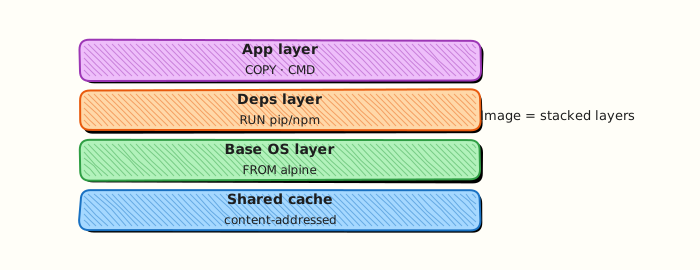
Images are layered, content-addressed artefacts. Tags (:latest, :1.2.3) are mutable pointers — production prefers digests or immutable tags.
This is a core tutorial in Module 4 · Images of the REBASH Academy Docker for Cloud & DevOps Engineers series — written for Cloud, DevOps, Platform, and SRE engineers.
Prerequisites
Learning Objectives
By the end of this tutorial, you will be able to:
-
docker pull/images/history - Tag for a target registry
- Explain layers and cache reuse
-
docker save/load - Prune unused images carefully
Architecture
This topic’s control points and relationships are shown below.
Theory
What
Images are immutable, layered packages identified by name, tag, and content digest. You pull them from registries, tag them for promotion, inspect layer history, save/load tarballs for air-gapped moves, and prune unused images to reclaim disk.
Why
Deployments should promote digests, not floating tags. Understanding layers explains cache behaviour and image size. Disk-full CI runners are often unpruned images and build cache — operational hygiene is part of image literacy.
How it works
docker pull nginx:alpine downloads missing layers. docker images (or docker image ls) lists local images. docker history shows how layers were created. docker tag adds a new name pointing at the same image ID — tagging does not create a new filesystem. docker push uploads to a registry after login. save/load move image tarballs without a registry. Digests (repo@sha256:…) pin exact content; tags like :latest can move.
| Action | Command |
|---|---|
| Pull | docker pull nginx:alpine |
| List | docker images |
| Layers | docker history <image> |
| Tag | docker tag src registry/app:1.0.0 |
| Save/load | docker save / docker load |
| Remove | docker rmi / docker image prune |
Key concepts
- Tag vs digest — human label vs immutable content address
- Shared layers — storage deduplication across images
- Multi-arch manifests — one name, several platform variants
- Prune carefully — do not delete images still needed by stopped containers you care about
Common pitfalls
- Promoting only
:latestthrough environments - Retagging without rebuilding and assuming content changed
- Leaving dangling images until the disk fills
- Trusting a tag on a public registry without pinning a digest in production
Hands-on Lab
Objective
Pull a pinned image, retag it, inspect layers and digest metadata, then export and reload the image via a tar archive with evidence files.
Prerequisites
- Docker Engine or Docker Desktop
- Network access to pull from Docker Hub (or a mirror)
Lab environment
Workspace: ~/rebash-docker/module-04
Enough disk for one small image tar (~10 MB for Alpine).
Real-world scenario
Your team mirrors images to an air-gapped registry. Before promoting alpine:3.20 to staging, you document its layer history, tag it for your namespace, capture Id and RepoDigests from inspect, and prove docker save / docker load works for offline transfer.
Step-by-step tasks
Task 1 – Pull, tag, and list
cd ~/rebash-docker/module-04
docker pull alpine:3.20 | tee pull-alpine.txt
docker tag alpine:3.20 rebash/alpine-lab:3.20
docker image ls --format 'table {{ "{{" }}.Repository{{ "}}" }}\t{{ "{{" }}.Tag{{ "}}" }}\t{{ "{{" }}.ID{{ "}}" }}' | grep -E 'alpine|rebash' | tee image-ls.txt
grep -q 'rebash/alpine-lab' image-ls.txt
Expected output
pull-alpine.txt shows pull progress; image-ls.txt lists both alpine and rebash/alpine-lab tags.
Task 2 – History and inspect Id/Digest
cd ~/rebash-docker/module-04
docker image history alpine:3.20 --no-trunc=false | tee image-history.txt
docker image inspect alpine:3.20 --format 'Id={{ "{{" }}.Id{{ "}}" }} Digest={{ "{{" }}index .RepoDigests 0{{ "}}" }}' | tee image-id-digest.txt
grep -q 'Id=sha256:' image-id-digest.txt
test -s image-history.txt
Expected output
image-history.txt shows layer steps; image-id-digest.txt includes a sha256 Id and a RepoDigests entry.
Task 3 – Save, remove local tag, and load
cd ~/rebash-docker/module-04
docker save rebash/alpine-lab:3.20 -o rebash-alpine-lab-3.20.tar
ls -lh rebash-alpine-lab-3.20.tar | tee tar-ls.txt
docker rmi rebash/alpine-lab:3.20
docker load -i rebash-alpine-lab-3.20.tar | tee load-output.txt
docker image ls rebash/alpine-lab:3.20 | tee reload-ls.txt
grep -q 'rebash/alpine-lab' reload-ls.txt
Expected output
Tar file is non-empty; after load, reload-ls.txt shows rebash/alpine-lab:3.20 again.
Validation steps
-
image-ls.txtshows original and retagged names -
image-history.txtandimage-id-digest.txtcapture layers and digest metadata -
load-output.txtproves save/load round-trip succeeded
Common errors and fixes
| Error | Cause | Fix |
|---|---|---|
| manifest unknown | Wrong tag | Use pinned alpine:3.20 |
| Error response from daemon: No such image | Tag removed before save | Re-pull and retag before docker save |
| open rebash-alpine-lab-3.20.tar: permission denied | Wrong directory | Run from ~/rebash-docker/module-04 |
Challenge exercise
Load the tar on a “clean” name only, then compare digests before and after:
cd ~/rebash-docker/module-04
docker tag alpine:3.20 rebash/alpine-lab:3.20
DIGEST_BEFORE="$(docker image inspect alpine:3.20 --format '{{ "{{" }}index .RepoDigests 0{{ "}}" }}')"
docker save alpine:3.20 -o alpine-only.tar
docker rmi alpine:3.20 rebash/alpine-lab:3.20 2>/dev/null || true
docker load -i alpine-only.tar
DIGEST_AFTER="$(docker image inspect alpine:3.20 --format '{{ "{{" }}index .RepoDigests 0{{ "}}" }}')"
printf 'before=%s\nafter=%s\n' "$DIGEST_BEFORE" "$DIGEST_AFTER" | tee digest-compare.txt
grep -q 'before=sha256:' digest-compare.txt
Expected output
digest-compare.txt shows matching sha256 digests before and after reload.
Learning outcomes
- Pulled and retagged images with explicit repository names
- Read layer history and digest metadata for promotion checks
- Exported and imported images with
docker saveanddocker load
Cleanup
cd ~/rebash-docker/module-04
docker rmi rebash/alpine-lab:3.20 alpine:3.20 2>/dev/null || true
rm -f rebash-alpine-lab-3.20.tar alpine-only.tar 2>/dev/null || true
Validation
- Lab commands run under
~/rebash-docker/module-04/ -
image-id-digest.txtandload-output.txtprove inspect and save/load workflow - You can explain each Theory section in your own words
- You can describe one production failure mode for this topic
Code Walkthrough
Production practice for Working with Docker Images always combines:
- Inspect before you change (status, plan, logs, dry-run)
- Prefer reversible, documented changes (Git, IaC, drop-ins, version pins)
- Capture evidence (command output, pipeline logs) for handovers
- Prefer current tools and APIs over legacy shortcuts
- Least privilege — escalate credentials only when required
Keep runbooks short enough to follow under pressure. Automate checks; keep humans for judgement.
Security Considerations
- Treat credentials and tokens for docker as privileged — never commit them
- Prefer short-lived auth (OIDC, roles, SSO) over long-lived keys
- Validate blast radius before apply/deploy/delete operations
- Restrict who can approve production changes
- Collect audit logs; limit who can read sensitive traces
Common Mistakes
Promoting only :latest through environments
Validate assumptions against the Theory section and official docs before changing production.
Retagging without rebuilding and assuming content changed
Lab shortcuts (open security groups, admin roles, skip approvals) must not ship unchanged.
Changing production without a rollback path
Always know how to revert (previous artefact, prior release, state rollback, DNS failback).
Best Practices
- Encode Working with Docker Images changes as code and review them in pull requests
- Pin versions (images, modules, actions, provider plugins)
- Separate environments with clear promotion gates
- Alert on symptoms with runbooks attached
- Destroy lab resources; tag everything with owner and expiry where possible
Troubleshooting
| Symptom | Likely cause | Fix |
|---|---|---|
| Auth / permission denied | Wrong identity, policy, or scope | Check caller identity, roles, and least-privilege policies |
| Timeout / no route | Network, DNS, security group, or endpoint | Trace path, DNS, and allow-lists before retrying |
| Drift / unexpected plan | Manual change or wrong state/workspace | Reconcile desired vs actual; avoid click-ops on managed resources |
| Pipeline/job red | Flaky step, cache, or missing secret | Read failing step logs; bisect recent workflow/config changes |
| Cost spike | Idle load balancer, NAT, oversized compute | Inventory billable resources; stop/delete labs promptly |
Summary
Working with Docker Images is essential for Cloud and DevOps engineers working with docker. Practise the lab until the inspection and change path is muscle memory, then continue the track.
Interview Questions
- What does an image tag represent?
- How do save/load help air-gapped environments?
- Why pin digests in production?
- What does docker images not tell you about vulnerabilities?
- How do you delete dangling images safely?
Sample answer — question 2
Verify tags with docker image inspect and confirm the digest you expect.
Sample answer — question 4
Only pull from trusted registries; scan before promoting.