Docker Performance and Resource Limits
Overview
Apply CPU and memory limits, observe container stats, and relate storage drivers and lifecycle to performance.
Unlimited containers can starve the host. Set --memory / --cpus (or Compose deploy.resources) so noisy neighbours fail safely. Know your storage driver (overlay2) and prune policy.
This is a core tutorial in Module 14 · Performance of the REBASH Academy Docker for Cloud & DevOps Engineers series — written for Cloud, DevOps, Platform, and SRE engineers.
Prerequisites
Learning Objectives
By the end of this tutorial, you will be able to:
- Set memory and CPU limits
- Read
docker stats - Explain OOM kill behaviour
- Name storage driver implications
- Prune safely for disk
Architecture
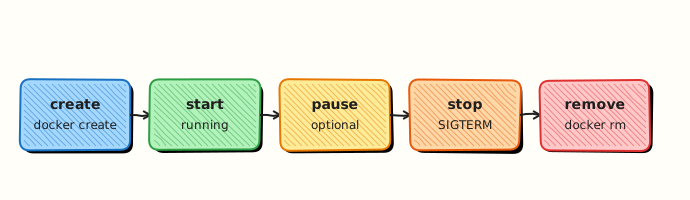
This topic’s control points and relationships are shown below.
Theory
What
Containers can consume all host CPU, memory, and process slots unless you set resource limits. Docker and Compose expose flags such as --memory, --cpus, and --pids-limit. Disk usage from images, layers, and build cache also needs active management with docker system df and scheduled prune policies.
Why
One runaway container can starve neighbours on a shared runner or VM — a classic noisy-neighbour incident. Limits make failure modes predictable (OOM kill) instead of mysterious host freezes. Performance work also includes image size and registry pull time.
How it works
Memory limits constrain cgroup memory; exceeding them typically triggers the OOM killer and stops the container. CPU limits throttle scheduling share. PIDs limits mitigate fork bombs. Design applications to honour limits (buffer sizes, worker counts). Watch docker stats during load tests. On disk, remove unused images and build cache regularly in CI; pin retention for artefacts you still need. Multi-stage and slim bases reduce pull latency more than micro-optimising Go flags alone.
| Limit | Flag / Compose |
|---|---|
| Memory | --memory / mem_limit |
| CPU | --cpus / cpus |
| PIDs | --pids-limit |
Key concepts
- Requests vs limits — Kubernetes distinguishes them; Docker flags are closer to limits
- OOM diagnostics — exit codes and host dmesg
- Build performance — cache mounts, remote cache
- I/O — volume performance differs bind vs named volume drivers
Load-test with realistic concurrency before you copy limits from a tutorial. Language runtimes often need explicit memory settings (heap size) that sit below the container limit so the kernel OOM killer is not your first garbage collector. In CI, separate heavy image builds onto larger runners instead of raising every job’s limits blindly.
Common pitfalls
- Unlimited containers on shared CI hosts
- Setting memory so low the JVM/runtime cannot start
- Never pruning build cache on busy runners
- Blaming “Docker slowness” when the image is multi-gigabytes
Hands-on Lab
Objective
Run a CPU/memory hungry container with --memory and --cpus limits, then prove enforced limits via docker inspect and docker stats --no-stream.
Prerequisites
- Docker Engine or Docker Desktop
- ~512 MB RAM available for the lab container
Lab environment
Workspace: ~/rebash-docker/module-14
Real-world scenario
A batch worker spikes CPU and RSS during peak load. Platform policy caps it at 256 MB RAM and half a CPU so noisy neighbours on the host stay protected. You deploy with limits and capture inspect/stats proof for the capacity review.
Step-by-step tasks
Task 1 – Create a stress test image
Create Dockerfile:
FROM alpine:3.20
RUN apk add --no-cache stress-ng
CMD ["stress-ng", "--vm", "1", "--vm-bytes", "200M", "--cpu", "2", "--timeout", "120s", "--metrics-brief"]
Build:
cd ~/rebash-docker/module-14
docker build -t rebash-perf-lab:1.0.0 .
docker images rebash-perf-lab:1.0.0 | tee perf-build.txt
grep -q rebash-perf-lab perf-build.txt
Expected output
Image rebash-perf-lab:1.0.0 listed in perf-build.txt.
Task 2 – Run with memory and CPU limits
Apply cgroup limits at runtime:
cd ~/rebash-docker/module-14
docker run -d --name rebash-perf-18140 \
  --memory 256m \
  --cpus 0.5 \
  rebash-perf-lab:1.0.0
docker ps --filter name=rebash-perf-18140 --format '{{ "{{" }}.Names{{ "}}" }} {{ "{{" }}.Status{{ "}}" }}' | tee perf-run.txt
grep -q rebash-perf-18140 perf-run.txt
Expected output
Container shows as Up in perf-run.txt.
Task 3 – Prove limits via inspect and stats
Capture configured limits and live usage:
cd ~/rebash-docker/module-14
docker inspect rebash-perf-18140 --format 'Memory={{ "{{" }}.HostConfig.Memory{{ "}}" }} NanoCpus={{ "{{" }}.HostConfig.NanoCpus{{ "}}" }}' | tee limits-inspect.txt
grep -q 'Memory=268435456' limits-inspect.txt
docker stats rebash-perf-18140 --no-stream --format '{{ "{{" }}.MemUsage{{ "}}" }} CPU={{ "{{" }}.CPUPerc{{ "}}" }}' | tee limits-stats.txt
test -s limits-stats.txt
docker logs rebash-perf-18140 2>&1 | tail -5 | tee perf-logs.txt
Expected output
limits-inspect.txt shows Memory=268435456 (256 MiB) and NanoCpus=500000000 (0.5 CPU); stats line shows memory at or below ~256 MiB.
Validation steps
- Container runs with
--memory 256mand--cpus 0.5 - Inspect shows Memory and NanoCpus values
- Stats snapshot captured while stress runs
- Cleanup removes container and image
Common errors and fixes
| Error | Cause | Fix |
|---|---|---|
| OOMKilled immediately | Limit too low for stress-ng overhead | Increase to --memory 256m as specified or reduce --vm-bytes in Dockerfile |
NanoCpus=0 | Limits not applied | Ensure flags on docker run, not only Compose |
| Stats shows host totals | Wrong container name | Filter by rebash-perf-18140 |
| stress-ng missing | Build cache skipped apk | Rebuild with --no-cache |
Challenge exercise
Add --memory-swap 256m (disable swap) and compare OOM behaviour; record whether the container restarts in oom-test.txt.
Learning outcomes
- Applied CPU and memory cgroup limits at
docker run - Read limit configuration from inspect fields
- Correlated live usage with
docker stats --no-stream - Understood why unlimited containers risk host starvation
Cleanup
docker rm -f rebash-perf-18140 2>/dev/null || true
docker rmi rebash-perf-lab:1.0.0 2>/dev/null || true
rm -f ~/rebash-docker/module-14/*.txt
Validation
- Lab commands run under
~/rebash-docker/module-14/ - You can explain each Theory section in your own words
- You used modern tooling where it applies to this topic
- You can describe one production failure mode for this topic
Code Walkthrough
Production practice for Docker Performance and Resource Limits always combines:
- Inspect before you change (status, plan, logs, dry-run)
- Prefer reversible, documented changes (Git, IaC, drop-ins, version pins)
- Capture evidence (command output, pipeline logs) for handovers
- Prefer current tools and APIs over legacy shortcuts
- Least privilege — escalate credentials only when required
Keep runbooks short enough to follow under pressure. Automate checks; keep humans for judgement.
Security Considerations
- Treat credentials and tokens for docker as privileged — never commit them
- Prefer short-lived auth (OIDC, roles, SSO) over long-lived keys
- Validate blast radius before apply/deploy/delete operations
- Restrict who can approve production changes
- Collect audit logs; limit who can read sensitive traces
Common Mistakes
Unlimited containers on shared CI hosts
Validate assumptions against the Theory section and official docs before changing production.
Setting memory so low the JVM/runtime cannot start
Lab shortcuts (open security groups, admin roles, skip approvals) must not ship unchanged.
Changing production without a rollback path
Always know how to revert (previous artefact, prior release, state rollback, DNS failback).
Best Practices
- Encode Docker Performance and Resource Limits changes as code and review them in pull requests
- Pin versions (images, modules, actions, provider plugins)
- Separate environments with clear promotion gates
- Alert on symptoms with runbooks attached
- Destroy lab resources; tag everything with owner and expiry where possible
Troubleshooting
| Symptom | Likely cause | Fix |
|---|---|---|
| Auth / permission denied | Wrong identity, policy, or scope | Check caller identity, roles, and least-privilege policies |
| Timeout / no route | Network, DNS, security group, or endpoint | Trace path, DNS, and allow-lists before retrying |
| Drift / unexpected plan | Manual change or wrong state/workspace | Reconcile desired vs actual; avoid click-ops on managed resources |
| Pipeline/job red | Flaky step, cache, or missing secret | Read failing step logs; bisect recent workflow/config changes |
| Cost spike | Idle load balancer, NAT, oversized compute | Inventory billable resources; stop/delete labs promptly |
Summary
Docker Performance and Resource Limits is essential for Cloud and DevOps engineers working with docker. Practise the lab until the inspection and change path is muscle memory, then continue the track.
Interview Questions
- How do --memory and --cpus protect a host?
- What does docker stats show you?
- OOM kills — how do you confirm?
- When do limits cause false failures?
- How do cgroups relate to containers?
Sample answer — question 2
Use docker stats and inspect OOM fields / exit codes.
Sample answer — question 4
Set limits in shared environments so one container cannot starve neighbours.