Docker Capstone and Next Steps
Overview
You have built images, wired networks, secured containers, integrated CI/CD, and mapped Docker to Kubernetes. This capstone ties it together: deploy a multi-service voting application — web frontend, API, worker, Redis, and PostgreSQL — using production Docker patterns, observability hooks, and a documented path to Kubernetes.
This is Tutorial 20 — the finale of Module 6: Production & Beyond and the complete REBASH Academy Docker track.
Prerequisites
- From Docker to Kubernetes
- Docker in CI/CD Pipelines
- Production Docker Patterns
- Docker Compose Fundamentals
- Container Logging and Monitoring
- Docker Engine 24+ with Compose v2
- Optional: GitHub or GitLab account for CI lab
Learning Objectives
By the end of this capstone, you will be able to:
- Architect a multi-tier container application with clear service boundaries
- Deploy the stack with Compose using health checks, secrets, and resource limits
- Configure reverse-proxy routing and internal-only database access
- Wire a CI pipeline that builds, scans, and pushes service images
- Document operational runbooks for backup, rollback, and scaling
- Outline a Kubernetes migration plan using the concept map from Tutorial 19
Architecture
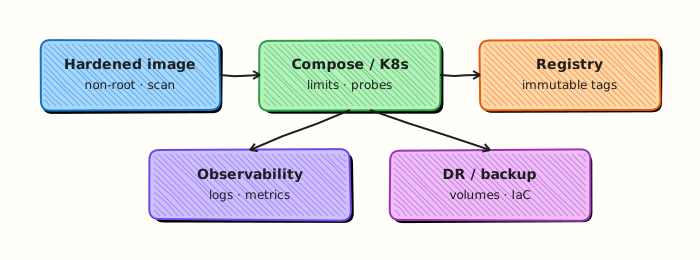
Project Overview — VoteStack
VoteStack is a simplified poll application:
| Service | Role | Image base |
|---|---|---|
| web | React/Vite static UI + server | node:22-alpine |
| api | REST API for polls and votes | node:22-alpine |
| worker | Aggregates votes from Redis queue | node:22-alpine |
| redis | Message queue and cache | redis:7-alpine |
| postgres | Persistent vote storage | postgres:16-alpine |
| nginx | TLS termination and routing | nginx:1.27-alpine |
You will clone or create the project structure, containerize each service, and run the full stack locally — mirroring how teams ship real products.
Project Structure
votestack/
├── web/
│   ├── Dockerfile
│   ├── package.json
│   └── src/
├── api/
│   ├── Dockerfile
│   ├── package.json
│   └── src/server.js
├── worker/
│   ├── Dockerfile
│   └── src/worker.js
├── nginx/
│   └── default.conf
├── compose.yml
├── compose.prod.yml
├── .env.example
├── scripts/
│   ├── backup-db.sh
│   └── smoke-test.sh
└── .github/workflows/ci.yml
Theory
Core ideas for this tutorial appear inline in the lab steps and Code Walkthrough. Read each step explanation before running commands.
Capstone quality bar
Before you call the VoteStack (or your variant) complete, verify it behaves like a miniature production system: images build reproducibly, Compose (or Kubernetes) brings dependencies up in order, healthchecks gate traffic, resource limits contain faults, and secrets never live in Git. Add a short README that documents ports, required env vars, and teardown commands — future-you and interviewers both care that you can operate what you built.
Use the capstone as a portfolio artefact: push images to a personal registry, attach a CI workflow that builds and scans, and write a one-page architecture note covering failure domains (what happens if Redis dies, if Postgres is slow, if the worker crashes mid-vote).
Field notes for docker capstone and next steps
Re-read the Architecture diagram alongside the Hands-on Lab: each lab step should map to a box or arrow in that picture. If you cannot point to where a command fits, pause and revisit Theory before continuing — that habit prevents cargo-cult YAML and Compose snippets in production reviews.
Practice mindset
As you work through this tutorial, narrate why each control or command exists — not only how to type it. Production incidents are rarely solved by memorising flags; they are solved by connecting symptoms to the architecture (daemon vs kubelet, image vs running container, Service vs Endpoints, volume vs writable layer). After the lab, write three bullet notes in your own words: what you verified, what would break in production if skipped, and what you would monitor next.
Connecting the lab to production reviews
When a teammate asks “is this ready?”, answer with evidence from this tutorial’s controls: image provenance, privilege level, network exposure, health signals, and teardown/rollback. Copy-pasting a working lab snippet into production without those answers is how quiet misconfigurations become incidents. Prefer small, reviewable changes — one Dockerfile improvement, one RBAC binding, one probe — over large untested stacks.
Observability while you learn
Get into the habit of watching state while commands run: docker events / kubectl get events, resource usage, and logs in a second pane. Many failures are timing issues (probes, readiness, volume attach) that disappear if you only look at the final steady state. Capturing a short timeline of what you saw will also make your Troubleshooting section notes far more valuable later.
Checklist before you leave the lab
- Resources created in this tutorial are deleted or clearly labelled for retention.
- No secrets, kubeconfigs, or registry passwords were written into Git.
- You can explain the Architecture diagram without reading the caption.
- Validation pass criteria in this page are satisfied on your machine.
- You noted one question to revisit in the next tutorial of the series.
Common production failure modes this topic prevents
Misconfiguration here usually shows up as intermittent outages rather than clean errors: restart loops without log shipping, services that listen but never become Ready, volumes that work on one node only, or credentials that leak into image history. Use the Hands-on Lab as a rehearsal for the failure mode — break something on purpose, watch the signal, then apply the fix documented in Troubleshooting.
Hands-on Lab
Objective
Build a multi-service Compose application (API + web) with Dockerfiles, healthchecks, and pinned tags — then bundle evidence into a tarball for handover.
Prerequisites
- Docker Engine with Compose v2
- Ports
18210(web) and18211(api direct) available
Lab environment
Workspace: ~/rebash-docker/docker-capstone-and-next-steps
mkdir -p ~/rebash-docker/docker-capstone-and-next-steps/{api,web} && cd ~/rebash-docker/docker-capstone-and-next-steps
Real-world scenario
You are delivering a minimal status platform to another team. They need Compose manifests, built images, health proof, and an evidence tarball — not slides.
Step-by-step tasks
Task 1 – Create API service
Create api/Dockerfile:
FROM python:3.12-alpine
WORKDIR /app
COPY server.py .
EXPOSE 8080
HEALTHCHECK CMD python -c "import urllib.request; urllib.request.urlopen('http://127.0.0.1:8080/healthz')"
CMD ["python", "server.py"]
Create api/server.py:
from http.server import BaseHTTPRequestHandler, HTTPServer
import json

class H(BaseHTTPRequestHandler):
    def do_GET(self):
        if self.path == "/healthz":
            self.send_response(200)
            self.end_headers()
            self.wfile.write(b'{"status":"ok"}\n')
            return
        if self.path == "/status":
            body = json.dumps({"app": "rebash-capstone", "tier": "api"}).encode()
            self.send_response(200)
            self.end_headers()
            self.wfile.write(body)
            return
        self.send_error(404)
    def log_message(self, *args):
        return

HTTPServer(("0.0.0.0", 8080), H).serve_forever()
Task 2 – Create web proxy and Compose stack
Create web/Dockerfile:
FROM python:3.12-alpine
WORKDIR /app
COPY proxy.py .
EXPOSE 8000
HEALTHCHECK CMD python -c "import urllib.request; urllib.request.urlopen('http://127.0.0.1:8000/healthz')"
CMD ["python", "proxy.py"]
Create web/proxy.py:
from http.server import BaseHTTPRequestHandler, HTTPServer
from urllib.request import urlopen
import os

API = os.environ.get("API_URL", "http://api:8080")

class H(BaseHTTPRequestHandler):
    def do_GET(self):
        if self.path == "/healthz":
            self.send_response(200)
            self.end_headers()
            self.wfile.write(b'{"status":"ok"}\n')
            return
        if self.path == "/":
            with urlopen(API + "/status", timeout=3) as r:
                body = r.read()
            self.send_response(200)
            self.end_headers()
            self.wfile.write(body)
            return
        self.send_error(404)
    def log_message(self, *args):
        return

HTTPServer(("0.0.0.0", 8000), H).serve_forever()
Create compose.yaml:
services:
  api:
    build: ./api
    image: rebash-capstone-api:1.0.0
    ports:
      - "18211:8080"
    healthcheck:
      test: ["CMD", "python", "-c", "import urllib.request; urllib.request.urlopen('http://127.0.0.1:8080/healthz')"]
      interval: 10s
      timeout: 3s
      retries: 3

  web:
    build: ./web
    image: rebash-capstone-web:1.0.0
    ports:
      - "18210:8000"
    environment:
      API_URL: http://api:8080
    depends_on:
      api:
        condition: service_healthy
    healthcheck:
      test: ["CMD", "python", "-c", "import urllib.request; urllib.request.urlopen('http://127.0.0.1:8000/healthz')"]
      interval: 10s
      timeout: 3s
      retries: 3
Deploy:
cd ~/rebash-docker/docker-capstone-and-next-steps
docker compose up -d --build
sleep 20
docker compose ps | tee capstone-ps.txt
grep -q rebash-capstone capstone-ps.txt
Expected output
Both services running in capstone-ps.txt.
Task 3 – End-to-end proof and evidence tarball
cd ~/rebash-docker/docker-capstone-and-next-steps
curl -sS http://127.0.0.1:18210/healthz | tee capstone-web-health.txt
curl -sS http://127.0.0.1:18210/ | tee capstone-web-root.txt
grep -q rebash-capstone capstone-web-root.txt
docker compose logs --no-color --tail=20 | tee capstone-logs.txt
tar czf capstone-evidence.tar.gz capstone-ps.txt capstone-web-health.txt capstone-web-root.txt capstone-logs.txt compose.yaml api web
test -s capstone-evidence.tar.gz
ls -lh capstone-evidence.tar.gz | tee capstone-tar.txt
Expected output
JSON status from /; capstone-evidence.tar.gz is non-empty.
Validation steps
- API and web images build with healthchecks
- Web waits for healthy API via
depends_on - HTTP checks pass on port
18210 - Evidence tarball contains ps/logs/compose sources
- Cleanup removes stack, images, and tarball
Common errors and fixes
| Error | Cause | Fix |
|---|---|---|
| Web 502 | API not healthy yet | Wait for health; check docker compose ps |
| Healthcheck fail | Python urllib error | Confirm services listen on 8080/8000 |
| Port conflict | Previous capstone run | docker compose down first |
| Tarball missing yaml | Wrong paths in tar | Run tar from project root as shown |
Challenge exercise
Add a non-root USER to both Dockerfiles, rebuild, and prove UID in docker compose exec api id.
Learning outcomes
- Delivered a multi-service Compose stack with health gates
- Built and pinned service images locally
- Validated end-to-end HTTP through the web tier
- Packaged operational evidence for handover
Cleanup
cd ~/rebash-docker/docker-capstone-and-next-steps
docker compose down -v --remove-orphans
docker rmi rebash-capstone-api:1.0.0 rebash-capstone-web:1.0.0 2>/dev/null || true
rm -f capstone-evidence.tar.gz *.txt
Validation
Confirm the lab before moving on:
- Re-run the critical commands from the Hands-on Lab and compare them to the expected output in each step.
- Check that you can explain why each successful result matters (not only that it printed).
- Note any warnings or unexpected output — resolve them using Troubleshooting before continuing.
| Check | Pass criteria |
|---|---|
| Images | api/web/worker images build successfully |
| Stack | Compose stack is healthy including dependencies |
| Patterns | Healthchecks, restarts, and non-root settings present |
| Cleanup | Stack stopped; secrets not committed |
Code Walkthrough
# Smoke test (scripts/smoke-test.sh)
curl -sf "$BASE_URL/api/health" | grep -q ok && curl -sf "$BASE_URL/" -o /dev/null

# Logs and health
docker compose logs -f api worker
docker inspect votestack-api-1 | jq -r '.[0].State.Health.Status'
See Container Logging and Monitoring for metrics exporters.
Security Considerations
- Treat the capstone stack like production: non-root, healthchecks, limits, and no committed secrets
- Use distinct credentials per environment; never reuse lab Postgres passwords in real deployments
- Scan and sign the images you build before any registry push outside your laptop
- Segment database networks from public-facing web services in Compose
- Document break-glass procedures — do not leave
--privileged“temporary” services in the final compose file - Tear down or snapshot lab data so the next learner does not inherit your secrets
Common Mistakes
Publishing postgres and redis ports to the host
Data stores should stay on internal networks — only nginx exposes 80/443.
Same .env committed to Git
Use .env.example only; inject secrets via CI or Docker secrets in prod.
No worker idempotency
Queue consumers must handle duplicate deliveries — design worker with unique vote IDs.
Skipping smoke tests after update
Always run ./scripts/smoke-test.sh after image updates.
Stopping at Compose for high-traffic prod
Single-host Compose hits vertical limits — plan Swarm or Kubernetes.
Best Practices
One Dockerfile per service
Independent build and deploy cycles — matches microservice CI matrices.
Version the whole stack in Git
Compose files, nginx config, init SQL, and CI workflows together — reproducible environments.
Treat capstone as portfolio piece
Push to GitHub with README architecture diagram for interviews.
Practice failure injection
docker compose stop redis — observe api /ready and recovery behaviour.
Continue the learning path
Docker completes the container foundation — Kubernetes is the natural next track.
Troubleshooting
| Issue | Cause | Solution |
|---|---|---|
| api stuck unhealthy | Postgres not ready | Check depends_on; extend start_period |
| 502 from nginx | upstream down | docker compose logs api web |
| worker idle | Redis URL wrong | Verify env; test redis-cli |
| Disk full | Unbounded logs/images | Log rotation; docker system prune |
| CI push denied | Registry auth | Configure GITHUB_TOKEN scopes |
Summary
- The VoteStack capstone combines multi-service architecture, Compose orchestration, and production patterns from the full Docker track
- Edge nginx, health-gated depends_on, resource limits, and secrets mirror real production stacks
- CI/CD builds per-service images with SHA tags — same artifacts deploy to Compose today and Kubernetes tomorrow
- Runbooks for backup, update, and rollback complete the operational picture
- You have finished all 20 Docker tutorials — continue to Kubernetes, GitLab CI/CD, and Learning Paths
Interview Questions
- Which Docker skills are prerequisites for Kubernetes?
- How would you demonstrate production readiness of an image?
- What cleanup habits prevent lab debt?
- When do you graduate from Compose to an orchestrator?
- What personal lab project would you build next?
Sample answer — question 2
Re-run the capstone stack from a clean directory and confirm teardown leaves no containers/volumes.
Sample answer — question 4
Carry forward non-root images, scanning, and secret hygiene into Kubernetes/Helm/GitOps next steps.
Related Tutorials
- From Docker to Kubernetes (previous)
- Docker in CI/CD Pipelines
- Production Docker Patterns
- Docker Compose Fundamentals
- Docker – Category Overview — track complete
- Kubernetes – Category Overview — next track
- GitLab CI/CD Overview
- Learning Paths
- Cheat sheet: Docker Cheat Sheet
- Interview prep: Docker Interview Prep
- Learning path: DevOps Engineer
References
- Docker – Awesome Compose examples
- Compose – Production guide
- The Twelve-Factor App
- OWASP – Docker Security
- REBASH Academy – Kubernetes Overview
- REBASH Academy – Roadmap
Congratulations
You have completed all 20 tutorials in the REBASH Academy Docker track — from your first container to production CI/CD, Swarm basics, and the bridge to Kubernetes. Return to the Docker Overview to review the curriculum, deploy VoteStack as a portfolio project, and begin the Kubernetes track when you are ready for cluster-scale orchestration.