Docker Architecture and Components
Overview
Describe the Docker client–daemon path and the roles of dockerd, containerd, and the OCI runtime so you can debug “where did my request fail?”
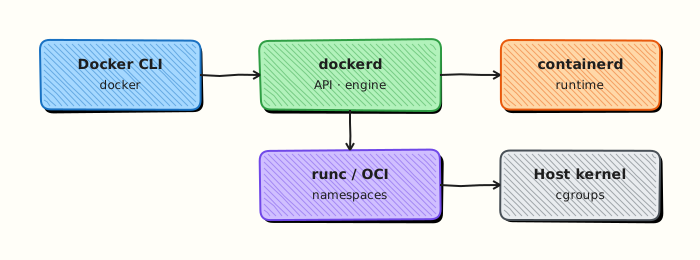
You talk to the Docker CLI; it calls the Docker Engine API on dockerd. The daemon uses containerd and runc to create containers on the host kernel.
This is a core tutorial in Module 1 · Container Fundamentals of the REBASH Academy Docker for Cloud & DevOps Engineers series — written for Cloud, DevOps, Platform, and SRE engineers.
Prerequisites
Learning Objectives
By the end of this tutorial, you will be able to:
- Trace CLI → dockerd → containerd → runc
- Distinguish image, container, and registry
- Know what
docker contextselects - Relate namespaces/cgroups to isolation
Architecture
This topic’s control points and relationships are shown below.
Theory
What
Docker’s architecture separates the CLI, the Engine (dockerd), containerd, and an OCI runtime such as runc, all sitting on the host kernel. Images, containers, networks, and volumes are API objects the daemon manages. Registries store images remotely.
Why
Troubleshooting “Docker is broken” means knowing which layer failed: CLI talking to the wrong context, daemon down, pull failing in containerd, or runtime/kernel limits. Production platforms (and Kubernetes) reuse pieces of this stack — especially containerd and OCI — so the mental model transfers.
How it works
You type docker commands; the CLI calls the Engine API (local Unix socket or TCP). dockerd orchestrates networks, volumes, and higher-level UX. It delegates image pull and container lifecycle to containerd, which invokes runc to start the process in namespaces/cgroups. An image is immutable layers plus config; a container adds a writable layer and process state; a registry (Docker Hub, GitHub Container Registry, Amazon Elastic Container Registry) is the remote store.
| Component | Role |
|---|---|
| Docker CLI | User interface (docker) |
| dockerd | Engine API, networks, volumes |
| containerd | Image pull, container lifecycle |
| runc | OCI runtime — starts the process |
| Host kernel | Namespaces, cgroups, filesystems |
Key concepts
- Client–daemon — CLI is not the container runtime
- Contexts — CLI can point at remote engines
- Rootful vs rootless — privilege model of the daemon
- Shim / supervisors — keep containers reparented correctly after daemon restarts
Common pitfalls
- Exposing the Docker socket without understanding it is root-equivalent
- Debugging inside the CLI when
dockerdis the failing component - Assuming Desktop networking equals Linux Engine networking
- Confusing image ID, digest, and tag
Hands-on Lab
Objective
Prove the Docker client talks to a healthy Engine by collecting version, info, context, and disk-usage evidence files.
Prerequisites
- Docker Engine or Docker Desktop running
- Permission to run
dockercommands
Lab environment
Workspace: ~/rebash-docker/module-01-arch
Local Docker daemon. Evidence files only — no long-running containers required.
Real-world scenario
A developer reports “Docker is broken” after switching laptops. Before you restart services, you capture client versus server versions, active context, storage driver details, and disk usage — the same artefacts SREs attach to incident tickets.
Step-by-step tasks
Task 1 – Split client and server version evidence
The CLI and daemon can differ; record both sides explicitly.
cd ~/rebash-docker/module-01-arch
docker version | tee docker-version.txt
docker version --format 'Client={{ "{{" }}.Client.Version{{ "}}" }} Server={{ "{{" }}.Server.Version{{ "}}" }}' | tee version-split.txt
grep -q 'Client:' docker-version.txt
grep -q 'Server:' docker-version.txt
Expected output
docker-version.txt shows Client and Server blocks; version-split.txt has both version strings on one line.
Task 2 – Engine info and storage driver
docker info reveals runtime, cgroup driver, and storage driver — common root causes when containers fail to start.
cd ~/rebash-docker/module-01-arch
docker info | tee docker-info.txt
docker info --format 'StorageDriver={{ "{{" }}.Driver{{ "}}" }} CgroupDriver={{ "{{" }}.CgroupDriver{{ "}}" }}' | tee info-drivers.txt
grep -q 'Storage Driver' docker-info.txt
test -s info-drivers.txt
Expected output
docker-info.txt is multi-line; info-drivers.txt names the storage and cgroup drivers.
Task 3 – Context and disk footprint
Contexts route the CLI; docker system df shows image/container/volume pressure on the node.
cd ~/rebash-docker/module-01-arch
docker context ls | tee docker-contexts.txt
docker system df | tee docker-system-df.txt
grep -q 'CURRENT' docker-contexts.txt
grep -E 'Images|Containers|Local Volumes' docker-system-df.txt
Expected output
docker-contexts.txt marks the current context with *; docker-system-df.txt lists Images, Containers, and Local Volumes rows.
Validation steps
-
docker-version.txtandversion-split.txtprove client and server are reachable -
info-drivers.txtrecords storage and cgroup drivers -
docker-contexts.txtanddocker-system-df.txtcapture context and disk summary
Common errors and fixes
| Error | Cause | Fix |
|---|---|---|
| Cannot connect to the Docker daemon | dockerd stopped or wrong context | docker context ls; start Engine or switch context |
| Server section missing in version | Daemon unreachable | Check Docker Desktop or systemctl status docker |
| permission denied | Socket access | Fix docker group membership or use rootless mode |
Challenge exercise
Switch context temporarily (if a second context exists), re-run docker context ls, then switch back and append a one-line note to docker-contexts.txt.
cd ~/rebash-docker/module-01-arch
ALT="$(docker context ls --format '{{ "{{" }}.Name{{ "}}" }}' | grep -v "$(docker context show)" | head -n 1 || true)"
if [ -n "$ALT" ]; then
  docker context use "$ALT"
  docker context ls | tee docker-contexts-alt.txt
  docker context use default 2>/dev/null || docker context use "$ALT"
fi
echo "Active context after lab: $(docker context show)" | tee -a docker-contexts.txt
Expected output
If an alternate context exists, docker-contexts-alt.txt shows the switch; the final line names the restored active context.
Learning outcomes
- Separated Docker CLI client output from Engine server metadata
- Identified storage and cgroup drivers from
docker info - Documented active context and node disk usage for troubleshooting handovers
Cleanup
No containers were created. Remove evidence files if you do not need them:
cd ~/rebash-docker/module-01-arch
rm -f docker-version.txt version-split.txt docker-info.txt info-drivers.txt \
  docker-contexts.txt docker-contexts-alt.txt docker-system-df.txt 2>/dev/null || true
Validation
- Lab commands run under
~/rebash-docker/module-01-arch/ - Evidence files prove client, Engine, context, and disk usage were captured
- You can explain each Theory section in your own words
- You can describe one production failure mode for this topic
Code Walkthrough
Production practice for Docker Architecture and Components always combines:
- Inspect before you change (status, plan, logs, dry-run)
- Prefer reversible, documented changes (Git, IaC, drop-ins, version pins)
- Capture evidence (command output, pipeline logs) for handovers
- Prefer current tools and APIs over legacy shortcuts
- Least privilege — escalate credentials only when required
Keep runbooks short enough to follow under pressure. Automate checks; keep humans for judgement.
Security Considerations
- Treat credentials and tokens for docker as privileged — never commit them
- Prefer short-lived auth (OIDC, roles, SSO) over long-lived keys
- Validate blast radius before apply/deploy/delete operations
- Restrict who can approve production changes
- Collect audit logs; limit who can read sensitive traces
Common Mistakes
Exposing the Docker socket without understanding it is root-equivalent
Validate assumptions against the Theory section and official docs before changing production.
Debugging inside the CLI when dockerd is the failing component
Lab shortcuts (open security groups, admin roles, skip approvals) must not ship unchanged.
Changing production without a rollback path
Always know how to revert (previous artefact, prior release, state rollback, DNS failback).
Best Practices
- Encode Docker Architecture and Components changes as code and review them in pull requests
- Pin versions (images, modules, actions, provider plugins)
- Separate environments with clear promotion gates
- Alert on symptoms with runbooks attached
- Destroy lab resources; tag everything with owner and expiry where possible
Troubleshooting
| Symptom | Likely cause | Fix |
|---|---|---|
| Auth / permission denied | Wrong identity, policy, or scope | Check caller identity, roles, and least-privilege policies |
| Timeout / no route | Network, DNS, security group, or endpoint | Trace path, DNS, and allow-lists before retrying |
| Drift / unexpected plan | Manual change or wrong state/workspace | Reconcile desired vs actual; avoid click-ops on managed resources |
| Pipeline/job red | Flaky step, cache, or missing secret | Read failing step logs; bisect recent workflow/config changes |
| Cost spike | Idle load balancer, NAT, oversized compute | Inventory billable resources; stop/delete labs promptly |
Summary
Docker Architecture and Components is essential for Cloud and DevOps engineers working with docker. Practise the lab until the inspection and change path is muscle memory, then continue the track.
Interview Questions
- Role of dockerd versus the CLI?
- What storage driver concerns matter on Linux?
- How do containerd/runc fit the stack?
- Why does architecture knowledge help troubleshooting?
- What is the difference between create and run?
Sample answer — question 2
Use docker info and inspect to see driver/runtime details.
Sample answer — question 4
Limit who can talk to the daemon socket.