Building Images with Dockerfile
Overview
Author a clear Dockerfile for a small app: choose a base image, install deps, copy code, set USER, and define CMD/ENTRYPOINT.
A Dockerfile is a build recipe. Each instruction can create a layer — order matters for cache and size (optimisation is Module 6).
This is a core tutorial in Module 5 · Dockerfile of the REBASH Academy Docker for Cloud & DevOps Engineers series — written for Cloud, DevOps, Platform, and SRE engineers.
Prerequisites
Learning Objectives
By the end of this tutorial, you will be able to:
- Use
FROM,RUN,COPY,WORKDIR - Contrast
CMDvsENTRYPOINT - Set
ENV/ARG,EXPOSE,LABEL,USER - Build and run a local image
Architecture
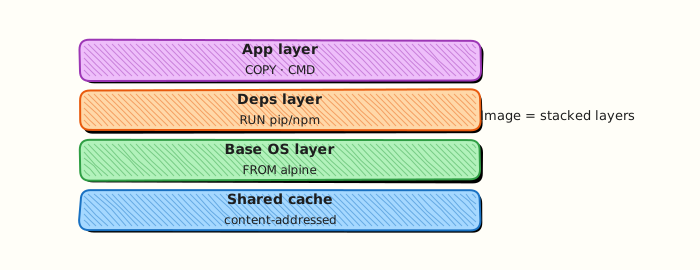
This topic’s control points and relationships are shown below.
Theory
What
A Dockerfile is a recipe of instructions that BuildKit executes to produce an image. Core instructions include FROM, RUN, COPY, WORKDIR, ENV, ARG, USER, EXPOSE, CMD, and ENTRYPOINT. The build context is the directory you send to the daemon (filtered by .dockerignore).
Why
Hand-built containers are not reproducible. Dockerfiles give teams a reviewable, CI-friendly definition of how production artefacts are made. Instruction choice affects size, cache hit rate, and security (especially USER and what you COPY).
How it works
Each instruction creates a layer (conceptually). FROM selects a base. RUN executes build-time commands. COPY adds files from the context; prefer it over ADD unless you need a specific ADD feature. ARG values are build-time only; ENV persists into the runtime image. CMD and ENTRYPOINT together define the default process — know shell vs exec form. EXPOSE documents ports; it does not publish them. Builds run with BuildKit on modern Docker (DOCKER_BUILDKIT=1).
| Instruction | Role |
|---|---|
FROM | Base image |
RUN | Execute at build time |
COPY / ADD | Prefer COPY for files |
WORKDIR | Working directory |
ENV / ARG | Runtime env vs build args |
USER | Drop root when possible |
EXPOSE | Document ports (not publish) |
CMD / ENTRYPOINT | Default process |
Key concepts
- Build context — only send what you need
- Layer caching — order stable steps before frequently changing ones
- Exec form —
CMD ["python","app.py"]avoids shell surprises - Reproducibility — pin base tags or digests
Common pitfalls
COPY . .without a.dockerignore(secrets,.git, node_modules)- Running as root in the final image by default
- Confusing
ARG(build) with runtime configuration - Using
latestbases that break builds unexpectedly
Hands-on Lab
Objective
Build a small HTTP image from a Dockerfile and static index.html, tag it locally, run it, and prove the page content via curl.
Prerequisites
- Docker Engine or Docker Desktop with build support
curlon the host
Lab environment
Workspace: ~/rebash-docker/module-05/app
Host port 18085 is used for this build lab.
Real-world scenario
You package an internal status page for a microservice. Instead of pulling a generic nginx config, you add a tiny index.html and a Dockerfile that copies it into nginx:1.27-alpine, build rebash-mod05:local, and verify the HTML served on a published port.
Step-by-step tasks
Task 1 – Create application files
Create index.html:
<!DOCTYPE html>
<html lang="en">
<head><meta charset="utf-8"><title>REBASH mod05</title></head>
<body><h1>rebash-mod05 build ok</h1></body>
</html>
Create Dockerfile:
Expected output
Both files exist in ~/rebash-docker/module-05/app/.
Task 2 – Build and tag the image
cd ~/rebash-docker/module-05/app
docker build -t rebash-mod05:local .
docker image ls rebash-mod05:local | tee build-ls.txt
grep -q 'rebash-mod05' build-ls.txt
Expected output
build-ls.txt lists rebash-mod05 with tag local.
Task 3 – Run and verify HTTP body
cd ~/rebash-docker/module-05/app
docker run -d --name rebash-mod05-web -p 18085:80 rebash-mod05:local
curl -s http://127.0.0.1:18085/ | tee build-curl.txt
grep -q 'rebash-mod05 build ok' build-curl.txt
Expected output
build-curl.txt contains the heading text from index.html.
Validation steps
-
Dockerfileandindex.htmlare present in the app directory -
rebash-mod05:localimage built successfully -
build-curl.txtproves the custom HTML is served
Common errors and fixes
| Error | Cause | Fix |
|---|---|---|
| COPY failed: file not found | Wrong build context | Run docker build from the directory containing index.html |
| port is already allocated | Port 18085 in use | Stop the old container or change the host port |
| 403 Forbidden from nginx | Wrong COPY path | Ensure file lands in /usr/share/nginx/html/ |
Challenge exercise
Add a .dockerignore that excludes *.txt evidence files, rebuild with tag rebash-mod05:v2, and confirm the image still serves HTML:
Create .dockerignore:
Build and verify:
cd ~/rebash-docker/module-05/app
docker build -t rebash-mod05:v2 .
docker rm -f rebash-mod05-web 2>/dev/null || true
docker run -d --name rebash-mod05-web -p 18085:80 rebash-mod05:v2
curl -s http://127.0.0.1:18085/ | grep -q 'rebash-mod05 build ok'
echo 'v2 ok' | tee build-v2.txt
Expected output
build-v2.txt contains v2 ok; curl still returns the custom heading.
Learning outcomes
- Authored a minimal
DockerfilewithCOPYand a pinned base image - Built and tagged a local image for deployment testing
- Validated runtime behaviour with curl against a published port
Cleanup
cd ~/rebash-docker/module-05/app
docker rm -f rebash-mod05-web 2>/dev/null || true
docker rmi rebash-mod05:local rebash-mod05:v2 2>/dev/null || true
Validation
- Lab commands run under
~/rebash-docker/module-05/app/ -
build-curl.txtproves the built image serves custom content - You can explain each Theory section in your own words
- You can describe one production failure mode for this topic
Code Walkthrough
Production practice for Building Images with Dockerfile always combines:
- Inspect before you change (status, plan, logs, dry-run)
- Prefer reversible, documented changes (Git, IaC, drop-ins, version pins)
- Capture evidence (command output, pipeline logs) for handovers
- Prefer current tools and APIs over legacy shortcuts
- Least privilege — escalate credentials only when required
Keep runbooks short enough to follow under pressure. Automate checks; keep humans for judgement.
Security Considerations
- Treat credentials and tokens for docker as privileged — never commit them
- Prefer short-lived auth (OIDC, roles, SSO) over long-lived keys
- Validate blast radius before apply/deploy/delete operations
- Restrict who can approve production changes
- Collect audit logs; limit who can read sensitive traces
Common Mistakes
COPY . . without a .dockerignore (secrets, .git, node_modules)
Validate assumptions against the Theory section and official docs before changing production.
Running as root in the final image by default
Lab shortcuts (open security groups, admin roles, skip approvals) must not ship unchanged.
Changing production without a rollback path
Always know how to revert (previous artefact, prior release, state rollback, DNS failback).
Best Practices
- Encode Building Images with Dockerfile changes as code and review them in pull requests
- Pin versions (images, modules, actions, provider plugins)
- Separate environments with clear promotion gates
- Alert on symptoms with runbooks attached
- Destroy lab resources; tag everything with owner and expiry where possible
Troubleshooting
| Symptom | Likely cause | Fix |
|---|---|---|
| Auth / permission denied | Wrong identity, policy, or scope | Check caller identity, roles, and least-privilege policies |
| Timeout / no route | Network, DNS, security group, or endpoint | Trace path, DNS, and allow-lists before retrying |
| Drift / unexpected plan | Manual change or wrong state/workspace | Reconcile desired vs actual; avoid click-ops on managed resources |
| Pipeline/job red | Flaky step, cache, or missing secret | Read failing step logs; bisect recent workflow/config changes |
| Cost spike | Idle load balancer, NAT, oversized compute | Inventory billable resources; stop/delete labs promptly |
Summary
Building Images with Dockerfile is essential for Cloud and DevOps engineers working with docker. Practise the lab until the inspection and change path is muscle memory, then continue the track.
Interview Questions
- What do FROM/COPY/RUN/CMD/ENTRYPOINT each do?
- Build context is huge — how do you shrink it?
- Why avoid running as root in the final image?
- Difference between CMD and ENTRYPOINT?
- How do build args differ from runtime env?
Sample answer — question 2
Read the Dockerfile and docker history; rebuild with --progress=plain to see failing RUN lines.
Sample answer — question 4
Do not COPY secrets into layers. Use multi-stage builds and non-root users.