Docker Compose Fundamentals
Overview
Author a compose.yaml with services, a shared network, a volume, environment variables, and a health check — then bring the stack up and down.
Compose declares multi-container apps as code. Ideal for local DevOps stacks and simple single-host deploys before Kubernetes.
This is a core tutorial in Module 9 · Docker Compose of the REBASH Academy Docker for Cloud & DevOps Engineers series — written for Cloud, DevOps, Platform, and SRE engineers.
Prerequisites
Learning Objectives
By the end of this tutorial, you will be able to:
- Define services, networks, volumes
- Pass env vars /
env_file - Add health checks
- Use profiles for optional services
-
compose up/down/logs
Architecture
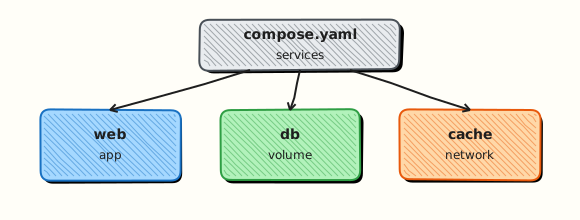
This topic’s control points and relationships are shown below.
Theory
What
Docker Compose defines multi-container applications as YAML (compose.yaml). Compose v2 is the docker compose CLI plugin (space, not hyphen). Services, networks, and volumes are declared together; up creates them as a project. On the default project network, service names become DNS names.
Why
Real systems need an app plus database, cache, or sidecar. Running five independent docker run commands is brittle. Compose is the standard local and small-server orchestration file format and a stepping stone to Kubernetes manifests.
How it works
A Compose file lists services: with images or build contexts, environment, ports, volumes, and depends_on. docker compose up -d creates a project-prefixed network and starts containers. docker compose logs -f, ps, exec, and down manage the stack. Profiles and multiple compose files (-f) specialise environments. Prefer explicit healthchecks over blind depends_on for readiness. Secrets and env files keep configuration out of images.
Compose v2 command shape:
Key concepts
| Idea | Detail |
|---|---|
| Project name | Prefixes resources; set via folder or -p |
| Service DNS | http://api:8080 from another service |
| Build vs image | Local Dockerfile or registry image |
| Override files | compose.override.yaml for local deltas |
Keep Compose files readable: one service per concern, explicit image tags or digests, and comments only where behaviour is non-obvious. Use .env for local non-secret defaults and never commit production credentials beside compose.yaml. When a stack grows beyond a single host, treat Compose as the development contract and plan the Kubernetes translation deliberately.
Common pitfalls
- Using obsolete
docker-composev1 behaviour docs blindly - Publishing database ports to the world on shared networks
- Relying on
depends_onwithout health conditions - Hard-coding hostpaths that only exist on one laptop
Hands-on Lab
Objective
Define a two-service Compose stack with a named volume, start it detached, verify with curl, and tear down including volumes.
Prerequisites
- Docker Engine with Compose plugin (
docker compose version) curlon the host
Lab environment
Workspace: ~/rebash-docker/module-09
Host port 18087 maps to the web service.
Real-world scenario
Locally you replicate a minimal production pair: nginx serves a static page while Redis holds session keys. Compose wires service DNS, mounts a volume for Redis data, publishes only the web port, and lets you run the same file in CI with docker compose up -d.
Step-by-step tasks
Task 1 – Create Compose file and static page
Create html/index.html:
<!DOCTYPE html>
<html lang="en">
<head><meta charset="utf-8"><title>REBASH mod09</title></head>
<body><h1>compose stack ok</h1></body>
</html>
Create compose.yaml:
services:
  web:
    image: nginx:1.27-alpine
    ports:
      - "18087:80"
    depends_on:
      - redis
    volumes:
      - ./html:/usr/share/nginx/html:ro
  redis:
    image: redis:7.4-alpine
    volumes:
      - redis-data:/data
    command: ["redis-server", "--save", "", "--appendonly", "no"]

volumes:
  redis-data:
Expected output
compose.yaml and html/index.html exist in the lab directory.
Task 2 – Start stack and check status
cd ~/rebash-docker/module-09
docker compose up -d
docker compose ps | tee compose-ps.txt
grep -E 'web|redis' compose-ps.txt
curl -s http://127.0.0.1:18087/ | tee compose-curl.txt
grep -q 'compose stack ok' compose-curl.txt
Expected output
compose-ps.txt shows web and redis running; curl returns the custom heading.
Task 3 – Prove Redis volume and fetch logs
cd ~/rebash-docker/module-09
docker compose exec redis redis-cli PING | tee redis-ping.txt
grep -q 'PONG' redis-ping.txt
docker compose logs --tail=10 web | tee compose-web-logs.txt
test -s compose-web-logs.txt
Expected output
redis-ping.txt is PONG; web logs captured.
Validation steps
-
docker compose psshows web and redis services up -
compose-curl.txtserves custom HTML on port 18087 -
redis-ping.txtconfirms Redis responds inside the stack
Common errors and fixes
| Error | Cause | Fix |
|---|---|---|
| port is already allocated | 18087 in use | Edit host port in compose.yaml |
| service "web" depends on undefined service | Typo in depends_on | Match service names exactly |
| bind mount not found | Missing html/ | Create html/index.html before up |
Challenge exercise
Scale web to two replicas is not valid with static published ports — instead add a healthcheck to web and prove Compose reports healthy state:
Add under web: in compose.yaml:
Reconcile and verify:
cd ~/rebash-docker/module-09
docker compose up -d
docker compose ps | tee compose-ps-health.txt
grep -i 'healthy\|running' compose-ps-health.txt
Expected output
After a short wait, compose-ps-health.txt shows web as healthy or running with healthcheck configured.
Learning outcomes
- Authored a multi-service
compose.yamlwith pinned images - Started and inspected a stack with
docker compose psand logs - Verified HTTP and Redis connectivity before teardown
Cleanup
cd ~/rebash-docker/module-09
docker compose down -v
docker rmi nginx:1.27-alpine redis:7.4-alpine 2>/dev/null || true
Validation
- Lab commands run under
~/rebash-docker/module-09/ -
compose-ps.txtandcompose-curl.txtprove the stack ran correctly - You can explain each Theory section in your own words
- You can describe one production failure mode for this topic
Code Walkthrough
Production practice for Docker Compose Fundamentals always combines:
- Inspect before you change (status, plan, logs, dry-run)
- Prefer reversible, documented changes (Git, IaC, drop-ins, version pins)
- Capture evidence (command output, pipeline logs) for handovers
- Prefer current tools and APIs over legacy shortcuts
- Least privilege — escalate credentials only when required
Keep runbooks short enough to follow under pressure. Automate checks; keep humans for judgement.
Security Considerations
- Treat credentials and tokens for docker as privileged — never commit them
- Prefer short-lived auth (OIDC, roles, SSO) over long-lived keys
- Validate blast radius before apply/deploy/delete operations
- Restrict who can approve production changes
- Collect audit logs; limit who can read sensitive traces
Common Mistakes
Using obsolete docker-compose v1 behaviour docs blindly
Validate assumptions against the Theory section and official docs before changing production.
Publishing database ports to the world on shared networks
Lab shortcuts (open security groups, admin roles, skip approvals) must not ship unchanged.
Changing production without a rollback path
Always know how to revert (previous artefact, prior release, state rollback, DNS failback).
Best Practices
- Encode Docker Compose Fundamentals changes as code and review them in pull requests
- Pin versions (images, modules, actions, provider plugins)
- Separate environments with clear promotion gates
- Alert on symptoms with runbooks attached
- Destroy lab resources; tag everything with owner and expiry where possible
Troubleshooting
| Symptom | Likely cause | Fix |
|---|---|---|
| Auth / permission denied | Wrong identity, policy, or scope | Check caller identity, roles, and least-privilege policies |
| Timeout / no route | Network, DNS, security group, or endpoint | Trace path, DNS, and allow-lists before retrying |
| Drift / unexpected plan | Manual change or wrong state/workspace | Reconcile desired vs actual; avoid click-ops on managed resources |
| Pipeline/job red | Flaky step, cache, or missing secret | Read failing step logs; bisect recent workflow/config changes |
| Cost spike | Idle load balancer, NAT, oversized compute | Inventory billable resources; stop/delete labs promptly |
Summary
Docker Compose Fundamentals is essential for Cloud and DevOps engineers working with docker. Practise the lab until the inspection and change path is muscle memory, then continue the track.
Interview Questions
- What problem does Compose solve locally?
- How do you tear down including volumes?
- Service DNS names in Compose?
- Compose versus Swarm/Kubernetes for production?
- How do you override config per environment?
Sample answer — question 2
Run docker compose ps and docker compose logs for the failing service.
Sample answer — question 4
Do not commit .env secrets.