Troubleshooting Python Automation
Overview
When a DevOps Python job fails at 2 a.m., speed comes from a checklist, not guesswork. You fingerprint the environment, read the traceback to the failing line, classify the error (NameError, ImportError, swallowed exceptions), apply a minimal fix, and keep before/after evidence for the incident record.
In this tutorial you will start from a deliberately broken automation script, run a triage helper that captures the traceback plus an environment fingerprint, apply a focused fix, and prove the job succeeds afterward. This closes the Python for Cloud & DevOps Engineers tutorial track with a skill you will use on every team.
“Works on my machine” is an environment bug until proven otherwise. Wrong virtual environment (venv), missing dependency, typo in a variable name, or except Exception: pass that hides the real failure — each leaves a different fingerprint. Professionals capture evidence first, then change one thing at a time.
This is Tutorial 27 in Module 27: Troubleshooting of the REBASH Academy Python for Cloud & DevOps Engineers series. It is written for DevOps, platform, and SRE engineers. By the end you will have a before/after evidence pack under ~/rebash-python/lab27.
Prerequisites
- AI for DevOps — OpenAI, MCP, and LangChain
- Logging and Debugging (helpful)
- Error Handling and Exceptions (helpful)
- Python 3.10+ on a practice machine
- Willingness to read full tracebacks (do not truncate the first time)
Learning Objectives
By the end of this tutorial, you will be able to:
- Fingerprint Python version, platform, and working directory during an incident
- Capture a full traceback from a failing automation script
- Recognise and fix
NameError,ImportError, and overly broad exception handling - Re-run the job and produce clear before/after evidence
- Describe a production debugging order that avoids random changes
Architecture
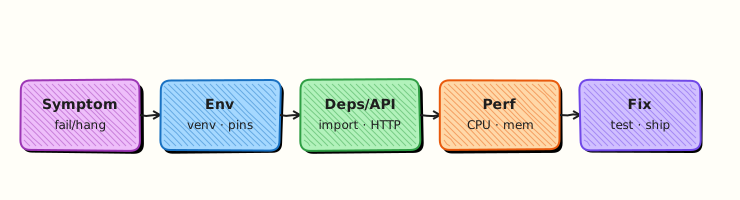
Troubleshooting is a loop: reproduce → fingerprint environment → capture traceback → classify → fix → verify → store evidence. The triage script automates the middle of that loop.
Theory
What it is
Troubleshooting means finding why automation failed and proving the fix. A traceback is Python’s stack of calls ending at the exception. An environment fingerprint records interpreter path, version, platform, virtualenv hints, and working directory so “works on my machine” becomes comparable data. Common failure classes in ops scripts:
| Exception | Typical meaning |
|---|---|
NameError | Typo or variable used before assignment |
ImportError / ModuleNotFoundError | Missing package or wrong venv/PYTHONPATH |
Broad except: / except Exception: pass | Real error hidden; job looks “fine” or fails late |
Why it matters
CI failures, cron jobs, and Kubernetes CronJob containers fail for the same Python reasons as laptops — plus different images and missing system libraries. Without a fingerprint, two engineers “fix” different things. Without a traceback file, chat messages lose the failing line. Without fixing bad except blocks, the next incident stays silent until customers notice.
How it works
- Reproduce — run the same command the job uses; do not start by rewriting the whole script.
- Fingerprint — Python version, executable path, cwd, optional
VIRTUAL_ENV. - Capture — run under a triage wrapper that writes traceback and fingerprint files.
- Classify — name error vs import vs logic vs permissions.
- Fix minimally — correct the name, install/import the module, or narrow exception handling.
- Verify — same command succeeds; keep before/after artefacts.
import traceback
from pathlib import Path

def write_traceback(exc: BaseException, path: Path) -> None:
    path.write_text("".join(traceback.format_exception(type(exc), exc, exc.__traceback__)), encoding="utf-8")
Memory growth and slow jobs need profilers (tracemalloc, cProfile) after the crash class is ruled out. Start with the exception you have.
Key concepts and comparisons
| Step | Question | Artefact |
|---|---|---|
| Reproduce | Does it fail the same way? | Command + exit code |
| Fingerprint | Which Python/where? | env-fingerprint.txt |
| Traceback | Which line/exception? | traceback.txt |
| Fix | Smallest correct change? | Diff / fixed file |
| Verify | Does the same command pass? | after-run.stdout |
| Anti-pattern | Prefer |
|---|---|
| Rewrite without reading traceback | Read bottom frame first |
except Exception: pass | Catch specific types; log and re-raise or exit non-zero |
| Debugging on production only | Minimal repro in lab/CI |
| Changing three things at once | One change, then re-test |
Common pitfalls
- Reading only the top of the traceback (the useful line is usually near the bottom).
- Fixing the wrong venv while CI uses another interpreter.
- Swallowing exceptions so triage shows “success” with empty outputs.
- Pasting secrets from env dumps into tickets.
- Skipping the after-run proof when the clock is stressful.
Hands-on Lab
Objective
Under ~/rebash-python/lab27, break-fix a small automation script: capture before evidence (traceback + fingerprint), apply fixes for NameError / ImportError / bad exception handling, and save after evidence.
Prerequisites
- Python 3.10+
- Standard library only
- Practice directory (not a production checkout)
Lab environment
Workspace: ~/rebash-python/lab27
mkdir -p ~/rebash-python/lab27 && cd ~/rebash-python/lab27
set -euo pipefail
python3 --version | tee python-version.txt
Expected output
python-version.txt shows Python 3.10+.
Real-world scenario
A nightly inventory job started failing after a hurried change. On-call sees a non-zero exit in CI but the chat paste is incomplete. You recreate the broken script, run a triage helper to capture traceback and environment fingerprint, fix the defects, and attach before/after files to the incident ticket.
Step-by-step tasks
Task 1 – Broken script and triage helper (before evidence)
Create a broken job and a triage runner that records fingerprint + traceback.
Create broken_job.py:
"""Intentionally broken automation for troubleshooting practice."""
from __future__ import annotations

import json
import sys
from pathlib import Path

# Bug 1: ImportError — module name is wrong (should be 'json', already imported).
# We additionally attempt a missing helper module below in load_rules().


def load_rules(path: Path) -> dict:
    try:
        # Bug 2: wrong exception handling — swallows real errors
        import rebash_missing_helper  # type: ignore  # noqa: F401
        text = path.read_text(encoding="utf-8")
        return json.loads(text)
    except Exception:
        # Hides ImportError and file errors — looks like "empty rules"
        return {}


def render_report(rules: dict) -> str:
    service = rules.get("service", "unknown")
    # Bug 3: NameError — typo in variable name
    return f"service={servcie} checks={rules.get('checks', [])}"


def main() -> int:
    rules_path = Path("rules.json")
    rules_path.write_text(
        json.dumps({"service": "payments-api", "checks": ["latency", "errors"]}),
        encoding="utf-8",
    )
    rules = load_rules(rules_path)
    print(render_report(rules))
    print("RESULT=ok")
    return 0


if __name__ == "__main__":
    raise SystemExit(main())
Create triage.py:
"""Capture environment fingerprint + traceback for a target script."""
from __future__ import annotations

import os
import platform
import runpy
import sys
import traceback
from pathlib import Path


def fingerprint(path: Path) -> None:
    lines = [
        f"python_executable={sys.executable}",
        f"python_version={sys.version.replace(chr(10), ' ')}",
        f"platform={platform.platform()}",
        f"cwd={Path.cwd()}",
        f"VIRTUAL_ENV={os.environ.get('VIRTUAL_ENV', '')}",
        f"sys_path_0={sys.path[0] if sys.path else ''}",
    ]
    path.write_text("\n".join(lines) + "\n", encoding="utf-8")


def main() -> int:
    if len(sys.argv) < 2:
        print("usage: triage.py <script.py>", file=sys.stderr)
        return 2
    target = Path(sys.argv[1]).resolve()
    out_dir = Path.cwd()
    fingerprint(out_dir / "env-fingerprint.txt")
    tb_path = out_dir / "traceback.txt"
    try:
        runpy.run_path(str(target), run_name="__main__")
        tb_path.write_text("NO_EXCEPTION\n", encoding="utf-8")
        print("TRIAGE_RESULT=ok")
        return 0
    except SystemExit as exc:
        code = exc.code if isinstance(exc.code, int) else 1
        if code == 0:
            tb_path.write_text("NO_EXCEPTION\n", encoding="utf-8")
            print("TRIAGE_RESULT=ok")
            return 0
        tb_path.write_text(
            "".join(traceback.format_exception(type(exc), exc, exc.__traceback__)),
            encoding="utf-8",
        )
        print(f"TRIAGE_RESULT=fail exit={code}")
        return code if code else 1
    except BaseException as exc:
        tb_path.write_text(
            "".join(traceback.format_exception(type(exc), exc, exc.__traceback__)),
            encoding="utf-8",
        )
        print(f"TRIAGE_RESULT=fail exc={type(exc).__name__}")
        return 1


if __name__ == "__main__":
    raise SystemExit(main())
Run:
cd ~/rebash-python/lab27
set -euo pipefail
set +e
python3 triage.py broken_job.py >before-triage.stdout 2>before-triage.stderr
before_rc=$?
set -e
test "$before_rc" -ne 0
grep -F 'TRIAGE_RESULT=fail' before-triage.stdout
test -s env-fingerprint.txt
test -s traceback.txt
cp traceback.txt traceback-before.txt
cp env-fingerprint.txt env-fingerprint-before.txt
grep -E 'NameError|ImportError|ModuleNotFoundError' traceback-before.txt
grep -F 'python_executable=' env-fingerprint-before.txt
Expected output
triage fails; traceback-before.txt mentions NameError and/or import failure; fingerprint file is non-empty.
Note: because load_rules swallows exceptions, you may see NameError: name 'servcie' is not defined first (empty rules still reach render_report). That is intentional — bad except changes what you see.
Task 2 – Fix the script (imports, exceptions, NameError)
Create fixed_job.py:
"""Fixed automation after triage (lab27)."""
from __future__ import annotations

import json
import sys
from pathlib import Path


def load_rules(path: Path) -> dict:
    if not path.is_file():
        raise FileNotFoundError(path)
    text = path.read_text(encoding="utf-8")
    data = json.loads(text)
    if not isinstance(data, dict):
        raise ValueError("rules root must be an object")
    return data


def render_report(rules: dict) -> str:
    service = rules.get("service", "unknown")
    checks = rules.get("checks", [])
    return f"service={service} checks={checks}"


def main() -> int:
    rules_path = Path("rules.json")
    if not rules_path.exists():
        rules_path.write_text(
            json.dumps({"service": "payments-api", "checks": ["latency", "errors"]}),
            encoding="utf-8",
        )
    try:
        rules = load_rules(rules_path)
        print(render_report(rules))
        print("RESULT=ok")
        return 0
    except (OSError, ValueError, json.JSONDecodeError) as exc:
        print(f"RESULT=fail error={type(exc).__name__}: {exc}", file=sys.stderr)
        return 1


if __name__ == "__main__":
    raise SystemExit(main())
Run:
Expected output
fixed_job.py compiles cleanly.
Task 3 – After evidence and comparison pack
cd ~/rebash-python/lab27
set -euo pipefail

python3 triage.py fixed_job.py | tee after-triage.stdout
grep -F 'TRIAGE_RESULT=ok' after-triage.stdout
grep -F 'NO_EXCEPTION' traceback.txt
cp traceback.txt traceback-after.txt

python3 fixed_job.py | tee after-run.stdout
grep -F 'service=payments-api' after-run.stdout
grep -F 'RESULT=ok' after-run.stdout

# Show that the old bug names are gone from the fixed source
! grep -F 'servcie' fixed_job.py
! grep -F 'rebash_missing_helper' fixed_job.py
! grep -F 'except Exception:' fixed_job.py

{
  echo "=== BEFORE (traceback head) ==="
  head -n 20 traceback-before.txt
  echo "=== AFTER ==="
  cat traceback-after.txt
  echo "=== FINGERPRINT ==="
  cat env-fingerprint-before.txt
} | tee before-after-summary.txt

tar -czf lab27-evidence.tgz \
  python-version.txt broken_job.py fixed_job.py triage.py \
  traceback-before.txt traceback-after.txt \
  env-fingerprint-before.txt \
  before-triage.stdout after-triage.stdout after-run.stdout \
  before-after-summary.txt rules.json
ls -l lab27-evidence.tgz | tee evidence-ls.txt
Expected output
after triage is OK; after-run.stdout shows RESULT=ok; evidence archive exists.
Validation steps
- Before triage fails and
traceback-before.txtis non-empty -
env-fingerprint-before.txtincludespython_executable=andpython_version= -
fixed_job.pyruns withRESULT=okand correct service name -
traceback-after.txtcontainsNO_EXCEPTION -
lab27-evidence.tgzexists under~/rebash-python/lab27
Common errors and fixes
| Error | Cause | Fix |
|---|---|---|
| Before run shows only empty rules | Swallowed ImportError | Expected in Task 1; fix includes removing broad except |
NameError: servcie | Typo left in place | Use service in fixed_job.py |
| Triage reports OK on broken script | Ran fixed_job too early | Re-copy broken script and re-run Task 1 |
| Fingerprint empty | Triage not run from lab dir | cd ~/rebash-python/lab27 first |
| Still importing missing helper | Edited wrong file | Run fixed_job.py, not broken_job.py |
Challenge exercise
Add a second broken mode: write broken_job_v2.py that raises ImportError without swallowing it (delete the broad except, keep the bad import). Run triage and confirm traceback.txt shows ModuleNotFoundError or ImportError for rebash_missing_helper. You do not need to keep v2 after capturing traceback-import-before.txt.
Learning outcomes
- Captured traceback + environment fingerprint before changing code
- Fixed NameError, bad import usage, and swallow-all exception handling
- Proved success with after-run evidence
- Packaged before/after artefacts for an incident ticket
Cleanup
cd ~/rebash-python/lab27
set -euo pipefail
rm -rf __pycache__
# Keep lab27-evidence.tgz for your portfolio if you want
Validation
- Lab finished under
~/rebash-python/lab27/with evidence archive - You can explain the difference between fingerprint and traceback
- You know why
except Exception: passmakes incidents harder - You can describe a safe production debugging order
Code Walkthrough
Production troubleshooting for Python automation usually follows this order:
- Reproduce with the same command the scheduler/CI uses
- Fingerprint interpreter and cwd before changing code
- Save the traceback (full text, not a screenshot crop)
- Fix the smallest root cause (name, import, handler)
- Re-run and attach before/after to the ticket or pull request
Profilers and debuggers come after the crash class is understood.
Security Considerations
- Redact secrets when sharing fingerprints and env dumps
- Do not paste production tokens into incident chat to “try the call again”
- Prefer read-only diagnosis on production; mutate only with change control
- Keep triage scripts from writing credentials to world-readable files
- Treat customer data inside logs as sensitive when attaching evidence
Common Mistakes
Reading only the first lines of a traceback
The error type and line are usually at the bottom. Fix: scroll to the last frame before guessing.
Swallowing all exceptions
The job returns empty success and fails later elsewhere. Fix: catch specific errors; log; non-zero exit.
Changing the system Python instead of the job venv
Local pip install never reaches CI. Fix: compare sys.executable in the fingerprint to the pipeline image.
Declaring victory without an after-run artefact
The next on-call cannot see proof. Fix: save stdout/stderr and a RESULT=ok line.
Best Practices
- Keep a triage script or CI “debug job” that dumps fingerprint + traceback
- One fix per attempt; re-run the same command
- Add a regression test for the bug class when practical
- Document the root cause in the ticket in plain English
- Prefer specific exception types and clear exit codes in automation
Troubleshooting
| Symptom | Likely cause | Fix |
|---|---|---|
ModuleNotFoundError in CI only | Dependency not in image/lockfile | Pin and install in the pipeline venv |
NameError after refactor | Renamed variable incompletely | Grep the old name; add a tiny unit test |
| Exit 0 but wrong output | Broad except returned defaults | Remove swallow; assert required keys |
| Different failure locally | Wrong cwd or Python | Match fingerprint fields to CI |
| Huge memory after fix | Unrelated leak | Use tracemalloc after crash is gone |
Summary
Troubleshooting DevOps Python is a disciplined loop: reproduce, fingerprint, capture traceback, fix minimally, prove after. You close this course track ready to debug real jobs — next, revisit the course overview or plan practice with the roadmap.
Interview Questions
1. What is the first thing you capture when a scheduled Python job fails?
Reveal answer
Reproduce with the same command, then save a full traceback and an environment fingerprint (Python executable, version, platform, cwd, virtualenv). That evidence prevents “works on my machine” debates and shows whether you are even on the same interpreter as CI.
2. How do you read a Python traceback under pressure?
Reveal answer
Start at the bottom: exception type, message, and the last frame (file and line). Then skim upward only as needed for call context. Do not begin rewriting from the first line of the dump.
3. Why is except Exception: pass dangerous in automation?
Reveal answer
It hides the real failure, often replacing it with empty defaults or a later confusing error. Operators lose the original traceback. Prefer specific exceptions, logging, and a non-zero exit so CI and cron alert correctly.
4. How do you distinguish a local ModuleNotFoundError from a CI-only import failure?
Reveal answer
Compare sys.executable, VIRTUAL_ENV, and installed packages (or lockfiles) from fingerprints in both environments. Local installs into the wrong Python never reach the pipeline image. Fix the image/lockfile, not only the laptop.
5. What before/after evidence would you attach to an incident ticket?
Reveal answer
Before: command, exit code, traceback-before.txt, env-fingerprint.txt. After: successful run stdout showing RESULT=ok (or equivalent), traceback-after / “NO_EXCEPTION”, and a one-paragraph root cause. Avoid pasting secrets.
6. A job prints success but production state did not change — where do you look?
Reveal answer
Look for swallowed errors, dry-run flags left on, wrong credentials that skip work, or idempotent early-returns. Check exit codes versus side effects, and verify the code path that performs the write still runs.
7. How does troubleshooting automation differ from debugging a web app request?
Reveal answer
Automation often runs unattended (cron/CI) with different env vars, images, and working directories. You rely more on artefacts (logs, fingerprints, exit codes) than interactive breakpoints. The method is the same — reproduce and evidence — but the runtime context is the usual culprit.
Related Tutorials
- Python for Cloud & DevOps – Overview
- AI for DevOps — OpenAI, MCP, and LangChain (previous)
- Learning roadmap (next / plan practice)
- Logging and Debugging
- Production Engineering Patterns
- Error Handling and Exceptions
References
- traceback — Print or retrieve a stack traceback — Python docs
- runpy — Locating and executing Python modules — Python docs
- The Python Debugger —
pdb - faulthandler — dump tracebacks on faults
- Track index: Python for Cloud & DevOps Engineers · Roadmap