Infrastructure Automation — Terraform
Overview
Infrastructure as Code (IaC) means you describe servers, networks, and files in code, then let a tool apply the plan. Terraform (and OpenTofu) use HashiCorp Configuration Language (HCL). In DevOps Python work you rarely rewrite providers in Python. You orchestrate the CLI: format, validate, plan, parse plan JSON, and fail Continuous Integration (CI) when policy says no.
Python wrappers give one standard path for every pipeline: timeouts, exit codes, artefact upload of tfplan, and checks such as “no unexpected destroys.” Click-ops drift and unreviewed apply cause outages. State backends hold real inventory and sometimes secrets — protect them; never commit terraform.tfstate.
This is Tutorial 19 in Module 19: Infrastructure of the REBASH Academy Python for Cloud & DevOps Engineers series. It is written for Cloud, DevOps, Platform, and Site Reliability Engineering (SRE) engineers. By the end you will have a local-only Terraform (or template) workflow under ~/rebash-python/lab19 that you can explain in a change ticket — with no apply to paid cloud.
Prerequisites
- Kubernetes Python Client Automation
- Linux Automation — subprocess (subprocess patterns)
- Python 3.10+ on a practice machine
- Optional:
terraformortofuonPATH(lab works without them)
Learning Objectives
By the end of this tutorial, you will be able to:
- Explain Python’s role around Terraform CLI (orchestrate, not replace HCL)
- Run
fmt/validate(and optionalplan) via subprocess with timeouts - Template a tiny local HCL module and prove required blocks exist when Terraform is missing
- Capture plan JSON or validation evidence for CI
- State why apply/destroy stay gated and why state files are sensitive
- Summarise when CDK for Terraform (CDKTF) is useful versus plain HCL
Architecture
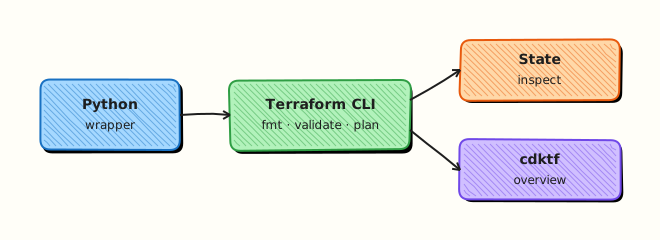
Python sits beside Terraform: it starts the CLI, reads exit codes and JSON, and applies policy. HCL still owns resources. State lives in a backend — not in Git.
Theory
What it is
Terraform reads .tf files, builds a dependency graph, and produces a plan of creates, updates, and deletes. Python wraps terraform or tofu with subprocess.run([...], timeout=..., capture_output=True, text=True) — never shell=True with interpolated paths. CDK for Terraform (CDKTF) lets teams define stacks in Python that synthesise to Terraform JSON when language reuse matters; state still exists afterwards.
Why it matters
Platform teams build wrappers once so every pipeline behaves the same. Parsing human plan text breaks when wording changes; terraform show -json is stable. Auto-apply from a laptop against shared state without a lock or ticket is a common incident cause. Understanding the boundary — HCL owns resources; Python owns process and policy — keeps both layers honest.
How it works
- Format —
terraform fmt -check -recursive(ortofu fmt). - Validate —
terraform init -backend=falsethenterraform validatefor syntax and provider schema without remote state. - Plan —
terraform plan -out=tfplanthenterraform show -json tfplanfor create/update/delete counts. - Gate — CI fails on policy (for example unexpected destroys). Apply only with an explicit flag and human approval.
- State —
state list/state showare read-sensitive; never print secrets from state into chat logs.
terraform fmt -check -recursive
terraform init -backend=false
terraform validate
# plan is optional in labs; apply to paid cloud is never the tutorial default
Key concepts and comparisons
| Approach | Role | Prefer when |
|---|---|---|
| HCL + CLI wrappers | Default for most ops teams | Shared modules, clear reviews |
| CDKTF (Python/TS) | Synthesise Terraform JSON | Strong language reuse across services |
| Pure cloud SDKs | Bypass Terraform | Small one-off API calls — different trade-offs |
| Command | Tutorial default |
|---|---|
fmt / validate / local plan | Allowed |
apply / destroy against cloud | Require explicit approval; never in this lab |
Common pitfalls
- Running apply from a laptop against shared state without a lock or ticket.
- Parsing human
plantext instead of-json. - Committing state or provider credentials.
- Skipping
timeout=so stuck providers hang CI forever. - Treating CDKTF as “no need to understand Terraform state” — state still exists.
Hands-on Lab
Objective
Under ~/rebash-python/lab19, create a Docker-provider Terraform module and a Python wrapper that runs fmt/validate/plan/apply/destroy when Terraform and Docker are available — proving real infrastructure lifecycle without paid cloud.
Prerequisites
- Python 3.10+
- Docker Engine running (
docker info) terraformortofubinary on PATH- Write access under your home directory
Lab environment
Workspace: ~/rebash-python/lab19
mkdir -p ~/rebash-python/lab19 && cd ~/rebash-python/lab19
set -euo pipefail
python3 --version | tee python-version.txt
docker info | tee docker-info.txt
terraform version | tee terraform-version.txt
Expected output
python-version.txt, docker-info.txt, and terraform-version.txt are non-empty.
Real-world scenario
Your platform team wants every pull request to prove Terraform configs are formatted, valid, and plannable before merge — and staging apply jobs must prove resources exist before destroy. You build a Python wrapper around a Docker-provider module so CI agents with Docker can run the full lifecycle without cloud credentials.
Step-by-step tasks
Task 1 – Docker-provider Terraform module
Create tf/main.tf:
terraform {
  required_version = ">= 1.0"
  required_providers {
    docker = {
      source  = "kreuzwerker/docker"
      version = "~> 3.0"
    }
  }
}

provider "docker" {}

resource "docker_image" "nginx" {
  name         = "nginx:1.25-alpine"
  keep_locally = false
}

resource "docker_container" "lab_marker" {
  name  = "rebash-python-lab19"
  image = docker_image.nginx.image_id

  ports {
    internal = 80
    external = 8080
  }
}

output "container_id" {
  value = docker_container.lab_marker.id
}
Run:
cd ~/rebash-python/lab19
set -euo pipefail
mkdir -p tf
grep -q 'docker_container' tf/main.tf
grep -q 'lab_marker' tf/main.tf
wc -l tf/main.tf | tee hcl-lines.txt
Expected output
hcl-lines.txt shows a positive line count; grep finds docker_container.
Task 2 – Python wrapper: validate, plan, apply, destroy
Create tf_wrapper.py:
#!/usr/bin/env python3
"""Orchestrate terraform/tofu fmt, validate, plan, apply, and destroy for lab19."""
from __future__ import annotations

import json
import shutil
import subprocess
import sys
from pathlib import Path

ROOT = Path(__file__).resolve().parent
TF_DIR = ROOT / "tf"


def find_bin() -> str:
    for name in ("terraform", "tofu"):
        path = shutil.which(name)
        if path:
            return path
    raise SystemExit("terraform or tofu binary required for this lab")


def run(cmd: list[str]) -> dict:
    proc = subprocess.run(
        cmd,
        cwd=TF_DIR,
        capture_output=True,
        text=True,
        timeout=180,
        check=False,
    )
    step = {
        "cmd": cmd,
        "returncode": proc.returncode,
        "stdout": proc.stdout[-2000:],
        "stderr": proc.stderr[-2000:],
    }
    if proc.returncode != 0:
        raise SystemExit(json.dumps({"ok": False, "step": step}, indent=2))
    return step


def main() -> int:
    if not TF_DIR.joinpath("main.tf").is_file():
        print("missing tf/main.tf", file=sys.stderr)
        return 1
    bin_path = find_bin()
    steps = []
    for args in (
        [bin_path, "fmt", "-check", "-recursive"],
        [bin_path, "init", "-input=false"],
        [bin_path, "validate", "-json"],
        [bin_path, "plan", "-input=false", "-out=tfplan"],
        [bin_path, "apply", "-input=false", "-auto-approve", "tfplan"],
        [bin_path, "destroy", "-input=false", "-auto-approve"],
    ):
        steps.append(run(args))
    result = {"mode": "cli", "bin": bin_path, "ok": True, "steps": steps}
    out = ROOT / "validate-result.json"
    out.write_text(json.dumps(result, indent=2) + "\n", encoding="utf-8")
    print(out.read_text(encoding="utf-8"))
    return 0


if __name__ == "__main__":
    raise SystemExit(main())
Run:
cd ~/rebash-python/lab19
set -euo pipefail
docker info >/dev/null
python3 tf_wrapper.py | tee wrapper-run.txt
python3 -c 'import json; d=json.load(open("validate-result.json")); assert d["ok"] is True; assert d["mode"] == "cli"'
docker ps -a --filter name=rebash-python-lab19 --format '{{.Names}}' | tee post-destroy-check.txt
! grep -q rebash-python-lab19 post-destroy-check.txt || test ! -s post-destroy-check.txt
Expected output
validate-result.json has "ok": true; container is gone after destroy.
Task 3 – Operational proof script
Create prove-lifecycle.sh:
#!/usr/bin/env bash
set -euo pipefail
cd "$(dirname "$0")/tf"
docker info >/dev/null
terraform init -input=false
terraform plan -input=false -out=tfplan
terraform apply -input=false -auto-approve tfplan
docker ps --filter name=rebash-python-lab19 --format '{{.Names}} {{.Status}}' | tee ../container-proof.txt
grep -q 'rebash-python-lab19' ../container-proof.txt
curl -sf http://127.0.0.1:8080 >/dev/null
terraform destroy -input=false -auto-approve
echo lab19_lifecycle_ok
Run:
cd ~/rebash-python/lab19
set -euo pipefail
chmod +x prove-lifecycle.sh
./prove-lifecycle.sh | tee lifecycle-run.txt
grep -q lab19_lifecycle_ok lifecycle-run.txt

tar -czf terraform-lab-evidence.tgz \
  python-version.txt docker-info.txt terraform-version.txt hcl-lines.txt \
  validate-result.json wrapper-run.txt container-proof.txt lifecycle-run.txt \
  tf/main.tf tf_wrapper.py prove-lifecycle.sh
ls -l terraform-lab-evidence.tgz | tee evidence-ls.txt
test -s terraform-lab-evidence.tgz
Expected output
lifecycle-run.txt ends with lab19_lifecycle_ok; evidence archive is non-empty.
Validation steps
-
tf/main.tfuses the Docker provider (no cloud provider block) -
python3 tf_wrapper.pywritesvalidate-result.jsonwith"ok": true -
prove-lifecycle.shapplies, curls port 8080, and destroys the container - Evidence archive exists under
~/rebash-python/lab19 - No container named
rebash-python-lab19remains after cleanup
Common errors and fixes
| Error | Cause | Fix |
|---|---|---|
Cannot connect to the Docker daemon | Docker not running | Start Docker Desktop or sudo systemctl start docker |
Error: Failed to query available provider packages | Network blocked for provider download | Run once with network; cache .terraform/providers |
fmt -check fails | Bad indentation | Run terraform fmt tf/ once, then re-check |
| Wrapper timeout | Slow provider init | Increase timeout in tf_wrapper.py; ensure Docker responds |
| Port 8080 in use | Another service bound | Change external port in main.tf and re-plan |
Challenge exercise
Extend tf_wrapper.py so after apply it runs docker ps --filter name=rebash-python-lab19 and writes container status to container-proof.json before destroy. Include that file in the evidence tarball.
Learning outcomes
- Authored a Docker-provider Terraform module
- Orchestrated fmt/validate/plan/apply/destroy from Python
- Proved container lifecycle with
docker psandcurl - Can explain why apply stays gated in production wrappers
Cleanup
cd ~/rebash-python/lab19
set -euo pipefail
(cd tf && terraform destroy -auto-approve 2>/dev/null) || true
docker rm -f rebash-python-lab19 2>/dev/null || true
rm -rf tf/.terraform tf/.terraform.lock.hcl tf/tfplan tf/terraform.tfstate* 2>/dev/null || true
Validation
- Lab finished under
~/rebash-python/lab19/with evidence files - You can explain fmt → validate → plan → gated apply
- You can describe why state files and credentials must not land in Git
- You know when CDKTF helps versus staying with HCL
Code Walkthrough
In production Terraform orchestration usually follows this order:
- Detect binary —
terraformortofu, pin versions in CI images - Format and validate first — fail fast before plan
- Plan as an artefact — upload
tfplan/ JSON summary - Policy gate — no surprise destroys; no auto-apply on main without approval
- Least privilege — short-lived cloud credentials; separate plan and apply roles
Keep humans for apply judgement; automate checks.
Security Considerations
- Never commit
terraform.tfstate,.tfvarswith secrets, or provider keys - Prefer OpenID Connect (OIDC) / short-lived roles over long-lived access keys
- Treat
state showoutput as sensitive — redact before logging - Separate plan credentials from apply credentials where the cloud allows it
- Block
applyin tutorial and PR jobs unless an explicit protected environment is used
Common Mistakes
Auto-apply from a wrapper cron
Shared state can be corrupted or resources destroyed. Fix: require an explicit --apply flag plus environment protection; default to plan-only.
Parsing human plan text in CI
Wording changes break gates. Fix: use terraform show -json and count resource changes structurally.
Committing state or lock files with secrets
Credentials and resource IDs leak. Fix: remote backend + .gitignore for local state; scan pull requests.
No timeout on subprocess
A stuck provider download hangs the whole pipeline. Fix: always set timeout= and fail with a clear message.
Best Practices
- One wrapper library shared by all Terraform pipelines
- Pin Terraform/OpenTofu and provider versions
- Use
-backend=falsefor pure validate in PR agents when safe - Store plan artefacts with retention limits
- Document that local labs never touch paid cloud
Troubleshooting
| Symptom | Likely cause | Fix |
|---|---|---|
| Provider download fails | Network in CI | Cache plugins; use HCL assert path for offline labs |
| State locked | Concurrent apply | Do not apply from casual wrappers; wait or force-unlock with care |
| Wrong binary | tofu vs terraform | Detect both; pin one in the image |
validate fails after fmt | Syntax / missing required_providers | Fix HCL; re-run wrapper |
| Plan wants cloud auth | Real cloud resources in module | Keep lab on Docker provider only |
Summary
Python orchestrates Terraform: format, validate, plan, and policy — while HCL remains the source of truth. This lab proved a Docker-provider module and a wrapper that runs the full lifecycle locally without paid cloud. Next, automate remote hosts with SSH Automation — Paramiko and Fabric.
Interview Questions
1. Why do platform teams wrap Terraform in Python (or another language) instead of only calling the CLI in a shell script?
Reveal answer
Wrappers standardise timeouts, exit-code handling, plan JSON parsing, artefact upload, and policy gates across many repositories. Shell one-liners drift; a small library gives one behaviour for fmt/validate/plan and keeps apply behind explicit controls. Interviewers want the orchestration boundary: Python owns process and policy; HCL owns resources.
2. When is terraform init -backend=false useful in CI?
Reveal answer
For syntax and provider schema validation without talking to remote state. It speeds pull-request checks and avoids needing backend credentials just to validate. Full plan against real state still needs a proper backend and credentials. Labs and offline agents often combine this with a tiny local-only module.
3. Why is parsing human-readable terraform plan output a bad CI strategy?
Reveal answer
Human text changes between Terraform versions and terminal width. terraform show -json (or plan JSON) gives stable fields for create/update/delete counts and policy engines. Teams that grep English lines get flaky pipelines and missed destroys.
4. What makes Terraform state sensitive, and how should Python tools treat it?
Reveal answer
State can contain resource IDs, attributes, and sometimes secrets. Python tools must not print full state to chatty logs, must not commit state files, and should use remote backends with access control. state show is a privileged read — redact before sharing in tickets.
5. Compare HCL + CLI wrappers with CDK for Terraform (CDKTF). When would you pick each?
Reveal answer
HCL + wrappers is the default: clear reviews, huge module ecosystem, ops-friendly. CDKTF helps when the team already lives in Python/TypeScript and wants shared language libraries that synthesise Terraform. CDKTF does not remove state or the need to understand plans and applies.
6. How would you design a safe “apply” path for production in a Python wrapper?
Reveal answer
Default to plan-only. Require an explicit --apply (or separate job), environment protection, and often a different Identity and Access Management (IAM) role. Check plan JSON for forbidden actions, keep locks, and record who approved. Never auto-apply from a laptop cron against shared state.
7. A junior engineer wants to add an AWS provider to the lab “to make it real.” What do you say?
Reveal answer
For learning orchestration, the Docker provider already exercises fmt, validate, plan, apply, and destroy without cost or cloud credentials. Cloud providers belong in a sandboxed account with budget alerts and destroy automation — not in a tutorial that must stay free on any laptop with Docker. Prove the wrapper first; add cloud later under explicit sandbox rules.
8. How do you prove in a change ticket that a Terraform PR is safe to merge?
Reveal answer
Attach fmt/validate success, a plan summary (JSON or counted changes), confirmation of no unexpected destroys, and note that apply is a separate gated step. Include wrapper version and Terraform version. Least privilege is shown by what the plan will not do, as well as by what it will.
Related Tutorials
- Python for Cloud & DevOps – Overview
- Kubernetes Python Client Automation (previous)
- SSH Automation — Paramiko and Fabric (next)
- Lab — Terraform Wrapper (more practice)
- Terraform track
References
- Terraform CLI — HashiCorp
- CDK for Terraform — HashiCorp
subprocess— Python docs- Track index: Python for Cloud & DevOps Engineers