AI for DevOps — OpenAI, MCP, and LangChain
Overview
Large Language Models (LLMs) can help DevOps work — summarise logs, draft runbook steps, or suggest next checks — but they must not silently change production. AI for DevOps means using models as assistants with clear guardrails: human approval before mutating actions, secrets kept out of prompts, and an offline-first design so learning never depends on a paid Application Programming Interface (API).
In this tutorial you will build a small runbook helper that uses a mock LLM client by default. If OPENAI_API_KEY is set in the environment, the same interface can call a real OpenAI-compatible chat API. The lab never requires a paid key. You will also see a prompt template that injects incident text without embedding credentials, and a short note on Model Context Protocol (MCP) clients and LangChain-style tool calling.
On real platforms, teams wire assistants into chat or ticketing. The dangerous pattern is giving the model long-lived cloud keys and letting it run kubectl delete or Terraform apply without a human gate. Good design: the model proposes; your code and your people dispose.
This is Tutorial 26 in Module 26: AI for DevOps of the REBASH Academy Python for Cloud & DevOps Engineers series. It is written for DevOps, platform, and SRE engineers. By the end you will have an offline-first assistant under ~/rebash-python/lab26.
Prerequisites
- Security for DevOps Python
- REST APIs — requests, Auth, and Resilience (helpful)
- Python 3.10+
- Optional:
OPENAI_API_KEYin the environment (lab works without it) - Do not paste production secrets into prompts
Learning Objectives
By the end of this tutorial, you will be able to:
- Explain why DevOps AI tools must be offline-first and human-approved for mutations
- Implement a mock LLM client that returns runbook suggestions
- Use a prompt template that includes incident text but never hard-coded secrets
- Optionally call a real chat API only when
OPENAI_API_KEYis set - Describe MCP clients and LangChain-style tool calling at a high level
Architecture
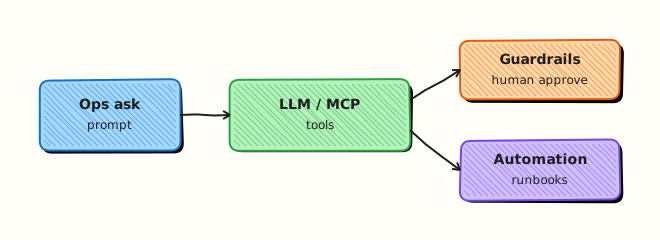
The CLI builds a prompt from a template and incident input, then calls an LLM client interface. The default client is a local mock. An optional OpenAI client activates only when a key exists. Tool ideas (MCP / LangChain) stay behind a human approval boundary.
Theory
What it is
An LLM client sends a prompt (system + user messages) and receives text. A prompt template is a fixed string with placeholders for safe fields (service name, error snippet) — not for API keys. MCP (Model Context Protocol) is a way for assistants to discover and call tools through a controlled client. LangChain (and similar frameworks) help chain prompts, tools, and memory; the important idea for ops is tool calling with policy, not the brand name.
TEMPLATE = """You are a DevOps assistant. Suggest read-only checks only.
Service: {service}
Symptom: {symptom}
"""
prompt = TEMPLATE.format(service="payments-api", symptom="high latency")
Why it matters
Engineers drown in logs during incidents. An assistant that drafts “check disk, check recent deploy, check dependency latency” saves minutes. An assistant that auto-runs destructive tools can delete the wrong namespace. Offline-first design lets students, air-gapped networks, and CI unit tests run without buying tokens. Security review will ask: where does the key live, what is logged, and who approves side effects?
How it works
- Interface — one function
complete(prompt: str) -> strused by the CLI. - Mock client — pattern-match on keywords and return canned runbook steps (no network).
- Optional real client — if
os.environ.get("OPENAI_API_KEY"), call the HTTP API with timeout; else never try. - Guardrails — system text forbids secrets and mutating actions; print
APPROVAL_REQUIREDfor any tool idea. - MCP / LangChain sketch — tools are declared; the host decides whether to execute after human approval.
import os

def select_client():
    if os.environ.get("OPENAI_API_KEY"):
        return OpenAIClient()  # optional path
    return MockLLMClient()
You do not need LangChain installed for this lab. Understand the flow: prompt → model → optional tool request → human/policy gate → result.
Key concepts and comparisons
| Mode | When to use | Cost / dependency |
|---|---|---|
| Mock LLM | Labs, CI, demos, air-gap | Free, deterministic |
| Real API | Optional enrichment when key present | Paid / networked |
| MCP tools | Controlled tool discovery | Host must enforce policy |
| LangChain-style chain | Multi-step retrieve → reason → act | Extra dependency; still need gates |
| Guardrail | Meaning |
|---|---|
| No secrets in prompts | Keys stay in env/vault; never interpolated into templates |
| Read-only suggestions default | Mutating tools require explicit approval |
| Timeouts | HTTP calls must not hang CI |
| Logging redaction | Do not log full prompts if they may contain customer data |
Common pitfalls
- Requiring an API key to import the module or run tests.
- Putting
OPENAI_API_KEYinto the prompt “so the model can call tools”. - Auto-executing shell commands suggested by the model.
- Logging entire prompts that contain personal or customer data.
- Treating model output as ground truth without checking production state.
Hands-on Lab
Objective
Build an offline-first runbook assistant under ~/rebash-python/lab26 with a mock LLM, a safe prompt template, and an optional real client gated on OPENAI_API_KEY. Prove both paths with evidence.
Prerequisites
- Python 3.10+ (stdlib + optional
urllibfor real API) - No paid account required
- Unset
OPENAI_API_KEYfor the default path (or leave it unset)
Lab environment
Workspace: ~/rebash-python/lab26
mkdir -p ~/rebash-python/lab26 && cd ~/rebash-python/lab26
set -euo pipefail
python3 --version | tee python-version.txt
# Record whether a key is present without printing the secret
if [ -n "${OPENAI_API_KEY:-}" ]; then
  echo "OPENAI_API_KEY=present" | tee key-status.txt
else
  echo "OPENAI_API_KEY=absent" | tee key-status.txt
fi
Expected output
key-status.txt says present or absent — never prints the key value.
Real-world scenario
Your SRE team wants a CLI that turns a short incident blurb into suggested runbook checks. Legal and security require that training and CI work without calling a vendor. Production may optionally use OpenAI when a vault-injected key exists. Mutating actions must print APPROVAL_REQUIRED and stop.
Step-by-step tasks
Task 1 – Mock LLM client and prompt template
Create ai_runbook.py:
"""Offline-first AI runbook helper for DevOps (mock LLM + optional OpenAI)."""
from __future__ import annotations

import argparse
import json
import os
import sys
import urllib.error
import urllib.request
from dataclasses import dataclass

PROMPT_TEMPLATE = """You are a DevOps assistant for REBASH Academy labs.
Rules:
- Suggest read-only diagnostic checks only.
- Never ask for or repeat API keys, passwords, or tokens.
- If a mutating action is needed, say APPROVAL_REQUIRED.

Service: {service}
Environment: {environment}
Symptom: {symptom}
Recent change: {recent_change}
"""


@dataclass
class LLMResult:
    provider: str
    text: str


class MockLLMClient:
    """Deterministic offline client — no network."""

    def complete(self, prompt: str) -> LLMResult:
        lower = prompt.lower()
        steps = [
            "1. Check recent deploys and config changes for the service.",
            "2. Inspect golden signals: latency, errors, saturation, traffic.",
            "3. Verify dependency health (DB, cache, upstream API) with read-only probes.",
        ]
        if "latency" in lower or "slow" in lower:
            steps.append("4. Compare p95 latency to the previous deploy baseline.")
        if "oom" in lower or "memory" in lower:
            steps.append("4. Check container/memory limits and recent RSS growth.")
        if "disk" in lower:
            steps.append("4. Run df/inode checks on the affected nodes (read-only).")
        steps.append("Mutating remediation: APPROVAL_REQUIRED before restart or scale.")
        return LLMResult(provider="mock", text="\n".join(steps))


class OpenAIClient:
    """Optional real client — used only when OPENAI_API_KEY is set."""

    def __init__(self, api_key: str, model: str = "gpt-4o-mini") -> None:
        self.api_key = api_key
        self.model = model
        self.url = "https://api.openai.com/v1/chat/completions"

    def complete(self, prompt: str) -> LLMResult:
        body = {
            "model": self.model,
            "messages": [
                {"role": "system", "content": "You are a careful DevOps assistant."},
                {"role": "user", "content": prompt},
            ],
            "temperature": 0.2,
        }
        data = json.dumps(body).encode("utf-8")
        req = urllib.request.Request(
            self.url,
            data=data,
            headers={
                "Authorization": f"Bearer {self.api_key}",
                "Content-Type": "application/json",
            },
            method="POST",
        )
        try:
            with urllib.request.urlopen(req, timeout=30) as resp:
                payload = json.loads(resp.read().decode("utf-8"))
            text = payload["choices"][0]["message"]["content"].strip()
            return LLMResult(provider="openai", text=text)
        except (urllib.error.URLError, urllib.error.HTTPError, KeyError, IndexError, TimeoutError) as exc:
            # Fall back to mock so labs never hard-fail on network/billing
            mock = MockLLMClient().complete(prompt)
            mock.text = (
                f"[openai_error={type(exc).__name__}; fell back to mock]\n" + mock.text
            )
            return LLMResult(provider="openai_fallback_mock", text=mock.text)


def build_prompt(service: str, environment: str, symptom: str, recent_change: str) -> str:
    return PROMPT_TEMPLATE.format(
        service=service,
        environment=environment,
        symptom=symptom,
        recent_change=recent_change,
    )


def select_client() -> MockLLMClient | OpenAIClient:
    key = os.environ.get("OPENAI_API_KEY", "").strip()
    if key:
        return OpenAIClient(api_key=key)
    return MockLLMClient()


def main(argv: list[str] | None = None) -> int:
    parser = argparse.ArgumentParser(description="REBASH lab26 AI runbook helper")
    parser.add_argument("--service", required=True)
    parser.add_argument("--environment", default="lab")
    parser.add_argument("--symptom", required=True)
    parser.add_argument("--recent-change", default="none")
    parser.add_argument("--force-mock", action="store_true", help="Ignore OPENAI_API_KEY")
    args = parser.parse_args(argv)

    prompt = build_prompt(
        args.service, args.environment, args.symptom, args.recent_change
    )
    # Guard: refuse if someone pasted a key-looking string into symptom
    if "OPENAI_API_KEY=" in prompt or "AKIA" in prompt:
        print("RESULT=fail error=secret_like_input_blocked", file=sys.stderr)
        return 2

    client: MockLLMClient | OpenAIClient
    if args.force_mock:
        client = MockLLMClient()
    else:
        client = select_client()

    result = client.complete(prompt)
    print(f"provider={result.provider}")
    print("--- suggestion ---")
    print(result.text)
    print("--- end ---")
    if "APPROVAL_REQUIRED" in result.text:
        print("gate=human_approval_required_for_mutations")
    print("RESULT=ok")
    return 0


if __name__ == "__main__":
    raise SystemExit(main())
Run:
Expected output
py_compile succeeds.
Task 2 – Offline run (force mock) and secret-like input block
cd ~/rebash-python/lab26
set -euo pipefail

python3 ai_runbook.py --force-mock \
  --service payments-api \
  --symptom "high latency after deploy" \
  --recent-change "version 1.8.2" \
  | tee run-mock.stdout

grep -F 'provider=mock' run-mock.stdout
grep -F 'APPROVAL_REQUIRED' run-mock.stdout
grep -F 'RESULT=ok' run-mock.stdout
grep -F 'OPENAI_API_KEY' ai_runbook.py | head -n 5
# Prompt template must not embed a literal secret value
! grep -E 'sk-[A-Za-z0-9]{10,}' ai_runbook.py

set +e
python3 ai_runbook.py --force-mock \
  --service payments-api \
  --symptom "OPENAI_API_KEY=sk-should-block" \
  >run-blocked.stdout 2>run-blocked.stderr
rc=$?
set -e
test "$rc" -eq 2
grep -F 'secret_like_input_blocked' run-blocked.stderr
Expected output
mock run prints suggestions and RESULT=ok; secret-like symptom exits 2.
Task 3 – Optional real API path and evidence pack
cd ~/rebash-python/lab26
set -euo pipefail

# Optional path: only attempts OpenAI when key is present (still safe if call fails)
python3 ai_runbook.py \
  --service payments-api \
  --symptom "high latency after deploy" \
  --recent-change "version 1.8.2" \
  | tee run-auto.stdout

grep -E 'provider=(mock|openai|openai_fallback_mock)' run-auto.stdout
grep -F 'RESULT=ok' run-auto.stdout

# Save a redacted prompt sample (no secrets)
python3 - << 'EOF' | tee prompt-sample.txt
from ai_runbook import build_prompt
print(build_prompt("payments-api", "lab", "high latency", "version 1.8.2"))
EOF
grep -F 'Never ask for or repeat API keys' prompt-sample.txt
! grep -E 'sk-[A-Za-z0-9]{10,}' prompt-sample.txt

tar -czf lab26-evidence.tgz \
  python-version.txt key-status.txt ai_runbook.py \
  run-mock.stdout run-blocked.stderr run-auto.stdout prompt-sample.txt
ls -l lab26-evidence.tgz | tee evidence-ls.txt
Expected output
auto path still ends with RESULT=ok; prompt sample has guardrail text and no sk- secret; evidence archive exists.
Validation steps
-
ai_runbook.pycompiles -
--force-mockrun showsprovider=mockandAPPROVAL_REQUIRED - Secret-like symptom is blocked with exit code 2
- Auto client path prints a known
provider=value andRESULT=ok -
lab26-evidence.tgzexists under~/rebash-python/lab26
Common errors and fixes
| Error | Cause | Fix |
|---|---|---|
| Accidental paid call in CI | Key injected in CI secrets | Use --force-mock in CI unit jobs |
openai HTTP error | Network/billing/model | Lab falls back to mock; check provider=openai_fallback_mock |
| Key printed in logs | Echoed env | Never echo "$OPENAI_API_KEY"; use present/absent only |
Model suggests kubectl delete | Weak system rules | Keep APPROVAL_REQUIRED gate; do not auto-run tools |
| Import fails without key | Bad design | select_client() must default to mock |
Challenge exercise
Add a --tools-demo flag that prints a fake MCP/LangChain-style tool request JSON (for example {"tool": "kubectl_get", "args": {"resource": "pods"}}) and then prints APPROVAL_REQUIRED without executing anything. Save tools-demo.stdout showing both the JSON and the gate line.
Learning outcomes
- Offline-first mock LLM for runbook suggestions
- Prompt template without secrets
- Optional OpenAI path gated on env
- Human approval boundary for mutating ideas
Cleanup
cd ~/rebash-python/lab26
set -euo pipefail
rm -rf __pycache__
# Do not write API keys into files; if you exported a key in this shell, unset it when done:
# unset OPENAI_API_KEY
Validation
- Lab finished under
~/rebash-python/lab26/with evidence archive - You can explain mock vs optional real client without requiring payment
- You can describe MCP/LangChain tool calling plus a human gate
- You know why secrets must not appear in prompts or prompt templates
Code Walkthrough
AI-assisted ops tools usually follow this order:
- Default offline — tests and training never require a vendor
- Template prompts — only safe fields; block secret-like input
- One client interface — swap mock/real behind the same method
- Timeouts and fallback — network failure must not strand the operator
- Approve before act — model output is advice until a human or policy allows a tool
Security Considerations
- Store
OPENAI_API_KEYin a vault or CI secret store — never in Git - Redact prompts in logs when they may contain customer data
- Do not grant the model direct cloud credentials for mutating APIs
- Prefer read-only tools first; separate roles for break-glass actions (emergency admin)
- Review prompt injection risk when incident text comes from untrusted tickets
Common Mistakes
Making the paid API mandatory
Students and CI then cannot run the suite. Fix: mock by default; real client only when a key exists.
Interpolating secrets into the prompt
Keys appear in vendor logs and your debug output. Fix: tools that need auth use env/IAM outside the prompt.
Auto-running shell from model output
Prompt injection becomes remote command execution. Fix: parse tool requests; require explicit approval.
Trusting the model as the source of truth
Hallucinated kubectl flags cause outages. Fix: verify against live state and runbooks.
Best Practices
- Keep a deterministic mock for CI snapshots
- Version prompt templates like code; review changes in pull requests
- Separate “suggest” and “execute” permissions
- Document data retention for any vendor API you enable
- Measure usefulness (time saved) before expanding tool rights
Troubleshooting
| Symptom | Likely cause | Fix |
|---|---|---|
Always provider=mock with key set | Typo in env name / empty value | Check key-status.txt logic; export correct name |
| Hang on real call | No timeout | Keep urlopen(..., timeout=30) |
| Fallback every time | Firewall or invalid key | Expected in locked-down labs; use mock |
| Secret blocked unexpectedly | Symptom contained AKIA | Rephrase symptom; keep blocker |
| Empty suggestions | Mock bug | Ensure complete() returns steps |
Summary
AI for DevOps works best as an offline-first assistant: mock clients for labs and CI, optional real APIs when keys exist, prompt templates without secrets, and human approval before any mutating tool. Next, close the track with Troubleshooting Python Automation.
Interview Questions
1. Why should an AI ops CLI work without OPENAI_API_KEY?
Reveal answer
Training, Continuous Integration (CI), and air-gapped networks cannot depend on a paid vendor. Offline mocks keep tests deterministic and free. Production can still enable a real client when a vault injects a key. Interviewers look for this split: capability optional, core path local.
2. What belongs in a prompt template, and what must never be interpolated?
Reveal answer
Safe fields: service name, environment label, redacted symptom text, change ID. Never interpolate API keys, passwords, session cookies, or private keys. Authentication for tools belongs in the runtime environment, not in the prompt text.
3. How do MCP clients and LangChain-style tool calling fit into a safe design?
Reveal answer
They help the model request tools (list pods, fetch a dashboard URL). The host application must decide whether to run the tool, under which credentials, and whether a human must approve. The protocol or framework does not remove the need for policy.
4. A model suggests kubectl delete namespace prod. What should your tool do?
Reveal answer
Print the suggestion, mark APPROVAL_REQUIRED, and not execute. Prefer deny-by-default for destructive verbs. Require a second person or a change ticket for production mutations. Log who approved.
5. How do you prevent prompt injection from a malicious ticket description?
Reveal answer
Treat ticket text as untrusted data: constrain templates, strip obvious secret patterns, do not let the model freely choose shell commands, and keep a human/policy gate before tools run. Avoid putting raw untrusted text into system instructions.
6. What do you log when calling a real LLM API during an incident?
Reveal answer
Log provider, model name, latency, and maybe a hash or truncated prompt ID — not full prompts if they may contain personal or customer data, and never the API key. Redact aggressively; follow your organisation’s data policy.
7. When is a mock LLM better than a real model even in production paths?
Reveal answer
Unit tests, contract tests, demos, disaster-recovery drills without vendor dependency, and fallbacks when the vendor is down. Some teams also use mocks for “golden” suggestion fixtures reviewed by humans.
Related Tutorials
- Python for Cloud & DevOps – Overview
- Security for DevOps Python (previous)
- Troubleshooting Python Automation (next)
- CLI Applications — argparse, Click, and Typer
- Production Engineering Patterns
References
- OpenAI API reference — optional real client
- Model Context Protocol — MCP overview
- LangChain documentation — tool/chain concepts
- urllib.request — Python stdlib HTTP
- Track index: Python for Cloud & DevOps Engineers