Configuration Management and Secrets
Overview
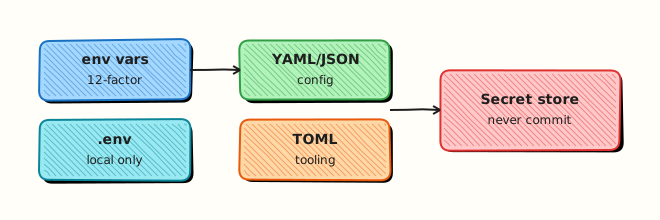
Twelve-factor style configuration keeps settings in the environment and structure in files. Secrets — API tokens, passwords, private URLs — must not live in git. A common pattern for DevOps Python tools is: YAML (or TOML/JSON) for non-secret structure, os.environ for secrets and overrides, and a committed .env.example that shows required keys without real values.
If a required secret is missing, the tool should fail at startup with a clear message — not continue with an empty token and fail deep in an API call. Locally you may load a private .env file (never committed). In Continuous Integration (CI) and production, inject secrets from the platform vault or CI variables.
This is Tutorial 11 in Module 11: Configuration of the REBASH Academy Python for Cloud & DevOps Engineers series. It is written for DevOps, Cloud, Platform, and Site Reliability Engineering (SRE) engineers. By the end, you will load config from env + YAML under ~/rebash-python/lab11 without committing secrets.
Prerequisites
- Logging and Debugging
- File Handling — pathlib, JSON, YAML, CSV
- Python 3.12+ and ability to
pip install PyYAML
Learning Objectives
By the end of this tutorial, you will be able to:
- Load non-secret settings from YAML
- Read secrets and overrides from
os.environ - Ship
.env.exampleand keep real.envout of git - Fail fast when a required secret is missing
- Explain why secrets must not be committed or logged
Architecture
Config files describe structure (regions, feature flags, paths). The process environment supplies secrets and environment-specific overrides. The app merges them at startup and refuses to run if secrets are absent.
Theory
What it is
Configuration is everything that changes between environments without changing code: regions, base URLs, log levels, inventory paths.
Secrets are credentials and sensitive values: API tokens, passwords, private keys.
import os
from pathlib import Path
import yaml

def load_settings(config_path: Path) -> dict:
    with config_path.open(encoding="utf-8") as fh:
        cfg = yaml.safe_load(fh) or {}
    token = os.environ.get("REBASH_API_TOKEN")
    if not token:
        raise SystemExit("REBASH_API_TOKEN is required")
    cfg["api_token"] = token
    cfg["log_level"] = os.environ.get("REBASH_LOG_LEVEL", cfg.get("log_level", "INFO"))
    return cfg
.env.example documents variable names for humans. A real .env is local-only (add to .gitignore). Libraries like python-dotenv can load .env into the environment for laptop use — still never commit the filled file.
TOML is common for tool settings (pyproject.toml). JSON is fine for machine-generated config. The rule is the same: no secrets in the repo.
Why it matters
Committed tokens are copied into forks, CI logs, and backups. Empty secrets cause confusing 401 errors far from startup. Env overrides let the same image run in stage and prod with different values.
How it works
- Commit
config.yaml+.env.example+.gitignore - Load YAML with
safe_load - Require secrets from
os.environ - Optional: load
.envlocally into the environment - Fail fast if required keys are missing; never log secret values
Key concepts and comparisons
| Source | Holds | In git? |
|---|---|---|
| YAML/JSON/TOML | Structure, non-secrets | Yes (reviewed) |
os.environ | Secrets + overrides | Injected at runtime |
.env.example | Key names + dummy placeholders | Yes |
.env | Real local secrets | Never |
| Pattern | Prefer when | Avoid when |
|---|---|---|
| Fail if secret missing | Production CLIs | Silent default empty token |
| Env override of YAML | Stage vs prod | Duplicating whole YAML per env in git with secrets |
| Vault / CI variables | Shared platforms | Secrets in Docker images |
| dotenv for laptop | Local DX | Using dotenv as the production secret store |
Common pitfalls
- Committing
.envbecause “it is only a practice token”. - Defaulting secrets to a hard-coded string in source.
- Logging the full settings dict including tokens.
- Using
yaml.loadinstead ofsafe_load. - Documenting secrets only in chat — no
.env.examplefor the next engineer.
Hands-on Lab
Objective
Create YAML config, .env.example, .gitignore, and a loader that reads env + YAML, fails when REBASH_API_TOKEN is missing, and succeeds when the token is present. Workspace: ~/rebash-python/lab11.
Prerequisites
- Python 3.12+
- PyYAML in a venv
- Write access under your home directory
Lab environment
Workspace: ~/rebash-python/lab11
mkdir -p ~/rebash-python/lab11 && cd ~/rebash-python/lab11
set -euo pipefail
python3 -m venv .venv
source .venv/bin/activate
python -m pip install --upgrade pip
python -m pip install 'PyYAML>=6.0'
python -c "import yaml, os; print('ok')"
Expected output
ok
Real-world scenario
You are building a small inventory API client for a practice environment. Non-secret settings (base URL, timeout) live in YAML. The API token must come from the environment. Security review requires .env.example, a .gitignore that blocks .env, and a startup failure when the token is missing.
Step-by-step tasks
Task 1 – Config files without secrets
Create config.yaml:
app_name: rebash-inventory
base_url: https://api.example.invalid/v1
timeout_sec: 10
log_level: INFO
Create .env.example:
# Copy to .env and fill real values. Never commit .env.
REBASH_API_TOKEN=replace-me
REBASH_LOG_LEVEL=INFO
Create .gitignore:
Create .env:
Run:
test -f config.yaml
test -f .env.example
grep -qx '.env' .gitignore
echo "task1 ok" | tee task1-ok.txt
Expected output
task1 ok; .gitignore contains .env.
Task 2 – Loader with fail-if-missing secret
Create load_config.py:
from __future__ import annotations
import os
import sys
from pathlib import Path
import yaml
REQUIRED_SECRET = "REBASH_API_TOKEN"
def load_dotenv(path: Path) -> None:
"""Minimal .env loader for the lab (KEY=VALUE lines). Does not override existing env."""
if not path.is_file():
return
for raw in path.read_text(encoding="utf-8").splitlines():
line = raw.strip()
if not line or line.startswith("#") or "=" not in line:
continue
key, value = line.split("=", 1)
key = key.strip()
value = value.strip().strip('"').strip("'")
os.environ.setdefault(key, value)
def load_config(root: Path) -> dict:
load_dotenv(root / ".env")
cfg_path = root / "config.yaml"
with cfg_path.open(encoding="utf-8") as fh:
cfg = yaml.safe_load(fh) or {}
token = os.environ.get(REQUIRED_SECRET)
if not token:
raise SystemExit(f"{REQUIRED_SECRET} is required (see .env.example)")
cfg["api_token"] = token
cfg["log_level"] = os.environ.get("REBASH_LOG_LEVEL", cfg.get("log_level", "INFO"))
return cfg
def public_view(cfg: dict) -> dict:
"""Safe dict for logs/proof — never include the raw token."""
return {
"app_name": cfg.get("app_name"),
"base_url": cfg.get("base_url"),
"timeout_sec": cfg.get("timeout_sec"),
"log_level": cfg.get("log_level"),
"api_token_set": bool(cfg.get("api_token")),
"api_token_length": len(cfg.get("api_token") or ""),
}
if __name__ == "__main__":
root = Path.home() / "rebash-python" / "lab11"
cfg = load_config(root)
print(public_view(cfg))
Run:
python load_config.py | tee task2-success.txt
grep -q "api_token_set" task2-success.txt
if grep -q "lab-only-not-for-git" task2-success.txt; then
echo "ERROR: secret leaked into proof output" >&2
exit 1
fi
Expected output
task2-success.txt shows api_token_set true and does not print the raw token string lab-only-not-for-git.
Task 3 – Prove missing secret fails
cd ~/rebash-python/lab11
set -euo pipefail
source .venv/bin/activate
# Clear secret and disable .env load by renaming temporarily
mv .env .env.hidden
env -u REBASH_API_TOKEN python load_config.py >task3-out.txt 2>task3-err.txt || true
mv .env.hidden .env
grep -F 'REBASH_API_TOKEN is required' task3-err.txt
test ! -s task3-out.txt -o ! -f task3-out.txt || true
# Exit code must be non-zero when secret missing
mv .env .env.hidden
set +e
env -u REBASH_API_TOKEN python load_config.py >/dev/null 2>&1
code=$?
set -e
mv .env.hidden .env
test "$code" -ne 0
echo "missing-secret-exit=$code" | tee task3-ok.txt
Expected output
stderr mentions required token; missing-secret-exit is non-zero.
Validation steps
-
config.yamlhas no token field -
.env.exampleexists and.gitignoreignores.env - Loader succeeds with token from env/
.envwithout printing the secret - Loader exits non-zero when
REBASH_API_TOKENis unset
Common errors and fixes
| Error | Cause | Fix |
|---|---|---|
| Success without token | Default empty string accepted | Treat missing/blank as failure |
| Token printed in proof | Logged full cfg | Use public_view / redact |
.env committed | Not ignored | Add .env to .gitignore; rotate token |
ModuleNotFoundError: yaml | PyYAML missing | Install in venv |
Challenge exercise
Extend load_config.py to also require REBASH_API_TOKEN to be at least 8 characters, and to allow REBASH_BASE_URL env to override base_url from YAML. Prove with a short script: override URL to https://override.example.invalid and write challenge-ok.txt containing that URL (still without printing the token).
Learning outcomes
- Separated structure (YAML) from secrets (env)
- Used
.env.example+.gitignorecorrectly - Failed fast when a secret was missing
Cleanup
cd ~/rebash-python/lab11
set -euo pipefail
# shred or delete local secrets when finished
# rm -f .env
# rm -rf .venv __pycache__ *.py *.yaml *.txt .env.example .gitignore
deactivate 2>/dev/null || true
Validation
- Lab finished under
~/rebash-python/lab11/ - You can explain what belongs in YAML vs env
- You never commit
.env - You fail startup when required secrets are missing
Code Walkthrough
Production habits:
- Document keys in
.env.example - Ignore real secret files in git
- Load structure from YAML/TOML/JSON
- Require secrets from the environment
- Redact before logging or writing proof files
Prefer a secret manager or CI variables over long-lived .env files on servers.
Security Considerations
- Never commit secrets — rotate any token that was pushed
- Never log raw tokens, passwords, or private keys
- Prefer short-lived credentials and least privilege
- Restrict permissions on
.env(chmod 600) - Treat example placeholders as documentation only, not code defaults
Common Mistakes
Hard-coding a ‘temporary’ token in source
It lives forever in git history. Fix: env only; rotate if it was committed.
Committing .env for convenience
Practice tokens train a bad habit and often become real. Fix: .gitignore + .env.example.
Continuing with empty secret
Failures appear as random 401s. Fix: exit at startup with the variable name.
Dumping os.environ into logs
May include unrelated secrets. Fix: allow-list keys for debug output.
Best Practices
- One prefix for your tool (
REBASH_) to avoid collisions - Validate types (int timeout) after merge
- Inject production secrets from the platform, not the image
- Review PRs for accidental secret strings
- Pair with Module 25 for deeper hardening
Troubleshooting
| Symptom | Likely cause | Fix |
|---|---|---|
token is required locally | .env not loaded / wrong cwd | Run from lab root |
| Still using YAML URL after override | Env not set / typo | Check key names in public_view |
| Secret in git status | .gitignore missing | Add .env; rotate |
| PyYAML error | Bad indentation | Re-dump YAML from Python |
| CI has no token | Variable not configured | Set CI secret; do not bake into repo |
Summary
Configuration belongs in files and environment variables; secrets belong only in the environment (or a vault) — never in git. Load YAML for structure, require tokens from os.environ, ship .env.example, and fail fast when secrets are missing. Next, wrap tools in a proper CLI in CLI Applications — argparse, Click, and Typer.
Interview Questions
1. What should go in YAML versus environment variables for a DevOps CLI?
Reveal answer
Put non-secret structure in YAML/JSON/TOML (URLs that are not sensitive, timeouts, feature flags). Put secrets and environment-specific overrides in the process environment. Do not store API tokens in committed YAML.
2. Why commit .env.example but never .env?
Reveal answer
.env.example documents required keys for the next engineer and for onboarding. .env holds real secrets for a laptop. If .env is committed, tokens leak through git history, forks, and backups. Use .gitignore and rotate on exposure.
3. How should a tool behave when API_TOKEN is missing?
Reveal answer
Fail at startup with a clear message naming the variable (and pointing at .env.example). Do not default to an empty string and continue. CI should see a non-zero exit code.
4. Is python-dotenv safe for production secret management?
Reveal answer
It is fine for local developer experience. Production should inject secrets from the platform (CI variables, cloud secret manager, Kubernetes secrets mounted as env). Do not rely on a .env file on a shared server as your long-term store.
5. How do you prove in a PR that secrets are not logged?
Reveal answer
Show a public_view or redaction helper, unit tests that assert the token value does not appear in log output, and sample evidence files that only show api_token_set=true / length. Reviewers look for positive proof, not promises.
6. A junior engineer commits a practice token “just for the lab”. What do you do?
Reveal answer
Remove it from the tree, add .gitignore, rotate/revoke the token if it could be real or reused, and teach .env.example. If it hit a shared remote, treat it as a credential incident even for “practice” values.
7. How do env overrides interact with YAML defaults?
Reveal answer
Load YAML first, then apply environment overrides for selected keys (log level, base URL). Secrets usually have no YAML default. Document precedence in the README so stage/prod behaviour is predictable.
Related Tutorials
- Python for Cloud & DevOps – Overview
- Logging and Debugging (previous)
- CLI Applications — argparse, Click, and Typer (next)
- File Handling — pathlib, JSON, YAML, CSV
- Security for DevOps Python
References
- os.environ — Python docs
- The Twelve-Factor App — Config
- PyYAML safe_load
- Track index: Python for Cloud & DevOps Engineers