Kubernetes Python Client Automation
Overview
The official kubernetes Python package is a generated client around the Kubernetes API server. Your script loads credentials, builds typed API objects such as CoreV1Api, and issues the same verbs kubectl uses — get, list, create, patch, delete — over HTTPS. For this course the happy path is get/list inventory, not cluster surgery.
Out of cluster, config.load_kube_config() reads KUBECONFIG or ~/.kube/config. Inside a Pod, config.load_incluster_config() uses the mounted ServiceAccount token. Errors surface as ApiException with HTTP status codes: 401/403 for auth or Role-Based Access Control (RBAC), 404 for missing objects. Prefer namespace-scoped lists when you can — cluster-wide scans need broader permissions and are slower.
If you have no cluster (common on student laptops), you still practise by generating and validating YAML manifests and printing dry-run notes in script output. Never run delete-namespace or destroy kind clusters from a learning script’s default path.
This is Tutorial 18 in Module 18: Kubernetes Automation of the REBASH Academy Python for DevOps Engineers series. It is written for Kubernetes, Platform, DevOps, and Site Reliability Engineering (SRE) engineers. By the end you will have inventory evidence from a live API or validated manifests with dry-run guidance — without destroying a cluster.
Prerequisites
- Docker SDK Automation
- REST APIs concepts (status codes, timeouts)
- Python 3.10+ and a virtual environment
- Optional: kubeconfig for kind / minikube / k3s / a lab cluster — otherwise use the YAML path
Learning Objectives
By the end of this tutorial, you will be able to:
- Load kubeconfig (and describe in-cluster config)
- List Namespaces and Pods read-only when the API is reachable
- Sketch Deployments, Services, ConfigMaps, Jobs, and Secret handling rules
- Treat Secret data as opaque (metadata only in reports)
- Generate/validate YAML manifests when kubeconfig is missing
- Refuse cluster-destroy style flags in lab tooling
Architecture
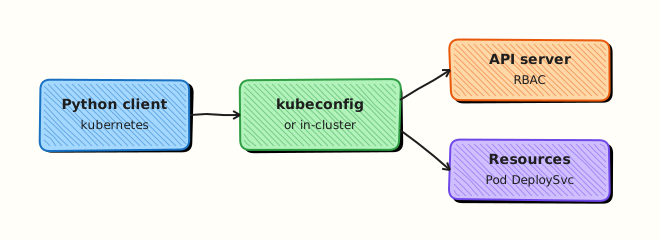
Python loads kubeconfig or in-cluster credentials, calls the API server through typed clients, and emits inventory JSON. Offline, the same workflow validates local manifests and prints dry-run notes instead of mutating the cluster.
Theory
What it is
kubernetes clients wrap REST under /api and /apis. Pods are the atomic running unit; Deployments manage replicas; Services provide stable networking; ConfigMaps and Secrets hold configuration; Jobs run finite work; Namespaces isolate names. RBAC decides whether your identity may list or change them.
from kubernetes import client, config

config.load_kube_config()
v1 = client.CoreV1Api()
for ns in v1.list_namespace().items:
    print(ns.metadata.name)
Why it matters
Platform and SRE teams live in clusters. Shelling out to kubectl works for one-offs; Python gives structured objects, testable parsers, and CI gates (“no Pending Pods older than N minutes”). Mutating tools inherit the ServiceAccount’s RBAC — least privilege is enforceable.
How it works
- Load config — kubeconfig or in-cluster.
- Build API clients —
CoreV1Api,AppsV1Api, …. - List/get — namespaced or cluster-scoped.
- Handle ApiException — map status codes to clear errors.
- Offline path — write YAML,
kubectl apply --dry-run=clientnotes, or PyYAML validation only.
| Resource | Typical read | Caution |
|---|---|---|
| Namespace / Pod | list names & phases | Wide list needs RBAC |
| Deployment | replicas / conditions | Avoid delete in labs |
| Secret | list names only | Never log data values |
| Job | completions / failures |
Key concepts and comparisons
| Mode | Prefer when | Evidence label |
|---|---|---|
| Live client list | kubeconfig works | mode: live |
| YAML validate + dry-run notes | No cluster / CI | mode: manifest-dry-run |
kubectl subprocess | Quick check | Still read-only flags |
Common pitfalls
- Logging Secret values.
- Cluster-admin kubeconfig in CI for a list job.
- Ignoring 403 (RBAC) vs 401 (auth).
- Deleting namespaces as “cleanup” in shared clusters.
- Mixing API versions (
apps/v1vs obsolete ones).
Hands-on Lab
Objective
Under ~/rebash-python/lab18, list namespaces/pods when kubeconfig works; otherwise generate a small Deployment+Service YAML set, validate with PyYAML, and write dry-run notes. Refuse destroy flags. No cluster teardown.
Prerequisites
- Python 3.10+
- Optional: working
kubectl/ kubeconfig pip install kubernetes pyyaml(kubernetes optional if offline-only)
Lab environment
Workspace: ~/rebash-python/lab18
mkdir -p ~/rebash-python/lab18/manifests && cd ~/rebash-python/lab18
set -euo pipefail
python3 -m venv .venv
# shellcheck disable=SC1091
source .venv/bin/activate
python -m pip install -U pip
python -m pip install 'pyyaml>=6,<7'
python -m pip install 'kubernetes>=29,<32' || true
command -v kubectl >/dev/null && kubectl config current-context 2>/dev/null | tee kube-context.txt || echo "no-kubeconfig" | tee kube-context.txt
Expected output
venv ready; kube-context.txt has a context name or no-kubeconfig.
Real-world scenario
Your platform team wants a Python health inventory: namespaces and Pod phases for a lab cluster. Student machines often lack clusters, so the same repository must validate example manifests and print how you would dry-run apply. Destroying kind clusters or namespaces is forbidden in the default tool.
Step-by-step tasks
Task 1 – Manifest generate + YAML validation (always works)
Create generate_manifests.py:
#!/usr/bin/env python3
"""Generate sample manifests and validate YAML structure."""
from __future__ import annotations

import json
from pathlib import Path

import yaml

ROOT = Path(__file__).resolve().parent
MAN = ROOT / "manifests"

DEPLOYMENT = """
apiVersion: apps/v1
kind: Deployment
metadata:
  name: rebash-lab18-web
  namespace: default
  labels:
    app: rebash-lab18
spec:
  replicas: 1
  selector:
    matchLabels:
      app: rebash-lab18
  template:
    metadata:
      labels:
        app: rebash-lab18
    spec:
      containers:
        - name: web
          image: nginx:1.27
          ports:
            - containerPort: 80
"""

SERVICE = """
apiVersion: v1
kind: Service
metadata:
  name: rebash-lab18-web
  namespace: default
spec:
  selector:
    app: rebash-lab18
  ports:
    - port: 80
      targetPort: 80
  type: ClusterIP
"""


def main() -> int:
    MAN.mkdir(parents=True, exist_ok=True)
    (MAN / "deployment.yaml").write_text(DEPLOYMENT.strip() + "\n", encoding="utf-8")
    (MAN / "service.yaml").write_text(SERVICE.strip() + "\n", encoding="utf-8")
    docs = []
    for path in sorted(MAN.glob("*.yaml")):
        loaded = list(yaml.safe_load_all(path.read_text(encoding="utf-8")))
        for doc in loaded:
            assert doc and "kind" in doc and "apiVersion" in doc
            docs.append({"file": path.name, "kind": doc["kind"], "name": doc["metadata"]["name"]})
    notes = {
        "mode": "manifest-dry-run",
        "docs": docs,
        "dry_run_notes": [
            "kubectl apply --dry-run=client -f manifests/",
            "kubectl apply --dry-run=server -f manifests/  # needs API access",
            "Do NOT kubectl delete namespace or kind delete cluster from this lab",
        ],
    }
    Path("manifest-evidence.json").write_text(json.dumps(notes, indent=2) + "\n", encoding="utf-8")
    print(json.dumps(notes, indent=2))
    return 0


if __name__ == "__main__":
    raise SystemExit(main())
Run:
cd ~/rebash-python/lab18
set -euo pipefail
# shellcheck disable=SC1091
source .venv/bin/activate
python generate_manifests.py | tee manifest-run.txt
test -s manifests/deployment.yaml
test -s manifest-evidence.json
python -c 'import json; d=json.load(open("manifest-evidence.json")); assert len(d["docs"])==2; print("yaml ok")'
Expected output
two manifests; manifest-evidence.json lists Deployment and Service with dry-run notes.
Task 2 – Live read-only list (or honest skip)
Create k8s_inventory.py:
#!/usr/bin/env python3
"""Read-only namespace/pod inventory — never destroy."""
from __future__ import annotations

import json
import os
import sys
from pathlib import Path

ROOT = Path(__file__).resolve().parent


def refuse_destroy() -> None:
    bad = {"--destroy", "--delete-all", "--delete-namespace", "--kind-delete"}
    if bad.intersection(sys.argv):
        print("REFUSED: cluster destroy / delete flags disabled in lab18", file=sys.stderr)
        raise SystemExit(2)


def live_inventory() -> dict:
    from kubernetes import client, config
    from kubernetes.client.rest import ApiException

    config.load_kube_config()
    v1 = client.CoreV1Api()
    namespaces = [i.metadata.name for i in v1.list_namespace().items]
    pods = []
    # Limit blast: default namespace only for the lab report
    for p in v1.list_namespaced_pod("default").items:
        pods.append(
            {
                "name": p.metadata.name,
                "phase": p.status.phase,
                "namespace": p.metadata.namespace,
            }
        )
    return {
        "mode": "live",
        "namespaces": namespaces,
        "pods_default": pods,
        "policy": "read-only list; no deletes",
    }


def main() -> int:
    refuse_destroy()
    if os.environ.get("LAB18_FORCE_MANIFEST") == "1":
        result = {
            "mode": "skipped-live",
            "reason": "LAB18_FORCE_MANIFEST=1",
            "policy": "read-only list; no deletes",
        }
    else:
        try:
            result = live_inventory()
        except Exception as exc:  # noqa: BLE001 — missing kubeconfig/module/RBAC
            result = {
                "mode": "skipped-live",
                "reason": type(exc).__name__,
                "detail": str(exc)[:300],
                "policy": "read-only list; no deletes",
                "hint": "use manifest-evidence.json dry-run path",
            }
    Path("k8s-inventory.json").write_text(json.dumps(result, indent=2) + "\n", encoding="utf-8")
    print(json.dumps(result, indent=2))
    return 0


if __name__ == "__main__":
    raise SystemExit(main())
Run:
cd ~/rebash-python/lab18
set -euo pipefail
# shellcheck disable=SC1091
source .venv/bin/activate
python k8s_inventory.py | tee inventory-run.txt
test -s k8s-inventory.json
Expected output
k8s-inventory.json with mode live or skipped-live — both acceptable.
Task 3 – Destroy refusal and evidence pack
Create pack_evidence.py:
import json
from pathlib import Path

pack = {
    "manifests": json.loads(Path("manifest-evidence.json").read_text(encoding="utf-8")),
    "inventory": json.loads(Path("k8s-inventory.json").read_text(encoding="utf-8")),
    "destroy_refused": True,
}
Path("lab18-evidence.json").write_text(json.dumps(pack, indent=2) + "\n", encoding="utf-8")
assert pack["manifests"]["mode"] == "manifest-dry-run"
print("evidence ok")
Run:
cd ~/rebash-python/lab18
set -euo pipefail
# shellcheck disable=SC1091
source .venv/bin/activate

set +e
python k8s_inventory.py --destroy >destroy-denied.txt 2>&1
rc=$?
set -e
test "$rc" -eq 2
grep -F 'REFUSED' destroy-denied.txt
python pack_evidence.py
Expected output
destroy refused; lab18-evidence.json merges manifest + inventory evidence.
Validation steps
- Manifests validate (
kind/apiVersionpresent) - Live list is read-only or cleanly skipped
- Destroy-style flags exit
2 - Evidence under
~/rebash-python/lab18
Common errors and fixes
| Error | Cause | Fix |
|---|---|---|
ConfigException / no kubeconfig | No cluster | Use manifest path; expected |
ApiException 403 | RBAC too tight | Ask for get/list only; or skip-live |
ModuleNotFoundError: kubernetes | pip failed | Manifest path still works with PyYAML |
| Fear of kind delete | Old habits | Lab refuses destroy flags |
Challenge exercise
Add a ConfigMap manifest (rebash-lab18-config) with two keys, validate it in generate_manifests.py, and extend evidence docs to three entries. Optional: if live mode works, also list Deployments in default via AppsV1Api().list_namespaced_deployment — still no deletes. Never print Secret data.
Learning outcomes
- Generated and validated Kubernetes YAML in Python
- Listed namespaces/pods when kubeconfig allowed
- Documented dry-run apply notes for tickets
- Refused cluster-destroy flags
Cleanup
cd ~/rebash-python/lab18
deactivate 2>/dev/null || true
# Do NOT kind delete cluster / kubectl delete ns from this lab.
# If you manually applied manifests in a personal cluster, delete only those named objects:
# kubectl delete -f manifests/ --dry-run=client
# rm -rf .venv
Validation
- Lab finished under
~/rebash-python/lab18/ - You can explain kubeconfig vs in-cluster config
- You never log Secret values
- You know why destroy is gated
Code Walkthrough
Production Kubernetes Python automation usually follows:
- Load identity — kubeconfig or ServiceAccount
- Least-privilege list/get — namespace scope when possible
- Map ApiException codes — 401/403/404
- Report phases/conditions — not raw Secret data
- Mutate only with flags + RBAC + change control
Security Considerations
- Use read-only Roles/ClusterRoles for inventory bots
- Never commit kubeconfig files with embedded tokens
- Do not log Secret
dataor bearer tokens - Prefer namespaced ServiceAccounts over cluster-admin
- Audit who can
delete collectionin production
Common Mistakes
Logging Secret values for debugging
Credentials leak into CI logs. Fix: log Secret names and keys existence only.
Cluster-admin kubeconfig in a list job
Over-privilege. Fix: bind get/list on required resources only.
kubectl delete namespace as lab cleanup on shared clusters
Wipes teammates’ work. Fix: delete only named lab objects; never default destroy.
Ignoring 403
Scripts look “empty” when RBAC denied the list. Fix: surface ApiException status clearly.
Best Practices
- Default tools to dry-run / read-only
- Pin client library versions
- Prefer server-side apply in real GitOps; keep Python for inventory/gates
- Record API resource versions in evidence when debugging races
- Pair with NetworkPolicy and Pod Security separately from this client intro
Troubleshooting
| Symptom | Likely cause | Fix |
|---|---|---|
| Empty pod list | Wrong namespace | Query default or pass namespace flag |
| 401 | Expired token / bad kubeconfig | kubectl auth can-i list pods |
| 403 | Missing RBAC | Grant get/list RoleBinding |
| SSL errors | Custom CA | Configure cluster CA in kubeconfig |
| Slow cluster list | Too wide | Namespace scope; limit field selectors |
Summary
Kubernetes Python automation starts with config loading, read-only list/get, careful Secret hygiene, and an offline manifest + dry-run notes path when no cluster exists — never default cluster destroy. Next, wrap Terraform workflows in Infrastructure Automation — Terraform.
Interview Questions
1. What is the difference between load_kube_config and load_incluster_config?
Reveal answer
load_kube_config reads a kubeconfig file (local laptop, CI with a fetched kubeconfig). load_incluster_config uses the ServiceAccount token and CA mounted into a Pod. Controllers and in-cluster jobs use the latter; developer laptops use the former. Choosing wrong raises a clear config error.
2. Why should inventory tools avoid printing Secret data?
Reveal answer
Secret values are credentials and tokens. CI logs and chat pastes become leak channels. Report Secret names, namespaces, and maybe key names — never base64 payloads. Prefer external secret managers for real systems.
3. How do HTTP status codes from ApiException guide troubleshooting?
Reveal answer
401 means identity/auth failed. 403 means authenticated but RBAC denied. 404 means the object or path is missing. 409 often means conflict. Retrying 403 with the same SA will not help — fix RoleBindings.
4. When is a YAML dry-run path acceptable instead of a live list?
Reveal answer
When teaching parsers, validating manifests in CI without a cluster, or developing on a laptop. Label evidence manifest-dry-run vs live. Add a separate integration job against kind for true API behaviour.
5. What RBAC verbs should a pod inventory bot need?
Reveal answer
Typically get and list on pods and namespaces (and maybe deployments) in the target namespaces. It should not need delete, create, or secrets get on data. Bind a dedicated ServiceAccount with a Role/RoleBinding.
6. How do Deployments and Pods relate in an inventory report?
Reveal answer
A Deployment owns ReplicaSets that own Pods. Reporting only Pods shows phases; reporting Deployments shows desired vs ready replicas and conditions. Healthy platforms watch both — Pending Pods under a Deployment that cannot schedule is a common production signal.
7. A junior engineer wants the script to kind delete cluster in Cleanup. What do you say?
Reveal answer
Refuse in shared or unclear environments. Cleanup should remove only lab-named objects the script created, with dry-run first. Destroying a cluster is a deliberate local decision, not a default tutorial step — especially when kubeconfig might point at something else.
Related Tutorials
- Python for DevOps Engineers – Overview
- Docker SDK Automation (previous)
- Infrastructure Automation — Terraform (next)
- Lab — Kubernetes Health Checker (more practice)