CLI Applications — argparse, Click, and Typer
Overview
DevOps tools are Command-Line Interfaces (CLIs) first. A good ops CLI has clear --help, subcommands for different jobs, honest exit codes for Continuous Integration (CI), and a habit of sending human messages to stderr while keeping stdout free for data.
argparse is in the Python standard library and is enough for many wrappers. Click and Typer reduce boilerplate for larger command trees and type-driven help. Rich can add tables and progress bars when you need them — keep it optional so thin environments still work.
This is Tutorial 12 in Module 12: CLI Applications of the REBASH Academy Python for Cloud & DevOps Engineers series. It is written for DevOps, Cloud, Platform, and Site Reliability Engineering (SRE) engineers. By the end, you will ship a small inventory CLI with check and list under ~/rebash-python/lab12.
Prerequisites
- Configuration Management and Secrets
- Python 3.12+ with a project virtual environment (venv)
Learning Objectives
By the end of this tutorial, you will be able to:
- Build a CLI with argparse (flags and subcommands)
- Contrast argparse vs Click vs Typer for ops tools
- Implement
--help,check, andlistbehaviours - Return meaningful exit codes from
main - Keep stdout/stderr roles clear for CI pipelines
Architecture
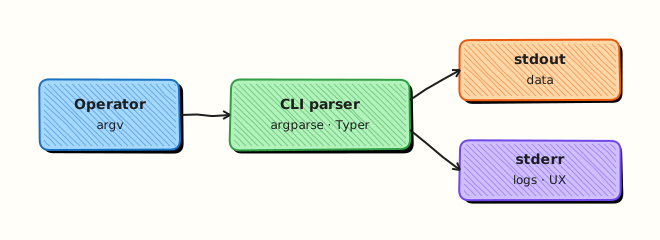
The user invokes a command. The CLI parser selects a subcommand. Business logic runs. Exit codes and streams tell CI and operators what happened.
Theory
What it is
A CLI parses sys.argv, runs a function, and exits with a status code.
argparse example shape:
import argparse

parser = argparse.ArgumentParser(prog="inv")
sub = parser.add_subparsers(dest="command", required=True)
sub.add_parser("list", help="list hosts")
p_check = sub.add_parser("check", help="check inventory file")
p_check.add_argument("--path", required=True)
args = parser.parse_args()
Click uses decorators for commands and options. Typer builds on type hints and feels natural with modern Python. All three should expose --help and support subcommands.
Exit codes: 0 success; non-zero for usage errors, missing files, or failed checks. Document them.
Streams: stdout for machine-readable output; stderr for logs and errors. Add --dry-run when a command would change systems.
Why it matters
CI calls your tool non-interactively. If --help is broken, onboarding fails. If every failure exits 0, pipelines stay green. If logs go to stdout, tool | jq breaks.
How it works
- Define the parser — program name, description, subcommands.
- Parse args — fail with usage on bad input (usually exit
2for argparse). - Dispatch — call
list_cmd/check_cmd. - Return int from
mainandraise SystemExit(main()). - Grow — move to Click/Typer when the command tree hurts in argparse.
| Library | Pros | Cons |
|---|---|---|
| argparse | Stdlib, no deps | Verbose for large trees |
| Click | Mature, many plugins | Extra dependency |
| Typer | Type hints, fast to write | Extra dependency; teach the team |
Key concepts and comparisons
| Feature | Why operators care |
|---|---|
--help | Discover flags without reading source |
| Subcommands | check vs list vs apply |
| Exit codes | CI pass/fail |
--dry-run | Safe preview of changes |
| Rich (optional) | Readable tables; keep optional |
Common pitfalls
- Forgetting
required=Trueon subparsers (Python 3.7+ supports it). - Printing errors to stdout.
- Catching all exceptions and exiting 0.
- Building Click/Typer apps that cannot run without Rich in minimal images.
- Hiding the real failure behind a generic “error” with no path or host name.
Hands-on Lab
Objective
Build an inventory CLI (invcli.py) with argparse: --help, subcommands list and check, and distinct exit codes. Prove help text and both subcommands. Workspace: ~/rebash-python/lab12.
Prerequisites
- Python 3.12+ (argparse is standard library)
- Write access under your home directory
Lab environment
Workspace: ~/rebash-python/lab12
mkdir -p ~/rebash-python/lab12 && cd ~/rebash-python/lab12
set -euo pipefail
python3 -m venv .venv
source .venv/bin/activate
python -c "import argparse; print('ok')"
Expected output
ok
Real-world scenario
Your team wants a tiny inventory helper for CI: list prints host names from a CSV, and check validates that the file exists and has at least one data row. The pipeline must fail with a non-zero exit when the file is missing or empty.
Step-by-step tasks
Task 1 – Sample inventory and CLI skeleton
Create data/hosts.csv:
Create invcli.py:
from __future__ import annotations

import argparse
import csv
import sys
from pathlib import Path


def cmd_list(path: Path) -> int:
    if not path.is_file():
        print(f"missing inventory: {path}", file=sys.stderr)
        return 2
    with path.open(encoding="utf-8", newline="") as fh:
        rows = list(csv.DictReader(fh))
    for row in rows:
        print(row["name"])
    return 0


def cmd_check(path: Path) -> int:
    if not path.is_file():
        print(f"missing inventory: {path}", file=sys.stderr)
        return 2
    with path.open(encoding="utf-8", newline="") as fh:
        rows = list(csv.DictReader(fh))
    if not rows:
        print(f"empty inventory: {path}", file=sys.stderr)
        return 3
    required = {"name", "env", "ip"}
    missing = required - set(rows[0].keys())
    if missing:
        print(f"missing columns: {sorted(missing)}", file=sys.stderr)
        return 3
    print(f"ok hosts={len(rows)}", file=sys.stderr)
    return 0


def build_parser() -> argparse.ArgumentParser:
    parser = argparse.ArgumentParser(
        prog="invcli",
        description="Small inventory CLI for REBASH lab12",
    )
    sub = parser.add_subparsers(dest="command", required=True)

    p_list = sub.add_parser("list", help="list host names")
    p_list.add_argument(
        "--path",
        type=Path,
        default=Path("data/hosts.csv"),
        help="path to inventory CSV",
    )

    p_check = sub.add_parser("check", help="validate inventory CSV")
    p_check.add_argument(
        "--path",
        type=Path,
        default=Path("data/hosts.csv"),
        help="path to inventory CSV",
    )
    return parser


def main(argv: list[str] | None = None) -> int:
    parser = build_parser()
    args = parser.parse_args(argv)
    path: Path = args.path
    if args.command == "list":
        return cmd_list(path)
    if args.command == "check":
        return cmd_check(path)
    print("unknown command", file=sys.stderr)
    return 1


if __name__ == "__main__":
    raise SystemExit(main())
Run:
Expected output
data/hosts.csv and invcli.py exist.
Task 2 – Prove --help and happy-path subcommands
cd ~/rebash-python/lab12
set -euo pipefail
source .venv/bin/activate

python invcli.py --help | tee help-main.txt
grep -E 'list|check' help-main.txt

python invcli.py list --help | tee help-list.txt
grep -F '--path' help-list.txt

python invcli.py check --help | tee help-check.txt
grep -F '--path' help-check.txt

python invcli.py list --path data/hosts.csv | tee list-out.txt
test "$(wc -l < list-out.txt | tr -d ' ')" -eq 3

python invcli.py check --path data/hosts.csv 2>check-ok.txt
test "$(python invcli.py check --path data/hosts.csv >/dev/null; echo $?)" -eq 0
grep -F 'ok hosts=3' check-ok.txt
Expected output
Help mentions list and check; list prints three names; check exits 0 with ok hosts=3 on stderr.
Task 3 – Prove failure exit codes
cd ~/rebash-python/lab12
set -euo pipefail
source .venv/bin/activate

set +e
python invcli.py check --path data/missing.csv 2>check-missing.err
code_missing=$?
set -e
test "$code_missing" -eq 2
grep -F 'missing inventory' check-missing.err

: > data/empty.csv
printf 'name,env,ip\n' > data/empty.csv
set +e
python invcli.py check --path data/empty.csv 2>check-empty.err
code_empty=$?
set -e
test "$code_empty" -eq 3
grep -F 'empty inventory' check-empty.err

echo "exit-codes missing=$code_missing empty=$code_empty" | tee task3-ok.txt
Expected output
Missing file → exit 2; header-only CSV → exit 3; task3-ok.txt records both codes.
Validation steps
-
python invcli.py --helpshowslistandcheck -
listprints three host names to stdout -
checksucceeds (exit 0) ondata/hosts.csv - Missing file exits 2; empty inventory exits 3
Common errors and fixes
| Error | Cause | Fix |
|---|---|---|
the following arguments are required: command | No subcommand | Pass list or check |
| Exit 0 on failure | Forgot return / SystemExit | Return non-zero from main |
| Names mixed with logs | Printed status on stdout | Use stderr for status (check) |
| Wrong default path | Ran outside lab dir | Pass --path explicitly |
Challenge exercise
Add a Typer (or Click) alternative invcli_typer.py with the same list and check subcommands and the same exit codes. Prove python invcli_typer.py --help works after pip install typer. Keep argparse invcli.py as the primary lab artefact.
Example install:
Learning outcomes
- Built argparse subcommands with
--help - Separated stdout data from stderr status
- Proved CI-friendly exit codes for missing and empty inventory
Cleanup
cd ~/rebash-python/lab12
set -euo pipefail
# rm -rf .venv __pycache__ data *.py *.txt *.err
deactivate 2>/dev/null || true
Validation
- Lab finished under
~/rebash-python/lab12/ - You can explain argparse vs Typer trade-offs
- You document exit codes for operators
- You know why
--dry-runmatters for mutating commands
Code Walkthrough
Production habits for CLIs:
- Help first — every subcommand usable from
--helpalone - Subcommands by verb —
check,list,apply - Exit codes — stable numbers documented in README
- stderr vs stdout — never break pipes
- Grow dependencies carefully — argparse until Click/Typer pays for itself
Security Considerations
- Prefer env for secrets (argv is visible in
ps) - Validate
--pathunder an allowed directory when the tool is privileged - Avoid interactive prompts in CI
- Avoid
shell=Truewrappers behind CLI args - Prefer
--dry-runfor destructive commands when practical
Common Mistakes
One giant script with no subcommands
Flags collide and help becomes hard to read. Fix: subcommands per verb.
Exiting 0 after printing an error
CI stays green. Fix: return 2 / raise SystemExit(code).
Required Rich for basic --help
Thin images fail. Fix: optional pretty output; core path stdlib-only when possible.
Secrets as CLI flags
Visible in process lists and shell history. Fix: environment variables (Module 11).
Best Practices
progname matches the console script you will ship later- Prefer keyword flags (
--path) over many positionals - Add
--dry-runbefore any mutate/apply command - Smoke-test that
--helpexits 0 - Package with
pyproject.tomlentry points when the tool stabilises
Troubleshooting
| Symptom | Likely cause | Fix |
|---|---|---|
| Help missing subcommands | Parser misbuilt | Use add_subparsers |
| Argparse exits 2 on bad args | Expected for usage errors | Document; do not hide |
list empty | Wrong CSV path / cwd | Pass absolute --path |
| Typer not found | Dep not installed | pip install typer in venv |
| CI cannot parse output | Logs on stdout | Move status to stderr |
Summary
Operator-friendly CLIs need discoverable help, clear subcommands, and honest exit codes. Start with argparse; move to Click or Typer when the command tree grows. Next, drive Linux tools safely in Linux Automation — subprocess and psutil.
Interview Questions
1. When do you choose argparse over Typer or Click?
Reveal answer
Choose argparse when you want zero third-party dependencies and a small command surface. Choose Typer/Click when you have many subcommands, want type-driven options, or faster iteration. Explain the trade-off: stdlib stability vs developer speed.
2. Why do exit codes matter for a DevOps CLI?
Reveal answer
CI and shell scripts use the process exit status to decide pass/fail. Exit 0 means success. Non-zero must mean failure modes you document (missing file, validation error). Tools that print errors but exit 0 cause false greens.
3. How should stdout and stderr be used in an ops tool?
Reveal answer
stdout for data that may be piped (list of names, JSON). stderr for human status, logs, and errors. That way invcli list | wc -l stays reliable.
4. What belongs in --help for a production CLI?
Reveal answer
Short description, subcommands, important flags, and examples of safe usage. Operators should not need to open the source. Mention exit codes in README or extended help when they are part of the contract.
5. How do you add a destructive apply command safely?
Reveal answer
Require an explicit subcommand, support --dry-run (prefer dry-run default or confirmation for high risk), log what would change, and keep secrets out of argv. Test the dry-run path in CI.
6. Argparse gives exit code 2 on bad usage. How do you handle that in tests?
Reveal answer
Treat usage errors as expected failures. In unit tests, call main([...]) and assert the return code, or use pytest.raises(SystemExit) carefully. Do not wrap parse_args in a bare except that forces exit 0.
7. How would you evolve this lab CLI toward a packaged tool?
Reveal answer
Keep main() importable, add tests for help/list/check, then declare a console script entry point in pyproject.toml. Stable exit codes and --help become part of the public interface.
Related Tutorials
- Python for Cloud & DevOps – Overview
- Configuration Management and Secrets (previous)
- Linux Automation — subprocess and psutil (next)
- Functions — Parameters and Scope
- Packaging — pyproject.toml and Wheels
References
- argparse — Parser for command-line options — Python docs
- Typer documentation — Typer
- Click documentation — Click
- Track index: Python for Cloud & DevOps Engineers