SSH Automation — Paramiko and Fabric
Overview
Secure Shell (SSH) is still how many fleets get bootstrap scripts and emergency fixes. Paramiko is the lower-level Python SSH library (connect, exec, SFTP). Fabric sits higher — tasks, Connection.run(), put/get — built on Paramiko for multi-host scripts. Both should use key-based auth and careful host-key checks.
Prefer configuration management or cloud-init for steady state. Use Paramiko or Fabric for targeted remote execution: health checks, config pulls, and controlled restarts. Never hard-code keys or passwords. A wrong host-key policy is a Man-in-the-Middle (MitM) risk.
This is Tutorial 20 in Module 20: SSH Automation of the REBASH Academy Python for Cloud & DevOps Engineers series. It is written for Linux administrators, DevOps, Platform, and Site Reliability Engineering (SRE) engineers. By the end you will prove a safe local or mock SSH path under ~/rebash-python/lab20 and clean up lab keys only inside that directory.
Prerequisites
- Infrastructure Automation — Terraform
- Linux Automation — subprocess
- SSH client basics (
ssh,ssh-keygen) - Python 3.10+; ability to
pip install paramikoin a venv
Learning Objectives
By the end of this tutorial, you will be able to:
- Contrast Paramiko (library) with Fabric (task layer)
- Describe key-based auth and
known_hosts/ RejectPolicy risks - Sketch remote exec and SCP/SFTP flows
- Run a localhost SSH check, OpenSSH BatchMode fallback, or a mock channel
- Clean up lab keys under the lab directory only
- Gate destructive remote commands behind allow-lists and dry-run
Architecture
Your Python process authenticates with a private key, verifies the server host key, then opens an exec or SFTP channel. Fabric wraps the same path for multi-host tasks.
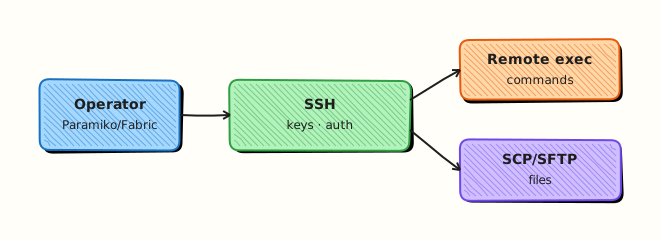
Theory
What it is
SSH automation runs commands and transfers files on remote Linux hosts without an interactive terminal. Paramiko gives SSHClient, channels, and SFTP. Fabric adds @task style helpers and host lists on top of Paramiko/Invoke. OpenSSH CLI via subprocess is still useful for one-liners; structured Python wins when you need tests and allow-lists.
Why it matters
Cloud APIs do not cover every appliance, jump server (bastion), or legacy box. Fleet checks (uname, disk, service status) still travel over SSH. Doing that in Python beats unmaintainable expect scripts — if you treat host keys, command allow-lists, and dry-run as first-class controls.
How it works
- Keys — prefer Ed25519; never commit private keys; load from agent or
key_filenamefrom a secure path. - Host keys — load
known_hosts; useRejectPolicyfor unknown keys in production (notAutoAddPolicy). - Connect — username + key; set socket and command timeouts.
- Exec / SFTP —
exec_commandfor remote shells; SFTP for put/get; validate remote paths before writes. - Fabric — wrap the same flow in tasks and host lists for multi-host scripts.
import paramiko
client = paramiko.SSHClient()
client.set_missing_host_key_policy(paramiko.RejectPolicy())
# client.load_system_host_keys()
# client.connect(hostname, username=..., key_filename=...)
Key concepts and comparisons
| Tool | Level | Best for |
|---|---|---|
| Paramiko | Low | Fine control, embedding in larger apps |
| Fabric | High | Multi-host task scripts |
| OpenSSH CLI via subprocess | External | One-liners; weaker structure |
| Action | Tutorial default |
|---|---|
uname, read-only checks | Allowed in labs |
rm, service restart | --apply + command allow-list |
Common pitfalls
AutoAddPolicyin production (accepts any host key).- Logging command lines that embed passwords.
- Unbounded parallel SSH that trips fail2ban or MaxStartups.
- Writing files to world-writable
/tmppaths without ownership checks. - Skipping bastion/ProxyJump modelling so scripts only work on a flat lab network.
Hands-on Lab
Objective
Under ~/rebash-python/lab20, generate lab-only SSH keys, then prove connectivity with Paramiko to localhost, or fall back to ssh -o BatchMode=yes, or a unittest.mock channel if no SSH server is available. Delete only keys created in the lab directory.
Prerequisites
- Python 3.10+
- Packages:
openssh-client(forssh/ssh-keygen); optional localsshd - Network: localhost only
Lab environment
Workspace: ~/rebash-python/lab20
mkdir -p ~/rebash-python/lab20 && cd ~/rebash-python/lab20
set -euo pipefail
python3 -m venv .venv
# shellcheck disable=SC1091
source .venv/bin/activate
python -m pip install -q --upgrade pip
python -m pip install -q 'paramiko>=3.4'
python -c 'import paramiko; print(paramiko.__version__)' | tee paramiko-version.txt
Expected output
paramiko-version.txt contains a version such as 3.x.
Real-world scenario
You need a small inventory script that runs uname -a on jump hosts. Security asks for key-based auth, RejectPolicy for unknown hosts, and no passwords in code. Your laptop may not have sshd listening — so the script must fall back to OpenSSH BatchMode or a mock path while still proving the control flow for CI.
Step-by-step tasks
Task 1 – Lab-only key pair
Create keys only under the lab directory. Do not touch ~/.ssh/id_*.
cd ~/rebash-python/lab20
set -euo pipefail
# shellcheck disable=SC1091
source .venv/bin/activate

ssh-keygen -t ed25519 -N '' -f ./lab_ed25519 -C 'rebash-lab20' -q
test -f lab_ed25519 && test -f lab_ed25519.pub
ls -l lab_ed25519 lab_ed25519.pub | tee key-ls.txt
chmod 600 lab_ed25519
Expected output
key-ls.txt lists private and public key files; private key mode is restrictive.
Task 2 – Connect, BatchMode, or mock
Create ssh_lab.py:
#!/usr/bin/env python3
"""Try Paramiko localhost, then OpenSSH BatchMode, then mock."""
from __future__ import annotations

import json
import os
import subprocess
import sys
from pathlib import Path
from unittest.mock import MagicMock, patch

import paramiko

ROOT = Path(__file__).resolve().parent
KEY = ROOT / "lab_ed25519"
USER = os.environ.get("USER") or os.environ.get("LOGNAME") or "lab"


def try_paramiko() -> dict | None:
    client = paramiko.SSHClient()
    client.set_missing_host_key_policy(paramiko.RejectPolicy())
    try:
        client.load_system_host_keys()
    except OSError:
        pass
    # Lab-only: allow first localhost key so practice VMs work; production must use RejectPolicy + known_hosts
    client.set_missing_host_key_policy(paramiko.WarningPolicy())
    try:
        client.connect(
            "127.0.0.1",
            username=USER,
            key_filename=str(KEY),
            timeout=5,
            allow_agent=False,
            look_for_keys=False,
        )
        _stdin, stdout, stderr = client.exec_command("uname -s", timeout=10)
        out = stdout.read().decode("utf-8", errors="replace").strip()
        err = stderr.read().decode("utf-8", errors="replace").strip()
        code = stdout.channel.recv_exit_status()
        client.close()
        if code != 0:
            return None
        return {"mode": "paramiko", "stdout": out, "stderr": err, "ok": True}
    except Exception as exc:  # noqa: BLE001 — lab probes many failure modes
        return {"mode": "paramiko", "ok": False, "error": str(exc)}


def try_openssh() -> dict | None:
    pub = KEY.with_suffix(".pub")
    # BatchMode never prompts; fails cleanly if auth/sshd unavailable
    cmd = [
        "ssh",
        "-o",
        "BatchMode=yes",
        "-o",
        "StrictHostKeyChecking=accept-new",
        "-o",
        "ConnectTimeout=5",
        "-i",
        str(KEY),
        f"{USER}@127.0.0.1",
        "uname -s",
    ]
    try:
        proc = subprocess.run(cmd, capture_output=True, text=True, timeout=15, check=False)
    except (FileNotFoundError, subprocess.TimeoutExpired) as exc:
        return {"mode": "openssh", "ok": False, "error": str(exc)}
    if proc.returncode != 0:
        return {
            "mode": "openssh",
            "ok": False,
            "error": proc.stderr.strip() or proc.stdout.strip(),
            "pub_hint": str(pub),
        }
    return {"mode": "openssh", "stdout": proc.stdout.strip(), "ok": True}


def try_mock() -> dict:
    with patch("paramiko.SSHClient") as mock_cls:
        client = mock_cls.return_value
        stdout = MagicMock()
        stderr = MagicMock()
        channel = MagicMock()
        channel.recv_exit_status.return_value = 0
        stdout.channel = channel
        stdout.read.return_value = b"Linux\n"
        stderr.read.return_value = b""
        client.exec_command.return_value = (MagicMock(), stdout, stderr)
        client.connect(
            "127.0.0.1",
            username=USER,
            key_filename=str(KEY),
            timeout=5,
        )
        _stdin, so, _se = client.exec_command("uname -s", timeout=10)
        out = so.read().decode().strip()
        assert out == "Linux"
        client.exec_command.assert_called()
    return {"mode": "mock", "stdout": out, "ok": True}


def main() -> int:
    if not KEY.is_file():
        print("missing lab_ed25519", file=sys.stderr)
        return 1
    result = try_paramiko()
    if not result or not result.get("ok"):
        result = try_openssh()
    if not result or not result.get("ok"):
        result = try_mock()
    out = ROOT / "ssh-result.json"
    out.write_text(json.dumps(result, indent=2) + "\n", encoding="utf-8")
    print(out.read_text(encoding="utf-8"))
    return 0 if result.get("ok") else 1


if __name__ == "__main__":
    raise SystemExit(main())
Run:
cd ~/rebash-python/lab20
set -euo pipefail
# shellcheck disable=SC1091
source .venv/bin/activate
python ssh_lab.py | tee ssh-run.txt
python -c 'import json; d=json.load(open("ssh-result.json")); assert d["ok"] is True'
Expected output
ssh-result.json has "ok": true and "mode" of paramiko, openssh, or mock.
Task 3 – Evidence and key hygiene note
cd ~/rebash-python/lab20
set -euo pipefail

# Prove keys stayed in the lab directory
find . -maxdepth 1 -name 'lab_ed25519*' | tee lab-keys-find.txt
grep -q 'lab_ed25519' lab-keys-find.txt

tar -czf ssh-lab-evidence.tgz \
  paramiko-version.txt key-ls.txt ssh-result.json ssh-run.txt \
  lab-keys-find.txt ssh_lab.py lab_ed25519.pub
# Do NOT pack the private key into shared tickets
ls -l ssh-lab-evidence.tgz | tee evidence-ls.txt
test -s ssh-lab-evidence.tgz
Expected output
Evidence archive exists; private key is not required inside the tarball (public key only).
Validation steps
-
lab_ed25519/.pubexist only under~/rebash-python/lab20 -
ssh_lab.pyproducesssh-result.jsonwith"ok": true - Mode is one of paramiko / openssh / mock
- Evidence tarball does not need the private key
- You understand RejectPolicy vs AutoAddPolicy
Common errors and fixes
| Error | Cause | Fix |
|---|---|---|
Authentication failed | Public key not in authorized_keys | Use openssh fallback or mock; or append .pub to your user authorized_keys only on a practice VM |
Connection refused | No sshd on localhost | Expected — script falls through to mock |
No hostkey for host / RejectPolicy | Unknown host key | Lab uses WarningPolicy for localhost probe; production must preload known_hosts |
paramiko import error | venv not active | source .venv/bin/activate and reinstall |
| Hung SSH | No timeout | Keep ConnectTimeout / Paramiko timeout |
Challenge exercise
Add fabric_probe.py that defines a Fabric @task (or a thin wrapper class if Fabric is heavy) to run uname -s with the same fallback chain, and write fabric-result.json. Install Fabric in the lab venv only if you take this stretch: python -m pip install -q fabric. Cleanup must still remove only lab-dir keys.
Learning outcomes
- Generated lab-scoped SSH keys
- Exercised Paramiko with safe fallbacks for missing sshd
- Separated public evidence from private key material
- Can explain host-key policy for production
Cleanup
cd ~/rebash-python/lab20
set -euo pipefail
# Remove ONLY lab keys in this directory — never rm ~/.ssh/id_*
rm -f lab_ed25519 lab_ed25519.pub
rm -rf .venv
# Keep evidence if you want it; otherwise:
# rm -f ssh-lab-evidence.tgz *.txt *.json
Validation
- Lab finished under
~/rebash-python/lab20/with evidence files - You can explain Paramiko vs Fabric and RejectPolicy
- You know why passwords must not appear in automation code
- You can describe cleanup limited to the lab directory
Code Walkthrough
Production SSH automation usually follows this order:
- Keys from a vault or agent — never from the repo
- Load known_hosts + RejectPolicy — verify out-of-band on first trust
- Timeouts on connect and exec — fail fast
- Command allow-list + dry-run — especially for restarts and deletes
- Bound concurrency — avoid MaxStartups / lockouts
Capture stdout/stderr and exit codes for tickets; redact secrets.
Security Considerations
- Prefer Ed25519 keys; disable password auth for service accounts
- Never log private keys or passwords
- Use RejectPolicy (or pinned host keys) in production — not AutoAddPolicy
- Validate remote paths before SFTP writes
- Limit who can read automation logs that may contain host inventory
Common Mistakes
Using AutoAddPolicy in production
Any host key is accepted — MitM becomes easy. Fix: RejectPolicy + managed known_hosts (or certificate-based host keys).
Committing private keys into Git
Full account takeover. Fix: generate keys outside the repo; use agents/secrets managers; rotate on leak.
No command allow-list for remote exec
A bug can run rm -rf. Fix: allow exact commands; dry-run by default; require --apply for changes.
Cleaning up with rm -rf ~/.ssh
Destroys the engineer’s real keys. Fix: delete only files under the lab path you created.
Best Practices
- One small library for connect + exec with shared timeouts
- Prefer configuration management for steady state; SSH for break-glass and bootstrap
- Model ProxyJump/bastion explicitly
- Rate-limit parallel SSH
- Store only public keys in tickets and evidence packs
Troubleshooting
| Symptom | Likely cause | Fix |
|---|---|---|
| Auth failure | Wrong key/user | ssh -v -i lab_ed25519 user@127.0.0.1; check authorized_keys |
| Host key verify fail | First connect / rotation | Verify out-of-band; update known_hosts |
| Hang | No timeout | Set socket and command timeouts |
| fail2ban lockout | Too many parallel tries | Lower workers; backoff |
| Works in shell, fails in Paramiko | Agent vs key_filename | Pass key_filename and disable agent if needed |
Summary
Paramiko is the library; Fabric is the task layer. Prefer keys, RejectPolicy, timeouts, and allow-lists. This lab proved a localhost or mock path and cleaned up keys only under ~/rebash-python/lab20. Next, speed up fan-out with Concurrency — Threads, asyncio, and Futures.
Interview Questions
1. What is the difference between Paramiko and Fabric, and when do you pick each?
Reveal answer
Paramiko is the SSH protocol library: connect, channels, SFTP. Fabric builds a task-oriented API on top for multi-host scripts. Pick Paramiko when embedding SSH inside a larger app; pick Fabric when operators want concise @task host loops. Both need the same security controls for keys and host keys.
2. Why is AutoAddPolicy dangerous in production?
Reveal answer
It accepts any server host key on first connect, so an attacker on the network can present a fake host and capture credentials or commands. Production should use RejectPolicy (or WarningPolicy only in tightly controlled labs) and maintain known_hosts or SSH certificates.
3. How would you automate SSH when the CI agent has no sshd on localhost?
Reveal answer
Use a mock (unittest.mock) to assert connect/exec call patterns in unit tests, and run integration tests against a disposable VM or container with sshd in a labelled job. Falling back to ssh -o BatchMode=yes is useful on developer laptops when keys and sshd exist.
4. What should never appear in Git or evidence tarballs for SSH labs?
Reveal answer
Private keys, passwords, and sometimes full known_hosts with internal hostnames if policy forbids it. Public keys and redacted command output are usually fine. Rotate any private key that was ever committed.
5. How do you prevent a buggy script from running destructive remote commands?
Reveal answer
Maintain an allow-list of exact remote commands, default to dry-run (print what would run), require --apply for changes, and keep separate low-privilege SSH users. Log what ran with exit codes for audit.
6. How does key-based auth relate to service accounts on jump servers?
Reveal answer
Service accounts should use keys (or certificates), no interactive password, often ForceCommand or restricted shells, and narrow sudo if needed. Human accounts stay separate. Automation loads keys from a secrets store or agent, not from the repository.
7. Your Paramiko job suddenly hangs against 200 hosts. What do you check first?
Reveal answer
Timeouts, pool size (MaxStartups / fail2ban), DNS delays, and whether host-key prompts are blocking. Cap workers, set connect/exec timeouts, and fail per-host without blocking the whole batch. Interviewers want bounded fan-out, not “spawn one thread per host forever.”
8. When would you still shell out to the OpenSSH client instead of Paramiko?
Reveal answer
For one-off operator commands, ProxyJump setups already perfected in ~/.ssh/config, or environments where Paramiko cannot be installed. For testable productised automation with mocks and structured errors, prefer Paramiko/Fabric. Many teams use OpenSSH in thin wrappers and Paramiko inside libraries — be consistent per codebase.
Related Tutorials
- Python for Cloud & DevOps – Overview
- Infrastructure Automation — Terraform (previous)
- Concurrency — Threads, asyncio, and Futures (next)
- Linux Automation — subprocess and psutil