Cloud Automation — AWS, Azure, and GCP
Overview
Cloud vendors expose control planes as APIs. In Python you usually call boto3 (Amazon Web Services / AWS), the Azure SDK, or Google Cloud client libraries. The important skills are the same on every cloud: how credentials are resolved, how to list resources safely, how pagination works, and how to keep mutating calls behind an explicit flag.
This tutorial teaches inventory patterns, not every service API. Prefer Identity and Access Management (IAM) roles and short-lived credentials over long-lived access keys. Prefer read-only actions in labs. If you have no cloud account, use local stub clients and fixture JSON — that is still valid practice for CI.
Creating virtual machines, load balancers, or large disks in a learning lab can create surprise bills. REBASH labs for this module are read-only or simulated. Never run “create instance” samples against a personal account without a budget alarm and a destroy plan.
This is Tutorial 15 in Module 15: Cloud Automation of the REBASH Academy Python for DevOps Engineers series. It is written for Cloud, DevOps, Platform, and Site Reliability Engineering (SRE) engineers. By the end you will produce inventory evidence from live read-only APIs or honest stubs — without creating paid resources.
Prerequisites
- REST APIs — requests, Auth, and Resilience
- Comfort with environment-based secrets (Configuration and Secrets)
- Python 3.10+ and a virtual environment
- Optional: AWS / Azure / GCP credentials with read-only IAM — otherwise use fixtures
Learning Objectives
By the end of this tutorial, you will be able to:
- Describe boto3 session / client patterns for list APIs
- Outline Azure
DefaultAzureCredentialand resource-group listing - Outline Google Application Default Credentials for a list call
- Prefer IAM roles over long-lived access keys
- Run a dry-run inventory CLI that uses stubs when creds are missing
- Refuse to create paid resources in lab automation
Architecture
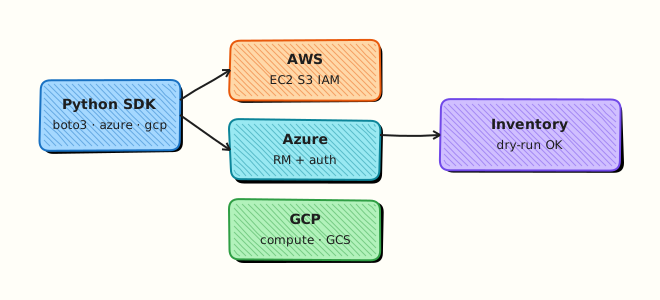
Credentials resolve from the environment or cloud metadata. Your Python inventory client calls list APIs (or loads fixtures). Reports become JSON evidence. Mutating APIs stay disabled unless a future tool adds an explicit --apply (not used here).
Theory
What it is
boto3 builds a session and clients (s3, ec2, …) that sign HTTP calls to AWS. Azure SDK uses DefaultAzureCredential and management clients for subscriptions and resource groups. Google Cloud clients use Application Default Credentials (ADC) for services such as Cloud Storage. All three are HTTP clients with pagination helpers and IAM underneath.
# Pattern only — lab uses read-only list or stubs
import boto3

session = boto3.Session()  # env vars, shared config, or instance role
s3 = session.client("s3")
# response = s3.list_buckets()  # read-only
Why it matters
Manual console clicking does not scale across accounts. Inventory bots find untagged resources, public buckets, and abandoned disks. The blast radius of a bad key with *:* is an entire cloud bill. Engineers who default to list + report and gate create/delete behind change control cause fewer incidents.
How it works
- Resolve credentials — env, config files, instance/workload identity — never hard-code.
- Create a client — service-scoped (S3, Resource Manager, …).
- List with pagination — paginators /
next_link/ pages. - Normalise to JSON — names, regions, tags for tickets.
- Stub when needed — same interface, fixture data,
mode: stubin evidence.
| Cloud | Auth habit | Safe list example |
|---|---|---|
| AWS | Instance role / OIDC → boto3 Session | list_buckets, describe_instances |
| Azure | DefaultAzureCredential | list resource groups |
| GCP | Application Default Credentials | list buckets / projects (read) |
Key concepts and comparisons
| Idea | Prefer | Avoid |
|---|---|---|
| Credentials | Roles, OIDC, short-lived | Long-lived keys in git |
| Lab mode | Read-only list or stub | Create VM / disk “to try” |
| CI | Fixtures + contract tests | Live keys in public runners |
| Mutation | Explicit --apply later | Default destroy/create |
Common pitfalls
- Committing access keys.
- Using AdministratorAccess for a list script.
- Pagination stopped after first page.
- Creating resources without tags, budgets, or cleanup.
- Pretending a stub run proved live IAM.
Hands-on Lab
Objective
Build a read-only inventory tool under ~/rebash-python/lab15 that lists S3-style buckets (boto3) when AWS credentials work, otherwise uses fixture stubs for AWS/Azure/GCP shapes — and never creates paid resources.
Prerequisites
- Python 3.10+
- Optional AWS credentials with
s3:ListAllMyBuckets(or broader read-only) - No requirement for Azure/GCP accounts — stubs cover them
Lab environment
Workspace: ~/rebash-python/lab15
mkdir -p ~/rebash-python/lab15/fixtures && cd ~/rebash-python/lab15
set -euo pipefail
python3 -m venv .venv
# shellcheck disable=SC1091
source .venv/bin/activate
python -m pip install -U pip
python -m pip install 'boto3>=1.34,<2'
python -c "import boto3; print(boto3.__version__)" | tee boto3-version.txt
Expected output
boto3-version.txt shows a version; Azure/GCP SDKs are not required for the stub path.
Real-world scenario
FinOps asks for a weekly bucket / resource-group inventory across clouds. Security allows read-only roles only. Many laptops have no cloud creds, so the same CLI must emit fixture-based reports in CI. Creating resources is out of scope and forbidden in this lab.
Step-by-step tasks
Task 1 – Fixture files for stub clients
Create fixtures/aws-buckets.json:
{
  "Buckets": [
    {"Name": "rebash-lab-demo-logs", "CreationDate": "2026-01-15T10:00:00+00:00"},
    {"Name": "rebash-lab-demo-artifacts", "CreationDate": "2026-02-01T08:30:00+00:00"}
  ]
}
Create fixtures/azure-resource-groups.json:
{
  "value": [
    {"name": "rg-rebash-lab-net", "location": "centralindia"},
    {"name": "rg-rebash-lab-app", "location": "centralindia"}
  ]
}
Create fixtures/gcp-buckets.json:
{
  "items": [
    {"name": "rebash-lab-demo-gcs", "location": "ASIA-SOUTH1"},
    {"name": "rebash-lab-demo-tfstate", "location": "ASIA-SOUTH1"}
  ]
}
Run:
cd ~/rebash-python/lab15
set -euo pipefail
test -s fixtures/aws-buckets.json
echo "fixtures ok"
Expected output
three fixture files under fixtures/; fixtures ok printed.
Task 2 – Inventory CLI (live AWS list or stubs)
Create cloud_inventory.py:
#!/usr/bin/env python3
"""
Read-only cloud inventory. NEVER creates paid resources.
Uses boto3 list_buckets when credentials work; otherwise fixtures.
"""
from __future__ import annotations

import json
import os
import sys
from pathlib import Path

ROOT = Path(__file__).resolve().parent
FIX = ROOT / "fixtures"


def load_json(name: str) -> dict:
    return json.loads((FIX / name).read_text(encoding="utf-8"))


def aws_list_buckets() -> dict:
    if os.environ.get("LAB15_FORCE_STUB") == "1":
        data = load_json("aws-buckets.json")
        return {"mode": "stub", "provider": "aws", "buckets": [b["Name"] for b in data["Buckets"]]}
    try:
        import boto3
        from botocore.exceptions import BotoCoreError, ClientError
    except ImportError:
        data = load_json("aws-buckets.json")
        return {"mode": "stub", "provider": "aws", "buckets": [b["Name"] for b in data["Buckets"]], "reason": "boto3 missing"}

    try:
        client = boto3.client("s3")
        response = client.list_buckets()
        names = [b["Name"] for b in response.get("Buckets", [])]
        return {"mode": "live", "provider": "aws", "buckets": names}
    except (BotoCoreError, ClientError, Exception) as exc:  # noqa: BLE001 — lab: any creds failure → stub
        data = load_json("aws-buckets.json")
        return {
            "mode": "stub",
            "provider": "aws",
            "buckets": [b["Name"] for b in data["Buckets"]],
            "reason": type(exc).__name__,
        }


def azure_list_resource_groups() -> dict:
    # Stub-only in this lab (no create; optional live left for advanced readers)
    data = load_json("azure-resource-groups.json")
    return {
        "mode": "stub",
        "provider": "azure",
        "resource_groups": [x["name"] for x in data["value"]],
    }


def gcp_list_buckets() -> dict:
    data = load_json("gcp-buckets.json")
    return {
        "mode": "stub",
        "provider": "gcp",
        "buckets": [x["name"] for x in data["items"]],
    }


def main() -> int:
    # Guardrail: refuse known mutating intent
    if "--create" in sys.argv or "--apply" in sys.argv:
        print("REFUSED: this lab is read-only / stub only. No cloud creates.", file=sys.stderr)
        return 2

    report = {
        "aws": aws_list_buckets(),
        "azure": azure_list_resource_groups(),
        "gcp": gcp_list_buckets(),
        "policy": "read-only-or-stub; no paid resource creation",
    }
    out = ROOT / "cloud-inventory.json"
    out.write_text(json.dumps(report, indent=2) + "\n", encoding="utf-8")
    print(json.dumps(report, indent=2))
    assert report["aws"]["buckets"], "expected bucket names"
    assert report["azure"]["resource_groups"], "expected RGs"
    assert report["gcp"]["buckets"], "expected GCS names"
    return 0


if __name__ == "__main__":
    raise SystemExit(main())
Run:
cd ~/rebash-python/lab15
set -euo pipefail
# shellcheck disable=SC1091
source .venv/bin/activate
python cloud_inventory.py | tee inventory-run.txt
test -s cloud-inventory.json
python -c 'import json; d=json.load(open("cloud-inventory.json")); assert d["policy"].startswith("read-only"); print(d["aws"]["mode"], len(d["aws"]["buckets"]))'
Expected output
cloud-inventory.json with aws.mode of live or stub; Azure/GCP stub lists non-empty; --create is refused (see Task 3).
Task 3 – Negative guard and evidence pack
Create pack_evidence.py:
import json
from pathlib import Path
d = json.loads(Path("cloud-inventory.json").read_text(encoding="utf-8"))
assert d["aws"]["mode"] == "stub"
pack = {
    "inventory": d,
    "create_denied_exit": 2,
}
Path("lab15-evidence.json").write_text(json.dumps(pack, indent=2) + "\n", encoding="utf-8")
print("evidence ok")
Run:
cd ~/rebash-python/lab15
set -euo pipefail
# shellcheck disable=SC1091
source .venv/bin/activate

set +e
python cloud_inventory.py --create >create-denied.txt 2>&1
rc=$?
set -e
test "$rc" -eq 2
grep -F 'REFUSED' create-denied.txt

LAB15_FORCE_STUB=1 python cloud_inventory.py >stub-run.txt
python pack_evidence.py
Expected output
--create exits 2 with REFUSED; forced stub mode writes evidence; lab15-evidence.json exists.
Validation steps
- No code path creates VMs, disks, or buckets in this lab
-
cloud-inventory.jsonlists names for aws/azure/gcp shapes - Missing creds degrade to fixtures with
mode: stub -
--create/--applyare refused
Common errors and fixes
| Error | Cause | Fix |
|---|---|---|
NoCredentialsError | No AWS creds | Expected — stub path fills fixtures |
AccessDenied on list_buckets | IAM too tight or wrong | Use stub; or attach read-only list permission |
| Import errors for azure/gcp | Not installed | Lab uses fixtures — OK |
| Accidental billing fear | Old habits from create tutorials | This lab refuses --create |
Challenge exercise
Add a --provider aws|azure|gcp|all flag (argparse) that filters the report, and write inventory-aws-only.json when --provider aws is set. Still refuse --create. Optional stretch: if AZURE_SUBSCRIPTION_ID and azure-identity/mgmt packages exist, attempt a read-only resource-group list — on any failure, keep the stub.
Learning outcomes
- Listed cloud inventory with boto3 or stubs
- Modelled Azure/GCP list shapes with fixtures
- Enforced read-only policy in the CLI
- Saved evidence without creating paid resources
Cleanup
cd ~/rebash-python/lab15
deactivate 2>/dev/null || true
# No cloud resources were created by this lab.
# rm -rf .venv
Validation
- Lab finished under
~/rebash-python/lab15/ - You can explain role-based auth vs access keys
- You know why labs default to list/stub
- You can describe a billing incident from unbounded create scripts
Code Walkthrough
Production cloud automation usually follows:
- Authenticate with least privilege — read-only for inventory
- List + paginate — never assume one page
- Normalise + tag gaps — report, do not silently fix
- Mutate only with
--apply+ change ticket - Evidence — account/subscription IDs, mode live vs stub
Security Considerations
- Never commit cloud access keys or JSON key files
- Prefer OIDC / instance roles / workload identity
- Scope IAM to list/get for inventory bots
- Separate audit accounts from break-glass admin (emergency admin)
- Log which identity ran the inventory — not the secret material
Common Mistakes
Using AdministratorAccess for a list script
A stolen CI token can destroy the account. Fix: grant only List* / Get* / Reader roles.
Creating resources in a learning script
Orphan VMs generate cost. Fix: inventory-only labs; budgets and destroy plans for any apply tooling.
Stopping after the first API page
Silent under-count. Fix: use paginators / follow next links.
Calling a stub run ‘production verified’
Fixtures do not prove IAM. Fix: label mode: stub vs live in evidence.
Best Practices
- One inventory schema across clouds for FinOps joins
- Tag
ownerandexpiryon every created resource (when you create outside this lab) - Run inventory in CI with stubs; schedule live reads with roles
- Pin SDK versions
- Document required IAM actions next to the CLI
Troubleshooting
| Symptom | Likely cause | Fix |
|---|---|---|
| Empty bucket list live | Wrong account/region profile | Check AWS_PROFILE / account |
| Stub always | LAB15_FORCE_STUB=1 or no creds | Unset force; configure read-only role |
| Slow lists | Many regions scanned | Scope regions; parallel carefully |
| Azure auth fails on laptop | No az login / SP | Use stub; or az login for advanced work |
| GCP ADC missing | No gcloud auth application-default login | Use stub |
Summary
Multi-cloud Python automation starts with credential patterns, read-only list APIs, and honest stubs when offline — never surprise creates. Next, automate Git forges in Git Automation — GitHub and GitLab.
Interview Questions
1. Why are long-lived AWS access keys risky for inventory bots?
Reveal answer
Keys in env files or CI variables are often copied, logged, or left in forks. They do not rotate with host identity. Prefer instance roles, GitHub OIDC, or short-lived credentials so compromise is time-bounded and scoped. Inventory should use read-only policies.
2. How do you keep a multi-cloud inventory script from creating cost?
Reveal answer
Default to list/get only; refuse --create / --apply in learning tools; use stubs in CI; require separate change-controlled tools for mutation; enable budgets and anomaly alerts on the account. Evidence should show mode: live|stub and the IAM principal used.
3. What does DefaultAzureCredential try, at a high level?
Reveal answer
It chains common Azure identity sources (environment service principal, managed identity, Azure CLI login, and others depending on version/package). That lets the same code run on a laptop (CLI login) and in Azure (managed identity) without hard-coding secrets. Failures should fall back clearly in labs.
4. How does pagination bite cloud list APIs?
Reveal answer
APIs return pages. If you only read the first response, reports miss resources and FinOps numbers look wrong. Use boto3 paginators, Azure list iterators, or GCP page tokens until exhausted, and record page counts in evidence.
5. When is a fixture stub acceptable in CI?
Reveal answer
When you are testing parsing, CLI flags, and report shape, not live IAM. Mark mode: stub so reviewers know. Add a separate scheduled job with real read-only roles for production inventory truth.
6. Compare boto3 client vs resource interfaces briefly.
Reveal answer
Clients map closely to AWS API calls (good for explicit list/get). Resources are higher-level object wrappers. Many production inventory tools prefer clients + paginators for clarity and fewer surprises. Either way, still apply least-privilege IAM.
7. A junior engineer wants to “just boto3 create_instance” in the lab account. What do you say?
Reveal answer
Refuse without budget, tags, size limits, and a destroy checklist. Point them to read-only inventory and local stubs for learning. Unbounded create scripts are a common source of cloud bill incidents in training accounts.
Related Tutorials
- Python for DevOps Engineers – Overview
- REST APIs — requests, Auth, and Resilience (previous)
- Git Automation — GitHub and GitLab (next)
- Lab — AWS EC2 Inventory (more practice)